
NET-103 · Lesson 1 of 12 · 29 min
Linux distributions and the command line
▶ Video coming soon A video version of this lesson is on the way.
For its first five years, Ridgeline Coffee Roasters rented everything it needed online: the shop ran on a hosted e-commerce platform, the roast log lived in a spreadsheet, and Sam Ortiz, the support technician who visits each week, looked after the office computers. This year Rosa decided to bring the online shop and the roast log in-house. The platform fees had grown, Kai wanted the roaster's temperature data stored properly, and Theo wanted the shop to show real stock levels straight from the roastery. Sam's recommendation was a small rented Linux server, and he asked Jordan, the barista who writes Ridgeline's Python tools, to help him build and run it. This course follows that server from the first login to a hardened, monitored machine.
Linux runs most of the world's servers, almost every cloud platform, every one of the five hundred fastest supercomputers, the Android phones in people's pockets and countless small devices such as the Raspberry Pi that will log temperatures beside Ridgeline's roaster. Learning to administer it is one of the most useful skills in IT, whether you go on to networking, security, cloud or software development. This first lesson explains what Linux is, why there are so many versions of it, and how to talk to a Linux machine through the command line, which is where nearly all server administration happens.
What Linux is
Strictly speaking, Linux is a kernel: the core program that starts when the computer boots, manages memory and the processor, talks to hardware through drivers and decides which program runs at each moment. Linus Torvalds, then a student in Helsinki, announced the first version in August 1991 as a hobby project. He released it under the GNU General Public License, which allows anyone to use, study, change and share the code, provided that they share their changes under the same terms. Thousands of developers and companies now contribute to the kernel, and a new version comes out roughly every nine or ten weeks.
A kernel on its own is not something a person can use. It needs a shell to type commands into, utilities to copy files and edit text, a system to start services, libraries, compilers and much more. Many of those pieces came from the GNU project, started by Richard Stallman in 1983 to build a complete free operating system. That is why some people call the whole system GNU/Linux. In everyday speech, and in this course, Linux means the complete operating system built around the Linux kernel.
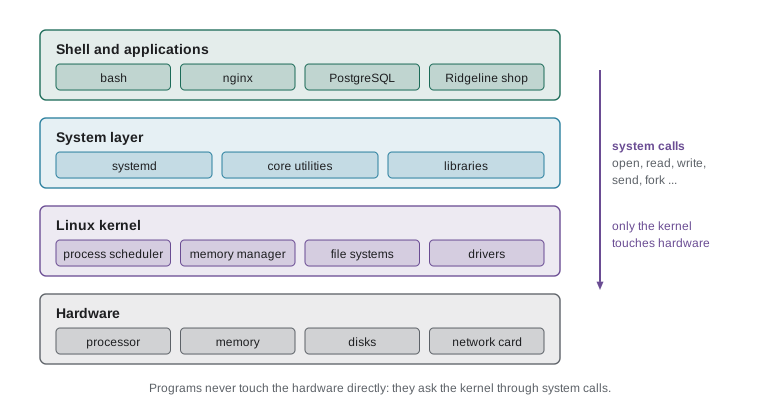
The figure shows the layers. Programs such as the nginx web server or the Ridgeline shop never touch the disk or the network card directly. They make system calls, requests to the kernel such as open this file, read these bytes or send this packet, and the kernel carries them out safely. This separation is what lets many programs and many users share one machine without trampling on each other, and it is the reason a crashing application does not normally bring the whole server down.
Distributions
Because the kernel and the GNU tools are free to share and change, many groups package them together with an installer, a package manager, default settings and a support policy. Each such bundle is a distribution, or distro. All distributions use the same kernel and largely the same tools, so a skill learned on one transfers to the others. The differences lie in how software is packaged and installed, how often new versions arrive, how long each version receives security updates and who stands behind it.
| Family | Examples | Package format and tool | Typical use |
|---|---|---|---|
| Debian | Debian, Ubuntu, Linux Mint, Raspberry Pi OS | .deb packages, apt | Servers, desktops, cloud, small devices |
| Red Hat | Red Hat Enterprise Linux, Fedora, Rocky Linux, AlmaLinux | .rpm packages, dnf | Enterprise servers, government, finance |
| SUSE | SUSE Linux Enterprise, openSUSE | .rpm packages, zypper | Enterprise servers, especially in Europe |
| Arch | Arch Linux, Manjaro | pacman packages | Enthusiasts who want the newest software |
| Independent | Alpine Linux | apk packages | Very small systems and containers |
Debian, started in 1993, is run entirely by volunteers and is known for stability. Ubuntu, released by the company Canonical in 2004, is built from Debian and adds a predictable release schedule and commercial support. Red Hat Enterprise Linux, usually shortened to RHEL, is the commercial distribution most common in large companies. Fedora is its fast-moving community cousin, where new features are tried first, while Rocky Linux and AlmaLinux are free rebuilds designed to behave like RHEL. Alpine Linux is tiny, which makes it popular as the base for containers.
Distributions follow one of two release models. A fixed-release distribution, such as Ubuntu, Debian or RHEL, publishes a numbered version and then, for its support period, gives it only security and bug fixes, so the system stays the same and dependable. A rolling-release distribution, such as Arch, updates continuously, so there is no version 1 or version 2, only the latest packages. Servers almost always use fixed releases, because predictability matters more than having the newest features.
Ubuntu numbers its versions by year and month, so 24.04 came out in April 2024. Every two years, in April, Canonical publishes a long-term support release, marked LTS, that receives at least five years of free security updates, with paid extended support available for longer. The releases in between are supported for only nine months and are meant for people who want newer software on desktops. Each version also has a nickname: 24.04 is Noble Numbat.
Worked problem
Choosing a distribution for ridge-web
Sam must choose a distribution for Ridgeline's new server. The shop app is written in Python, the roast log needs PostgreSQL, Jordan already uses a Raspberry Pi at home, and nobody at Ridgeline wants to reinstall the server every year. Which distribution and version fit best, and why?
Show solution
- A server needs a fixed-release distribution with a long support period, so a rolling release such as Arch is out.
- An LTS release gives at least five years of security updates without changing the system underneath the shop.
- The cloud provider offers ready-made images for Ubuntu, Debian and Rocky Linux; all would work technically.
- Jordan already knows apt from the Raspberry Pi, and the roaster-pi in the roastery will run Raspberry Pi OS, which is Debian-based, so a Debian-family distribution keeps one set of commands for both machines.
- Ubuntu Server 24.04 LTS has wide documentation and is supported well past the time Ridgeline expects to need before a planned upgrade.
Answer: Ubuntu Server 24.04 LTS: a fixed, long-supported release from the same family as the Raspberry Pi, so Jordan learns one package system for both machines.
Servers, consoles and terminals
Ridgeline's server, which Sam names ridge-web, is a virtual machine: a slice of a large physical computer in the cloud provider's data centre, with two virtual processors, four gigabytes of memory and an 80 gigabyte disk. It has no monitor or keyboard. Servers like this are called headless, and they are run almost entirely from a text interface reached over the network. Even when a server has a graphical desktop available, administrators rarely install it, because it uses memory and adds software that needs updating and securing.
Three words are often mixed up. A terminal, or terminal emulator, is the window that shows text and takes keystrokes; on a laptop it might be Windows Terminal, the macOS Terminal app or GNOME Terminal. The shell is the program running inside that window that reads the commands you type, runs them and shows the results. The console is the text screen attached directly to the machine, which on a cloud server is reached through the provider's web dashboard as an emergency back door. When people say they are on the command line, they mean they are typing commands into a shell.
The most common shell on Linux is Bash, the Bourne Again Shell, written for the GNU project in 1989. Ubuntu and Debian use Bash for people logging in, and a smaller, faster shell called dash for running system scripts. macOS now defaults to zsh, which is largely compatible with Bash. Everything in this course works in Bash.
When the shell is ready for a command it shows a prompt. On ridge-web the prompt shows the user name, the host name and the current directory, for example jordan@ridge-web:~ followed by a symbol. The tilde stands for the user's home directory. By tradition the prompt ends in one symbol for an ordinary user and in a hash sign for the all-powerful root user. In this course's listings, a command typed by an ordinary user is shown after a greater-than sign, a command typed as root is shown after a hash sign, and lines without either symbol are output.
The anatomy of a command
Every command line follows the same pattern: the name of a command, then options that change how it behaves, then arguments that tell it what to work on, all separated by spaces. Options usually begin with a dash. Short options are single letters, such as -l, and can often be combined, so -l -a can be written -la. Long options are whole words after two dashes, such as --all, and are easier to read in scripts. Arguments are usually file names, directory names, user names or other targets.
> ls -la /var/log
total 2140
drwxrwxr-x  10 root   syslog    4096 Nov  3 06:25 .
drwxr-xr-x  13 root   root      4096 Oct 28 14:02 ..
-rw-r-----   1 syslog adm      38711 Nov  3 09:14 auth.log
drwxr-xr-x   2 root   root      4096 Oct 28 14:10 apt
-rw-r-----   1 syslog adm     812455 Nov  3 09:15 syslog
...
> ls --all --human-readable -l /var/log/apt
> uname -r
6.8.0-48-generic
> hostname
ridge-web
In the first command, ls is the command that lists directory contents, -la combines two options (l for the long format with details, a for all files including hidden ones) and /var/log is the argument. The output's details are explained in lessons 2 and 4. The command uname -r prints the version of the running kernel, and hostname prints the machine's name. Because the shell splits a line at spaces, a file name that contains a space must be quoted or the space escaped with a backslash, otherwise the shell treats it as two arguments.
Linux commands are case-sensitive, and so are file names: LS is not a command, and Roast.csv and roast.csv are two different files. Most commands are short and lowercase, a habit inherited from the slow terminals of the 1970s, when every keystroke counted. Commands also follow a philosophy summed up as do one thing well: ls lists, cp copies, grep searches. Power comes from combining small commands, which lesson 3 explores.
Python's standard library contains a module called shlex that splits a command line the way a shell does, respecting quotation marks. It is a handy way to see how the shell will interpret a line before you run it. Press Edit and run and try your own command lines.
import shlex

lines = [
    "ls -la /var/log",
    "cp roast_log.csv /srv/ridgeline/roastlog/",
    'grep -i "sunrise blend" orders.txt',
    "mkdir weekly\\ reports",
]
for line in lines:
    parts = shlex.split(line)
print(len(parts), "parts:", parts)3 parts: ['ls', '-la', '/var/log'] 3 parts: ['cp', 'roast_log.csv', '/srv/ridgeline/roastlog/'] 4 parts: ['grep', '-i', 'sunrise blend', 'orders.txt'] 2 parts: ['mkdir', 'weekly reports']
See how the quotation marks around sunrise blend keep the two words together as one argument, and the backslash before the space in weekly reports does the same. Quoting is one of the most common sources of mistakes on the command line, especially in scripts, and lesson 11 returns to it.
Getting help
No administrator remembers every option of every command. The skill is knowing how to look them up quickly. Almost every command accepts --help and prints a short summary of its options. For full documentation there is man, short for manual: man ls opens the manual page for ls, which you scroll with the arrow keys or the space bar, search by typing a slash followed by a word, and leave by pressing q. Manual pages are divided into numbered sections; section 1 is user commands, section 5 is file formats and section 8 is administration commands, so man 5 passwd describes the password file rather than the passwd command.
| Need | Command | Example |
|---|---|---|
| Short summary of options | command --help | ls --help |
| Full manual page | man command | man ls |
| Manual for a file format | man 5 name | man 5 crontab |
| Search manual descriptions | apropos keyword | apropos firewall |
| One-line description | whatis command | whatis grep |
| Where a command lives | which command, type command | which python3 |
| Built-in shell commands | help builtin | help cd |
Two other habits save hours. Tab completion finishes command and file names: type the first few letters and press Tab, and the shell completes the rest if there is only one match, or shows the choices after a second Tab. Command history recalls earlier commands: the up arrow steps back through them, history lists them with numbers, and Ctrl+R searches backwards as you type. Ctrl+C stops a running command, Ctrl+L clears the screen, and Ctrl+D at an empty prompt logs you out.
Ordinary users, root and sudo
Every Linux system has a superuser called root, whose account can read or change any file and run any command. Working as root all the time is dangerous: a typing mistake can delete the whole system, and a program run as root can do unlimited damage if it is malicious or buggy. Ubuntu therefore locks the root password by default and gives administrators the sudo command instead. Typing sudo in front of a command runs that one command with root privileges after the user enters their own password, and every use is recorded in the logs.
> apt update
Reading package lists... Done
E: Could not open lock file /var/lib/apt/lists/lock - open (13: Permission denied)
> sudo apt update
[sudo] password for jordan:
Hit:1 http://archive.ubuntu.com/ubuntu noble InRelease
...
> whoami
jordan
> sudo whoami
root
Sam adds Jordan to the sudo group, which is what grants this ability on Ubuntu, and sets a rule that both of them will use sudo for individual commands rather than switching to a root shell for long periods. Lesson 4 explains users and groups in detail, and lesson 12 shows how sudo access is limited and audited on a hardened server.
Your first session on ridge-web
Sam's first login to the new server goes like this. He connects from the office over SSH, the secure shell protocol covered in lesson 10, then gathers basic facts about the machine before changing anything. Checking first is a habit worth copying: you need to know the operating system version, the kernel, how long the machine has been running and who else is logged in before you start making changes.
> cat /etc/os-release
PRETTY_NAME="Ubuntu 24.04.1 LTS"
NAME="Ubuntu"
VERSION_ID="24.04"
VERSION="24.04.1 LTS (Noble Numbat)"
VERSION_CODENAME=noble
ID=ubuntu
ID_LIKE=debian
HOME_URL="https://www.ubuntu.com/"
> uptime
 09:20:41 up 3 days,  2:11,  1 user,  load average: 0.02, 0.05, 0.01
> who
sam      pts/0        2026-11-03 09:18 (198.51.100.17)
The file /etc/os-release is a standard on modern distributions. It holds simple NAME=value lines that scripts can read to find out which distribution they are running on; the ID_LIKE line tells a script that Ubuntu behaves like Debian. The uptime command shows the time, how long the system has been running, how many users are logged in and the load average, which lesson 9 explains. The who command lists logged-in users and where they connected from.
Because os-release is plain text in a simple format, it is easy to read from a program. Ridgeline's monitoring script in lesson 9 starts by doing exactly that. The listing below turns the file's lines into a dictionary.
text = """PRETTY_NAME="Ubuntu 24.04.1 LTS"
NAME="Ubuntu"
VERSION_ID="24.04"
VERSION_CODENAME=noble
ID=ubuntu
ID_LIKE=debian"""

info = {}
for line in text.splitlines():
    key, value = line.split("=", 1)
    info[key] = value.strip('"')

print(info["PRETTY_NAME"])
print("Debian family:", info["ID"] == "debian" or "debian" in info.get("ID_LIKE", ""))Ubuntu 24.04.1 LTS Debian family: True
Try it yourself
Read os-release
Write a function parse_os_release(text) that takes the contents of an os-release file and returns a dictionary of keys and values with surrounding double quotes removed. Skip blank lines and lines that start with #.
def parse_os_release(text):
    info = {}
    # loop over the lines here
    return info


sample = 'NAME="Debian GNU/Linux"\nVERSION_ID="12"\nID=debian'
print(parse_os_release(sample))
Try it yourself
Options and arguments
Write a function describe(line) that splits a command line with shlex.split and returns a tuple (command, options, arguments), where options is a list of the words that start with a dash and arguments is a list of the other words after the command.
import shlex

def describe(line):
    words = shlex.split(line)
    return words, [], []


print(describe('ls -la /var/log'))
Common mistakes
MistakeThinking Ubuntu and Linux are different operating systems that need different skills.
InsteadUbuntu is one distribution of Linux; the kernel, shell and core commands are the same across distributions, and mostly the package tools differ.
MistakeChoosing a short-support or rolling-release distribution for a server.
InsteadUse a long-term support release so that the server receives security updates for years without disruptive upgrades.
MistakeTyping commands or file names with the wrong capital letters.
InsteadLinux is case-sensitive; use Tab completion to get names exactly right.
MistakeForgetting to quote a file name that contains spaces.
InsteadPut the name in quotation marks, or escape each space with a backslash.
MistakeLogging in as root for everyday work.
InsteadWork as an ordinary user and put sudo in front of individual commands that need root privileges.
MistakeChanging a new server before checking what it is.
InsteadStart with cat /etc/os-release, uname -r, uptime and who to learn the system and who else is on it.
Summary and key terms
- Linux is a kernel first released by Linus Torvalds in 1991; with GNU tools and other software it forms a complete free operating system.
- Applications and shells reach the hardware only through system calls to the kernel.
- A distribution packages the kernel and tools with an installer, package manager and support policy; the main families are Debian, Red Hat and SUSE.
- Servers use fixed-release distributions, usually long-term support versions such as Ubuntu 24.04 LTS.
- A terminal shows text, the shell interprets commands, and the console is the machine's own text screen.
- A command line is a command, options that change its behaviour and arguments that say what to work on.
- man, --help, apropos, Tab completion and history make the command line efficient.
- Root can do anything; administrators use sudo for individual commands instead of working as root.
- kernel
- The core program that manages hardware, memory and processes and serves system calls.
- distribution
- A packaged Linux operating system with its own installer, package manager and support policy.
- long-term support (LTS)
- A release that receives security updates for several years.
- headless
- Running without a monitor, keyboard or graphical desktop, managed over the network.
- terminal
- The program or window that shows text and passes keystrokes to a shell.
- shell
- The program that reads commands, runs them and shows the results, such as Bash.
- prompt
- The text the shell shows when it is ready for a command.
- option
- A word beginning with a dash that changes how a command behaves.
- argument
- A word that tells a command what to work on, such as a file name.
- root
- The superuser account that can read, change and run anything on the system.
- sudo
- A command that runs a single command with root privileges and logs its use.
Practice problems
Work each problem on paper first, then reveal the answer to check.
Name the distribution family of Rocky Linux and the package tool it uses.
Show answer
Red Hat family; it uses rpm packages and the dnf tool.
In the command tail -n 20 /var/log/syslog, identify the command, option and arguments.
Show answer
tail is the command, -n is an option with the value 20, and /var/log/syslog is the argument.
How would you look up the format of the /etc/crontab file in the manual?
Show answer
man 5 crontab, because section 5 covers file formats.
Why does Ubuntu lock the root password by default?
Show answer
So that nobody works as root routinely; administrators use sudo, which limits mistakes and records who did what.
What does ID_LIKE=debian in /etc/os-release tell a script?
Show answer
That the distribution behaves like Debian, so Debian tools such as apt can be expected.
A file is called Roast Log.csv. Write an ls -l command that lists just that file.
Show answer
ls -l "Roast Log.csv", or ls -l Roast\ Log.csv.
Lesson quiz · 5 questions
Score 60% or more to complete this lesson.
Create a free account to save your progress, take quizzes and earn a certificate.