
MSBA-340 · Lesson 9 of 12 · 20 min
Labels and resources
▶ Video coming soon A video version of this lesson is on the way.
The ninth clinic was short on code and long on words, which suited the topic. Cobalt Ridge's users work in three languages: English across all three companies, French for some staff and customers of CRCA, and Spanish for CRMX in Monterrey when it opens in January 2027. Every piece of text the warranty module showed, from the menu entry to the error message for a future installation date, had to be translatable. Desmond's opening statement was blunt: in finance and operations apps, a string that a user can read and that is typed directly into code or metadata is a bug.
What labels are
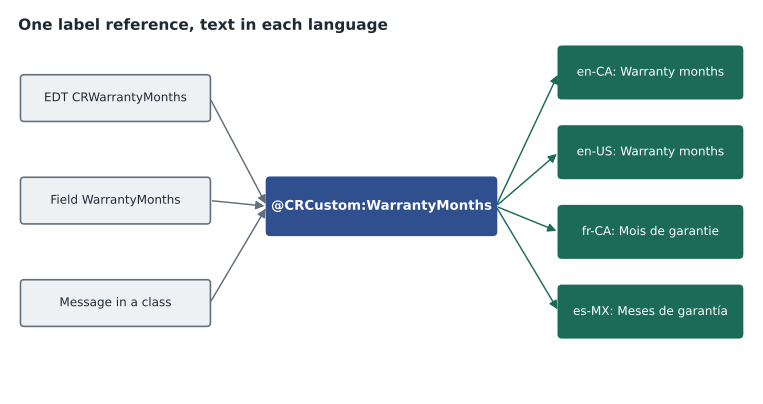
A label is a piece of user-facing text stored in a label file and referred to by an identifier. Elements and code never contain the text itself; they contain the label reference, and the application shows the text in the user's language at run time. The Label and HelpText properties of EDTs, fields, tables, forms, menu items, enums and other elements hold label references, and so do strings in X++ that will be shown to users, such as Infolog messages.
A label file belongs to a model and has one file per language. The label file for Cobalt Ridge's model is CRCustom, with files for English (Canada), English (United States), French (Canada) and Spanish (Mexico). Each language file is a simple list of label IDs, texts and optional comments. The label file ID becomes part of every reference.
Label references
A label reference has the form at sign, label file ID, colon, label ID: @CRCustom:WarrantyMonths. The label ID is a readable name chosen by the developer, which makes metadata and code easy to read. Older standard labels use a different, numeric style, such as @SYS12345 or @SYS67, from label files created before named label IDs existed; they still work and are found throughout standard code. New labels should always use named IDs.
CRCustom.en-CA.label.txt  (excerpt)

PumpWarranties=Pump warranties
 ;Menu item and form caption
PumpWarrantiesHelp=View and maintain warranties for serial-numbered pumps.
WarrantyMonths=Warranty months
WarrantyStartDate=Warranty start date
InstallDateInFuture=The installation date cannot be in the future.
 ;Error from CRPumpWarrantyTable.validateWrite
VoidWarranty=Void warranty
WarrantyVoided=Warranty for %1 is void.
 ;%1 = serial number
Two features of the file are worth noticing. Comments describe where a label is used and what placeholders mean, which matters enormously to translators who see only the text. And placeholders such as %1 are filled in at run time by strFmt, so a message like Warranty for %1 is void can be translated with the serial number in the right place for each language's word order.
Creating label files and labels
A label file is created in Visual Studio by adding a new item of type label file to a project and choosing its ID and languages; the wizard creates one file per language. Labels are added in the label editor, which shows a grid of label IDs, texts and comments, can search all label files, and can add a language file later. In the designers, the Label property of an element offers a search across label files, so a developer can reuse an existing label rather than create a duplicate. Microsoft's standard labels cover thousands of common terms; using @SYS labels for words like Customer account or Description is fine when the meaning is exactly the same.
Desmond gave Prudence three rules for creating labels. Use a named ID that describes the text, not where it is used, so the same label can be reused. Do not reuse a label whose text happens to match if the meaning is different, because a later change to one meaning would break the other. And never build a sentence by concatenating labels; write the whole sentence as one label with placeholders, because word order differs between languages.
| Practice | Good | Avoid |
|---|---|---|
| Label ID | WarrantyMonths | Field7Label |
| Sentence with values | WarrantyVoided=Warranty for %1 is void. | Concatenating "Warranty for " + serial + " is void." |
| Reusing standard labels | @SYS label for Customer account on a customer account field | @SYS label for Account on a field that means a ledger account when the label meant a bank account |
| Comments | Comment naming the element and explaining placeholders | No comment on labels with %1 placeholders |
| Help text | A short sentence telling the user what to enter | Repeating the label as the help text |
Using labels in X++
In X++ code, a string literal that starts with an at sign and matches a label reference is resolved to the label's text in the user's language. So info('@CRCustom:WarrantyMonths') shows Warranty months to an English user and Mois de garantie to a French one. For messages with values, the label reference is passed to strFmt as the format string. Functions such as literalStr wrap a label reference so that the compiler checks it exists, which catches typos at build time.
// Simple message
info('@CRCustom:WarrantyMonths');

// Message with a value; the label text contains %1
info(strFmt("@CRCustom:WarrantyVoided", warranty.SerialNumber));

// Validation failure using a label
ret = checkFailed("@CRCustom:InstallDateInFuture");

// Compile-time check that the label exists
str labelId = literalStr("@CRCustom:PumpWarranties");
The validateWrite method from lesson 5 had a message typed directly in English. Prudence replaced it with @CRCustom:InstallDateInFuture, and the best-practice check that had been warning about it went quiet. Lesson 11 shows that check and others like it.
Languages and translation
A label file can have any of the languages the application supports, and the user's language preference decides which text appears. If a label is missing in a language file, the application falls back to another language, which is why missing translations often go unnoticed until a French or Spanish user reports an English word in the middle of their screen. Desmond's checklist for a release included comparing the language files of CRCustom so that every label in English had a French and a Spanish entry.
Translation can be done by people editing the language files in the label editor, or with machine translation followed by review. Microsoft provides a translation service for finance and operations label files, through Lifecycle Services, that produces translated files from a source language for a project to review and import; teams also use general translation tools. Either way, translations are best reviewed by people who know the business. Cobalt Ridge's Spanish labels were reviewed by the part-time controller who would run CRMX's accounts, because she knew how Mexican users would describe a warranty claim, and her review changed four of the machine translations.
| Language file | Locale | Users |
|---|---|---|
| CRCustom.en-CA | English (Canada) | CRCA users in Hamilton and Calgary |
| CRCustom.en-US | English (United States) | CRUS users |
| CRCustom.fr-CA | French (Canada) | Some CRCA staff and customer documents |
| CRCustom.es-MX | Spanish (Mexico) | CRMX staff from January 2027 |
Canadian and US English rarely differ in finance and operations labels, but they do sometimes, and the two files allow for it. The warranty module has one label where they differ: the Canadian file says Installation postal code for a field on the service address, and the US file says Installation ZIP code. Everything else is the same text in both.
Writing good labels
Translatable text is only half the job; the text also has to be good. Microsoft publishes user interface text guidelines for finance and operations apps, and the standard application follows a consistent style that custom labels should match. Field labels are short noun phrases in sentence case, such as Warranty start date, without a final period. Button and menu labels are verbs or verb phrases, such as Void warranty or Send reminders. Messages are full sentences that say what happened and, where possible, what the user can do about it. Help text is one sentence that tells the user what to enter or what the page is for.
| Kind of text | Style | Warranty module example |
|---|---|---|
| Field label | Short noun phrase, sentence case, no period | Installation date |
| Button or menu item | Verb phrase | Void warranty |
| Form caption | Plural noun for lists, singular for one record | Pump warranties |
| Error message | Sentence saying what is wrong and how to fix it | The installation date cannot be in the future. Enter today or an earlier date. |
| Help text | One sentence describing the field or page | The date the pump was installed at the customer site. |
Teodora reviewed every English label with Prudence before translation started, because fixing the English first saved paying for a translation twice. Her changes were small but telling. Warranty mths became Warranty months, because abbreviations confuse screen readers and translators alike. Invalid date became The installation date cannot be in the future, because Invalid date told the user nothing about what to do. And the void confirmation gained a second sentence warning that voiding cannot be undone.
Help, task guides and documentation
Labels and help text are the first layer of help in the application. The Help pane in the browser adds Microsoft's documentation for standard pages and can show an organization's own content as well, and task guides, recorded with Task recorder, walk a user through a business process step by step. Task recorder also creates the recordings used for automated regression tests, which MSBA-343 covers. For the warranty module, Teodora recorded a task guide called Register a pump warranty manually, used for training the service desk before go-live, and Prudence kept the recording file in the repository's Docs folder so it could be updated when the form changed.
Developers sometimes ask whether help text is worth the effort, given how few users read it. Desmond's answer was that help text is also what appears in tooltips and what navigation search reads, so writing it improves both discoverability and accessibility, and it costs a sentence per field.
One label file or several
Most models need only one label file, and Cobalt Ridge kept to one. Large independent software vendor solutions sometimes have several, organized by functional area, to keep each file manageable and to let different teams own their text. A label file belongs to a model, and an element can use labels from any label file in a package its model references. Moving labels between files later means changing every reference, so the choice is worth making once at the start. Desmond's guidance was to start with one file per model and split only if the file grew beyond a few thousand labels or a separate team needed to own part of it.
Documents for customers
Labels are shown in the user's language, but documents sent to customers, such as invoices and warranty certificates, should usually appear in the customer's language. The standard approach is that reports and Electronic reporting formats use the language set on the customer record when printing, and label references in the report resolve in that language. The warranty certificate, built in MSBA-341, follows this pattern: a CRCA customer whose language is French receives a French certificate even when an English-speaking service agent prints it.
Resources
Not everything a module shows is text. Resources are elements that hold files, typically images, used by forms and reports, such as icons for tiles or a logo on a document. A resource is added to the model and referred to by name, so the file travels with the code. Images used as icons should follow the application's style and size guidance so they fit the browser client; in most modules the standard symbol font that the client uses for buttons and tiles provides an icon, and a custom image is unnecessary.
Other resources include style sheets and scripts used by extensible controls, mentioned in lesson 7, and files such as templates used by document generation. The rule for all of them is the same as for labels: anything the module needs at run time is an element in the model, under source control and deployed with the package, rather than a file copied by hand to a server.
Labels in the user interface and in data
Labels translate the application's own text, but not the data users type. A warranty claim reason description entered by a user in English stays in English for everyone. When master data must be shown in several languages, such as product names on customer documents, the application uses translation tables for that data, such as product translations, which MSBA-330 mentioned. Developers who create setup tables whose descriptions will be printed for customers should consider a translation table of the same kind. The warranty claim reasons did not need one, because they appear only internally.
Worked problem
Fixing a hard-coded message
Prudence's code review shows this line: warning('Warranty expires in ' + int2Str(days) + ' days'). What is wrong and what should it become?
Show solution
- The text is hard-coded in English, so French and Spanish users will see English.
- The sentence is built by concatenation, so translators cannot move the number to fit their word order.
- Create a label WarrantyExpiresInDays with the text Warranty expires in %1 days and a comment saying %1 is a number of days.
- Replace the line with warning(strFmt("@CRCustom:WarrantyExpiresInDays", days)) and add the French and Spanish translations.
Answer: Use one label with a placeholder, formatted with strFmt, and translate it in every language file.
Common mistakes
MistakeTyping user-facing text directly into code or element properties.
InsteadCreate a label and use its reference everywhere.
MistakeBuilding sentences by joining labels and values.
InsteadWrite one label with placeholders and format it with strFmt.
MistakeReusing a label because the text matches.
InsteadReuse only when the meaning is the same; otherwise create a new label.
MistakeShipping a release with untranslated labels.
InsteadCompare language files before release so every label exists in every language.
Summary and key terms
- Labels hold user-facing text in label files, one file per language, and elements and code refer to them by reference.
- A label reference has the form @LabelFileId:LabelId; older standard labels use numeric IDs such as @SYS12345.
- In X++, label references in string literals resolve to the user's language; strFmt fills placeholders.
- Translations are added per language file, reviewed by people who know the business, and checked for completeness before release.
- Resources such as images and style sheets are elements in the model, deployed with the code.
- Label
- A piece of user-facing text stored in a label file and referred to by an ID.
- Label file
- An element holding labels for a model, with one file per language.
- Label reference
- The text @LabelFileId:LabelId used in properties and code.
- Label editor
- The Visual Studio tool for creating, searching and editing labels.
- Placeholder
- A marker such as %1 in a label that strFmt replaces with a value.
- Resource
- An element holding a file, such as an image, used at run time.
Practice problems
Work each problem on paper first, then reveal the answer to check.
What is the label reference for the label PumpWarranties in the CRCustom file?
Show answer
@CRCustom:PumpWarranties.
Why do label comments matter?
Show answer
They tell translators where a label is used and what placeholders mean.
Which language does a customer document print in?
Show answer
Usually the language set on the customer record, not the user's language.
Lesson quiz · 5 questions
Score 60% or more to complete this lesson.
Create a free account to save your progress, take quizzes and earn a certificate.