
MSBA-340 · Lesson 2 of 12 · 21 min
Models, packages and projects
▶ Video coming soon A video version of this lesson is on the way.
The second clinic began with a question from Kiri Langford, who had wandered in with a coffee: where, physically, does Cobalt Ridge's code live? It was a better question than it sounded. In the old ERP, customizations had been edited directly in the vendor's source, and the company had paid heavily every time it upgraded. Kiri wanted to hear, in plain terms, why that would not happen again. Desmond answered by drawing three boxes inside each other on the whiteboard, labelled package, model and element, and spent the session explaining them.
Elements, models and packages
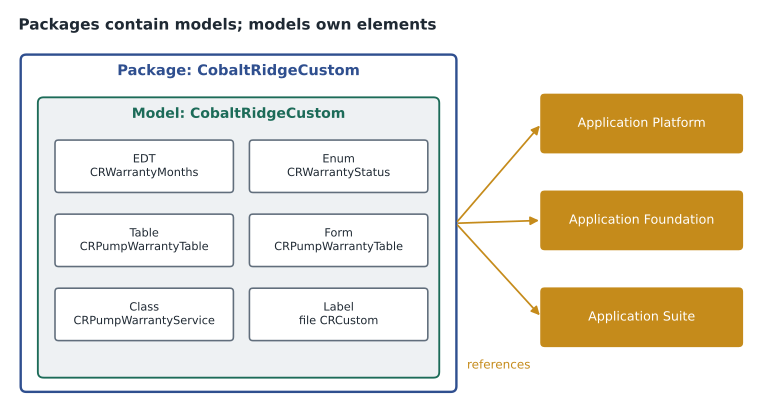
An element is a single piece of metadata: a table, a class, a form, an enum, a menu item, a label file and so on. Every element belongs to exactly one model. A model is a named group of elements that a team or a vendor owns and ships together; it has a publisher, a version and a description. Microsoft's application is divided into many models, with names such as Application Platform, Application Foundation and Application Suite.
A package is the unit of compilation and deployment. It contains one or more models, compiles into a set of assemblies, and is what gets deployed to an environment. Packages also define dependencies: a package declares which other packages it references, and its code can only use elements from those packages. When the application is deployed, packages are what the system installs and what a deployable package file carries.
In earlier versions of the product, one package could hold several models in different layers, and a model could change elements owned by another model in the same package through a technique called overlayering. A partner model in a higher layer could replace a method of a standard class, for example. Overlayering made upgrades expensive, because every service update had to be merged with the partner's copy of each changed element. Microsoft therefore sealed its own models. Today custom code lives in separate packages, and those packages change standard behaviour only through extensions. The practical rule Desmond wrote on the board was: new package, new model, extensions only.
Extension models
An extension model is a model in its own package that references the standard packages it needs to extend. Elements created in it are of two kinds. Some are entirely new, such as Cobalt Ridge's own tables and classes. Others are extension elements, which belong to the extension model but add to a standard element: a table extension adds fields, indexes or field groups to a standard table; a form extension adds controls or data sources; a class extension adds methods or wraps existing ones. Extension elements are named after the element they extend with a suffix, such as CustTable.CobaltRidge for an extension of the customer table owned by the CobaltRidge model.
Because the extension model is separate, Microsoft can update the standard packages and the custom package keeps compiling against the new version, unless Microsoft has removed or changed something the extension relied on. Microsoft publishes an extensibility process in which partners can request new extension points, such as a delegate or a method that can be wrapped, when the existing ones are not enough. MSBA-341 explains extensibility in detail, including how to read whether a method can be wrapped.
| Approach | How it changes standard behaviour | Status |
|---|---|---|
| Overlayering | Edits a copy of the standard element in a higher layer | Not allowed for Microsoft models, which are sealed |
| Extension elements | Adds fields, controls, methods or properties in a separate model | The standard approach |
| Chain of command | Wraps a standard method with code that runs before and after it | The standard approach (MSBA-341) |
| Event handlers | Subscribes to events and delegates raised by standard code | The standard approach (MSBA-341) |
Creating a model
Models are created in Visual Studio from the Dynamics 365 menu: Extensions, Dynamics 365, Model management, Create model. The wizard asks for a model name, a publisher, a description and a layer; then whether to create a new package or put the model in an existing one; and finally which packages to reference. For an extension model, the developer chooses a new package and selects the referenced packages. A small test model might reference only Application Platform and Application Foundation. A model that extends sales orders, vendors or products also needs Application Suite, which holds most of the business application.
Desmond had already created the main model for Cobalt Ridge before the clinics started. He showed Prudence its descriptor and explained each choice.
| Setting | Cobalt Ridge choice | Reason |
|---|---|---|
| Model name | CobaltRidgeCustom | One model for in-house work keeps references simple |
| Publisher | Cobalt Ridge Manufacturing | Identifies the owner in Application Explorer and deployment logs |
| Package | New package CobaltRidgeCustom | Custom code must be in its own package |
| Referenced packages | Application Platform, Application Foundation, Application Suite, Directory, Ledger | Only the packages whose elements the code uses |
| Element prefix | CR | New elements are easy to find and cannot collide with Microsoft names |
| Label file | CRCustom | All text for the model in one label file with translations |
Desmond warned against two habits he had seen at other companies. The first is creating a separate model for every small piece of work, which leads to dozens of packages with tangled references and slow builds. The second is the opposite: putting every vendor's add-on and every in-house change into one giant package. Independent software vendor solutions arrive as their own packages and should stay that way. Cobalt Ridge's rule was one package for in-house work, plus a second package only if a group of features ever needed to be deployed or removed on its own.
Model: CobaltRidgeCustom
  Publisher:   Cobalt Ridge Manufacturing
  Layer:       usr
  Package:     CobaltRidgeCustom (new)
  References:  ApplicationPlatform
               ApplicationFoundation
               ApplicationSuite
               Directory
               Ledger
  Prefix:      CR
  Label file:  CRCustom (en-CA, en-US, fr-CA, es-MX)
The layer setting deserves a short explanation, because it still appears in the wizard. Layers date from the overlayering era, when they decided which model's copy of an element won. With sealed models and extensions, layers matter far less. Partners and customers usually choose the layer suggested for their role, and the choice has no effect on extension behaviour.
Projects
A Visual Studio project is the developer's working set: the elements created or extended for a piece of work. A project belongs to one model, and every element added to it is created in that model. Projects are not deployed; they are a way of organizing work and of building and deploying a subset of changes. A project can be built on its own, and its properties include whether a build should also deploy changes to the connected online environment and whether deployment should synchronize the database, which lesson 10 explains.
In finance and operations development, the project is a lens rather than a container. Two projects in the same model can contain the same element, and an element removed from a project still exists in the model. Desmond's convention was one project per work item, named after the work item number, such as CR0042 Pump warranty registration. When the work was finished and merged, the project could be deleted without affecting the model.
| Concept | Purpose | Deployed? |
|---|---|---|
| Element | A single piece of metadata or code | Yes, as part of its model |
| Model | A group of elements owned and versioned together | Yes, inside its package |
| Package | The unit of compilation, references and deployment | Yes |
| Project | A developer's working set for one piece of work | No |
Building
Building compiles X++ into .NET assemblies and checks the metadata. A developer can build a project from Solution Explorer, which compiles the model of that project, or run a full build of selected models from Dynamics 365, Build models. The build output lists compiler errors, which must be fixed, and best-practice warnings, which lesson 11 shows how to treat. Builds are incremental where possible, so building a project after a small change is quick, while a full build of a large model takes longer.
A package can only compile if the packages it references are present in the reference metadata. When Microsoft releases a new version of the application, Desmond downloads the new metadata, points the configuration at it and rebuilds. If anything in the custom package depended on something Microsoft changed, the compiler says so before any code reaches a sandbox.
Source control with Azure DevOps and GitHub
Every element is an XML file in a folder for its model, so source control is natural. The MB-500 outline names two options, Azure DevOps and GitHub, and asks candidates to create, check out, review and check in code, maintain project artifacts, and compare code and resolve conflicts. Older projects often used Team Foundation Version Control in Azure DevOps, with explicit check-out; most new projects use Git, in either Azure Repos or GitHub, with branches and pull requests.
Cobalt Ridge chose Git in Azure Repos because the partner's build pipelines already ran in Azure DevOps. The repository holds a Metadata folder with the CobaltRidgeCustom package, a folder for pipeline definitions and a folder for documentation. Developers work on short-lived branches, one per work item, and merge through pull requests that must pass a build and be reviewed. Lesson 11 describes the review; MSBA-343 covers the pipelines that build deployable packages from the main branch.
cobalt-ridge-fno/
  Metadata/
    CobaltRidgeCustom/
      Descriptor/
        CobaltRidgeCustom.xml
      CobaltRidgeCustom/
        AxClass/
        AxEdt/
        AxEnum/
        AxForm/
        AxLabelFile/
        AxMenuItemDisplay/
        AxTable/
        AxTableExtension/
  Pipelines/
    build.yml
  Docs/
    conventions.md
With Git, the developer's workflow is the familiar one: pull the latest main branch, create a branch, open Visual Studio with the custom metadata folder pointing at the working copy, make changes in the designers, build, deploy and test in the developer environment, then commit and push. Visual Studio's Git integration shows changed files, and because each element is its own file, two developers changing different elements rarely conflict. When they do change the same element, the conflict is in XML, and the designers' consistent formatting makes most conflicts simple to resolve. Desmond asked that nobody resolve a conflict in a form or table by hand-editing XML they did not understand; if in doubt, open both versions in the designer and repeat the change.
Naming conventions
Because every custom element sits in the same global namespace as thousands of Microsoft elements, names must be chosen carefully. Microsoft's guidance is to give new elements a prefix that identifies the publisher, so that a future Microsoft element can never collide with a custom one. Cobalt Ridge uses CR. A new table is CRPumpWarrantyTable, a new class CRPumpWarrantyService, a new enum CRWarrantyStatus. Extension elements are named after the standard element and the model, and new fields or methods added through an extension also carry the prefix, such as CRPreferredServicePartner on the customer table extension. The prefix is not decoration: if Microsoft later adds a field called PreferredServicePartner to CustTable, an unprefixed custom field with the same name would stop the package compiling.
The second half of a good name is a clear noun. Desmond asked Prudence to read some standard names aloud: SalesTable for sales order headers, SalesLine for their lines, CustTable for customers, InventTable for released products. The pattern is subject first, then role. Tables that hold the main records of an area end in Table; tables of lines end in Line or Trans; parameter tables end in Parameters. Following the pattern makes custom code readable to any finance and operations developer, including the ones Cobalt Ridge will hire in five years.
| Element | Cobalt Ridge name | Pattern followed |
|---|---|---|
| Main warranty table | CRPumpWarrantyTable | Prefix, subject, Table |
| Warranty claim lines | CRPumpWarrantyClaimLine | Prefix, subject, Line |
| Module parameters | CRPumpWarrantyParameters | Prefix, subject, Parameters |
| Service class | CRPumpWarrantyService | Prefix, subject, role |
| Customer field added by extension | CRPreferredServicePartner | Prefix on new members of standard elements |
References and the cross-reference database
The references declared on a package are enforced by the compiler. If Prudence writes code that uses a class from a package her model does not reference, the build fails with an error naming the missing element. The fix is to add the reference through Model management, not to copy the class. Desmond showed the opposite case as well: references that are no longer used should be removed, because each one makes the package depend on another part of the application during upgrades and builds.
The cross-reference database, restored from the downloaded backup, helps with both jobs. Find references on an element lists every place it is used, across Microsoft code and custom code, so a developer can see the impact of a change before making it. After building a model, the developer can update the cross-references for that model so that new code is included in later searches.
Deployable packages and environments
A developer deploys models straight from Visual Studio to their own unified developer environment. Other environments receive code differently. A build pipeline compiles the packages from the main branch and produces a deployable package, a file that contains the compiled packages and can be installed in a sandbox or production environment. Deployable packages are stored, for example, in the Lifecycle Services asset library, and installed through the deployment tools for that environment. The MB-500 outline lists managing package deployments between environments and performing activities that require asset libraries; MSBA-343 teaches these steps fully.
Worked problem
Placing an element
Prudence needs a new table for warranty registrations, a new field on the standard customer table for a preferred service partner, and a change to how the standard sales order form shows a warning when a customer has an expired warranty. Where does each change live?
Show solution
- The new table, CRPumpWarrantyTable, is a new element in the CobaltRidgeCustom model.
- The customer field is added through a table extension of CustTable, created in the CobaltRidgeCustom model and named CustTable.CobaltRidgeCustom.
- The sales order change is a form extension or a class extension that adds logic, depending on where the warning should be raised; either way it lives in the CobaltRidgeCustom model.
- All three go into the CR0042 project and the same Git branch, and are built and deployed together.
Answer: Everything lives in Cobalt Ridge's own model and package. Standard elements are touched only through extension elements that the custom model owns.
Kiri left the session with the answer she wanted: Cobalt Ridge's code lives in Cobalt Ridge's package, in Cobalt Ridge's Git repository, and it touches Microsoft's code only through documented extension points. An upgrade still needs testing, but it no longer needs merging.
Common mistakes
MistakeCreating a model inside a Microsoft package.
InsteadCreate a new package for custom models; Microsoft packages are sealed.
MistakeCreating a new model and package for every small change.
InsteadKeep in-house work in one or a few well-defined packages to keep references and builds simple.
MistakeTreating the Visual Studio project as what gets deployed.
InsteadPackages are deployed; projects are only working sets of elements.
MistakeReferencing every standard package just in case.
InsteadReference only the packages whose elements the code uses.
Summary and key terms
- Elements belong to models; models live in packages; packages are compiled, reference other packages and are deployed.
- Microsoft models are sealed, so custom work goes into an extension model in its own package.
- Models are created with Model management, Create model, choosing a new package and its references.
- Projects organize a developer's work on one item; they are not deployed.
- Code is kept in Azure DevOps or GitHub, usually with Git branches and pull requests, and built into deployable packages for other environments.
- Model
- A named, versioned group of elements owned by one publisher.
- Package
- The unit of compilation and deployment, holding one or more models and referencing other packages.
- Extension model
- A model in its own package that adds to standard elements through extension elements.
- Overlayering
- The older practice of editing copies of standard elements in a higher layer, no longer allowed for Microsoft models.
- Deployable package
- A file of compiled packages built by a pipeline and installed in sandbox or production environments.
- Project
- A Visual Studio working set of elements in one model.
Practice problems
Work each problem on paper first, then reveal the answer to check.
What is the difference between a model and a package?
Show answer
A model groups and owns elements; a package is the compilation and deployment unit that contains models and references other packages.
How is an extension of the standard CustTable owned by CobaltRidgeCustom usually named?
Show answer
CustTable.CobaltRidgeCustom, the extended element name followed by a suffix.
Why is a project not deployed?
Show answer
It is only a working set; the model and package that own the elements are what is built and deployed.
Lesson quiz · 5 questions
Score 60% or more to complete this lesson.
Create a free account to save your progress, take quizzes and earn a certificate.