
MSBA-340 · Lesson 3 of 12 · 21 min
X++ syntax and data types
▶ Video coming soon A video version of this lesson is on the way.
Prudence arrived at the third clinic having read the first chapter of the X++ language reference on the bus. Her verdict was that X++ looked like C# that had been raised by a database. Desmond said that was the best one-line description he had heard, and spent the session showing her where the resemblance helped and where it misled.
What kind of language X++ is
X++ is an object-oriented, statically typed language with a syntax in the C family: statements end with semicolons, blocks use braces, and classes have methods, fields and inheritance. Code is compiled to the .NET Common Intermediate Language and runs on the .NET runtime inside the application server, which means X++ can call .NET classes directly. What sets it apart is that database access is built into the language. A select statement that reads a table is part of X++ grammar, not a string sent to a library, so the compiler checks table and field names at build time. X++ is also case-insensitive: CustTable, custtable and CUSTTABLE refer to the same table, although every style guide asks developers to use the casing of the element's definition.
internal final class CRHelloClinic
{
    public static void main(Args _args)
    {
        str    greeting = 'Hello from the developer clinic';
        int    attendees = 2;
        real   coffeeLitres = 1.5;

        info(strFmt('%1: %2 attendees, %3 litres of coffee', greeting, attendees, coffeeLitres));
    }
}
The example shows several features at once. Variables are declared with a type and a name, and can be initialized on the same line. The info function writes a message to the Infolog, the message pane that users and developers see in the browser. The global function strFmt builds a string by replacing numbered placeholders with values. And the class is a runnable class, with a static main method that takes an Args object, which is how small utilities and test scripts are started in finance and operations apps. Lesson 10 shows how to run one from Visual Studio.
Primitive data types
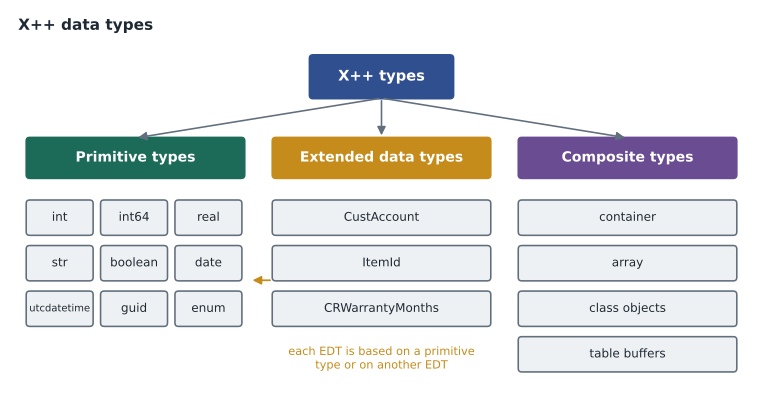
X++ has a small set of primitive types. They map onto .NET types under the covers, but they have their own names and a few behaviours that surprise newcomers.
| Type | Holds | Notes |
|---|---|---|
| int | A 32-bit whole number | Default value 0 |
| int64 | A 64-bit whole number | Used for RecId and other record identifiers |
| real | A decimal number | Stored with decimal precision suitable for amounts and quantities |
| str | A string of characters | Can be declared with a maximum length, such as str 20; compared case-insensitively by default |
| boolean | true or false | Default false; stored as an integer in the database |
| date | A calendar date | Default is an empty date, written dateNull() |
| utcdatetime | A date and time in UTC | Converted to the user's time zone for display |
| guid | A globally unique identifier | Created with newGuid() |
| enum | One value of a base enum | Stored as an integer; compared by named value |
Two behaviours deserve attention. First, every variable has a default value, so an uninitialized int is 0 and an uninitialized str is an empty string; there is no null for primitive types. Code that needs to know whether a date was entered checks it against dateNull() or uses the prmIsDefault function for parameters. Second, string comparison with the == operator is case-insensitive, which matches how finance and operations apps compare identifiers such as customer account numbers. Prudence's C# instincts told her that 'abc' == 'ABC' should be false; in X++ it is true.
Extended data types
Most variables and nearly all table fields in finance and operations apps are not declared with a primitive type directly. They use an extended data type, or EDT. An EDT is an element in the AOT, based on a primitive type or on another EDT, that adds properties: a label, help text, a string length, the number of decimals, display format and, often, a reference table that the value relates to. CustAccount, for example, is an EDT for customer account numbers. Every field that holds a customer account, on sales orders, invoices, payments and dozens of other tables, uses CustAccount, so they all share the same length, label and lookup to the customer table.
The benefit is consistency through inheritance. If the length of an EDT is increased, every field based on it grows with it at the next database synchronization. An EDT based on another EDT inherits its properties and can override some of them. Desmond showed Prudence the chain for a standard name field: Name is based on a str EDT, and several more specific EDTs extend Name, each changing only the label.
// Variables declared with EDTs rather than primitive types
CustAccount     customerAccount = 'C-000214';
ItemId          itemId          = 'MC-150';
InventSerialId  serialNumber    = 'MC150-260931';
TransDate       installDate     = mkDate(14, 10, 2026);

// A Cobalt Ridge EDT, created in the CobaltRidgeCustom model:
// CRWarrantyMonths  (based on int, label @CRCustom:WarrantyMonths)
CRWarrantyMonths warrantyMonths = 24;
Desmond's rule for the warranty module was that every new field would use an EDT, either a standard one when the meaning was the same or a new CR one when it was not. Fields of type str 30 with no EDT are a code smell in finance and operations development: they have no label, no help text and no relation, and they cannot be changed in one place later.
Base enums
A base enum is an element that defines a fixed list of named values, such as NoYes, SalesStatus or ABC. Each value has a name, a label and an integer value; the integer is what is stored in the database. Code compares enum values by name with the double-colon syntax, such as SalesStatus::Invoiced, which keeps code readable and safe. Enums appear to users as drop-down lists with the labels of the values.
// Cobalt Ridge enum CRWarrantyStatus: Draft, Active, Expired, Void
CRWarrantyStatus status = CRWarrantyStatus::Draft;

if (status == CRWarrantyStatus::Draft)
{
    status = CRWarrantyStatus::Active;
}

// The underlying integer is available but rarely needed
int storedValue = enum2int(status);
Standard enums can be made extensible, which allows other models to add values through enum extensions. Many Microsoft enums are extensible for exactly this reason. Code that handles an extensible enum should not assume it knows every value; a switch statement over one should have a default branch. MSBA-341 shows how to add values to a standard enum.
Composite types: containers, arrays, classes and tables
A container is an X++ type that holds an ordered list of values, possibly of different types, such as a string, a date and a number. Containers are value types: assigning a container to another variable copies it. They are built with square brackets and read with conpeek, and they are used throughout the standard application for packing settings and passing small sets of values. They are convenient but not efficient for large lists, because every change creates a copy.
Arrays in X++ are declared with square brackets after the variable name and hold values of one type. Fixed-length and dynamic arrays exist, and arrays are indexed from 1, not from 0, which catches out every C# developer at least once. For lists, sets and maps of objects, X++ code uses the collection classes List, Set and Map, or the .NET collections.
Variables can also hold objects of a class, created with new, and table buffers, which hold one record of a table. A table buffer is declared with the table name as its type, such as CustTable custTable, and is filled by a select statement. Lessons 4 to 6 cover objects, tables and data access in detail.
container packed = ['MC150-260931', mkDate(14, 10, 2026), 24];
str      serial  = conPeek(packed, 1);
int      months  = conPeek(packed, 3);

str 10   plants[3];
plants[1] = 'HAM';
plants[2] = 'AKR';
plants[3] = 'CGY';

List     serials = new List(Types::String);
serials.addEnd('MC150-260931');
serials.addEnd('MC150-260932');
Operators and expressions
Most operators behave as they do in C#: arithmetic with plus, minus, times, divide and modulo; comparison with ==, !=, less than and greater than; and logical and, or and not with the usual double-character symbols. Assignment operators such as += and ++ are supported. Strings are joined with the plus operator. The ternary conditional operator, condition ? a : b, is available, and so is the like operator for wildcard string matching, using an asterisk for any run of characters and a question mark for one character.
Integer division deserves a warning. Dividing two ints with the slash operator produces a real, not a truncated integer, while the div operator performs integer division and mod gives the remainder. When the warranty module needed whole years from a number of months, Prudence wrote months div 12, and her first attempt with the slash gave 1.5 years for 18 months.
Statements and control flow
X++ has the expected control statements: if and else, switch with case and default, while, do while, and for. A while select statement, which loops over the records of a query, is unique to X++ and appears in lesson 6. The break and continue statements work inside loops. A switch can list several values in one case separated by commas.
int  months = 18;
int  years  = months div 12;     // 1
int  extra  = months mod 12;     // 6

switch (status)
{
    case CRWarrantyStatus::Draft, CRWarrantyStatus::Active:
        info('Warranty can be edited');
        break;
    case CRWarrantyStatus::Expired:
        warning('Warranty has expired');
        break;
    default:
        error('Unexpected status');
}

for (int i = 1; i <= 3; i++)
{
    info(plants[i]);
}
The Infolog has three levels: info for information, warning for something the user should notice, and error for a failure. Calling error does not stop the code by itself; it only adds a message. To stop processing, code throws an exception.
Exceptions
X++ uses try, catch and finally, and the throw statement. The most common pattern in standard code is throw error('message'), which adds the message to the Infolog and throws an exception of type Exception::Error at the same time. Catch blocks can catch a specific exception type, such as Exception::Error, Exception::Deadlock or Exception::UpdateConflict, or all exceptions. X++ also has a retry statement, used inside a catch block to run the try block again, most often after a deadlock or an update conflict.
Exceptions interact with database transactions in a way that matters a great deal. A database transaction in X++ starts with ttsbegin and ends with ttscommit. Transactions can nest, but only the outermost ttscommit actually commits. If an exception is thrown inside a transaction and not caught inside it, the whole transaction is rolled back, and the exception travels to the first catch outside the outermost transaction. A catch block inside a transaction does not receive most exceptions, because the transaction has already been abandoned. The practical rule is to put try and catch outside ttsbegin and ttscommit, not inside them.
try
{
    ttsbegin;

    CRPumpWarrantyTable warranty;
    select forupdate warranty
        where warranty.SerialNumber == 'MC150-260931';

    if (!warranty)
    {
        throw error('No warranty registered for this serial number.');
    }

    warranty.Status = CRWarrantyStatus::Void;
    warranty.update();

    ttscommit;
}
catch (Exception::Error)
{
    // The transaction has already been rolled back.
    info('Warranty was not changed.');
}
Declarations, scope and the var keyword
Older X++ required every local variable to be declared at the top of a method, before any statements. Modern X++ allows declarations where they are needed, as in C#, and that is now the recommended style: declare a variable close to its first use and in the smallest block that needs it. A variable declared inside a block, such as the body of an if statement or a loop, is visible only inside that block. A variable declared in a for statement's header is visible only inside the loop.
X++ also accepts the var keyword, which lets the compiler infer the type from the initializing expression, such as var service = new CRPumpWarrantyService();. Desmond allowed var only where the type was obvious from the right-hand side, and never for table buffers or primitive values, because a reader skimming the code should not have to work out what CustAccount or int a variable really is. Constants can be declared with const inside methods or classes, and are preferred over the older macro syntax for fixed values.
Dates, times and time zones
Dates and times cause more bugs in business applications than almost anything else, and X++ is no exception. The date type has no time part. The utcdatetime type stores an instant in Coordinated Universal Time, and the application converts it to the user's preferred time zone when it is displayed. Server code should therefore store and compare utcdatetime values in UTC and convert only for display or for business rules that depend on local time. The DateTimeUtil class provides the conversions: getSystemDateTime for the current instant, applyTimeZoneOffset to move to a time zone, and functions to extract the date part or add days and hours.
The today function returns the session date, which a user can change in their options for testing. For business logic that must not be fooled by that setting, such as recording when a warranty was registered, Desmond asked Prudence to use the system date and time from DateTimeUtil rather than today. The warranty module stores the registration moment as utcdatetime and the installation date, which users type, as a plain date.
Comments and readability
X++ supports single-line comments with two slashes and block comments between slash-star and star-slash. Classes and public methods can carry documentation comments with three slashes and XML tags, in the same format as C#, and the editor shows them in tooltips. The best-practice checks in lesson 11 flag public methods without documentation in some configurations. Desmond's preference was for short comments that explain why something is done, not what the next line does; good names usually make the what obvious.
Global functions and the .NET framework
Alongside the language, the application provides hundreds of global functions that can be called anywhere, such as strFmt, strLen, subStr, today, mkDate, dayOfMth, any2Str and con2Str. Many live on the Global class. Microsoft's MB-500 outline lists implementing global functions in X++, and the readiness course reviews the common ones. When no X++ function exists, X++ can call .NET directly using the full namespace, such as System.Math or System.String, which is useful for things like regular expressions or advanced date handling.
Worked problem
Reading unfamiliar X++
Prudence finds this line in a standard class: if (custTable.Blocked != CustVendorBlocked::No && !prmIsDefault(_override)). What does it mean?
Show solution
- custTable is a table buffer for the customer table, and Blocked is a field based on the enum CustVendorBlocked.
- The first condition is true when the customer is blocked in any way, because the value is not the named value No.
- prmIsDefault(_override) is true when the caller did not pass the _override parameter; the exclamation mark negates it.
- So the whole condition is true when the customer is blocked and the caller explicitly passed an override value.
Answer: The code runs its block only for blocked customers when the caller has explicitly supplied the override parameter.
Common mistakes
MistakeDeclaring table fields and variables with bare primitive types.
InsteadUse extended data types so labels, lengths and relations are consistent and changeable in one place.
MistakeExpecting arrays to start at index 0.
InsteadX++ arrays are indexed from 1.
MistakeUsing the slash operator for whole-number division.
InsteadUse div for integer division and mod for the remainder.
MistakePutting try and catch inside ttsbegin and ttscommit.
InsteadCatch outside the transaction; an exception inside a transaction rolls it back and goes to the outer catch.
Summary and key terms
- X++ is a statically typed, object-oriented, case-insensitive language compiled to .NET, with database access built into its grammar.
- Primitive types include int, int64, real, str, boolean, date, utcdatetime, guid and enum; they have default values rather than null.
- Extended data types add labels, lengths, help and relations to primitive types and are used for almost every field and many variables.
- Base enums define named values stored as integers; extensible enums can gain values from other models.
- Transactions use ttsbegin and ttscommit; exceptions thrown inside roll the transaction back, so catch outside it.
- Extended data type (EDT)
- An AOT element based on a primitive type that adds properties such as label, length and reference table.
- Base enum
- An element defining a fixed list of named values, stored as integers.
- Container
- A value-type list of mixed values, built with square brackets and read with conpeek.
- Infolog
- The message pane that shows info, warning and error messages to users and developers.
- Runnable class
- A class with a static main method that can be run directly.
- ttsbegin and ttscommit
- The statements that start and commit a database transaction in X++.
Practice problems
Work each problem on paper first, then reveal the answer to check.
What does months div 12 return for 30 months?
Show answer
2, because div performs integer division.
Why should a switch over an extensible enum have a default branch?
Show answer
Other models can add values, so the code cannot assume it knows every value.
What does throw error(...) do?
Show answer
It writes an error message to the Infolog and throws an Exception::Error.
Lesson quiz · 5 questions
Score 60% or more to complete this lesson.
Create a free account to save your progress, take quizzes and earn a certificate.