
MSBA-340 · Lesson 12 of 12 · 20 min
Case study: building a simple module
▶ Video coming soon A video version of this lesson is on the way.
The last clinic was not a clinic at all. On Thursday, November 19, 2026, Prudence demonstrated the first release of the pump warranty module to Teodora Brisebois, Piotr Vasquez-Lind, Henrik Salo and Kiri Langford, running in her unified developer environment with test data copied from the CONFIG sandbox's product setup. Desmond sat at the back and said nothing for forty minutes, which Prudence later said was the highest praise he gave. This lesson walks through how the module was built, in the order it was built, so that each decision can be traced to an earlier lesson.
The requirement
Teodora's requirement, written after the seal investigation described in MSBA-330, had four parts. Record a warranty for every serial-numbered pump sold, with the customer, the installation date, the term and the status. Let service staff find the warranty for a serial number in seconds and see whether it is active. Let quality staff void a warranty, with a reason, when a pump is returned or the warranty is breached. And show which sold pumps have no registered warranty, so that none slip through. Automatic registration from sales invoices, expiry reminders and the workspace were planned for later releases and taught in MSBA-341, where the extension techniques they need are covered.
| Requirement | Release | Built with |
|---|---|---|
| Record warranties for serial-numbered pumps | 1 | Tables, EDTs, enum, form, service class |
| Find a warranty by serial number and see if it is active | 1 | Simple List and Details form, calculator class, display method |
| Void a warranty with a reason | 1 | Action menu item, runnable class, claim reasons setup |
| List sold pumps without a warranty | 1 | Inquiry form on a query with a notexists join |
| Register warranties automatically from invoices | 2 | Chain of command on posting (MSBA-341) |
| Send expiry reminders | 2 | SysOperation batch job (MSBA-341) |
| Warranty service workspace | 3 | Operational workspace |
Step 1: the data model
Prudence designed the data model first, as lesson 5 taught, because everything else would sit on it. She created the EDTs and the enum, then the tables, and reviewed them with Desmond before writing any code.
| Element | Type | Key decisions |
|---|---|---|
| CRInstallDate | EDT (date, based on TransDate) | Label Installation date; help text explains it is the site installation date |
| CRWarrantyMonths | EDT (int) | Label Warranty months; used for both default and per-warranty terms |
| CRWarrantyStatus | Base enum | Draft, Active, Expired, Void; not extensible in release 1 |
| CRWarrantyClaimReasonId | EDT (string) | Reference table CRWarrantyClaimReason for the automatic lookup |
| CRPumpWarrantyTable | Table, Main | Unique SerialIdx; relations to CustTable and InventTable; audit fields; EndDate stored and maintained by insert and update |
| CRWarrantyClaimReason | Table, Group | Code and description; Simple List form |
| CRPumpWarrantyParameters | Table, Parameter | One record per company; default months for municipal and mining pumps |
Two decisions from earlier lessons were revisited. The end date, which lesson 5 decided not to store, became a stored field in lesson 6 so that set-based expiry and service desk searches could use it; Prudence maintained it in the table's insert and update methods by calling the calculator, and nowhere else. And the warranty term classes from lesson 4, standard and mining, were kept, but the mining term's operating hours were left for release 2 because the run-hours data did not exist yet. The release 1 mining term used months only, with a description saying so.
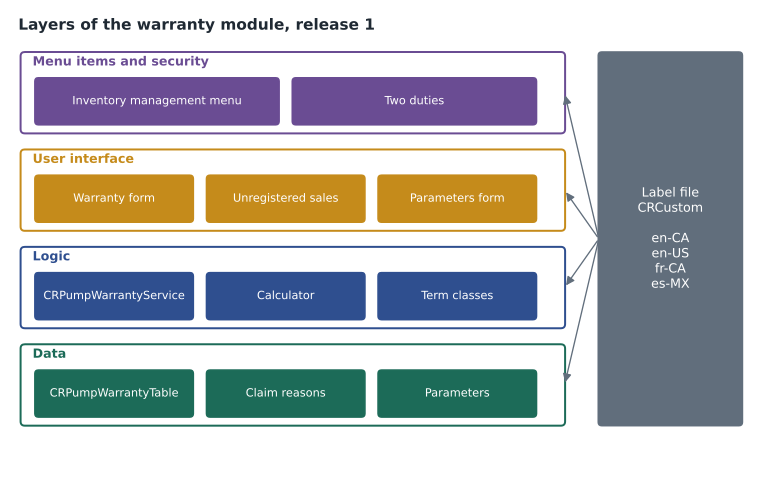
Step 2: the logic
With the tables deployed and synchronized, Prudence wrote the classes. CRPumpWarrantyCalculator computes end dates and activity, corrected in lesson 10 to include the anniversary day and covered by the unit tests in lesson 11. CRPumpWarrantyService is the single place where warranties are created, activated and voided. It validates the serial number against the item's tracking setup, so that only serial-tracked pumps can have warranties; defaults the term from the parameters by product family; and raises a delegate when a warranty is registered, for the mining division's future use. Forms and the void action call the service; nothing else writes to the warranty table.
internal final class CRPumpWarrantyService
{
    public static CRPumpWarrantyService construct()
    {
        return new CRPumpWarrantyService();
    }

    public CRPumpWarrantyTable register(InventSerialId _serial, ItemId _itemId, CustAccount _custAccount, CRInstallDate _installDate)
    {
        CRPumpWarrantyTable warranty;

        this.validateSerial(_serial, _itemId);

        ttsbegin;
        warranty.initValue();
        warranty.SerialNumber   = _serial;
        warranty.ItemId         = _itemId;
        warranty.CustAccount    = _custAccount;
        warranty.InstallDate    = _installDate;
        warranty.WarrantyMonths = this.defaultMonths(_itemId);
        warranty.Status         = CRWarrantyStatus::Active;

        if (!warranty.validateWrite())
        {
            throw error("@CRCustom:WarrantyNotRegistered");
        }
        warranty.insert();
        ttscommit;

        this.warrantyRegistered(warranty);
        return warranty;
    }

    protected void validateSerial(InventSerialId _serial, ItemId _itemId)
    {
        if (!_serial)
        {
            throw error("@CRCustom:SerialRequired");
        }
        if (CRPumpWarrantyTable::exist(_serial))
        {
            throw error(strFmt("@CRCustom:WarrantyExists", _serial));
        }
    }

    private CRWarrantyMonths defaultMonths(ItemId _itemId)
    {
        return CRPumpWarrantyParameters::find().monthsForItem(_itemId);
    }

    delegate void warrantyRegistered(CRPumpWarrantyTable _warranty)
    {
    }
}
Desmond pointed out three details to the audience. The transaction is short and contains only the insert; the delegate is raised after the commit, so a subscriber's failure cannot roll back a registration. validateSerial is protected and small, so it can be wrapped later. And every message is a label, with the serial number passed as a placeholder.
Step 3: the user interface
The warranty form used the Simple List and Details pattern, chosen in lesson 7: a list of warranties on the left, filtered to exclude void ones by default, and the selected warranty's details on the right in field groups: Overview, Dates, Sale and Service history. The end date and an Active today indicator came from the stored end date and a cheap display method. A MenuItemButton for Void warranty opened a dialog asking for a claim reason, then called the service. The Unregistered pump sales inquiry was a read-only form on an AOT query using the notexists join from lesson 6, with an enum parameter on its menu item to show all sites or the user's own site, as lesson 8 described.
Teodora tried to break the form during the demonstration. She entered a future installation date, which the table validation refused with a clear message in English, and then, after switching her language to French, in French. She tried to register a second warranty for the same serial number, which the service refused. She tried to void a warranty without choosing a reason, which the dialog would not allow. Each refusal was a label, a validation and a line of the review checklist from lesson 11.
Step 4: navigation and security
The menu items, menu extension, privileges and duties followed lesson 8 exactly. Display menu items opened the warranty form, the inquiry, the claim reasons and the parameters; an action menu item ran the void action. The menu extension placed them under Inventory management, with a shortcut in Sales and marketing. Two duties, Inquire into pump warranties and Maintain pump warranties, were added to the Service desk agent and Quality manager roles through role extensions. The test user with only the Service desk agent role had been created in lesson 8, and Prudence ran the demonstration's last ten minutes signed in as that user, to show what the service desk would see.
Step 5: labels and translations
The CRCustom label file held 46 labels by the end of release 1, each in four language files: English (Canada), English (United States), French (Canada) and Spanish (Mexico). The pipeline check from lesson 11 confirmed that every English label had a French and Spanish entry. Teodora's English review and the CRMX controller's Spanish review had both been done, and the French labels had been reviewed by a CRCA customer service lead.
Step 6: tests, review and deployment
Release 1 had eleven unit tests: five for the calculator, four for the service, and two for the parameters' default logic. Every pull request had passed the pipeline build with no best-practice warnings and had been reviewed against the checklist. Prudence had deployed and tested each change in her own environment, and the final pull request, merged on November 17, produced a deployable package that the partner had installed in the CONFIG sandbox the next day for Annelise to check against her configuration. The demonstration on November 19 used Prudence's environment because it held the most complete test data.
| Date (2026) | Milestone |
|---|---|
| October 13 | First clinic; Prudence's environment and tools set up |
| October 22 | Data model reviewed and synchronized |
| November 3 | Service and calculator classes with first unit tests |
| November 10 | Forms, menu items and security; end-date rule confirmed with Teodora |
| November 17 | Final pull request merged; deployable package built |
| November 18 | Package installed in the CONFIG sandbox |
| November 19 | Demonstration to quality, supply chain and the project manager |
What the demonstration decided
The audience agreed four things before leaving. Release 1 would go into the user acceptance testing cycle in January with the rest of the configuration, rather than earlier, so that it was tested with migrated sales data. The service desk would register warranties manually for pumps sold during the cut-over weeks, using the form. The migration plan would add a data project to load warranties for the pumps sold in the last three years from the old system's spreadsheet, using a data entity that MSBA-342 would teach Prudence to build. And release 2, with automatic registration from invoices and expiry reminders, would be planned in December, with Prudence leading it and Desmond reviewing.
Piotr asked one question at the end: how hard would it be to add warranties for distributor units, which were not serial-tracked? Prudence answered without looking at Desmond. The service's validateSerial method refuses items without serial tracking, and it is protected and small; a distributor rule would wrap it, or the tracking setup for distributor units would change. Either way, it would be an extension, not a rewrite. Desmond wrote that answer down for the clinic notes, because it was the best summary of the course anyone had given.
Lessons from the build
Looking back, Desmond listed the decisions that had made the module easy to build and would make it easy to maintain.
- The data model came first and was reviewed before any code was written.
- Every field used an EDT, and every string was a label from the start.
- One service class owned all writes to the warranty table.
- Forms followed their patterns and used field groups, MenuItemButtons and cheap display methods.
- Each entry point had a menu item and privileges, tested as a real user.
- The business rule behind the end date was confirmed with its owner and captured in unit tests.
- Every change went through a branch, a pipeline build and a checklist review.
Step 7: handing over to support
A module is not finished when it works; someone has to look after it. Kiri asked for a short handover document before the module entered testing, and Prudence wrote it in the repository's Docs folder. It named the model, package and work items; listed every element in the module and every standard element it extended, which in release 1 was only the Inventory management and Sales and marketing menus and two roles; described the business rules, including the anniversary-inclusive end date and the leap-year case; listed the labels and languages; and explained how to run the unit tests. It also had a short troubleshooting section, drawn from lesson 10: what a duplicate-serial error means, what to check when a service desk user cannot see the pages, and why a warranty's end date might look a day different from an old system printout.
The document took Prudence an afternoon. Desmond told her it would save the support team many afternoons, and that the best handover documents are written by the person who built the thing, while they still remember why each decision was made.
The module against the MB-500 skills
Desmond ended the course by mapping what Prudence had built to the MB-500 skills measured as of December 18, 2026. Most of the domains were touched, some lightly and some deeply, and the gaps showed what the next three courses in the program would add.
| MB-500 domain | Covered in the release 1 build | Still to come |
|---|---|---|
| Plan the architecture and solution design | Unified developer environment, models and packages, deployable package | ALM pipelines and environment management (MSBA-343) |
| Apply developer tools | Visual Studio, Application Explorer, designers, debugging, Git pull requests | More source control scenarios (MSBA-343) |
| Design and develop AOT elements | EDTs, enum, tables, forms, menu items, labels, query | Data entities (MSBA-342), workspace (later release) |
| Develop and test code | Classes, inheritance, delegates, transactions, SysTest unit tests | Chain of command, SysOperation, batch, workflow (MSBA-341) |
| Implement reporting | None | Warranty certificate report (MSBA-341) |
| Integrate and manage data solutions | None | Warranty migration entity, integrations (MSBA-342) |
| Implement security and optimize performance | Privileges, duties, role extensions, set-based expiry, caching choice | XDS, performance tuning (MSBA-343) |
Prudence looked at the table and said that the empty cells were the most useful part of it. Desmond agreed. They were the plan for the next two months.
Worked problem
Planning a small change after go-live
In March 2027, quality asks for a new field on the warranty: the site's water hardness, chosen from a list, because hard water shortens seal life. Using the course, list the steps Prudence will take.
Show solution
- Data model: create a base enum CRWaterHardness (Soft, Moderate, Hard, VeryHard) or an EDT with a reference table if the list must be maintained by users; add the field to CRPumpWarrantyTable and to the Service history field group.
- Labels: add labels for the field, its help text and the enum values in all four language files.
- Logic: if the hardness affects the term, change the calculator or a term class and add unit tests; otherwise no code is needed.
- User interface: the field appears on the form automatically through the field group; check pattern validation.
- Security and navigation: no new entry point, so no new privilege; confirm the existing duties cover the field.
- Delivery: branch, build, deploy with database synchronization in her environment, test as the service desk user, pull request, review, merge, package.
Answer: Enum or EDT, field in a field group, labels in four languages, tests if logic changes, then the normal deploy, review and package cycle.
Common mistakes
MistakeStarting with the form because it is what users see.
InsteadDesign and review the data model first; everything else depends on it.
MistakeLetting several forms and classes write to the same table directly.
InsteadRoute writes through one service class that validates and raises events.
MistakeDemonstrating only as a system administrator.
InsteadShow the module as a user with the target role.
MistakeTreating release 1 as the whole module.
InsteadPlan later releases explicitly and leave clean extension points for them.
Summary and key terms
- The warranty module was built in order: data model, logic, user interface, navigation and security, labels, then tests, review and deployment.
- A single service class owns writes to the warranty table, with short transactions, labels for messages and a delegate for future subscribers.
- The form follows the Simple List and Details pattern with field groups, a MenuItemButton for the void action and a cheap display method.
- Menu items, a menu extension, privileges, duties and role extensions make the module findable and secure; testing as a real user found the one security gap.
- Unit tests, pipeline builds and checklist reviews made release 1 reliable, and protected extension points make later changes extensions rather than rewrites.
- Service class
- A class that owns the business operations on a set of tables.
- Release plan
- The split of requirements into deliverable releases.
- Deployable package
- The compiled output of the main branch, installed in sandbox and production environments.
- Definition of done
- The agreed conditions a change must meet before it is complete.
- Extension point
- A small, accessible method or delegate where later code can change or react to behaviour.
Practice problems
Work each problem on paper first, then reveal the answer to check.
Why is the warranty delegate raised after ttscommit?
Show answer
So a subscriber's failure cannot roll back the registration itself.
Which requirements were deferred to release 2, and why?
Show answer
Automatic registration from invoices and expiry reminders, because they need extension and batch techniques taught in MSBA-341.
How would warranties for non-serial-tracked distributor units be added?
Show answer
By extending the protected validateSerial method or changing the tracking setup, not by rewriting the service.
Lesson quiz · 5 questions
Score 60% or more to complete this lesson.
Create a free account to save your progress, take quizzes and earn a certificate.