
MSBA-303 · Lesson 9 of 12 · 22 min
Content exclusions and policies
▶ Video coming soon A video version of this lesson is on the way.
Lesson 8 ended with a rule: keep sensitive material out of Copilot's context. On June 30 Rosa showed the two tools that enforce it centrally instead of relying on everyone remembering. Content exclusion tells Copilot to ignore specified files and paths. Policies decide which Copilot features, models and settings members may use at all. Both are available only on business plans, and both are tested in the GH-300 domains on features and on privacy and safeguards.
What content exclusion does
When a file is excluded, Copilot behaves as if it cannot see it. In supported editors there are no inline suggestions while you edit that file, and its content is not used as context for suggestions in other files. Copilot Chat does not use it to inform answers, and Copilot code review does not review it. The editor shows that Copilot is unavailable for the file, usually with a changed status icon. Exclusion is for files whose content must not leave the computer through Copilot, such as configuration holding connection strings, private keys that should never have been committed, partner code under confidentiality agreements, or data with personal information.
| Copilot feature | Effect of exclusion on the excluded file |
|---|---|
| Inline suggestions | None in the excluded file; its content is not used for suggestions elsewhere |
| Chat | Its content does not inform answers |
| Copilot code review | The file is not reviewed |
| Edit and agent modes in editors | Not supported at the time of writing; exclusion may not apply, so check current docs |
Who can set exclusions, and where
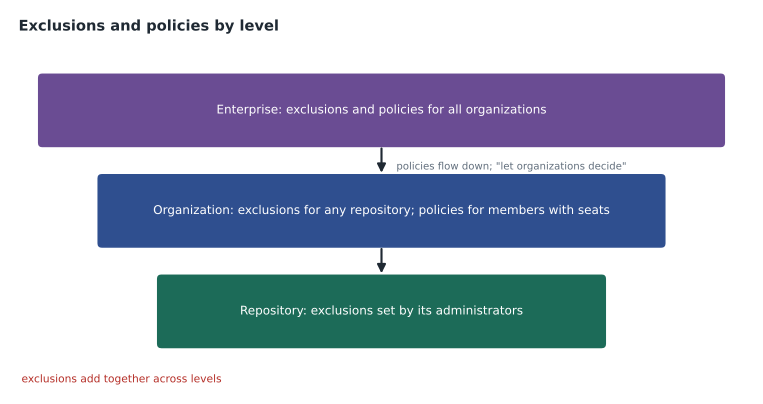
Exclusions can be set at three levels, and they add together. A repository administrator can exclude paths in their own repository, which applies to everyone with a Copilot seat from the same organization working in it. An organization owner can exclude paths in any repository, including repositories outside the organization, for the people who get Copilot from that organization. An enterprise owner can set exclusions that apply across the enterprise. Exclusions apply to people whose Copilot seat comes from the organization or enterprise that set them; someone with a seat from another organization working on the same files is governed by their own organization's exclusions.
Writing exclusion paths
Exclusions are written in the Copilot settings as a short YAML list of paths. In a repository's settings, each entry is a path or pattern relative to the repository root. In an organization's settings, entries are grouped under a repository reference, such as a repository name, its Git URL, or an asterisk meaning every repository. Patterns use familiar wildcards: an asterisk matches any characters within a name, and a pattern can match file types anywhere in the tree. Matching is not case sensitive.
# Repository settings for trailcheck-admin: exclude everything
- "/**"

# Repository settings for trailcheck
- "/config/secrets/**"
- "*.pem"
- "/data/volunteers.csv"# Organization settings for tidewater-guides
"*":
- "**/.env"
- "**/*.pem"
trail-notes:
- "/drafts/partner/**"
https://github.com/partner-press/shared-style.git:
- "/contracts/**"Worked problem
Does the exclusion apply?
The organization excludes "**/.env" for every repository. Malik, who gets Copilot through Tidewater, opens open-trail-report/.env. Lena, an intern whose seat comes from Tidewater, opens trailcheck/config/secrets/db.json. Hélène, an editor at the partner publisher with Copilot from her own employer, opens trailcheck/config/secrets/db.json in a clone. Which files are excluded for whom?
Show solution
- Malik: .env matches the organization rule for every repository, and his seat is from Tidewater, so it is excluded.
- Lena: the trailcheck repository rule covers /config/secrets/, and her seat is from Tidewater, so it is excluded.
- Hélène: her seat comes from her own employer, so Tidewater's exclusions do not apply to her; her employer's rules do.
Answer: Excluded for Malik and Lena; not governed by Tidewater for Hélène. The real protection against Hélène's case is keeping secrets out of the repository entirely.
Limits of content exclusion
The exam expects you to know what exclusion does not do. It is not access control: excluded files are still readable by anyone with repository access, and exclusion only changes what Copilot uses. It may not apply in every feature, and at the time of writing GitHub listed edit and agent modes in editors as not supported, so an agent could still read an excluded file. Copilot may still receive indirect information about an excluded file from the editor, such as type information or definitions shown in other files. Exclusions do not apply through symbolic links or to repositories on remote file systems. Changes can take some time, up to about half an hour, to reach editors that are already open, and reloading the editor picks them up sooner. On GitHub.com and GitHub Mobile, exclusion was in preview.
| Exclusion is | Exclusion is not |
|---|---|
| A way to stop Copilot using a file as context | A way to stop people reading the file |
| Set centrally by administrators | A replacement for keeping secrets out of repositories |
| Applied to people with seats from the setting organization or enterprise | Applied to everyone who opens the file |
| Effective for completions, chat and code review | Guaranteed for every agent feature |
Policies: what members may use
Policies are settings that decide which Copilot capabilities are available to people with business seats. They are set in the organization's Copilot settings and, for enterprises, in the enterprise's AI controls. Three groups matter most. Feature policies turn features on or off: Copilot in the editor, chat on GitHub.com, Copilot CLI, the coding agent, code review for members without seats, MCP servers in Copilot, and preview features. Model policies decide which models members may choose. Privacy policies include the setting for suggestions matching public code, allowed or blocked.
| Policy area | Examples | Tidewater's choice |
|---|---|---|
| Features | Editor, GitHub.com chat, CLI, coding agent, code review, MCP, previews | All on except preview features, reviewed monthly |
| Models | Which providers and models can be selected | Automatic selection plus two approved models |
| Privacy | Suggestions matching public code | Blocked |
| Content exclusion | Paths Copilot ignores | Rules from this lesson |
How enterprise and organization policies combine
In an enterprise, enterprise owners set a policy first. For most policies they can enable it, disable it, or choose "let organizations decide", which passes the choice to each organization's owners. For the coding agent, the enterprise chooses which organizations may use it. When a person gets Copilot from more than one organization in the same enterprise, GitHub usually applies the least restrictive setting among them, with some exceptions; when they hold licences from more than one enterprise, the most restrictive usually applies. These rules are easy to confuse, so it is worth knowing that GitHub documents them, and that administrators should review who has which seat.
Worked problem
Which policy wins?
An enterprise sets code review for members without seats to "let organizations decide". Organization A enables it; organization B disables it. Sunita has a seat from A and is also a member of B, in the same enterprise. Can she use the feature?
Show solution
- The enterprise passed the decision to organizations.
- Sunita belongs to two organizations in one enterprise.
- Within one enterprise the least restrictive setting usually applies.
Answer: Usually yes, because A enables it. Exceptions exist, so an administrator checking a real case should confirm with the current policy documentation.
Auditing changes
Business plans record Copilot events in the audit log: seats assigned and removed, policy changes, content exclusion edits and similar administrative actions. Organization owners can search the audit log for Copilot events, export them, or stream them to a security tool in larger setups. The audit log answers "who changed what, when"; it does not record the content of prompts or suggestions. Rosa set a monthly reminder to review Copilot events alongside the access review from MSBA-161.
Rosa made one more change before the pilot widened: she wrote the exclusion rules and policy choices into the admin repository's decision record, so that if she left the company the next administrator in Moncton could see what had been set and why.
Testing that an exclusion works
An exclusion that is mistyped protects nothing, so Rosa tested each rule after setting it. In an editor signed in with a Tidewater seat, she opened a file that should be excluded and checked that the Copilot status icon showed it as unavailable and that no inline suggestions appeared. She then opened chat, attached the file and asked a question about it; Copilot replied that it could not use the file's content. Finally she opened a file that should not be excluded, to confirm the rule was not too broad. If a change does not seem to apply, reloading the editor fetches the latest rules sooner.
Worked problem
Checking a pattern
Rosa wants to exclude every file ending in .pem anywhere in every repository, and the folder config/secrets in trailcheck only. She writes "*.pem" under "*" in the organization settings and "/config/secrets/**" in the trailcheck repository settings. Do the rules do what she wants?
Show solution
- "*.pem" under the all-repositories key matches .pem files at any depth, because a name pattern without a leading slash matches anywhere in the tree.
- "/config/secrets/**" in trailcheck's settings is relative to the repository root and matches everything below that folder.
- She tests one file of each kind and one file that should not match.
Answer: Yes, both rules match their intended files. Testing one matching and one non-matching file confirms it.
Policies for the coding agent and MCP
Two newer policies deserve attention because they control what agents can do. The coding agent policy decides whether members may assign work to Copilot in the cloud at all, and in which repositories; repository administrators can also turn it off for a specific repository. The MCP policy decides whether Copilot may use MCP servers, which extend agents with outside tools and data. Because an MCP server can read and send information, organizations often allow only approved servers. Tidewater allowed the coding agent in trailcheck and open-trail-report, turned it off in trail-notes, and allowed only the GitHub MCP server until the team had reviewed others.
| Policy | Question it answers | Tidewater |
|---|---|---|
| Coding agent | May members assign tasks to Copilot in the cloud, and where? | Yes, in trailcheck and open-trail-report only |
| MCP servers | May Copilot use MCP servers, and which? | Only the GitHub MCP server for now |
| Preview features | May members try features not yet generally available? | No, reviewed quarterly |
| Code review for members without seats | May people without a seat get Copilot reviews? | No, everyone who needs it has a seat |
A policy review routine
Policies drift as features are added. GitHub adds new settings with defaults that may not match a company's choices, so Rosa added a quarterly step to her calendar: open the Copilot policies page, compare every setting with the decision record, look up any new settings in the changelog, decide, and record the decision. The review took twenty minutes and caught one new preview feature that had arrived switched off, which was the setting Tidewater wanted, but which she recorded anyway.
Exclusions and policies work best together with good repository habits. The strongest protection for a secret is never to commit it; the next is push protection from MSBA-161; content exclusion is a third layer that stops Copilot using sensitive files that must live in a repository, such as partner drafts or data with personal details. Rosa described the layers to the owners in that order, so nobody thought exclusion alone made a repository safe. She also noted that exclusions protect only the people Tidewater pays for: a contractor using Copilot from another company would follow that company's rules, which is one more reason to keep sensitive material out of shared repositories altogether.
For the exam, remember three facts together: content exclusion needs Copilot Business or Enterprise; repository administrators, organization owners and enterprise owners can set it; and it controls what Copilot uses, not who can read the code.
Common mistakes
MistakeUsing content exclusion as access control.
InsteadExclusion stops Copilot using a file; repository permissions control who can read it.
MistakeAssuming exclusion covers every agent feature.
InsteadCheck the current support table; some editor modes are not covered.
MistakeAssuming an organization's exclusions apply to everyone who opens its files.
InsteadThey apply to people whose Copilot seat comes from that organization or its enterprise.
MistakeChanging policies without recording why.
InsteadRecord decisions and review Copilot events in the audit log.
Summary and key terms
- Content exclusion stops Copilot using specified files for suggestions, chat and code review; it is available on business plans.
- Repository administrators, organization owners and enterprise owners can set exclusions; they add together.
- Exclusions are YAML lists of paths and patterns; organization rules are grouped by repository reference.
- Exclusion is not access control, may not cover every agent mode, and does not follow symbolic links.
- Policies control features, models and privacy settings such as suggestions matching public code.
- Enterprise policies can pass decisions to organizations; Copilot events appear in the audit log.
- Content exclusion
- A setting that stops Copilot using specified files and paths as context.
- Feature policy
- A setting that enables or disables a Copilot feature for members with seats.
- Model policy
- A setting that controls which models members may use.
- Let organizations decide
- An enterprise policy choice that passes the decision to each organization.
- Audit log
- A record of administrative events such as seat and policy changes.
Practice problems
Work each problem on paper first, then reveal the answer to check.
Who can set content exclusions for a repository?
Show answer
Its repository administrators, organization owners and enterprise owners.
Does content exclusion stop a person reading an excluded file?
Show answer
No; it only stops Copilot using the file.
What does "let organizations decide" do?
Show answer
Passes an enterprise policy choice to each organization's owners.
Lesson quiz · 5 questions
Score 60% or more to complete this lesson.
Create a free account to save your progress, take quizzes and earn a certificate.