
MSBA-303 · Lesson 1 of 12 · 21 min
What GitHub Copilot is
▶ Video coming soon A video version of this lesson is on the way.
In May 2027, a month after Owen passed GH-900, Tidewater Trail Guides started a new lunchtime series in the Moncton boardroom. This time the main learner was Dmitri Kovac, the second web developer, who planned to sit Exam GH-300: GitHub Copilot in late August 2027. Priya Nair led the technical sessions again and Rosa Delgado led the administrative ones, because the series had a practical goal as well as an exam: the company had to decide whether to buy Copilot for its web team, and on what terms. "Half the developers I know use it every day," Dmitri said at the first Wednesday session on May 5. "The other half have banned it at work. I want to understand why both groups might be right."
This course, MSBA-303, explains what GitHub Copilot is, which plans exist, what each major feature does, how Copilot builds its answers, what happens to the data it handles, and how an organization controls and measures it. The next course, MSBA-304, is about getting good results from Copilot through prompting and team practice, and MSBA-309 reviews everything for the exam. The first lesson sets out the basic picture: what kind of tool Copilot is, where it appears, and what it can and cannot be trusted to do.
A coding assistant built on large language models
GitHub Copilot is an AI coding assistant. It uses large language models, often shortened to LLMs, which are statistical models trained on very large amounts of text and code. Given some input, called a prompt, an LLM predicts a likely continuation one small piece at a time. Those pieces are called tokens; a token is roughly a short word or part of a word, and a line of code is usually ten to twenty tokens. Because the models have seen a great deal of code, their continuations often look like what a competent programmer would write next. That is the whole trick, and it explains both Copilot's strengths and its weaknesses.
The strengths are speed and breadth. Copilot can draft a function from a comment, fill in repetitive code, explain an unfamiliar file, propose a test, translate code between languages or summarize a pull request in seconds. The weaknesses follow from the same mechanism: the model produces what is likely, not what is checked. It can write code that looks right and is wrong, call a function that does not exist, use an outdated library version, or repeat an insecure pattern it saw often. Copilot is therefore a pair programmer that drafts and suggests, while the person using it stays responsible for every line that is kept. GitHub's own documentation makes the same point repeatedly, and the GH-300 exam's first domain is about exactly this responsibility.
Worked problem
Counting tokens roughly
Dmitri's editor sends Copilot about 300 lines of surrounding code with each completion request. If a line averages 12 tokens, about how many tokens of context is that, and how does it compare with a context limit of 8,000 tokens?
Show solution
- Tokens of context: 300 lines x 12 tokens = 3,600 tokens.
- Compare with the limit: 3,600 is less than half of 8,000.
- The rest of the window is available for instructions, the cursor position and the reply.
Answer: About 3,600 tokens, comfortably inside an 8,000-token window. Real figures vary by model and editor; the point is that context is limited and Copilot cannot see a whole large repository at once.
Where Copilot appears
Copilot is not one window. It is a family of features that appear in several places, all tied to a person's GitHub account and the plan that gives them access. The GH-300 study guide expects candidates to recognize each surface and know what it is for.
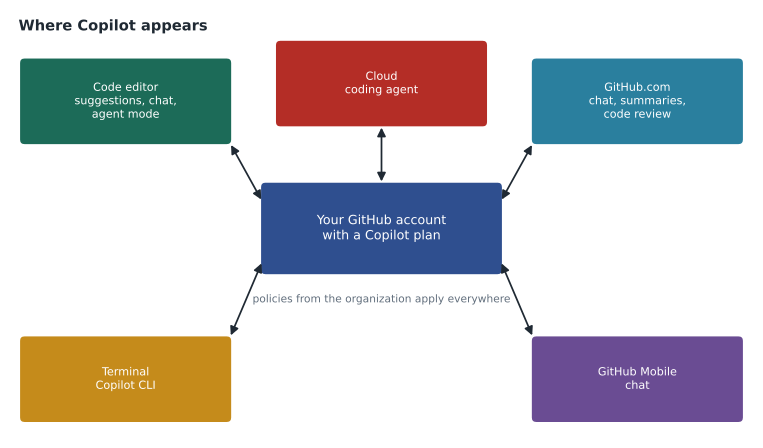
| Surface | What Copilot does there | Covered in |
|---|---|---|
| Code editor (VS Code, Visual Studio, JetBrains, Xcode, Eclipse and others) | Inline suggestions as you type, chat, edits across files, agent mode | Lessons 3, 4 and 5 |
| GitHub.com | Chat about repositories, issues and pull requests; pull request summaries; code review | Lessons 4 and 6 |
| Terminal | Copilot CLI: a command-line assistant that answers questions, writes scripts and works on files | Lesson 4 |
| GitHub Mobile | Chat on a phone or tablet | Lesson 4 |
| The cloud | The coding agent works on a task by itself and proposes changes in a pull request | Lesson 5 |
In the editor, Copilot is installed as an extension or is built in, and the person signs in with their GitHub account. Editors differ in which features they support and how quickly new features arrive; Visual Studio Code usually gets new features first. On GitHub.com, Copilot appears as a chat panel and as buttons on pull requests and issues. In the terminal, Copilot CLI is a separate program installed on the computer. Every surface checks the same thing first: does this account have a Copilot plan, and do the policies of the organization that provides it allow this feature?
Suggestions, chat and agents: three ways of working
It helps to group Copilot's features by how much they do on their own. Suggestions are the lightest touch: as you type, Copilot offers grey "ghost text" that you accept with a key or ignore. A related feature, next edit suggestions, predicts the next change you are likely to make elsewhere in the file. Chat is a conversation: you ask a question or request a change, and Copilot answers in words and code that you choose to apply. Agents take a goal and work toward it in several steps, reading files, making edits, running commands or tests and checking the results, with the person reviewing along the way or at the end.
| Way of working | Who drives | Typical use | Main risk |
|---|---|---|---|
| Inline suggestions | You, line by line | Finishing a line, filling a pattern, writing a function from a comment | Accepting code without reading it |
| Chat | You, one request at a time | Explaining code, proposing a fix, answering questions | Trusting a confident but wrong explanation |
| Agent mode in the editor | Copilot, with your approval of steps | A change across several files with tests run along the way | Large changes that are hard to review |
| Coding agent in the cloud | Copilot, from an assigned task | A well-defined issue completed as a pull request | Treating its pull request as reviewed because tests pass |
Priya drew the table on the whiteboard and added one line underneath: autonomy goes up as you move down the table, and so does the size of what you must review. That simple rule shaped Tidewater's eventual policy. Inline suggestions and chat were allowed for everyone with a seat; agent features were allowed but every result went through the same pull request review as human work.
What Copilot is good at, and what it is not
Dmitri wanted a straight answer about where the tool helps. Priya gave him a list from her own year with Copilot on a personal plan. It saved her the most time on boilerplate such as configuration files, data classes and repetitive tests; on unfamiliar syntax, for example a regular expression or a shell command she used twice a year; on explanations of code someone else wrote; and on first drafts of documentation and commit messages. It helped least, and sometimes hurt, on subtle logic where a small error changes the result, on security-sensitive code such as authentication, on anything that depended on facts it could not see, such as Tidewater's own naming rules, and on code that used a library released after the model was trained.
| Copilot tends to help with | Copilot needs close checking with |
|---|---|
| Repetitive code and patterns already present in the file | Business rules the model cannot know |
| Syntax you rarely use (regular expressions, shell, SQL) | Security, authentication and input handling |
| Explaining unfamiliar code | Recent library versions and APIs |
| Drafting tests, comments and documentation | Calculations where a small error matters |
| Translating between languages | Anything presented as a fact or a citation |
A first look at a suggestion
To make the idea concrete, Priya opened a small helper from the TrailCheck website in her editor. The site shows how many days ago each trail report was filed. She typed a comment describing what she wanted and the start of a function, and Copilot offered the rest as ghost text. She accepted it, then read it line by line before keeping it.
from datetime import date

def days_since(report_date: date, today: date) -> int:
    """Return how many whole days have passed since a trail report was filed."""
    return (today - report_date).days

print(days_since(date(2027, 4, 28), date(2027, 5, 5)))7
What this code does
The example takes two calendar dates: the day a trail report was filed and today. It subtracts the earlier date from the later one, which gives a span of time, and reports how many whole days that span covers. The printed 7 means a report filed on April 28 is seven days old on May 5, which is easy to confirm with a calendar.
The suggestion was correct, short and easy to check, which is the ideal case. Priya pointed out what made it easy: the function did one thing, its name and type hints said what it should do, and the result could be checked by hand in a few seconds. "The more a suggestion looks like this," she said, "the more you can lean on Copilot. The more it looks like a page of clever code you cannot check, the less."
Why responsible use is part of the exam
GH-300 begins with responsible AI for good reason. Copilot's output can include errors, insecure code, biased or offensive text in comments and names, code that closely matches public code under a licence, and confident explanations that are wrong. Organizations also worry about where their code goes when it is sent to a model, whether it is stored, and whether it trains future models. The rest of this course takes each worry in turn: lesson 8 covers data handling, lesson 9 content exclusions and policies, lesson 10 responsible AI and its limits, and lesson 11 managing Copilot in an organization. Lesson 12 brings them together in Tidewater's rollout.
Grace Achterberg, the managing editor, raised a question at the end of the session that the team would return to: if Copilot helps write guidebook text in trail-notes, who owns that text, and does it change anything under Canadian copyright law? Priya did not know the legal answer and said so. The team agreed to keep Copilot to code and technical documentation until lesson 10, and to ask the company's lawyer before using it for published guidebook prose.
The GH-300 exam in brief
Dmitri's goal is the GitHub Copilot certification, earned by passing Exam GH-300. Like GH-900 it is delivered through Microsoft's credentials program with Pearson VUE, scored on a scale where 700 is the passing mark. Microsoft's study guide, with skills measured as of August 7, 2026, groups the content into domains covering responsible use, Copilot features, data and architecture, prompt engineering and context, developer productivity, and privacy, content exclusions and safeguards. The features domain carries the most weight. The study guide also notes that most questions cover features that are generally available, although widely used preview features may appear, which matters for a product that changes as quickly as Copilot. MSBA-309 covers the exam format in detail.
Worked problem
Planning study time by weight
Dmitri has 60 study hours before the exam. If he gives each domain a share of time in proportion to the middle of its weight range, and the features domain is listed at 25 to 30 parts in 100, about how many hours does features get?
Show solution
- Middle of the range: (25 + 30) / 2 = 27.5 parts in 100.
- Hours: 60 x 27.5 / 100 = 16.5 hours.
- He rounds to 16 or 17 hours and adjusts later after a practice test.
Answer: About 16.5 hours for the features domain. Weights tell you where to start, not where to stop; weak areas deserve extra time.
Keeping up with a fast-moving product
Copilot changes monthly. Between Priya's first year with it and this series, GitHub had added agent mode, the coding agent, code review, a new command-line tool, more model choices and a new way of billing heavier features. Some names had changed too. For that reason the team adopted three habits for the series: check the official GitHub Docs page for any feature before relying on a detail, check the GitHub changelog for recent announcements, and treat anything marked preview as liable to change. This course follows the same habit and says so when a detail is likely to move.
Common mistakes
MistakeThinking of Copilot as a search engine that looks up correct code.
InsteadIt predicts likely code from patterns; every suggestion must be read and checked.
MistakeAssuming every editor has every Copilot feature.
InsteadFeature support differs by editor and version; check the documentation.
MistakeTreating agent output as finished because it ran tests.
InsteadAgent work gets the same review as a colleague's pull request, or more.
MistakeRelying on details remembered from last year.
InsteadCheck current docs and the changelog; Copilot changes often.
Summary and key terms
- GitHub Copilot is an AI coding assistant built on large language models that predict likely continuations of a prompt.
- It appears in the code editor, on GitHub.com, in the terminal through Copilot CLI, on GitHub Mobile and in the cloud through the coding agent.
- Features range from inline suggestions to chat to agents; the more autonomy, the more review is needed.
- Copilot is strongest on patterns, syntax, explanations and drafts, and weakest on business rules, security and facts it cannot see.
- Responsible use, data handling and organizational control are central to the GH-300 exam and to any rollout.
- Large language model (LLM)
- A model trained on large amounts of text and code that predicts likely continuations of a prompt.
- Prompt
- The input sent to the model, including your request and the context Copilot gathers.
- Token
- A small unit of text, roughly a short word or part of a word, that models read and produce.
- Inline suggestion
- Grey ghost text that Copilot offers as you type, accepted with a key.
- Agent
- A Copilot mode that works toward a goal in several steps, editing files and running commands.
- Pair programmer
- A collaborator who suggests and drafts while you stay responsible for the result.
Practice problems
Work each problem on paper first, then reveal the answer to check.
Name four places where Copilot features appear.
Show answer
Any four of: the code editor, GitHub.com, the terminal (Copilot CLI), GitHub Mobile and the cloud (coding agent).
Why can Copilot produce code that looks right but is wrong?
Show answer
Because it predicts likely code from patterns rather than checking that the code is correct.
Which needs more review: an inline suggestion or a coding agent pull request?
Show answer
The coding agent pull request, because it is larger and produced with more autonomy.
Lesson quiz · 5 questions
Score 60% or more to complete this lesson.
Create a free account to save your progress, take quizzes and earn a certificate.