
MSBA-290 · Lesson 9 of 12 · 25 min
Audit logs and streaming
▶ Video coming soon A video version of this lesson is on the way.
Freya brought a real question to the ninth session. During the previous quarter's audit, the external auditors had asked Skerry to show every change to branch protection on payment repositories over twelve months, and who made it. It had taken two people three days to piece together an incomplete answer from four organizations' audit logs, some of which no longer held events that old. "In the new enterprise," she said, "that question should take five minutes. This session is about making sure it does."
What the audit log records
The audit log is GitHub's record of actions that change things in an enterprise or organization. Each event has an action name such as repo.create, org.add_member or team.add_member, an actor (the user, app or token that did it), a timestamp, the organization and repository involved, and details specific to the event. Events are grouped by prefix: org events for organizations, repo events for repositories, team events for teams, and business events for the enterprise account itself, a name left over from GitHub's early term for enterprises.
There is an audit log for each organization, which organization owners can read, and one for the enterprise, which combines events from every organization with enterprise-level events and which enterprise owners can read. With Enterprise Managed Users, the enterprise log also records each managed user's own activity, such as creating repositories, because all of it happens inside the enterprise. The enterprise log is where Skerry's auditors' question belonged.
| Category | Example events | Typical question it answers |
|---|---|---|
| Membership | org.add_member, org.remove_member, team.add_member | Who gave this person access, and when? |
| Repositories | repo.create, repo.destroy, repo.access | Who made this repository public or deleted it? |
| Protection and rules | Branch protection and ruleset changes | Who weakened the rules on the payment repositories? |
| Enterprise settings | business events for policies and owners | Who changed the Actions policy? |
| Identity | SSO and SCIM provisioning events | When was this leaver suspended? |
| Git activity | Clone, fetch and push events | Who cloned this repository last week? |
Searching the log
The audit log page has a search box with qualifiers that narrow results. The most useful are action, actor, org, repo and created, which takes a date or range, plus operation, which filters by the kind of change such as create, modify or remove. Qualifiers can be combined, and wildcards match families of actions.
# Every ruleset or branch protection change in the stores organization in 2026
org:skerry-stores action:protected_branch.* created:2026-01-01..2026-11-23

# Everything one person did in the last week of October
actor:j-okafor-lee_skr created:2026-10-25..2026-10-31

# Repositories deleted anywhere in the enterprise
action:repo.destroy

# Members removed from any organization
operation:remove action:org.*
The web interface is fine for a quick question. For anything larger, owners export results as JSON or CSV from the audit log page, or query the REST API, which returns the same events and accepts the same search phrase. The API is how scheduled reports work: a nightly job can pull yesterday's membership and ruleset changes for the payment organization and post a summary to the security channel.
# Query the enterprise audit log with the REST API (GitHub CLI)
gh api --paginate \
  "/enterprises/skerry/audit-log?phrase=action:repo.destroy+created:>=2026-11-01&per_page=100" \
  --jq '.[] | {when: .["@timestamp"], actor, repo}'
How long events are kept
GitHub keeps audit log events for a limited time: most events for 180 days, and Git events for seven days. That is far too short for an auditor who asks about twelve months, and Git events are not shown in the web interface at all; they can be exported or streamed. Long-term retention is therefore the customer's job. The answer to Freya's question was not a better search; it was streaming.
Streaming the audit log
Audit log streaming sends enterprise audit events, including Git events, continuously to a storage or security system the company controls. As of November 2026 GitHub supports streaming to Amazon S3, Azure Blob Storage, Azure Event Hubs, Datadog, Google Cloud Storage and Splunk, and to Microsoft Purview for Copilot agent session events only. Enterprises can now stream to multiple endpoints at once, a capability GitHub describes as in public preview. Once the events are in Skerry's security information and event management system, they can be kept for as long as policy requires, correlated with Entra ID sign-in logs, and alerted on.
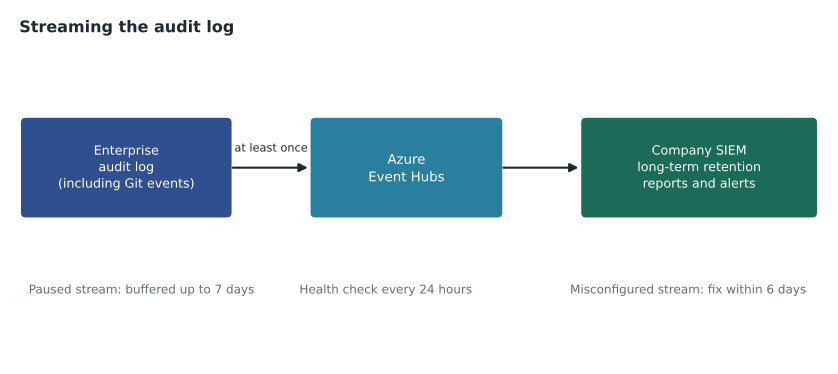
Streaming has operational rules worth knowing. Delivery is at least once, so a downstream system should expect occasional duplicate events and remove them by event identifier. An owner can pause a stream, for example during maintenance of the receiving system; GitHub buffers events for up to seven days, so there is no data loss for the first week. If a stream is paused for longer than that, it resumes from a point one week before the current time, and after three weeks or more it keeps nothing and starts again from the present. Datadog rejects logs older than 18 hours, so pausing a Datadog stream for longer than that risks losing events. GitHub checks each stream's health every 24 hours and emails enterprise owners if it is misconfigured; a misconfigured stream must be fixed within six days to avoid dropped events.
Worked problem
Planning maintenance
Skerry's SIEM team will move its Event Hubs namespace over a long weekend, with the stream paused from Friday evening to Tuesday morning, about four and a half days. Will any events be lost, and what should the team check afterwards?
Show solution
- A pause of up to seven days is buffered, so no events should be lost.
- When the stream resumes, GitHub delivers the buffered events.
- Delivery is at least once, so some events may arrive twice.
- Afterwards the team should confirm the stream is healthy and that de-duplication handled the replay.
Answer: No loss is expected; check stream health and de-duplication after resuming.
Extra detail in the stream
Two settings add detail that is off by default. API request events record calls to the REST API, which helps investigate a stolen token; owners must turn them on in the audit log settings, and GitHub limits them to security-relevant endpoints. Source IP disclosure adds the IP address of the actor to events in the enterprise log, which investigators often need; because IP addresses are personal data in many jurisdictions, Freya cleared the change with Skerry's privacy office first. Audit events also identify the token used when an action was performed with a personal access token or app token, so an investigator can find every action taken with a credential that leaked.
Implementing reporting
The GH-100 study guide asks administrators to implement audit logging and reporting, and to analyse audit logs and API usage. In practice that means deciding in advance which questions must be answerable and building the reports before an incident. Skerry's security team wrote six standing reports in its SIEM.
| Report | Source events | Who reads it |
|---|---|---|
| New enterprise or organization owners | Role changes at both levels | Security, within an hour |
| Rules weakened on restricted repositories | Ruleset and branch protection changes on repositories with the restricted property | Security and the owning team, daily |
| Repositories made public or deleted | Visibility changes and deletions | Security, within an hour |
| Bulk cloning | Git clone events above a threshold per user per day | Security, daily |
| Provisioning failures | SCIM events with errors | Identity team, daily |
| Policy changes | Enterprise policy events | Platform team, weekly |
Worked problem
Answering the auditor
With streaming in place since the enterprise was created, the auditors repeat their question: every change to branch protection or rulesets on payment repositories over twelve months, and who made it. How does Freya answer?
Show solution
- Payment repositories carry the custom property data-classification set to restricted.
- In the SIEM, filter streamed events for ruleset and branch protection actions on repositories with that property.
- Limit to the last twelve months, which the SIEM retains.
- Export the actor, time, repository and change details.
Answer: A single SIEM query over streamed events, filtered by action and repository property, produces the list in minutes.
Privacy and access to the log
An audit log is also a record of what people did, and some of it is sensitive: who cloned what, from where, at what time. Access to the enterprise audit log should therefore be limited to the people whose job requires it, and the streamed copy should follow the company's retention and privacy rules like any other personal data. Skerry documented who could query GitHub events in the SIEM, kept the raw events for 13 months to cover a full audit year, and kept summary reports for seven years.
A worked investigation
Freya walked the group through the investigation she most hoped never to run for real: a personal access token belonging to a developer was found in a public paste site. The audit log turned a frightening hour into a structured one.
Worked problem
Investigating a leaked token
A token belonging to a Skerry developer appears in a public paste at 14:05. What should the team do, and how does the audit log help?
Show solution
- Revoke the token immediately; containment comes before investigation.
- Find the token's identifier in the audit log and search for every event performed with it, in GitHub and in the streamed copy in the SIEM.
- Check Git events for clones or pushes made with the token and API request events for calls to security-relevant endpoints.
- Review any repositories, settings or secrets touched, rotate secrets that may have been exposed, and record the timeline for the incident report.
Answer: Revoke first, then use token-based audit searches, Git events and API events to scope what the token did, and rotate anything it reached.
Reading events from the API at scale
Large enterprises produce a lot of events, and the audit log API returns them in pages. Scripts should follow the pagination links rather than assume a single response holds everything, should filter with a search phrase to keep result sets small, and should respect API rate limits, backing off when the remaining allowance runs low. For anything continuous, streaming is the better tool; the API is best for targeted questions and for scheduled reports that cover a short period such as the previous day.
| Need | Best tool |
|---|---|
| A quick question about the last few weeks | Audit log search in the web interface |
| A one-off export for an auditor | Export from the audit log page, or the REST API |
| A nightly report of yesterday's changes | The REST API with a date-limited search phrase |
| Retention beyond GitHub's limits, alerting and correlation | Audit log streaming into a SIEM or storage |
| Git clone and push history | Export or streaming, since Git events are not in the web interface |
Audit events in managed users enterprises
Managed users change what the enterprise audit log can see. Because a managed user's activity all happens inside the enterprise, the enterprise log records user-level events that would otherwise be private to a personal account, such as creating repositories in the user's own namespace or changing personal settings that affect security. Provisioning events from SCIM also appear, so the log shows when each account was created, changed and suspended, and by which IdP request. For Skerry this closed a gap the auditors had raised for years: there was now one place showing both what people did and when their access began and ended.
Using audit data for adoption and hygiene
Audit events are not only for incidents. The monitoring domain of the GH-100 study guide asks administrators to analyse audit logs and API usage to understand how the platform is used. Skerry's monthly hygiene report, built from streamed events, counted repositories created without the required custom properties, teams with no recent activity, personal access tokens used by automation that should have been GitHub Apps, and ruleset bypasses by team. None of these was an incident, but each pointed to a habit worth changing, and the trend lines showed whether the platform team's guidance was working.
Worked problem
Finding tokens that should be apps
The hygiene report shows that one account performs about 40,000 API calls a day, all with the same personal access token, at regular intervals around the clock. What does this suggest, and what should happen?
Show solution
- Regular, round-the-clock calls with one token suggest an automated integration rather than a person.
- Automation on a personal token depends on one person's account and counts against that user's rate limit.
- The integration should move to a GitHub App with only the permissions it needs.
- Once moved, the token is revoked and the audit events stop.
Answer: An integration running on a person's token; move it to a GitHub App and revoke the token.
Common mistakes
MistakeRelying on the web audit log for year-long investigations.
InsteadStream events to a system you control; GitHub keeps them for a limited time.
MistakeExpecting to find Git clone events in the web interface.
InsteadGit events are available through export and streaming.
MistakeTreating every streamed event as unique.
InsteadDelivery is at least once; de-duplicate by event identifier.
MistakeTurning on source IP disclosure without checking privacy rules.
InsteadClear it with the privacy office and restrict who can see it.
Summary and key terms
- The audit log records actions with an action name, actor, time and details; enterprise logs combine all organizations.
- Search with qualifiers such as action, actor, org, repo, created and operation, or use exports and the REST API.
- GitHub keeps most events for 180 days and Git events for seven days, so long-term retention needs streaming.
- Streams can go to S3, Azure Blob Storage, Event Hubs, Datadog, Google Cloud Storage and Splunk, and Purview for Copilot agent events.
- Delivery is at least once; pauses buffer up to seven days; health checks run daily and problems must be fixed within six days.
- Build standing reports before you need them, and protect the log as personal data.
- Audit log
- GitHub's record of changes made in an organization or enterprise.
- Action
- The name of an audit event, such as repo.create.
- Actor
- The user, app or token that performed an audited action.
- Qualifier
- A search term, such as actor: or created:, that narrows audit log results.
- Audit log streaming
- Continuous delivery of audit events to an external storage or security system.
- At-least-once delivery
- A guarantee that every event is delivered, possibly more than once.
- SIEM
- Security information and event management, a system that collects and analyses security events.
Practice problems
Work each problem on paper first, then reveal the answer to check.
Where can Git events be seen?
Show answer
In exports and streams, not in the web audit log.
How long does GitHub buffer a paused stream without loss?
Show answer
Up to seven days.
Which qualifier limits audit log results to a date range?
Show answer
created:, for example created:2026-01-01..2026-11-23.
Lesson quiz · 5 questions
Score 60% or more to complete this lesson.
Create a free account to save your progress, take quizzes and earn a certificate.