
MSBA-290 · Lesson 3 of 12 · 19 min
Authentication: SAML and OIDC
▶ Video coming soon A video version of this lesson is on the way.
Amadou ran the third session. He had spent eight years connecting applications to Skerry's identity provider, Microsoft Entra ID, and he started with a story every identity engineer knows. In 2025 a developer had left Skerry on a Friday. Her Entra ID account was disabled within the hour, but on Monday she was still a member of four GitHub organizations, because those organizations knew her only by her personal GitHub account. Nobody had connected GitHub to the identity provider at all. "Authentication," Amadou said, "is how we make sure the person signing in is who they claim to be, and that our identity provider has the last word."
Authentication and authorization
Two words get mixed up constantly. Authentication answers "who are you?": a password, a passkey, a hardware key or a sign-in through the company's identity provider proves identity. Authorization answers "what may you do?": organization membership, team access, repository roles and enterprise roles decide what an authenticated person can reach. Single sign-on is an authentication tool. It does not, by itself, decide what anyone can see in GitHub; lessons 6 and 7 deal with that. The GH-100 study guide asks candidates to explain GitHub's authentication and authorization model, and most wrong answers on the topic come from blurring the two.
Single sign-on with SAML
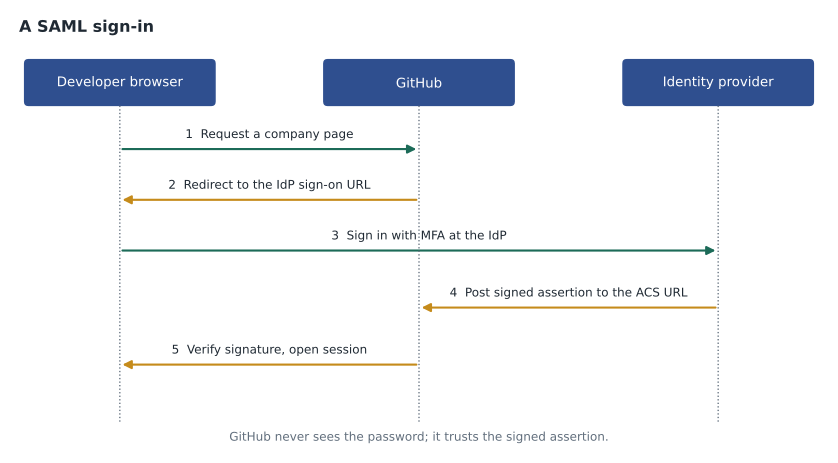
SAML 2.0 (Security Assertion Markup Language) is the long-established standard for web single sign-on. Two parties are involved: the identity provider (IdP), such as Entra ID, Okta or PingFederate, which knows the company's users and authenticates them, and the service provider, in this case GitHub, which trusts the IdP's signed statement, called an assertion, that a particular user has signed in. Configuring SAML means exchanging a few pieces of information so that each side recognizes the other.
| Setting | Comes from | What it is |
|---|---|---|
| Sign-on URL | Identity provider | Where GitHub sends users to authenticate |
| Issuer | Identity provider | The IdP's identifier, checked in each assertion |
| Public signing certificate | Identity provider | Used by GitHub to verify assertions were signed by the IdP |
| Entity ID (audience) | GitHub | GitHub's identifier for the enterprise, such as https://github.com/enterprises/skerry |
| Assertion consumer service URL | GitHub | Where the IdP posts assertions, such as https://github.com/enterprises/skerry/saml/consume |
| NameID and attributes | Identity provider | The user's identifier and details, such as name and email |
SAML with personal accounts
In an enterprise with personal accounts, SAML adds a second sign-in on top of GitHub's own. A developer signs in to GitHub.com with their personal account, then, when they open a resource that belongs to the enterprise, GitHub sends them to the IdP to authenticate. The first time, GitHub creates a linked identity between the personal account and the IdP identity. From then on, the developer can only reach company resources while they have an active SAML session, which GitHub re-checks with the IdP at regular intervals. If the IdP account is disabled, the next check fails and the developer loses access to company resources, though not to their personal account or anything outside the company.
SAML can be configured for the whole enterprise or, in an enterprise that has not configured it centrally, for individual organizations. Enterprise-level configuration is almost always better: one IdP application, one set of rules, and no organization left out by mistake. Once SAML is enforced at the enterprise level it applies to every organization in the enterprise and replaces any organization-level configurations.
Authorizing credentials
Developers do not only use the web interface. Git operations and scripts use personal access tokens and SSH keys, and these do not pass through the browser. GitHub handles this by requiring that classic personal access tokens and SSH keys be authorized for SSO before they can reach an organization that enforces SAML. The developer authorizes each credential once, while they have an active SAML session, and the credential stops working for the organization if the linked identity is revoked. Organization owners can see each member's linked identity and authorized credentials, and can revoke them, which is part of offboarding a leaver in an enterprise with personal accounts.
Worked problem
A leaver with personal accounts
Skerry's old enterprise uses personal accounts with SAML enforced. A developer leaves and her Entra ID account is disabled. What happens to her web access, and what should an owner still do?
Show solution
- Her next SAML session check fails, so she can no longer open company resources in the browser.
- Her authorized tokens and SSH keys are tied to the linked identity, which the owner should revoke.
- She is still an organization member until removed, and still counts as a licensed user.
- The owner should remove her from the organizations, or let SCIM do it if configured.
Answer: Web access stops at the next check, but the owner should revoke her linked identity and credentials and remove her from the organizations.
Two-factor authentication
GitHub.com requires every account that contributes code to use two-factor authentication, a change GitHub rolled out across 2023 and 2024. In an enterprise with personal accounts, owners can also set an enterprise policy that requires 2FA for all organization members; members, billing managers and outside collaborators who do not have it are removed when the policy is turned on, so owners should warn people first. In a managed users enterprise the question works differently: managed users authenticate only through the IdP, so multifactor authentication is enforced there, with the IdP's own methods and policies, rather than with GitHub's 2FA.
OpenID Connect for managed users
OpenID Connect (OIDC) is a newer standard built on OAuth 2.0. GitHub supports OIDC for single sign-on only in managed users enterprises and only with Entra ID. Its main advantage is support for the IdP's Conditional Access policies. With OIDC, GitHub validates access to the enterprise and its resources against the Entra ID Conditional Access policy, so conditions that the company already applies to other applications, such as requiring sign-in from approved network locations, apply to GitHub too. GitHub supports only some kinds of Conditional Access condition, so the documentation should be checked against the policy before relying on it. When the IdP's policy blocks access, GitHub blocks it as well.
| SAML | OIDC | |
|---|---|---|
| Available with personal accounts | Yes, as an extra sign-in on top of the personal account | No |
| Available with managed users | Yes, with partner IdPs or other SAML 2.0 providers | Yes, with Entra ID only |
| IdP Conditional Access support | No | Yes |
| Typical reason to choose it | IdP is Okta or PingFederate, or personal accounts are used | IdP is Entra ID and Conditional Access must apply |
Skerry used Entra ID and already had Conditional Access policies that limited administrative applications to managed devices and the corporate network. Freya wanted those same limits on GitHub, where the company's most valuable intellectual property lived. OIDC was the clear choice for the new managed users enterprise.
The supported identity providers
GitHub names Entra ID, Okta and PingFederate as partner identity providers for managed users: they offer applications built for GitHub that handle authentication and provisioning together, and GitHub tests them. Other identity systems can be used if they support SAML 2.0 and SCIM 2.0 and follow GitHub's integration guidelines, but GitHub does not test them and may not be able to help with problems. GitHub recommends using a single partner IdP for both authentication and provisioning, and explicitly does not support combining Okta and Entra ID, one for single sign-on and the other for provisioning, in either order.
Testing and recovery
A misconfigured single sign-on setup can lock everyone out, including the owners trying to fix it. Two habits prevent that. First, GitHub lets an owner test a SAML configuration before enforcing it, and the test should be run with a real user from the IdP, not only with an administrator. Second, owners should download and safely store the recovery codes GitHub provides when SSO is configured. If the IdP is unavailable or misconfigured, a recovery code lets an owner bypass SSO to reach the settings. In a managed users enterprise, the setup user described in lesson 5 holds the recovery codes. Freya had the codes printed, sealed and placed in the same safe as the break-glass Entra ID credentials, with a note in the incident runbook.
Single sign-on test checklist (Skerry platform runbook)
1. Configure the GitHub enterprise application in Entra ID
2. Assign one test user and one platform engineer
3. Run the test from the enterprise authentication settings
4. Sign in as the test user from a managed and an unmanaged device
5. Confirm Conditional Access blocks the unmanaged device
6. Download recovery codes and store them in the safe
7. Enable and announce enforcement
Team synchronization
In an enterprise with personal accounts, team synchronization can keep the membership of GitHub teams in step with groups in Entra ID or Okta. When someone is added to the IdP group, they are added to the team, provided their personal account has a linked SAML identity; when removed from the group, they leave the team. Team synchronization changes team membership only. It does not create or remove accounts, and it is not the same as SCIM provisioning, a distinction the exam tests directly and lesson 4 explains in full.
NameID and attributes
An assertion carries the user's identifier, called the NameID, and a set of attributes. For personal-account enterprises, the NameID is what GitHub stores in the linked identity, so it must be stable and unique for each person: an immutable identifier or the user principal name, not a display name that changes when someone marries or corrects a spelling. For managed users, the IdP's GitHub application sends the attributes GitHub expects, and the username comes from the SCIM userName described in lesson 4. A common mistake when building a custom SAML application is to map the NameID to email and then change email domains during a rebranding, which breaks every linked identity at once. Amadou's team documented the attribute mapping in the identity runbook and treated any change to it as a change requiring security review.
Single sign-on outside the browser
Developers spend most of their time in an editor and a terminal, not a browser, so it helps to know how single sign-on reaches them there. The GitHub CLI signs in through a browser-based device flow, which passes through the IdP like any other web sign-in. Git Credential Manager does the same for Git over HTTPS, storing a token that is tied to the developer's account and, in a SAML organization, authorized for SSO. For managed users the flow is simpler still, because the account can only authenticate through the IdP: there is no separate GitHub password to fall back on. When a developer's IdP session or access is revoked, browser sessions end, and tokens and keys stop working for the enterprise's resources according to the rules described above.
| Tool | How it authenticates | Single sign-on effect |
|---|---|---|
| Browser | Web sign-in | Redirected to the IdP when reaching company resources |
| GitHub CLI | Browser-based device flow, then a stored token | The device flow passes through the IdP |
| Git over HTTPS | Token stored by Git Credential Manager | Token must be valid for the account and, with personal accounts, authorized for SSO |
| Git over SSH | SSH key registered on the account | With personal accounts the key must be authorized for SSO |
| Scripts and integrations | Personal access token or GitHub App | Prefer GitHub Apps; tokens follow the account's SSO state |
Who configures what
Single sign-on sits between two teams, and Skerry wrote down who owned each part to avoid gaps. The identity team owned the Entra ID application, its attribute mapping, its assignment of users and groups, and the Conditional Access policies applied to it. The platform team owned the GitHub enterprise settings that pointed at the IdP, the recovery codes, and the test plan. Changes on either side went through a shared change request, because a certificate rotation or a mapping change on the IdP side can break GitHub sign-in just as surely as a change in GitHub itself. SAML signing certificates expire, and an expired certificate is one of the most common causes of a sudden, enterprise-wide sign-in failure, so the identity team put the expiry date in its calendar with a month's warning.
Common mistakes
MistakeTreating single sign-on as access control.
InsteadSSO proves identity; organization membership, teams and roles decide access.
MistakeConfiguring SAML separately in each organization.
InsteadConfigure it once at the enterprise level so no organization is missed.
MistakeExpecting OIDC with Okta.
InsteadGitHub supports OIDC only with Entra ID in managed users enterprises.
MistakeEnforcing SSO without testing or saving recovery codes.
InsteadTest with a real user and store the recovery codes before enforcing.
Summary and key terms
- Authentication proves who someone is; authorization decides what they can do.
- SAML exchanges a sign-on URL, issuer and certificate from the IdP with GitHub's entity ID and assertion consumer service URL.
- With personal accounts, SAML adds a linked identity and requires tokens and SSH keys to be authorized for SSO.
- OIDC is available only for managed users with Entra ID and brings Conditional Access policy support.
- Entra ID, Okta and PingFederate are partner IdPs; mixing Okta and Entra ID for SSO and provisioning is not supported.
- Test before enforcing, and keep recovery codes safe.
- Identity provider (IdP)
- The system that holds a company's user identities and authenticates them.
- SAML assertion
- A signed statement from the IdP that a user has authenticated.
- Linked identity
- The connection between a personal GitHub account and its IdP identity under SAML.
- Credential authorization
- Approving a personal access token or SSH key for use with an SSO-protected organization.
- OIDC
- OpenID Connect, an identity standard built on OAuth 2.0 and used by GitHub with Entra ID for managed users.
- Conditional Access policy
- An Entra ID rule that sets conditions, such as location or device, for signing in to an application.
- Recovery code
- A one-time code that lets an owner bypass SSO when the IdP is unavailable.
Practice problems
Work each problem on paper first, then reveal the answer to check.
Which two values does GitHub supply in a SAML configuration?
Show answer
The entity ID (audience) and the assertion consumer service URL.
Why must SSH keys be authorized for SSO?
Show answer
Because Git operations do not pass through the browser sign-in, so each credential must be tied to an active linked identity.
What does OIDC add over SAML for managed users?
Show answer
Support for Entra ID Conditional Access policies.
Lesson quiz · 5 questions
Score 60% or more to complete this lesson.
Create a free account to save your progress, take quizzes and earn a certificate.