
MSBA-290 · Lesson 4 of 12 · 23 min
Provisioning users with SCIM
▶ Video coming soon A video version of this lesson is on the way.
Authentication closed one gap in Amadou's story about the developer who left on a Friday. It did not close the other. Even with single sign-on, someone still had to create GitHub access for every new hire, change it when people moved teams, and remove it when they left. At Skerry that someone had been a queue of help desk tickets. The fourth session was about replacing the tickets with provisioning: letting the identity provider create, update and remove access automatically.
What SCIM is
SCIM (System for Cross-domain Identity Management) version 2.0 is an open standard for exchanging user and group information between systems. It defines a small REST API with two main resources, Users and Groups, and a standard set of attributes such as userName, name, emails and active. In GitHub's case the identity provider is the SCIM client and GitHub is the SCIM service: when something changes in the IdP, the IdP sends a SCIM request to GitHub, and GitHub creates, updates or deactivates the matching user or group.
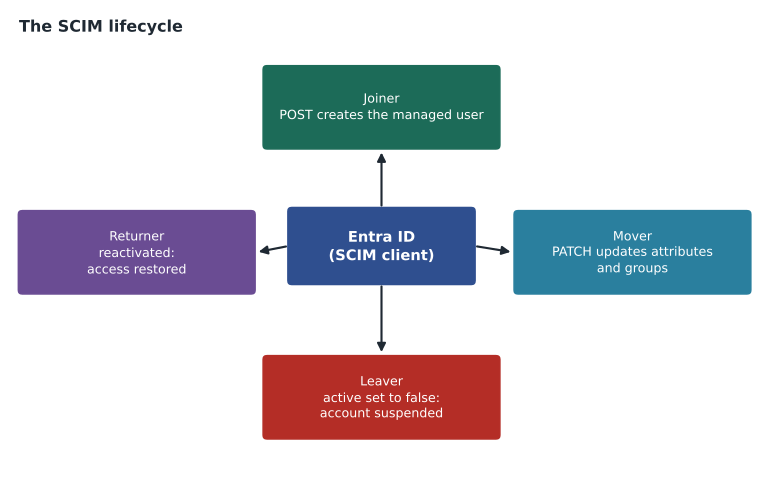
The point of SCIM is the joiner, mover, leaver lifecycle that identity teams already manage for every other application. A joiner is assigned the GitHub application in the IdP and gets an account. A mover changes department and their group membership, and therefore their GitHub teams, change with it. A leaver is disabled in the IdP, and GitHub follows within the IdP's provisioning cycle. Nobody files a ticket and nobody forgets.
SCIM with Enterprise Managed Users
For managed users, SCIM is not optional. Managed user accounts are created only through SCIM; there is no invitation and no sign-up. The IdP's provisioning service, or a custom system using GitHub's SCIM API, must create every account. Partner IdPs (Entra ID, Okta and PingFederate) include provisioning in their GitHub applications, and GitHub recommends using the same partner IdP for authentication and provisioning. Systems that are not partners must provide SCIM 2.0 user lifecycle management that talks to GitHub's REST API, and GitHub documents guidelines they must follow.
Provisioning needs a credential. During setup, the setup user for the enterprise, covered in lesson 5, creates a personal access token (classic) with the admin:enterprise scope and gives it to the IdP's provisioning configuration. That token is what lets the IdP call GitHub's SCIM endpoints. Because provisioning stops if the token stops working, GitHub's guidance is to create it without an expiration and to protect it like any other high-privilege secret.
# SCIM endpoints for a managed users enterprise on GitHub.com
https://api.github.com/scim/v2/enterprises/skerry/Users
https://api.github.com/scim/v2/enterprises/skerry/Groups

# Example request body the IdP sends to create a user (simplified)
{
  "schemas": ["urn:ietf:params:scim:schemas:core:2.0:User"],
  "userName": "amadou.ferrand-bakari@skerry.example",
  "name": { "givenName": "Amadou", "familyName": "Ferrand-Bakari" },
  "emails": [{ "value": "amadou.ferrand-bakari@skerry.example", "primary": true }],
  "roles": [{ "value": "user", "primary": true }],
  "active": true
}
Usernames from the IdP
GitHub builds each managed user's username from the SCIM userName the IdP sends. It normalizes the identifier, turning characters other than letters and digits into dashes, using the part before the at sign for email-style identifiers, and then appending an underscore and the enterprise's shortcode. Amadou's identifier above would become a username such as amadou-ferrand-bakari_skr if the shortcode were skr. Normalization can make two people collide: someone at two different email domains with the same local part, such as sam@skerry.example and sam@skerry-stores.example, would both normalize to sam. GitHub provisions the first and rejects the second with a conflict error. Amadou ran a script over Entra ID before provisioning anyone, found 31 collisions in a company of 2,300 people, and fixed them by changing the attribute mapping to use a unique employee identifier.
Worked problem
Predicting a username
An enterprise's shortcode is skr. Entra ID sends the userName j.okafor-lee@skerry.example. What username will GitHub create, and is it within the length limit?
Show solution
- Take the part before the at sign: j.okafor-lee.
- Replace characters that are not letters or digits with dashes: j-okafor-lee.
- Append an underscore and the shortcode: j-okafor-lee_skr.
- That is 16 characters, well within the 39-character limit on GitHub.com.
Answer: j-okafor-lee_skr, which is within the limit.
Roles through provisioning
In a managed users enterprise, SCIM also carries each user's enterprise role. The IdP can assign a user the ordinary user role, enterprise owner, billing manager or guest collaborator, typically by mapping IdP groups or app roles to GitHub roles. That makes the IdP the single place where an auditor can see who holds enterprise ownership, and means a departing owner loses the role when their IdP assignment ends. Skerry mapped an Entra ID group, GitHub-Enterprise-Owners, with exactly four members, to the owner role, and required an access review of the group every quarter.
Groups, teams and organization membership
SCIM Groups let the IdP manage team membership as well as accounts. In a managed users enterprise, a GitHub team can be connected to an IdP group. Once connected, the IdP controls the team's membership: people in the group are added to the team, and if the team belongs to an organization they are added to that organization too. Membership of a connected team cannot be edited by hand in GitHub, which surprises team maintainers the first time. Enterprise teams can be driven from IdP groups in the same way, so a single Entra ID group can give a set of people the same role in every organization.
Group-driven membership changes how a company thinks about access. Instead of asking "who should be in the stores-payments team on GitHub?", the question becomes "who should be in the Stores-Payments-Developers group in Entra ID?", which the identity team already reviews and which the HR system may already feed. Freya liked that a single access review in Entra ID would now cover GitHub too.
SCIM and team synchronization compared
The GH-100 study guide asks candidates to understand SCIM and team synchronization and the key differences between them. Both connect GitHub to IdP groups, but they solve different problems.
| SCIM provisioning | Team synchronization | |
|---|---|---|
| What it manages | User accounts or organization membership, and optionally groups | Membership of GitHub teams only |
| Creates accounts | Yes, for managed users | No |
| Removes access when a person leaves | Yes, by deactivating or deprovisioning | Removes them from synced teams only |
| Account type | Required for managed users; limited options with personal accounts | Personal accounts with SAML linked identities |
| Supported IdPs | Partner IdPs or any SCIM 2.0 system following GitHub's guidelines | Entra ID and Okta |
| Who drives it | The IdP sends SCIM requests to GitHub | GitHub reads group membership from the IdP |
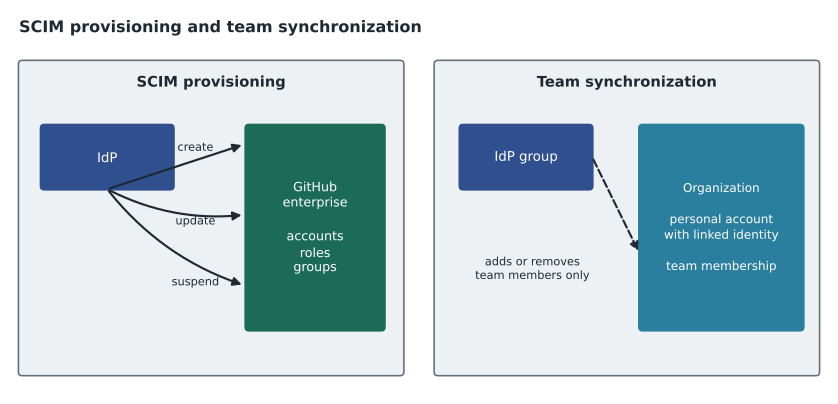
With personal accounts, provisioning is more limited because GitHub cannot create an account that a person owns. Where it is supported, SCIM can invite a person to an organization and remove them from it when they are deprovisioned, but the account itself remains the developer's. The options depend on whether SAML is configured at the enterprise or organization level and on the IdP, so administrators should check the current documentation for their combination rather than assume.
What deprovisioning does
When the IdP stops assigning the GitHub application to a managed user, or sets the user's active attribute to false, GitHub suspends the managed user account. A suspended managed user cannot sign in, their sessions and credentials stop working, and they no longer consume a licence. Their contributions remain: commits, pull requests, issues and comments keep their history, so nothing in the code record is lost. If the IdP reactivates the person, for example someone returning from a long leave, the account is restored with its memberships. That is a large improvement on the old world, where a leaver's personal account simply walked out the door with company access still attached until someone noticed.
Worked problem
Tracing a mover
A Skerry developer moves from the data group to the stores group. In Entra ID she is removed from Data-Developers and added to Stores-Developers. Both groups are connected to GitHub teams in the skerry and skerry-stores organizations. What changes in GitHub, and what does nobody need to do?
Show solution
- At the next provisioning cycle, Entra ID sends group membership changes to GitHub.
- She is removed from the connected data team and loses access granted through it.
- She is added to the connected stores team and, because it belongs to skerry-stores, becomes a member of that organization.
- No help desk ticket is needed and no organization owner edits teams by hand.
Answer: Her team and organization membership follow her IdP groups automatically; manual changes are neither needed nor possible on connected teams.
Operating provisioning well
Provisioning removes routine work, but it adds a dependency. Amadou listed what the platform team would monitor. The IdP's provisioning logs show failed requests, such as username conflicts or a rejected attribute. The enterprise audit log shows each account created, suspended or changed by SCIM. A scheduled report compares the number of users assigned the GitHub application in Entra ID with the number of active managed users in GitHub, and investigates any gap. And the provisioning token has an owner and a documented rotation plan, even though it does not expire, so that it can be replaced quickly if it is ever exposed.
Provisioning with Entra ID in practice
With a partner IdP, most of the work happens in the IdP's own interface. In Entra ID, administrators add GitHub's enterprise application, enter the SCIM endpoint and token, map attributes, and then assign users and groups to the application. Only assigned users and groups are provisioned, which is how Skerry limited GitHub accounts to people who need them instead of the whole company. Entra ID's provisioning service runs in cycles, so a change can take some time to reach GitHub; for urgent cases, such as a new hire on their first morning, Entra ID can provision a single user on demand. Scoping filters can further restrict which assigned users are provisioned, for example only active employees in particular departments.
Provisioning failures show up in the IdP first. Entra ID's provisioning logs record each request it sent to GitHub, the result and the error if any. The most common errors Skerry saw during the pilot were username conflicts, a missing required attribute for contractors whose records lacked an email address, and a group that had been nested inside another group, which the provisioning configuration did not expand. Each had a fix in the IdP, not in GitHub, which is why the identity team rather than the platform team took the first look at provisioning tickets.
Worked problem
A new hire on day one
A developer starts at Skerry on Monday at 9:00. HR created her Entra ID account on Friday and added her to Stores-Developers, which is assigned to the GitHub application and connected to a team. At 9:10 she cannot find a GitHub account. What should the help desk check?
Show solution
- Check the Entra ID provisioning logs for her user: was a create request sent, and did it succeed?
- If no request was sent yet, the provisioning cycle may not have reached her; use provision on demand.
- If the request failed, read the error, for example a username conflict, and fix the attribute in Entra ID.
- Once created, she signs in through Entra ID with her managed account and the connected team gives her access.
Answer: Start in the IdP's provisioning logs; use on-demand provisioning or fix the attribute error, not anything in GitHub.
Provisioning beyond partner IdPs
Some companies use an identity system that is not one of GitHub's partners, or build their own provisioning on top of an HR system. GitHub allows this for managed users as long as the system implements SCIM 2.0 user lifecycle management against GitHub's REST API and follows GitHub's integration guidelines. The trade-off is support: GitHub does not test non-partner systems and may not be able to help when something goes wrong, so the company owns the integration's reliability. A custom provisioning system also has to handle the details that partner applications handle for free, such as retries, rate limits, attribute validation and conflict handling. Amadou's advice to anyone considering it was simple: if a partner IdP is available, use it.
Common mistakes
MistakeInviting managed users by email.
InsteadManaged user accounts can only be created by SCIM provisioning from the IdP.
MistakeUsing Okta for single sign-on and Entra ID for provisioning.
InsteadUse one partner IdP for both; that combination is explicitly not supported.
MistakeEditing the members of a team connected to an IdP group.
InsteadChange the IdP group; the connected team follows it.
MistakeConfusing team synchronization with SCIM.
InsteadTeam synchronization only adjusts team membership; SCIM manages accounts and membership.
Summary and key terms
- SCIM 2.0 is a standard API for creating, updating and deactivating users and groups from an IdP.
- Managed users can only be created by SCIM; the setup user creates the provisioning token.
- GitHub normalizes the IdP userName and appends an underscore and the shortcode; conflicting names are rejected.
- SCIM can carry enterprise roles and drive team, organization and enterprise team membership through IdP groups.
- Deprovisioning suspends a managed user, keeps their contributions, and frees their licence.
- Team synchronization adjusts team membership for personal accounts and does not create or remove accounts.
- SCIM
- System for Cross-domain Identity Management, a standard API for provisioning users and groups.
- Provisioning
- Automatically creating, updating and removing accounts from an identity provider.
- Joiner, mover, leaver
- The stages of a person's identity lifecycle that provisioning automates.
- Shortcode
- A 3- to 8-character code unique to a managed users enterprise and appended to every username.
- Connected team
- A GitHub team whose membership is controlled by an IdP group.
- Deprovisioning
- Removing a user's access through the IdP, which suspends a managed user account.
- Team synchronization
- Keeping GitHub team membership in step with IdP groups for personal accounts with linked identities.
Practice problems
Work each problem on paper first, then reveal the answer to check.
What scope does the provisioning token need?
Show answer
admin:enterprise, on a personal access token (classic) created by the setup user.
What happens to a managed user's commits when they are deprovisioned?
Show answer
They remain; the account is suspended but contributions keep their history.
Why might two people collide when provisioned?
Show answer
Normalization can turn different identifiers, such as the same local part at two domains, into the same username.
Lesson quiz · 5 questions
Score 60% or more to complete this lesson.
Create a free account to save your progress, take quizzes and earn a certificate.