
MSBA-121 · Lesson 9 of 12 · 18 min
GitHub Copilot for software teams
▶ Video coming soon A video version of this lesson is on the way.
Quillfield is a brokerage, not a software company, but it employs four developers. They maintain the integrations between the broker management system and insurers' portals, the client website, the data feeds that power Daria's weekly renewal reports and, increasingly, the code behind Bram's Foundry projects. The team's backlog was over a year long. When Celestine's briefings reached software development, Bram asked whether GitHub Copilot was worth paying for in a team of four. The answer depended less on the tool than on how the team worked.
GitHub Copilot is not named in the AB-731 study guide. It is covered here because almost every organization that builds AI solutions also writes software, and because GitHub Copilot is one of the most widely adopted generative AI products in business. The companion courses MSBA-303 and MSBA-304 cover it in depth for developers; this lesson gives the leader's view.
What GitHub Copilot is
GitHub Copilot is an AI coding assistant from GitHub, which Microsoft owns. It works inside developers' editors, such as Visual Studio Code and Visual Studio, on GitHub.com, in the command line and on GitHub Mobile. It offers several kinds of help that have grown from simple code suggestions into agents that can carry out tasks.
| Feature | What it does | Who stays in control |
|---|---|---|
| Code completions and next edit suggestions | Suggests the next lines of code or the next edit as the developer types | The developer accepts or rejects each suggestion |
| Copilot Chat | Answers questions about code, explains errors, proposes fixes and tests | The developer decides what to use |
| Agent mode | Works on a multi-step task in the editor, editing several files and running commands | The developer watches and approves the changes |
| Coding agent | Takes an assigned issue, works in its own environment and opens a pull request | A person reviews and merges the pull request |
| Code review | Reviews a pull request and comments on possible problems | Human reviewers still approve the change |
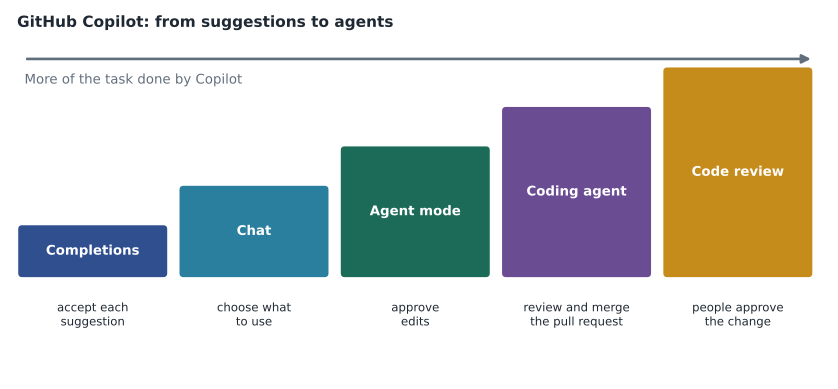
The progression mirrors the rest of Microsoft's AI landscape: from assistance, where the person does the work with help, to agents, where AI does a defined piece of work and a person reviews the result. The coding agent is the clearest example. A developer or manager assigns a well-defined issue, such as "add input validation to the address form and update the tests", and Copilot works on it in a separate environment, then opens a pull request that a person reviews like any other change.
Plans and prices
GitHub sells Copilot in plans for individuals and for organizations. The organizational plans are the ones leaders buy. At the prices used in MSBA-303, Copilot Free costs nothing, Copilot Pro for individuals costs 10 US dollars per person per month, Copilot Business costs 19 US dollars per user per month and Copilot Enterprise costs 39 US dollars per user per month. Copilot Business works with any GitHub organization plan, while Copilot Enterprise requires the organization to be on GitHub Enterprise Cloud.
From June 1, 2026, GitHub moved Copilot to usage-based billing measured in GitHub AI Credits. Each paid plan includes an allowance, pooled across an organization's users, and heavier features such as chat with premium models, agent mode and the coding agent consume credits according to the model and the work done. Inline code suggestions on paid plans do not consume credits. Usage beyond the allowance is billed, and administrators can set budgets. This is the same pattern seen with Copilot Credits in Microsoft 365 and Security Compute Units: a seat price plus a meter.
| Plan | Price per user per month | Key point for leaders |
|---|---|---|
| Copilot Free | None | Limited use for individuals; not for managing a team |
| Copilot Pro | 10 US dollars | Bought by individuals, not managed by the organization |
| Copilot Business | 19 US dollars | Central management, policies and audit for any organization plan |
| Copilot Enterprise | 39 US dollars | Adds enterprise features; requires GitHub Enterprise Cloud |
A team of developers each buying Copilot Pro with personal accounts is cheaper on paper, but the organization then has no control over policies, no audit trail and no say in how code and prompts are handled. For work on the organization's code, a managed plan is the leader's default.
The evidence on productivity
GitHub Copilot has been studied more than most AI tools. One of the best-known studies, a controlled experiment published by GitHub and Microsoft researchers in 2023, found that developers using Copilot completed a defined programming task about 55 percent faster than those without it. Later studies in real companies have generally found smaller but meaningful gains, larger for routine tasks and less experienced developers, and some have found that faster coding does not automatically mean faster delivery if review, testing or deployment become the bottleneck.
The lesson from MSBA-120 applies: time saved in one step only becomes value if the process changes. For Quillfield's team, the bottleneck was not typing code but understanding the old integration code nobody had documented. Copilot Chat's ability to explain unfamiliar code, and the coding agent's ability to take small, well-defined tasks off the backlog, mattered more than faster autocomplete.
Worked problem
Is Copilot Business worth it for four developers?
Quillfield's four developers each cost about 95 dollars an hour fully loaded and work about 1,700 hours a year. Bram estimates that Copilot Business would save each developer 2 hours a week over 46 working weeks, after allowing for time spent reviewing AI-generated code. Copilot Business costs 19 US dollars per user per month; assume the included allowance covers their usage. Compare the annual time value with the annual cost.
Show solution
- Annual licence cost: 4 users times 19 US dollars times 12 months = 912 US dollars.
- Hours saved: 4 developers times 2 hours times 46 weeks = 368 hours.
- Time value: 368 hours times 95 dollars = 34,960 dollars.
- Even if only half of the saved time turns into delivered work, the value is about 17,480 dollars against under 1,000 US dollars of licences.
Answer: At these assumptions, the time value is many times the licence cost. The real questions are whether the saved time reaches the backlog and whether code quality holds, so Bram tracked completed backlog items and defects for three months.
Risks and controls
AI-written code raises risks that leaders should understand at a high level.
Quality and security. AI can suggest code that works but contains bugs or security weaknesses. The controls are the same ones good teams already use: code review, automated tests, and security scanning such as GitHub Advanced Security, which the MSBA-360 series covers.
Confidential information. Prompts and code sent to Copilot may include sensitive material. On the business plans, GitHub provides data handling terms suited to organizations, and administrators can use content exclusions to stop Copilot from using particular files or repositories as context, such as files containing configuration secrets. Secrets should never be in code in the first place.
Matching public code. Copilot can occasionally suggest code that closely matches public code, which may carry licence obligations. Organizations can set a policy to block suggestions that match public code, or to show references so developers can check the source and licence.
Over-reliance. Developers who accept suggestions without understanding them build up code nobody can maintain. Teams need norms: the person who submits code is responsible for it, whoever or whatever wrote the first draft.
| Risk | Control | Owner |
|---|---|---|
| Bugs or vulnerabilities in AI-written code | Code review, tests and security scanning on every pull request | Development lead |
| Sensitive files used as context | Content exclusions; secrets kept out of code | Repository administrators |
| Suggestions matching public code | Policy to block matches or show references | Organization owners |
| Unchecked agent changes | Coding agent work arrives as a pull request that a person must approve | Reviewers |
| Uncontrolled spending | Budgets and usage reports for AI Credits | Engineering manager |
Questions a leader should ask
A leader approving GitHub Copilot does not need to understand pull requests in detail, but should ask five questions. Which plan, and does it give us central management and audit? What is the expected AI Credit usage and who watches it? What controls protect code quality and security? Which files are excluded, and how are secrets kept out of code? And how will we know it worked: which delivery measures will we track, such as completed work items, lead time and defect rates?
Bram's answers satisfied Lorne, who approved Copilot Business for the four developers with a three-month review. The coding agent was enabled for one repository, the client website, where tests were strongest.
GitHub Copilot beyond professional developers
Not everyone who writes code is a professional developer. Analysts write scripts, data teams write queries and administrators write automation. GitHub Copilot can help all of them, and Microsoft's other tools increasingly include code assistance of their own, such as Copilot in Power Platform for professional developers and the code-writing behind the Analyst agent. Leaders should think about code assistance as a capability that spreads across roles, and make sure the same controls apply wherever code that touches company systems is written.
Bram also pointed out a link to the Foundry work in lesson 7. The developers building the underwriting search and the claims photo system would write much of their code with GitHub Copilot's help. The quality of that code, and the reviews and tests around it, would decide whether the AI solutions themselves were reliable. Investing in good engineering practice, not just in AI tools, was part of the AI plan.
Rolling out GitHub Copilot
A successful rollout of GitHub Copilot looks much like a rollout of Microsoft 365 Copilot, adapted to developers. Start with a group willing to try it on real work. Agree what will be measured. Set policies before enabling features: content exclusions, public code matching, which models are allowed, whether the coding agent may be assigned issues and in which repositories. Train developers on prompting for code and on reviewing AI output critically. Review after a set period and decide whether to expand, adjust or stop.
| Rollout step | Quillfield's choice |
|---|---|
| Pilot group | All four developers, as the team is small |
| Measures | Completed backlog items, lead time from start to release, defects found after release |
| Policies | Content exclusions for configuration files; block suggestions matching public code |
| Agent features | Coding agent enabled only for the client website repository |
| Training | Half a day on prompting for code and reviewing AI changes |
| Review | After three months, with Lorne and Celestine |
Three months later, the team had closed about a third more backlog items than in the previous quarter, with no increase in defects found after release. Bram was careful to say that some of the improvement came from the team's new habit of writing clearer issues for the coding agent, which also helped the humans. The review approved continuing Copilot Business and extending the coding agent to one more repository.
Lorne asked the question finance leaders always ask: would the developers simply work less? Bram's answer was that the backlog was long enough that every recovered hour had an obvious next use, and the delivery measures would show whether that happened. Tying the review to completed work rather than to hours saved kept the discussion honest.
Where GitHub Copilot fits in the landscape
GitHub Copilot sits in the ready-made experiences layer, alongside Microsoft 365 Copilot and Security Copilot, but its users and data are different. It works on code and repositories rather than documents and email, it is bought and administered through GitHub rather than the Microsoft 365 admin center, and its billing runs on GitHub AI Credits rather than Copilot Credits. Leaders managing an AI portfolio should therefore expect a separate owner, budget and set of reports for it, usually the head of development, while applying the same principles: a managed plan, clear policies, a meter that someone watches and measures of real outcomes. Treating it as just another Copilot licence, managed by the same team in the same way, is a common source of confusion.
Common mistakes
MistakeLetting developers use personal Copilot Pro accounts on company code.
InsteadUse Copilot Business or Enterprise so the organization controls policies, audit and data handling.
MistakeMeasuring success by lines of code written.
InsteadMeasure delivered work, lead time and defect rates.
MistakeMerging coding agent pull requests without review.
InsteadReview agent changes like any other contribution, with tests and scanning.
MistakeIgnoring the AI Credit meter because seat prices are low.
InsteadSet budgets and review usage, especially for agent features.
Summary and key terms
- GitHub Copilot is an AI coding assistant that has grown from code suggestions to chat, agent mode, a coding agent and code review.
- Organizational plans are Copilot Business at 19 US dollars and Copilot Enterprise at 39 US dollars per user per month; Enterprise requires GitHub Enterprise Cloud.
- From June 1, 2026, GitHub uses usage-based billing in GitHub AI Credits, with pooled allowances for paid plans.
- Evidence shows real but uneven productivity gains; value depends on removing the team's actual bottleneck.
- Controls include code review, tests, security scanning, content exclusions, public code policies and budgets.
- GitHub Copilot
- GitHub's AI coding assistant for editors, GitHub.com, the command line and mobile.
- Coding agent
- A GitHub Copilot feature that works on an assigned issue and opens a pull request for review.
- Pull request
- A proposed change to code that others review before it is merged.
- GitHub AI Credits
- The unit of usage-based billing for GitHub Copilot features from June 2026.
- Content exclusion
- A setting that stops Copilot from using specified files or repositories as context.
- Agent mode
- A Copilot mode in the editor that carries out multi-step tasks across files with the developer's approval.
Practice problems
Work each problem on paper first, then reveal the answer to check.
What does Copilot Enterprise require that Copilot Business does not?
Show answer
The organization must be on GitHub Enterprise Cloud.
What is the annual licence cost of Copilot Business for 10 developers?
Show answer
10 times 19 times 12 = 2,280 US dollars, before any usage beyond the included allowance.
Name three controls that reduce the risk of AI-written code.
Show answer
Any three of code review, automated tests, security scanning, content exclusions, public code policies and budgets.
Lesson quiz · 5 questions
Score 60% or more to complete this lesson.
Create a free account to save your progress, take quizzes and earn a certificate.