
MSBA-121 · Lesson 5 of 12 · 18 min
AI in Dynamics 365
▶ Video coming soon A video version of this lesson is on the way.
Quillfield runs its policies in a broker management system built for the insurance industry, and it had no plan to replace it. But its commercial lines team tracked prospects and pipeline in spreadsheets, and the group benefits team managed renewals with a mix of email and a shared calendar. When Celestine's leadership team discussed where AI could help next, Bram Oosterhuis suggested looking at Microsoft Dynamics 365, because a customer relationship management system with AI built in might do more for the pipeline problem than any amount of Copilot in Excel. This lesson is the briefing Bram gave.
Dynamics 365 is not named in the AB-731 study guide. It is covered here because leaders mapping business processes to Microsoft's AI apps and services will meet it, and because many of the most practical agents Microsoft ships are built into its business applications.
What Dynamics 365 is
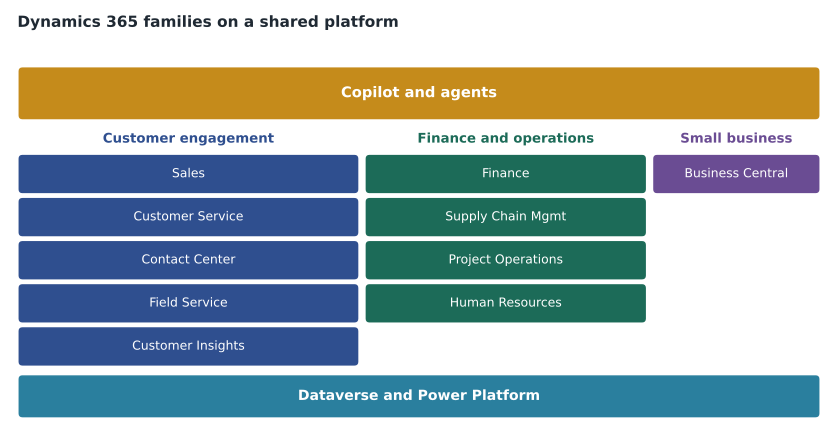
Dynamics 365 is Microsoft's family of business applications. It falls into two broad groups. The customer engagement applications, Sales, Customer Service, Contact Center, Field Service and Customer Insights, help organizations find, win, serve and keep customers. The finance and operations applications, Finance, Supply Chain Management, Project Operations and Human Resources, run accounting, purchasing, inventory, manufacturing, projects and people processes for larger organizations. Business Central is an all-in-one business management application for small and medium-sized businesses, covering finance, sales, purchasing and inventory in one product.
All of them store their data in Microsoft's cloud, most of it in Dataverse, the data platform shared with Power Platform. That shared foundation is what lets Copilot, Copilot Studio agents and Power Platform apps work with business data in Dynamics 365 without complex integration.
Two kinds of AI in business applications
AI shows up in Dynamics 365 in two ways. The first is Copilot inside the application: features that help a person do their work in the app, such as summarizing a sales opportunity, drafting an email to a customer, suggesting a reply to a support case or explaining a variance in a financial report. These features are usually included in the application licence and are switched on by administrators.
The second is agents: AI that carries out a piece of a business process, often starting on its own. An agent might read incoming customer emails, work out what each customer wants and create or update a case; qualify new sales leads by researching them and drafting outreach for a seller to approve; or read supplier emails about delayed deliveries and propose changes to purchase orders. Some agents are included with the application; others consume Copilot Credits. Microsoft also offers role-based agents in Microsoft 365 Copilot, such as a Sales Agent and a Finance Agent, that bring business application data and actions into Outlook, Teams and Excel so people can work without switching apps.
| Kind of AI | Who acts | Typical example | Leader's question |
|---|---|---|---|
| Copilot in the app | The person, with AI help | Summarize an opportunity before a call | Will people use it, and does it save time? |
| Agent in the app | The agent, with a person reviewing | Turn customer emails into cases with suggested replies | What is the agent allowed to do without approval? |
| Role-based agent in Microsoft 365 Copilot | The person, in Outlook, Teams or Excel | Update a sales record from an email in Outlook | Do our people live in Microsoft 365 more than in the app? |
Customer engagement applications
Sales. Copilot in Dynamics 365 Sales helps sellers catch up on accounts and opportunities, summarizes recent activity and emails, drafts customer emails and prepares for meetings using information from the sales system and from Microsoft 365. Microsoft's 2026 release plans emphasize Copilot experiences that combine sales data with Microsoft 365 signals, such as email and meeting recaps, to guide pipeline and deal work. Agents for sales can research and qualify leads and draft outreach for a seller to review.
Customer Service and Contact Center. Service teams were among the first to benefit from generative AI, and Microsoft's release plans for 2026 describe agentic capabilities for case management, email handling, understanding customer intent, evaluating the quality of service interactions and managing knowledge articles. Copilot summarizes cases and conversations, drafts responses grounded in knowledge articles and helps supervisors see where customers are struggling. Contact Center adds AI for self-service and assisted service across voice and digital channels.
Field Service. For organizations that send technicians to customer sites, the 2026 wave 1 plans include a Scheduling Operations Agent intended to help dispatchers schedule work orders intelligently, alongside mobile improvements for technicians.
Finance and operations applications
In Finance and Supply Chain Management, AI tends to target slow, repetitive work around exceptions: collections, reconciliations, supplier communications and planning. Copilot can summarize a customer's payment history for a collections coordinator, explain the drivers of a variance or draft a message to a supplier. Microsoft's 2026 release plans for Supply Chain Management mention AI-powered picking, inventory rebalancing and hands-free scanning in warehouses, and its role-based Finance Agent in Microsoft 365 Copilot targets reconciliation, variance analysis and customer communications. The pattern is the same as in customer engagement: AI drafts and proposes, and people approve anything that posts to the books.
Business Central. For smaller organizations, Business Central includes Copilot features and agents that automate sales and purchasing scenarios, such as turning a customer's email request into a quote or order for a person to confirm. Because Business Central serves organizations without large IT teams, its AI features are designed to work with little configuration.
Why AI in business applications is different
AI in a business application differs from Copilot in Word in three ways that matter to leaders.
It works on structured records. A Dynamics 365 agent can read and update customer, case, order and invoice records directly. That makes it more powerful than drafting a document, and also more consequential: a wrong update changes the system of record that other processes rely on.
It follows process rules. Business applications already contain approval limits, workflows and security roles. Agents work inside those rules, so the configuration of the application, who can approve what and which fields can change, becomes part of AI governance.
It is licensed with the application. Much of the Copilot functionality comes with the Dynamics 365 licence, which changes the business case. The cost question becomes "how much does adopting it take?" rather than "how much does the licence cost?", while agents that consume credits add a usage line.
Worked problem
Is Dynamics 365 Sales worth a pilot?
Quillfield's 15 commercial account executives track about 300 open opportunities in spreadsheets. Each spends an estimated 3 hours a week updating the spreadsheet, preparing pipeline reports and searching email for the latest client contact. Bram estimates that Dynamics 365 Sales with Copilot could cut that to 1 hour a week once adopted. At a fully loaded cost of 75 dollars an hour and 46 working weeks a year, what is the annual time value of the saving?
Show solution
- Hours saved per executive per week: 3 minus 1 = 2 hours.
- Hours saved per year: 15 executives times 2 hours times 46 weeks = 1,380 hours.
- Value: 1,380 hours times 75 dollars = 103,500 dollars.
- The figure is a time value, not cash; Celestine applies the capture-rate thinking from MSBA-120 and asks what the executives will do with the time, such as more prospect meetings.
Answer: About 103,500 dollars a year of time value before licence, implementation and adoption costs. That is enough to justify a scoped pilot, but not enough to justify a large implementation without evidence that the time turns into new business.
Bram's briefing also raised a practical point. A customer relationship management system only helps if people put their data in it. AI can reduce the effort, for example by drafting activity records from emails and meetings, but adoption is still the main risk. The pilot plan therefore measured data completeness as well as time saved.
Release waves and readiness
Dynamics 365 and Power Platform publish release plans for two waves each year. Wave 1 features are released between April and September, and wave 2 features between October and the following March. The 2026 wave 1 plans, published in March 2026, emphasized agentic capabilities across the applications. Leaders do not need to read every plan, but the person responsible for each application should, because new AI features often arrive switched off, waiting for an administrator to enable and configure them, and some features first appear in preview with different support terms.
| Question to ask before enabling an agent in a business application | Why it matters |
|---|---|
| Which records can the agent read and change? | Defines the blast radius of a mistake |
| Which actions need a person's approval? | Keeps people accountable for changes to the system of record |
| Is the feature generally available or in preview? | Preview features may change and have different support terms |
| Does it consume Copilot Credits? | Adds a usage cost that needs a budget |
| How will we measure whether it helps? | Without a baseline, value cannot be shown |
Copilot for people who do not live in the application
Many people who need business data rarely open the business application. A sales director may spend most of the day in Outlook and Teams; a finance manager may live in Excel. Microsoft's role-based agents in Microsoft 365 Copilot address this by bringing the data and some actions to where these people already work. A seller can ask in Outlook for the latest on an opportunity, see a summary drawn from Dynamics 365, and update the record from the email without switching apps. A finance user can ask for help reconciling figures in Excel with data from the finance system.
For leaders, this changes how adoption is planned. Instead of asking people to spend more time in a new system, the organization can meet them in the tools they use every day, while keeping the business application as the system of record. Bram recommended that any Dynamics 365 Sales pilot at Quillfield include the role-based agent for the account executives, because their work happened mostly in Outlook and Teams.
What Quillfield decided
Celestine's leadership team did not replace anything after Bram's briefing. They agreed to a twelve-week pilot of Dynamics 365 Sales for the commercial lines team only, with three measures: time spent on pipeline administration, completeness of opportunity records and the number of prospect meetings each executive held. If the pilot showed that time saved turned into more selling, they would extend it to group benefits. If not, they would stop and look at improving the spreadsheets instead. The business applications briefing ended, like every other, with a decision and a date.
| Pilot measure | Baseline | Target after 12 weeks |
|---|---|---|
| Hours a week on pipeline administration per executive | About 3 | 1.5 or fewer |
| Opportunities with a next step and date recorded | About 40 percent | 85 percent or more |
| Prospect meetings per executive per month | About 6 | 8 or more |
Data quality decides the result
Every AI feature in a business application works from the records in it. A Copilot summary of an account is only as current as the last activity recorded; an agent that proposes purchase order changes is only as good as the supplier and item data it reads. Organizations that rush AI into an application with incomplete or inconsistent data get confident summaries of the wrong picture. That is why Bram's pilot measured data completeness, and why Microsoft's own guidance for Copilot in its business applications stresses data hygiene: removing duplicates, completing key fields and agreeing which system is the source of truth for each kind of record.
Common mistakes
MistakeAssuming every Dynamics 365 agent is free with the licence.
InsteadMany Copilot features are included, but some agents consume Copilot Credits; check each one.
MistakeLetting an agent post directly to the books from day one.
InsteadStart with agents that propose changes for a person to approve.
MistakeExpecting AI to fix poor data entry habits on its own.
InsteadPlan for adoption and measure data completeness alongside time saved.
MistakeTreating a preview feature as production-ready.
InsteadCheck whether features are generally available and plan for change.
Summary and key terms
- Dynamics 365 includes customer engagement applications, finance and operations applications, and Business Central for smaller organizations, sharing Dataverse with Power Platform.
- AI appears as Copilot features inside the applications and as agents that carry out parts of business processes.
- Role-based agents in Microsoft 365 Copilot bring business application data into Outlook, Teams and Excel.
- AI in business applications works on structured records and process rules, so a wrong action has larger consequences.
- Release plans for two waves a year announce new AI features, many of which must be enabled and configured.
- Dynamics 365
- Microsoft's family of business applications for customer engagement, finance and operations, and small business management.
- Dataverse
- The data platform shared by Dynamics 365 and Power Platform.
- Customer engagement applications
- Dynamics 365 Sales, Customer Service, Contact Center, Field Service and Customer Insights.
- Role-based agent
- An agent in Microsoft 365 Copilot that brings a business function's data and actions into everyday apps.
- System of record
- The authoritative system holding a type of business data, such as customer or invoice records.
- Preview
- An early release of a feature for testing, with terms and behaviour that may change before general availability.
Practice problems
Work each problem on paper first, then reveal the answer to check.
Name two ways AI appears in Dynamics 365.
Show answer
Copilot features inside the applications, and agents that carry out parts of business processes (plus role-based agents in Microsoft 365 Copilot).
Ten people each save 2 hours a week for 46 weeks at 60 dollars an hour. What is the annual time value?
Show answer
10 times 2 times 46 times 60 = 55,200 dollars.
Between which months are Dynamics 365 wave 1 features released?
Show answer
Between April and September.
Lesson quiz · 5 questions
Score 60% or more to complete this lesson.
Create a free account to save your progress, take quizzes and earn a certificate.