
MSBA-121 · Lesson 3 of 12 · 18 min
Copilot Chat and agents
▶ Video coming soon A video version of this lesson is on the way.
At the second briefing, Saoirse Ndlovu-Park brought numbers from the Microsoft 365 admin center. In the month since Quillfield had told staff to use AI only with their work accounts, about 210 of its 380 people had used Microsoft 365 Copilot Chat at least once, most of them to draft emails, summarize documents they uploaded and ask general questions. Only the 60 people in the licence pilot had Microsoft 365 Copilot itself; for everyone else, Copilot Chat was the AI they had. "We are already running an AI program," she said. "We just did not call it one."
This lesson covers Copilot Chat, the version of Copilot that most employees in a Microsoft 365 organization can use without an extra licence, and the agents that extend it. It also covers two advanced agents the AB-731 study guide names specifically, Researcher and Analyst, and how leaders should decide when each is the right tool.
Microsoft 365 Copilot Chat
Microsoft 365 Copilot Chat is a secure AI chat experience available to users with an eligible Microsoft 365 or Office 365 subscription and a work account. It is reached through the Microsoft 365 Copilot app on the web, Windows and mobile devices, through Teams and Outlook, and through a Copilot Chat pane in apps such as Word, Excel and PowerPoint.
Copilot Chat is grounded in the web: when a question needs current public information, it searches the web and cites what it used. Users can upload files or work on the document they have open, and Copilot Chat will summarize, rewrite or answer questions about that content. Because it is used with a work account, it is covered by enterprise data protection: prompts and responses are processed under Microsoft's commercial terms, are not used to train foundation models, and are subject to the organization's retention and audit settings.
What Copilot Chat does not do on its own is search across the user's mailbox, OneDrive, SharePoint sites and Teams chats. That capability, grounding in work data through Microsoft Graph, comes with the Microsoft 365 Copilot licence. Copilot Chat can still use work data through agents, which is where its pay-as-you-go model comes in.
Mobile and web experiences
The study guide asks candidates to understand Copilot Chat's web and mobile experiences. In practice this means the same chat, with the same protections, is available wherever the user signs in with a work account: a browser, the Windows app, or the Microsoft 365 Copilot app on an iPhone or Android phone. Mobile use matters for staff who are rarely at a desk. Quillfield's commercial account executives spend much of their week visiting clients; they used Copilot Chat on their phones to summarize long emails between meetings and to draft short replies, which they reviewed before sending.
Leaders should remember that mobile access is also a security question. If staff can use Copilot Chat on personal phones, the organization needs mobile device or app protection policies so that work data copied from Copilot stays in managed apps. That is an IT decision, but it has a leadership dimension: a policy that is too strict pushes people back to consumer tools.
Agents in Copilot Chat
An agent in Microsoft 365 is a specialized assistant with its own instructions, knowledge and, optionally, actions. Users find agents in the Microsoft 365 Copilot app and can add them to chats. There are three main sources.
Microsoft-built agents. Microsoft ships agents for common tasks, including Researcher and Analyst for licensed users, and role-based agents for sales, service and finance work that connect Microsoft 365 with business applications.
Agents built with Agent Builder. Inside the Microsoft 365 Copilot app, a user can describe an agent in plain language, give it instructions, point it at knowledge sources such as a SharePoint site or a set of files, and share it with colleagues. These are sometimes called declarative agents, because they are declared with instructions and knowledge rather than programmed.
Agents built in Copilot Studio or by developers. For agents that need to follow processes, call other systems or run on their own, makers use Copilot Studio and developers use Microsoft Foundry or Microsoft's agent development kits. Lesson 4 covers Copilot Studio in detail.
For users without a Microsoft 365 Copilot licence, agents that use only web content or instructions are available in Copilot Chat. Agents that ground in shared work data, such as a SharePoint site, are billed on a pay-as-you-go basis in Copilot Credits, charged to an Azure subscription that the administrator links to the tenant. For licensed users, use of these agents is included within the licence's fair-use limits. This model lets an organization give everyone access to useful agents without licensing everyone.
Worked problem
An agent for policy wording
Yusra Kamaludin builds a "Coverage Explainer" agent with Agent Builder. It is grounded in a SharePoint library of approved policy wording summaries and instructed to answer staff questions in plain language and cite the summary used. The 45 contact centre agents, none of whom have a Microsoft 365 Copilot licence, use it about 1,600 times a month. If each response uses 2 Copilot Credits on the pay-as-you-go meter at one US cent per credit, what is the monthly cost? How does that compare with licensing the 45 agents?
Show solution
- Credits per month: 1,600 responses times 2 credits = 3,200 credits.
- Cost per month: 3,200 times 0.01 US dollars = 32 US dollars.
- Licensing 45 agents for Microsoft 365 Copilot at 30 US dollars each would cost 1,350 US dollars a month.
- The credit rate per response depends on the features the agent uses; the figure of 2 credits is illustrative, so Saoirse sets a budget alert and checks actual consumption after the first month.
Answer: About 32 US dollars a month on pay-as-you-go, against 1,350 US dollars a month for 45 licences. For a single, focused use, a metered agent can be far cheaper; for broad daily use across apps, the licence may be better value.
The example uses an illustrative credit rate. Microsoft publishes the number of credits each type of agent activity consumes, and the rates differ between simple answers, answers grounded in work data and actions that run processes. Leaders do not need to memorize the rates, but they should insist on a budget, an alert and a review of real usage before a metered agent goes to hundreds of people.
Researcher and Analyst
Researcher and Analyst are advanced agents included with the Microsoft 365 Copilot licence. Both use reasoning models that work through a problem in several steps rather than answering immediately, and both take longer to respond than ordinary chat, sometimes several minutes. The study guide asks candidates to identify when to use each.
Researcher is for multi-step research that combines work content and the web. It plans a set of searches, reads emails, files, meetings and web sources, and produces a structured report with citations. It suits questions such as "Prepare a briefing on everything we know about this prospective client, including our past correspondence, their public filings and recent news" or "Summarize what our teams have decided about cyber coverage this year and how competitors describe theirs."
Analyst is for working with data. It reasons over spreadsheets and other data files, can write and run code behind the scenes to calculate and chart results, and explains its steps. It suits questions such as "Using these three years of claims data, which product lines have rising frequency, and what might explain it?" or "Forecast next quarter's renewals from this table and show the assumptions."
| Question | Better choice | Why |
|---|---|---|
| What do our files and the web say about a prospect? | Researcher | Multi-source research and synthesis with citations |
| Which branches have the highest lapse rates in this spreadsheet? | Analyst | Calculation over structured data |
| Draft a reply to this email | Neither; ordinary Copilot | A quick task that does not need deep reasoning |
| How do our renewal terms compare with industry commentary? | Researcher | Combines internal documents with external sources |
| Is the trend in this claims table statistically meaningful? | Analyst | Data analysis with explained steps |
A simple rule helped Quillfield's managers: Researcher reads, Analyst calculates. If the answer lives in documents, messages and web pages, use Researcher. If the answer has to be computed from data, use Analyst. For a quick draft or summary, ordinary Copilot is faster and good enough.
Comparing the versions
The AB-731 exam expects candidates to distinguish versions of Copilot and to recommend one for a scenario. The comparison below summarizes this lesson and the previous one for a typical organization with Microsoft 365 subscriptions.
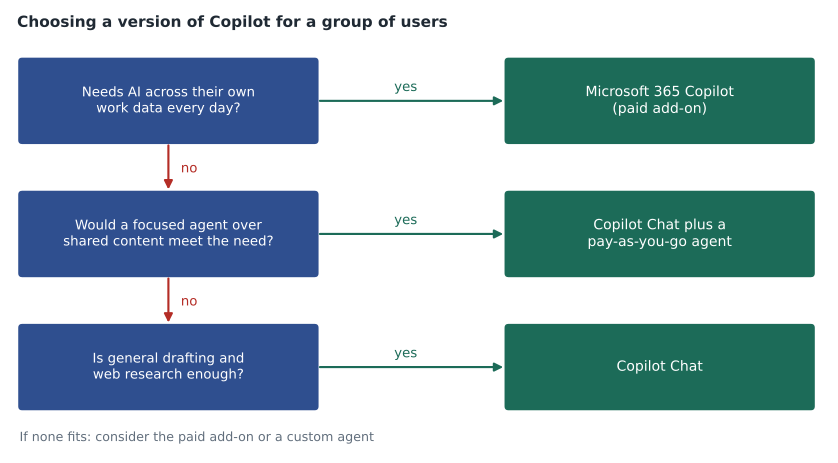
| User group at Quillfield | Main need | Recommended version |
|---|---|---|
| Account executives | Prepare for client meetings, draft proposals, recap meetings, research prospects | Microsoft 365 Copilot licence |
| Contact centre agents | Look up coverage explanations and draft replies | Copilot Chat with a pay-as-you-go agent |
| Finance team | Analyse spreadsheets, reconcile, report | Licence for analysts who use Analyst; Copilot Chat for others |
| Office administrators | Draft notices and summarize documents | Copilot Chat |
What leaders should ask about agents
Agents are easy to create, which is both their appeal and their risk. Within weeks of enabling Agent Builder, Saoirse found 23 agents in Quillfield's tenant, several of which pointed at the same documents and two of which pointed at a SharePoint site containing draft commission plans. Leaders do not manage agents themselves, but they should make sure the organization can answer five questions about every agent that reaches more than a handful of people: who owns it, what knowledge it uses, who can use it, what it can do, and what it costs. Lesson 11 shows the admin and governance features that support those answers.
Prompting well
Whatever version of Copilot people use, the quality of the answer depends heavily on the request. Microsoft's guidance on writing prompts for Copilot suggests including four things: the goal, what the user wants; the context, why they want it and for whom; the sources, which files, emails or meetings to use; and the expectations, such as format, length and tone. "Summarize this" produces a generic summary. "Summarize this 30-message thread about the Prairie Growers renewal for my manager in five bullet points, focusing on what the client has agreed and what is still open" produces something a manager can use.
Quillfield turned this into a one-page prompt guide with examples from each department and a shared library of prompts that worked well. Copilot itself supports saving and sharing prompts, so the best ones spread through teams. The companion course on prompting and conversations with Microsoft 365 Copilot covers the technique in depth; for leaders, the lesson is that a small investment in prompting skills raises the value of every licence and every agent.
| Prompt element | Weak version | Strong version |
|---|---|---|
| Goal | Write an email | Write a reply declining the request for a fee waiver |
| Context | (none) | The client has been with us eight years; keep the relationship warm |
| Sources | (none) | Use the thread from Tuesday and our fee schedule document |
| Expectations | (none) | Under 150 words, friendly, offer a call next week |
Agents and the licence decision over time
The choice between Copilot Chat with metered agents and the full licence is not made once. As people find more uses, the balance shifts. Saoirse set up a monthly check: for each user group, compare the cost of their agent consumption with the cost of licensing them, and look at how often they use Copilot in the Microsoft 365 apps. When a group's metered spending approaches the licence price, or when they ask repeatedly for features only the licence provides, it is time to license them. When licensed users barely use Copilot, the licences can be reassigned. This kind of active management keeps spending tied to value, and it is only possible because Microsoft reports usage by user and agent.
Common mistakes
MistakeThinking Copilot Chat searches every user's mailbox and files.
InsteadCopilot Chat is grounded in the web and in files the user provides; work-data grounding comes with the licence or through agents.
MistakeUsing Researcher for a quick email draft.
InsteadUse ordinary Copilot for quick tasks; Researcher suits multi-step research across many sources.
MistakeRolling out a pay-as-you-go agent to everyone with no budget.
InsteadSet a budget and alert, and review actual credit consumption after a pilot.
MistakeLetting anyone publish agents grounded in any site.
InsteadDecide who may share agents widely and check the knowledge sources they use.
Summary and key terms
- Copilot Chat is included with eligible Microsoft 365 subscriptions, grounded in the web and files users provide, and covered by enterprise data protection.
- Copilot Chat is available on the web, Windows and mobile, which raises device protection questions for leaders.
- Agents come from Microsoft, from users with Agent Builder, and from makers and developers; agents that use work data are billed on usage for unlicensed users.
- Researcher suits multi-step research across documents and the web; Analyst suits calculation and analysis of data.
- Choose the version of Copilot for each user group by how often and how deeply they need work-data AI.
- Copilot Chat
- Microsoft 365 Copilot Chat, the web-grounded AI chat included with eligible work subscriptions.
- Agent Builder
- The tool in the Microsoft 365 Copilot app for creating simple agents from instructions and knowledge sources.
- Declarative agent
- An agent defined by instructions, knowledge and actions rather than custom code.
- Researcher
- An advanced Microsoft 365 Copilot agent for multi-step research across work content and the web.
- Analyst
- An advanced Microsoft 365 Copilot agent that reasons over data and runs calculations to answer questions.
- Pay-as-you-go
- Billing for actual usage, such as Copilot Credits consumed by agents, charged to a linked Azure subscription.
Practice problems
Work each problem on paper first, then reveal the answer to check.
Give the four-word rule for choosing between Researcher and Analyst.
Show answer
Researcher reads, Analyst calculates.
An agent receives 2,000 questions a month and each uses 3 credits at one US cent each. What is the monthly cost?
Show answer
6,000 credits, or 60 US dollars.
What five questions should an organization be able to answer about any widely used agent?
Show answer
Who owns it, what knowledge it uses, who can use it, what it can do and what it costs.
Lesson quiz · 5 questions
Score 60% or more to complete this lesson.
Create a free account to save your progress, take quizzes and earn a certificate.