
MSBA-121 · Lesson 4 of 12 · 18 min
Copilot Studio for custom agents
▶ Video coming soon A video version of this lesson is on the way.
Tomasz Rybak had a problem that Copilot in Word could not solve. Every evening and weekend, Quillfield's website collected dozens of messages from clients asking the same things: how to add a driver to an auto policy, when a home policy renewed, what to do after a minor accident, how to get a proof of insurance. On Monday morning, the contact centre spent hours answering them. Tomasz wanted something that could answer common questions at any hour, collect details for the ones it could not answer, and hand them to a person the next morning. That is a job for a custom agent, and at Quillfield the tool for building it was Microsoft Copilot Studio.
What Copilot Studio is
Copilot Studio is Microsoft's low-code platform for building, testing, publishing and managing agents. "Low-code" means that most of the work is done in a visual designer and in plain-language instructions, so business technologists such as Yusra Kamaludin can build agents with support from IT, while professional developers can extend them with code where needed. Copilot Studio runs on Microsoft Power Platform, so agents live in Power Platform environments, store data in Dataverse, use Power Platform connectors to reach other systems and are governed through the Power Platform admin center.
The study guide asks candidates to understand Copilot Studio's capabilities. A leader's version of that list has six parts.
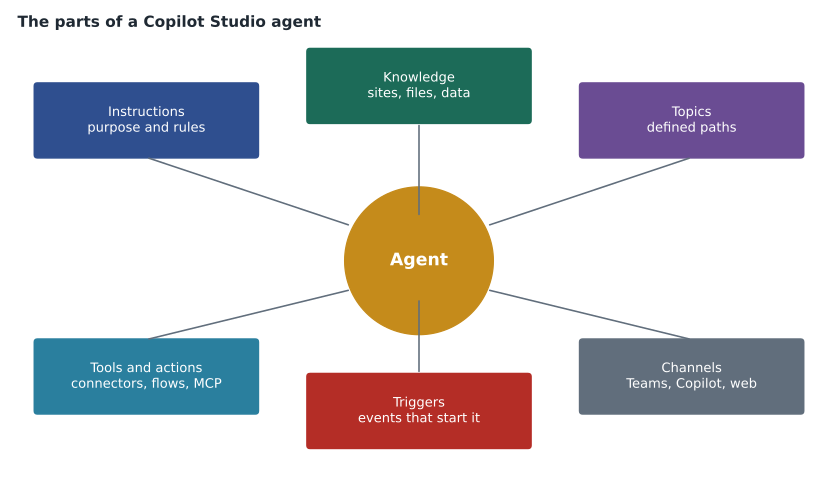
Instructions. A description of what the agent is for, how it should behave and what it must not do. For example: "Answer questions about Quillfield personal lines policies in plain language. Use only the approved knowledge sources. Never quote premiums. If the client wants to change a policy, collect their name, policy number and request, and create a follow-up task."
Knowledge. The sources the agent can search to answer questions: public websites, SharePoint sites, uploaded files, Dataverse tables, and enterprise systems through connectors. The agent retrieves relevant passages and uses them to ground its answers, the same retrieval-augmented approach that Microsoft 365 Copilot uses.
Topics. Defined conversation paths for situations where the organization wants a predictable flow, such as verifying identity before discussing a policy or collecting the details of an accident in a fixed order. Topics can ask questions, branch on answers and call actions.
Tools and actions. The ways an agent does things rather than just answering: creating a record in a system through a connector, running a Power Automate flow, calling an API, or using tools exposed by a server that implements the Model Context Protocol (MCP), an open standard for connecting AI agents to tools and data. Copilot Studio can use more than a thousand prebuilt Power Platform connectors to common business systems.
Triggers. Events that start the agent without a person typing a message, such as a new email arriving in a shared mailbox, a new row in a table or a scheduled time. Agents that run from triggers are often called autonomous agents.
Channels. Where the agent is published: Microsoft Teams, Microsoft 365 Copilot and Copilot Chat, a public website, a mobile app, and other messaging channels. The same agent can be published to several channels.
Generative orchestration
Early chatbots followed scripts: every question had to match a predefined path. Copilot Studio agents can use generative orchestration, in which a language model reads the user's request, decides which knowledge sources, topics and tools to use, and in what order, and then composes the response. This makes agents far more flexible, but it also means the agent's behaviour depends on how well its instructions, topic descriptions and tool descriptions are written. Testing matters more, not less.
Copilot Studio includes tools for that testing. Makers can try the agent in a test pane, see which sources and tools it chose, and run evaluations, sets of test questions with expected answers or criteria, so that changes can be checked before they reach users. Microsoft's 2026 release plans list deeper evaluation, multi-agent orchestration and governance features for Copilot Studio, and leaders should expect evaluation to become a normal part of releasing any agent.
Build, buy or extend: the extensibility framework
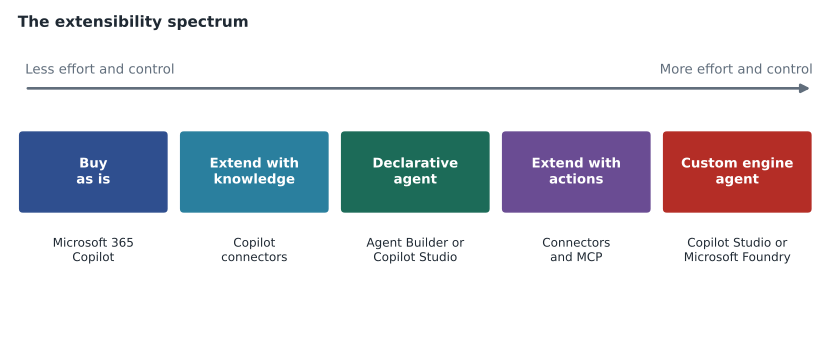
The AB-731 study guide asks candidates to identify when to build, buy or extend, including the Microsoft Copilot extensibility framework. The framework describes the ways an organization can add its own knowledge and capabilities to Microsoft 365 Copilot and its agents.
| Option | What it means | Typical tool | Example at Quillfield |
|---|---|---|---|
| Buy | Use a ready-made capability as it is | Microsoft 365 Copilot, Microsoft-built agents | Meeting recaps in Teams |
| Extend with knowledge | Bring company content into Copilot so it can answer from it | Copilot connectors, SharePoint knowledge in agents | Connect the broker management system's policy notes to Graph |
| Extend with a declarative agent | Give Copilot a focused role with instructions, knowledge and actions, running on Copilot's own model and orchestration | Agent Builder or Copilot Studio | Coverage Explainer agent for staff |
| Extend with actions | Let Copilot and agents call company systems | Connectors, API plugins, MCP servers | Create a follow-up task in the broker system |
| Build a custom engine agent | Build an agent with its own orchestration and model choices | Copilot Studio or Microsoft Foundry with agent SDKs | A claims triage agent with a specialized model |
The distinction between a declarative agent and a custom engine agent is worth knowing. A declarative agent runs inside Microsoft 365 Copilot and uses Copilot's own orchestrator and models; the organization supplies instructions, knowledge and actions. A custom engine agent brings its own orchestration and may use models the organization chooses, which gives more control at the cost of more work. Copilot Studio can build both kinds; Microsoft Foundry is used for the most demanding custom agents.
The leader's rule from MSBA-120 still applies: buy common capabilities, extend with company knowledge where that creates value, and build only where the capability is distinctive and the organization can sustain it. Most of Quillfield's agent ideas turned out to be extensions, not builds.
Licensing Copilot Studio
Copilot Studio agents are paid for in Copilot Credits, the common currency for Microsoft's agent consumption. Organizations can buy credits in three ways. Pay-as-you-go bills actual usage to an Azure subscription at one US cent per credit. Capacity packs are prepaid monthly blocks; Microsoft's pricing page listed a pack of 25,000 credits for 200 US dollars a month. Pre-purchase plans buy a larger quantity of credits in advance for a discount, which Microsoft described as up to 20 percent. Users with a Microsoft 365 Copilot licence can use agents built for internal use within the licence's terms, and makers need appropriate access to build in Copilot Studio.
The number of credits an agent uses depends on what it does. A simple scripted reply uses few credits; a generative answer grounded in knowledge uses more; an autonomous action that runs a process uses more still. Microsoft publishes a billing rate table, and the Power Platform admin center reports consumption by environment and agent. Because the rates and the categories have changed several times, leaders should treat any rate in a business case as an assumption to be checked against current Microsoft documentation and real pilot data.
Worked problem
Costing the after-hours agent
Tomasz expects the after-hours website agent to handle about 2,400 conversations a month. Bram estimates an average of 6 Copilot Credits per conversation, based on a two-week test with a mix of generative answers and a follow-up action. Compare pay-as-you-go with one capacity pack of 25,000 credits for 200 US dollars.
Show solution
- Credits per month: 2,400 times 6 = 14,400 credits.
- Pay-as-you-go cost: 14,400 times 0.01 US dollars = 144 US dollars.
- A capacity pack provides 25,000 credits for 200 US dollars, so it costs more than pay-as-you-go at this volume.
- Break-even for the pack: 200 divided by 0.01 = 20,000 credits a month. Above that, the pack is cheaper per credit; below it, pay-as-you-go is cheaper.
Answer: At 14,400 credits a month, pay-as-you-go costs about 144 US dollars and is cheaper than the 200 US dollar pack. If volume grows past about 20,000 credits a month, Quillfield should switch to a pack.
Compared with the time the contact centre spent on Monday mornings, the agent was cheap. Tomasz's team estimated that 70 percent of after-hours questions could be answered fully by the agent and the rest arrived on Monday with the details already collected, saving roughly a day of agent time each week. The bigger question was not cost but control: what the agent was allowed to say to the public.
Designing an agent responsibly
Quillfield's after-hours agent went through a design review before it was published. The review asked questions every leader should expect to see answered.
| Question | Quillfield answer |
|---|---|
| What is the agent for, and what is it not for? | General policy questions and collecting change requests; not quoting premiums, not giving coverage decisions |
| Which knowledge sources does it use? | Three approved public pages and a curated SharePoint library of plain-language guides, owned by personal lines |
| What actions can it take? | Create a follow-up task in the broker system; nothing else |
| How does it handle personal information? | Collects only name, policy number and request; tells the client how the information will be used |
| When does it hand off to a person? | Complaints, claims, anything about cancellation, and any request it cannot match to knowledge |
| How is quality checked? | An evaluation set of 120 questions before release; weekly review of 50 conversations for the first two months |
| Who owns it? | Tomasz owns the business outcome; Yusra maintains it; Saoirse's team manages the environment |
The agent also told users clearly that they were talking to an AI system, offered a link to contact a person, and used a topic to handle requests about claims by giving the claims line number instead of trying to help. Wendell reviewed the public wording against provincial insurance council rules on client communications, which do not prohibit AI assistance but do hold the brokerage responsible for what it tells clients.
Where Copilot Studio fits
Copilot Studio sits between the ready-made agents in Microsoft 365 and full custom development in Microsoft Foundry. It is the right tool when an organization needs an agent that uses its own knowledge, follows its processes, connects to its systems or runs on a trigger, and when the people building it are makers and IT professionals rather than AI engineers. When an organization needs specialized models, fine-tuning, complex multi-agent systems at large scale or deep integration into its own applications, Microsoft Foundry is usually the better platform, and the two can work together: a Copilot Studio agent can call a model or agent built in Foundry.
Agents that run on their own
Autonomous agents deserve particular care. An agent that starts when an email arrives and completes several steps without a person prompting each one can save a great deal of time, but its mistakes also happen without anyone watching. Microsoft's guidance for autonomous agents emphasizes limiting the tools and data they can use, keeping humans in the loop for consequential actions, monitoring their activity and testing them thoroughly before they go live. Quillfield decided that its first autonomous agent, one that sorted incoming emails in the renewals mailbox and drafted acknowledgements, would never send anything externally without approval in its first six months.
The renewals agent also showed why agents need owners in the business, not only in IT. When Quillfield changed its renewal process in the spring, the agent's instructions had to change too, and only the renewals team knew what the new process required.
Common mistakes
MistakeThinking low-code means no governance is needed.
InsteadAgents can talk to customers and take actions; they need owners, reviews, evaluations and environment controls.
MistakeGiving an agent every knowledge source "just in case".
InsteadUse a curated, owned set of sources so answers stay accurate and permissions stay clear.
MistakeUsing a single credit rate from a blog post in the business case.
InsteadCheck Microsoft's current billing rates and measure actual consumption in a pilot.
MistakeBuilding a custom engine agent when a declarative agent would do.
InsteadStart with the least complex option that meets the need.
Summary and key terms
- Copilot Studio is Microsoft's low-code platform for building agents, running on Power Platform and governed through its admin center.
- Agents are built from instructions, knowledge, topics, tools and actions, triggers and channels.
- Generative orchestration lets the model choose sources and tools, so testing and evaluations are essential.
- The extensibility framework runs from buying Copilot as it is, through connectors, declarative agents and actions, to custom engine agents.
- Copilot Studio usage is paid in Copilot Credits through pay-as-you-go, capacity packs or pre-purchase plans.
- Copilot Studio
- Microsoft's low-code platform for building, testing, publishing and managing agents.
- Generative orchestration
- A model deciding which knowledge, topics and tools an agent uses to answer a request.
- Model Context Protocol (MCP)
- An open standard for connecting AI agents to tools and data sources.
- Autonomous agent
- An agent that starts from a trigger, such as a new email, and completes steps without a user prompting each one.
- Custom engine agent
- An agent with its own orchestration and model choices, rather than running on Microsoft 365 Copilot's orchestrator.
- Capacity pack
- A prepaid monthly block of Copilot Credits, such as 25,000 credits for 200 US dollars.
Practice problems
Work each problem on paper first, then reveal the answer to check.
Name the six parts of a Copilot Studio agent used in this lesson.
Show answer
Instructions, knowledge, topics, tools and actions, triggers, and channels.
At what monthly credit volume does a 25,000-credit pack for 200 US dollars break even with pay-as-you-go at one US cent per credit?
Show answer
20,000 credits a month.
What is the difference between a declarative agent and a custom engine agent?
Show answer
A declarative agent runs on Microsoft 365 Copilot's orchestrator and models with the organization's instructions, knowledge and actions; a custom engine agent brings its own orchestration and model choices.
Lesson quiz · 5 questions
Score 60% or more to complete this lesson.
Create a free account to save your progress, take quizzes and earn a certificate.