
MSAZ-340 · Lesson 7 of 12 · 21 min
Defender for Cloud Apps
▶ Video coming soon A video version of this lesson is on the way.
Incident C from Ama's second shift, a marketing user downloading an unusual number of files from SharePoint, came from Defender for Cloud Apps. So did the inbox rule alert in Marek Novak's compromised mailbox. On Monday, November 2, Nadia spent the whole shift on this one product, because she thinks it is the most underused part of the Defender suite. Applications are where the company's data actually lives, and many of them were adopted by staff without IT ever hearing about them. This lesson covers how Defender for Cloud Apps discovers cloud applications, how it connects to the important ones, and how its policies and app governance features detect misuse.
What Defender for Cloud Apps does
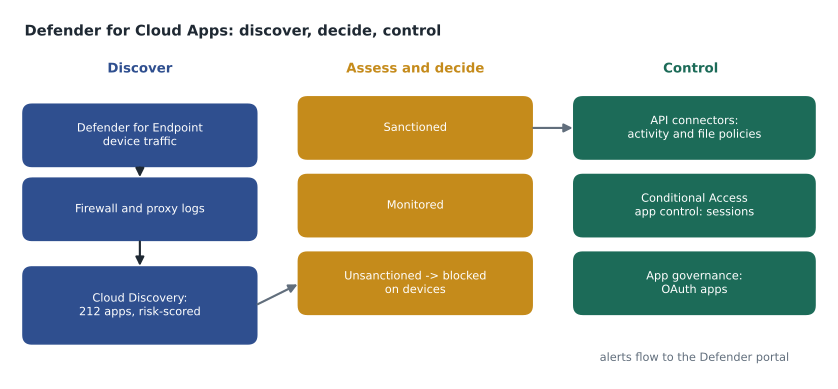
Defender for Cloud Apps is Microsoft's cloud access security broker, or CASB, with additional posture and application governance features. It does four jobs. It discovers which cloud applications people use, from network traffic, and rates their risk. It connects to sanctioned applications through their APIs to monitor activity, files and configuration. It applies policies that detect and respond to risky activity, both in real time through Conditional Access app control and after the fact through activity and file policies. And through app governance it watches OAuth applications, the third-party apps that users or administrators grant permission to act on their behalf in Microsoft 365 and other services.
Cloud Discovery
Cloud Discovery examines traffic to identify cloud applications. The simplest source is Defender for Endpoint: with the integration turned on, onboarded devices report the cloud services they reach, wherever they are, including laptops on home networks. Firewall and proxy logs can also be uploaded or streamed through a log collector, which covers devices that are not onboarded, such as guest networks. Each discovered app is matched to the cloud app catalogue, which scores tens of thousands of applications on general, security, compliance and legal factors, such as whether the provider supports multifactor authentication, encrypts data at rest, holds certifications, and states who owns uploaded data.
On November 2 the Cloud Discovery dashboard for the previous 30 days showed 212 applications in use from company devices. Most were expected: Microsoft 365, the payroll service, the point-of-sale vendor's portal, shipping carriers, supplier portals. Nadia asked Ama to filter for apps with a risk score of 5 or lower out of 10 and more than 100 megabytes uploaded. Five apps matched.
| App | Category | Risk score (of 10) | Users | Uploaded |
|---|---|---|---|---|
| A free PDF converter site | Productivity | 3 | 41 | 1.2 GB |
| A personal file-sharing service | Cloud storage | 4 | 9 | 3.8 GB |
| An AI writing assistant (free tier) | Generative AI | 4 | 17 | 0.3 GB |
| A note-taking app | Productivity | 5 | 6 | 0.2 GB |
| An online form builder | Productivity | 5 | 3 | 0.1 GB |
apps = [
    # name, risk score (10 = safest), users, GB uploaded
    ("PDF converter", 3, 41, 1.2),
    ("Personal file sharing", 4, 9, 3.8),
    ("AI writing assistant", 4, 17, 0.3),
    ("Note-taking app", 5, 6, 0.2),
    ("Form builder", 5, 3, 0.1),
]
def concern(a):
    name, score, users, gb = a
    return (10 - score) * (users + 10 * gb)   # low score, many users and big uploads raise concern

for a in sorted(apps, key=concern, reverse=True):
print(f"{a[0]:<22} concern {concern(a):6.1f}")PDF converter concern 371.0 Personal file sharing concern 282.0 AI writing assistant concern 120.0 Note-taking app concern 40.0 Form builder concern 20.0
What this code does
The program gives each app a concern value that grows when the risk score is low, when more people use it and when more data is uploaded to it. It then lists the apps from most to least concerning. The output puts the PDF converter first at 371 and the personal file-sharing service second at 282, with the AI writing assistant third, which is the order Nadia took the apps to the review group.
The concern measure is Nadia's invention, not a product feature, and she uses it only to start a conversation. The review group, Sunil, Carmen Ortiz and Grace Oduya, decided quickly. The PDF converter was unsanctioned: Microsoft 365 already converts documents, and invoices with supplier bank details had been uploaded to a site whose terms gave it rights over uploaded content. The personal file-sharing service was unsanctioned, and the nine users were contacted, because 3.8 gigabytes is a lot of company data in personal accounts. The AI writing assistant was marked monitored while Carmen's team reviewed the company's AI policy, with a note pointing users to the approved assistant in Microsoft 365. The note-taking app and form builder were left for the next review.
Sanctioning and blocking
Each discovered app can be marked sanctioned, unsanctioned or monitored, or left unmarked. With the Defender for Endpoint integration, marking an app unsanctioned can block it on onboarded devices: Defender for Cloud Apps creates URL indicators, and network protection blocks the app's domains on Windows devices, showing users a message. Monitored apps can show a warning that users can bypass, which records that they chose to continue. Blocking through endpoints works anywhere a device goes, which matters for laptops on home networks, but it needs network protection in block mode.
Nadia warned Ama that unsanctioning is only half a decision. Users who relied on the PDF converter still needed to convert documents, so the announcement told them how to do it in Word. Blocking without an alternative pushes people to the next unsafe site, which Cloud Discovery will dutifully report a month later.
App connectors and policies
For sanctioned applications that hold important data, app connectors use the provider's API to give Defender for Cloud Apps visibility into activity, users, files and configuration, and, for some apps, the ability to take governance actions such as suspending a user or removing a file share. The Microsoft 365 connector is the most important at Harrow & Finch; the company also connects its payroll service and its file-transfer service with suppliers. Connected apps feed the activity log, which can be searched by user, app, activity type, IP address and location.
Policies act on that data. Anomaly detection policies, built in and learning each user's baseline, cover patterns such as impossible travel, activity from infrequent countries, mass download, mass deletion, suspicious inbox rules and unusual file share activity. Activity policies let the team define their own conditions, such as an alert whenever someone outside IT creates an administrator in the payroll service. File policies scan files in connected apps for sensitive content, such as payment card numbers, and can quarantine files or remove public sharing. Session policies, through Conditional Access app control, act in real time: they can block downloads to unmanaged devices, apply sensitivity labels on download, or block uploads of sensitive files.
| Policy type | Works on | Harrow & Finch example |
|---|---|---|
| Anomaly detection | Built-in behavioural baselines | Mass download alert behind incident C |
| Activity policy | Activity from connected apps | Alert when an administrator is created in the payroll service |
| File policy | Files in connected apps | Remove public links from files containing card numbers |
| Session policy | Live sessions through Conditional Access app control | Block download of Confidential files to unmanaged devices |
| App governance policy | OAuth apps | Alert on new apps with high-privilege mail permissions |
Investigating alerts from Defender for Cloud Apps
Defender for Cloud Apps alerts appear in the Defender portal like any other, but their details live in the activity log of the connected app. Each alert links to the activities that triggered it, with the user, the app, the IP address and its location, the device and user agent, and the objects touched, such as files or mail rules. Ama learned to ask three questions of every one. Was the session the user's own, judged by device, location and timing against their history? What did the activity reach, judged by the files' labels and the app's data? And what happened next, judged by the activities after the alert and, through correlation, by any endpoint or email alerts on the same user?
Governance actions are available from the alert or the user's page in the connected app: suspend the user in the app, require the user to sign in again, remove a file's public link, or apply a label. For Microsoft 365 the identity actions overlap with those in Entra ID, which is why Nadia prefers to take them from the incident, so that every action on every product sits in one action center and one activity log.
Ama also set up one custom activity policy during the shift. It alerts when anyone downloads more than 50 files labelled Confidential or Highly Confidential from SharePoint or OneDrive in an hour, whatever their baseline. The anomaly policy watches for unusual behaviour; this one watches for unusual behaviour with the company's most sensitive data, which the review group thought deserved a fixed line as well as a learned one.
Worked problem
Resolving incident C
The mass download alert on October 20 showed a marketing coordinator downloading 640 files from a SharePoint site in 25 minutes, from her usual laptop at head office. Her baseline was about 20 files a day. Is this an attack, a data theft, or normal work?
Show solution
- Check the context in the alert and activity log: her usual device, an expected location, normal working hours. No sign of a stolen session.
- Check what was downloaded: product photographs for the spring catalogue, labelled General, from the marketing site she works in.
- Check what happened next on the device through Defender for Endpoint: the files were copied to a folder used by the design software. No uploads to personal cloud storage or USB.
- Ask her manager, not her, whether this was expected; the manager confirmed the catalogue deadline.
- Classify the alert as informational, expected activity. No tuning rule, because mass downloads by the same user in other circumstances should still alert.
Answer: Normal work: expected device, location, data and destination, confirmed by the manager. Close as expected activity without suppressing the anomaly policy.
Nadia praised the last step. A tuning rule that ignored mass downloads by the marketing team would have hidden exactly the alert the company would need if one of them were ever compromised or leaving to join a competitor.
App governance and OAuth apps
OAuth applications are a favourite route for attackers because a granted permission keeps working even after the user changes their password. An attacker who tricks a user into consenting to an app with permission to read and send mail has persistent access to that mailbox until the grant is revoked. App governance, part of Defender for Cloud Apps, inventories OAuth apps registered in or consented to by the tenant, shows their permissions, publisher verification, data access and usage, and raises alerts through built-in and custom policies, such as new apps with high-privilege permissions, apps with unusual data access, or apps that suddenly start sending mail.
On November 2 app governance listed an app called Mail Sorter Pro, from an unverified publisher, granted by three users the permissions to read and write their mail and to keep access while they were offline. It had been granted in September after a phishing message offering an inbox clean-up tool. It had accessed about 4,000 messages, mostly in one user's mailbox, and had not sent anything. Ama disabled the app through app governance, Nadia removed the user consents and the app's service principal in Microsoft Entra ID, and Renata's team changed the tenant's user consent settings so users can consent only to apps from verified publishers with low-risk permissions, with an admin consent workflow for everything else.
# Microsoft Graph PowerShell: review delegated grants for an app (shown as text)
Get-MgServicePrincipal -Filter "displayName eq 'Mail Sorter Pro'"
Get-MgOauth2PermissionGrant -Filter "clientId eq '<service-principal-object-id>'"
Remove-MgOauth2PermissionGrant -OAuth2PermissionGrantId '<grant-id>'
When an attacker uses an OAuth app this way, the SC-200 outline expects analysts to investigate and remediate the risk from Defender for Cloud Apps, and automatic attack disruption can now also act on a compromised OAuth app, as lesson 11 describes. The underlying lesson is the same as with mailbox rules: when cleaning up a compromised account, look for every way the attacker could keep access, not only the password.
Common mistakes
MistakeCloud Discovery needs firewall logs.
InsteadWith the Defender for Endpoint integration, onboarded devices report cloud app use from anywhere; logs add coverage for other devices.
MistakeUnsanctioning an app solves the problem.
InsteadUsers still need the task done; offer an approved alternative, or they move to another unsafe app.
MistakeA password reset removes an attacker's OAuth app access.
InsteadGranted OAuth permissions keep working until the grant is revoked or the app is disabled.
MistakeSuppress anomaly alerts for teams that often trigger them.
InsteadClose individual expected alerts; a broad suppression hides the case that matters.
Summary and key terms
- Defender for Cloud Apps discovers apps, connects to sanctioned ones, applies policies and governs OAuth apps.
- Cloud Discovery uses Defender for Endpoint and log sources, and scores apps from the catalogue.
- Apps can be sanctioned, monitored or unsanctioned; unsanctioned apps can be blocked through Defender for Endpoint network protection.
- App connectors give API visibility into activity, files and settings.
- Policies include anomaly detection, activity, file, session and app governance policies.
- App governance finds risky OAuth apps; remove grants and the service principal to end access.
- Cloud access security broker (CASB)
- A service that gives visibility and control over the use of cloud applications.
- Cloud Discovery
- Identification of cloud apps in use from network traffic and logs.
- App connector
- An API connection that lets Defender for Cloud Apps monitor and govern a cloud app.
- Conditional Access app control
- Real-time session monitoring and control for apps accessed through Conditional Access.
- OAuth app
- A third-party application granted permission to act on a user's or tenant's behalf.
- App governance
- Defender for Cloud Apps features that inventory, monitor and control OAuth apps.
Practice problems
Work each problem on paper first, then reveal the answer to check.
Which two apps did the review group unsanction?
Show answer
The free PDF converter and the personal file-sharing service.
How does Defender for Cloud Apps block an unsanctioned app on laptops at home?
Show answer
Through Defender for Endpoint network protection using indicators for the app's domains.
Why was incident C closed without a tuning rule?
Show answer
A broad rule would hide the same pattern if a marketing user were ever compromised or leaving.
Why does a password reset not end an OAuth app's access?
Show answer
The permission grant is separate from the password and stays valid until revoked.
What change did Renata's team make to user consent?
Show answer
Users can consent only to verified publishers with low-risk permissions; other apps go through admin consent.
Lesson quiz · 5 questions
Score 60% or more to complete this lesson.
Create a free account to save your progress, take quizzes and earn a certificate.