
MSAZ-340 · Lesson 12 of 12 · 20 min
Investigating a multi-stage incident
▶ Video coming soon A video version of this lesson is on the way.
Attack disruption contained Rosa Delgado's account at 09:58 on November 3. What it did not do was answer Nadia's question in full: what did the attacker touch, and what can they still touch? Answering it took Ama and Nadia the rest of the day. This final lesson follows that investigation from start to finish, using every part of the platform the course has covered, and ends with the report Ama wrote. It is also the kind of scenario the SC-200 exam describes as a complex attack: multi-stage, crossing several domains, with movement from one account to others.
The incident at a glance
The incident, number 4127, was titled as an adversary-in-the-middle phishing attack leading to business email compromise, with the suffix (attack disruption). It contained 14 alerts from four sources: Defender for Office 365, Microsoft Entra ID Protection, Defender for Cloud Apps and Defender XDR's own correlation detections. Its impacted assets were one user, Rosa; one mailbox, hers; and, as the investigation showed, 28 more mailboxes that received messages from her account. Defender for Endpoint contributed nothing, which was itself a finding: the attacker never touched a company device.
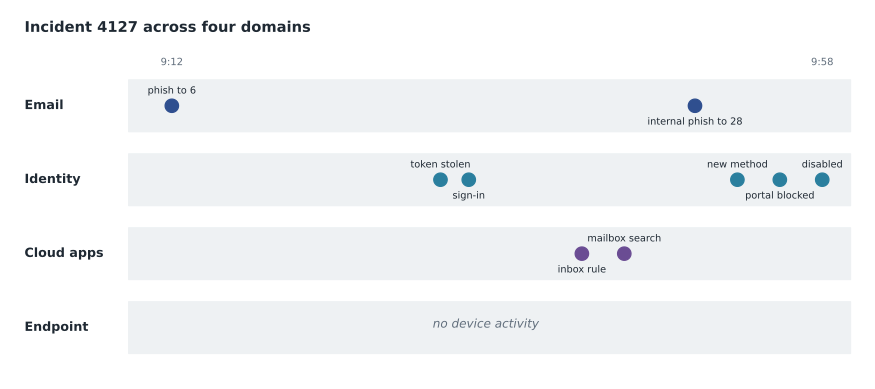
Stage by stage
Ama rebuilt the attack in order, mapping each step to a MITRE ATT&CK technique so the report would use the same language as the alerts and as Microsoft's threat analytics.
| Time | What happened | Evidence | MITRE ATT&CK |
|---|---|---|---|
| 09:12 | Phishing message about a staff schedule change delivered to 6 store managers | EmailEvents; email entity page | Phishing: spearphishing link |
| 09:31 | Rosa entered her password and code on a relay page; session token stolen | UrlClickEvents; Entra ID Protection alert | Steal web session cookie |
| 09:33 | Attacker signed in with the token from a hosting provider address | Sign-in logs; atypical sign-in alert | Valid accounts: cloud accounts |
| 09:41 | Inbox rule moved replies with the words schedule or payroll to an archive folder | CloudAppEvents; Purview Audit New-InboxRule | Hide artifacts: email hiding rules |
| 09:44 | Mailbox searched for invoice, bank and payroll; 112 messages read | Purview Audit MailItemsAccessed | Email collection |
| 09:49 | Internal phishing sent from Rosa's mailbox to 28 colleagues | EmailEvents (intra-organization) | Internal spearphishing |
| 09:52 | New authenticator app registered on Rosa's account | Audit logs: user registered security info | Account manipulation: additional authentication method |
| 09:55 | Sign-in to the Azure portal blocked by Conditional Access | Sign-in logs: failure, policy requires compliant device | Valid accounts (attempt) |
| 09:58 | Attack disruption disabled the user and revoked sessions | Action center | — |
Scoping with advanced hunting
The incident page told the story the correlation engine had assembled. Scoping meant checking for anything it might have missed, and that is the job of advanced hunting. MSAZ-342 teaches KQL properly; here Ama used four short queries Nadia keeps in the team's shared query library, each answering one question about scope.
// 1. Who else received the original phishing message?
EmailEvents
| where Timestamp between (datetime(2026-11-03 09:00) .. datetime(2026-11-03 12:00))
| where Subject has "schedule change" and SenderFromDomain == "rota-update.example"
| project Timestamp, RecipientEmailAddress, DeliveryAction, LatestDeliveryAction

// 2. Who clicked links in either message?
UrlClickEvents
| where Timestamp > datetime(2026-11-03 09:00)
| where Url has "rota-update.example" or NetworkMessageId in (internal_message_ids)
| project Timestamp, AccountUpn, Url, ActionType, IsClickedThrough

// 3. Did the attacker's address sign in to any other account?
AADSignInEventsBeta
| where Timestamp > datetime(2026-11-01)
| where IPAddress == "203.0.113.57"
| summarize Attempts = count(), Accounts = make_set(AccountUpn) by ErrorCode

// 4. Did any other user create a hiding rule this week?
CloudAppEvents
| where Timestamp > ago(7d)
| where ActionType == "New-InboxRule"
| project Timestamp, AccountDisplayName, RawEventData
The answers closed the scope. The original message reached six store managers; five had not clicked, and ZAP had removed it from their inboxes by 10:20. Of the 28 colleagues who received the internal phishing message, one, Ken Abara, an assistant manager at another store, had clicked at 10:02; by then the verdict had changed and Safe Links blocked him at the first page. The attacker's address had tried no other account at Harrow & Finch. No other hiding rules had been created that week. The second query also showed something worth recording: the IsClickedThrough value for Ken was false, confirming that he never reached the fake page.
Ama used the embedded Security Copilot summary to check her own reading of the incident and its guided response, which listed the same remediation steps she had already planned, plus one she had not: check whether the attacker had added Rosa's account to any mail-enabled groups or granted access to her calendar. They had not. Nadia's comment was that the assistant had been useful precisely because Ama had already formed her own view and was checking it, not adopting it.
Containment, eradication and recovery
With the scope known, the remaining work was to remove everything the attacker had left and to restore normal service safely. The steps follow the order lesson 11 described.
| Step | Action | Done by | Time |
|---|---|---|---|
| Contain | User disabled on premises and in Entra ID; sessions revoked | Attack disruption | 09:58 |
| Eradicate | Attacker's authenticator app removed from Rosa's account | Ama | 10:21 |
| Eradicate | Inbox rule removed; mailbox checked for forwarding and delegates (none) | Ama | 10:26 |
| Eradicate | 28 internal messages: 22 removed by ZAP, 6 soft-deleted from Threat Explorer | Automatic, then Ama | 10:20 to 10:34 |
| Prevent | Block indicators for the phishing domain and the relay page's domain; sender blocked in the tenant block list | Ama | 10:40 |
| Recover | Password reset; passkey registered in person with the store technician | Rosa, store technician | 11:30 |
| Recover | Account re-enabled from the action center with a recorded reason | Nadia | 11:40 |
| Communicate | Phone calls to Rosa and Ken; message to all store managers about the campaign | Nadia, Grace Oduya | 12:15 |
def minutes(t):
    h, m = map(int, t.split(":"))
    return h * 60 + m

events = [("09:12", "phishing delivered"), ("09:31", "token stolen"),
          ("09:33", "attacker sign-in"), ("09:58", "contained by disruption"),
          ("10:05", "analyst opens incident"), ("10:40", "eradication complete"),
          ("11:40", "account restored")]
t = {name: minutes(time) for time, name in events}

print(f"Delivery to compromise:        {t['token stolen'] - t['phishing delivered']:>3} min")
print(f"Attacker access:               {t['contained by disruption'] - t['attacker sign-in']:>3} min")
print(f"Containment to analyst:        {t['analyst opens incident'] - t['contained by disruption']:>3} min")
print(f"Analyst to eradication:        {t['eradication complete'] - t['analyst opens incident']:>3} min")
print(f"Compromise to full recovery: {t['account restored'] - t['token stolen']:>3} min")Delivery to compromise: 19 min Attacker access: 25 min Containment to analyst: 7 min Analyst to eradication: 35 min Compromise to full recovery: 129 min
What this code does
The program turns each clock time into minutes and subtracts pairs of events to get the intervals a security report usually states. The output shows 19 minutes from delivery to compromise, 25 minutes of attacker access, 7 minutes from containment to an analyst opening the incident, 35 minutes from then to the end of eradication, and 129 minutes from the credential theft to Rosa's account being fully restored.
Assessing the data
The attacker had read 112 messages. Ama exported the list from Purview Audit and gave it to Carmen Ortiz, who reviewed the messages with content search. Most were store schedules, delivery notices and head office announcements. Fourteen staff schedules included employees' personal phone numbers.
Carmen assessed the fourteen phone numbers under PIPEDA's test of a real risk of significant harm. Phone numbers alone, with no other sensitive data, read by an attacker whose evident aim was fraud through email rather than identity theft, did not meet the test, so no report to the Privacy Commissioner or notice to individuals was legally required. She recorded the breach in the register, which PIPEDA requires to be kept for 24 months, and the company told the fourteen employees anyway, so they could watch for unusual calls. Ama added the assessment to the incident's comments with a link to Carmen's register entry, because an auditor reading the incident later would otherwise not know the question had been asked.
Closing and learning
Ama resolved the incident with the classification true positive and the determination phishing, compromised account, and wrote the report Nadia asked for: one page, plain sentences, the timeline, the scope, the actions, the data assessment and three recommendations. Nadia reviewed it and added nothing to the facts, only one word to the title.
Keeping the record
Throughout the day, Ama recorded her work in the incident's activity log rather than in a private notebook. Each comment followed the same shape: what she checked, what she found, what she did, and the evidence, such as the query name or the audit record. Nadia explained why the habit matters. An incident record is read later by people who were not there: the next analyst on shift, Sunil preparing the board report, an auditor checking that breach assessments were made, or a lawyer if a supplier disputes a payment. A comment such as checked recipients, all clean tells them nothing; a comment that names the query, the six recipients, their delivery actions and the time of the check lets them verify it.
The incident also collected tasks for work that would outlive the day: the passkey rollout, the Conditional Access change, the monthly prerequisite check and the store operations manual update. Each task had an owner and a due date, and the incident stayed linked to them after it was resolved, so that a reader months later could see not only what happened but what changed because of it.
Worked problem
Choosing the lessons-learned actions
The attack succeeded because a session token was stolen through a relay page, which ordinary multifactor authentication does not stop, and it was contained quickly because attack disruption acted. Which three recommendations should the report make, and why those?
Show solution
- Phishing-resistant authentication for store managers and anyone who approves payments: passkeys or security keys cannot be relayed by a fake page because they are bound to the real site. Rosa's in-person passkey registration is the pilot; the rollout to all 23 store managers is planned for January 2027.
- Conditional Access that makes stolen tokens less useful: require a compliant or registered device for email and for registering security information, so a token used from a hosting provider is refused. The Azure portal sign-in was already blocked by such a policy, which shows it works.
- Keep attack disruption's prerequisites healthy: the incident was contained in 25 minutes only because Defender for Office 365, Entra ID Protection and Defender for Cloud Apps were all connected and the user was not excluded. Add a monthly check of the prerequisites to Ama's routine.
- Not recommended: more user training as the main fix. Training helps, and attack simulation starts in January, but a convincing relay page will always catch someone; the controls above work even when it does.
Answer: Phishing-resistant authentication for high-risk roles, Conditional Access that devalues stolen tokens, and monthly checks of the attack disruption prerequisites.
Sunil took the report to the November board meeting with the time comparison from lesson 11. The board approved the passkey rollout and asked for the same report format for every high-severity incident in future.
What the course has covered
Over four weeks Ama had worked a real queue with every Defender product: the unified platform and roles (lesson 1), incidents and alerts (2), Defender for Endpoint onboarding and configuration (3), device investigation and response (4), Defender for Office 365 (5), Defender for Identity (6), Defender for Cloud Apps (7), automated investigation and response (8), threat analytics and vulnerability management (9), Defender for Cloud alerts (10), attack disruption (11), and a multi-stage incident (12). The other SC-200 skills, Microsoft Sentinel's data, detections and automation and threat hunting with KQL, are the subjects of MSAZ-341 and MSAZ-342, and MSAZ-349 brings the whole outline together for the exam.
On her last shadow shift, Wednesday, November 11, Nadia asked Ama her own question back: what did the attacker touch, and what can they still touch? Ama answered for incident 4127 in four sentences, with evidence for each. Nadia told her that was the job.
Common mistakes
MistakeThe incident page shows the full scope of an attack.
InsteadCorrelation assembles the story; scoping queries confirm nothing was missed, such as other recipients or other accounts.
MistakeAn attack that never touched a device is less serious.
InsteadIdentity and email attacks can do as much harm; the empty endpoint lane is a finding, not reassurance.
MistakeThe fix for phishing is more training.
InsteadPhishing-resistant authentication and token-aware Conditional Access work even when someone is fooled.
MistakeSecurity Copilot's summary can be pasted into the report.
InsteadUse it to check your own reading; the analyst is accountable for the conclusions.
Summary and key terms
- A multi-stage incident should be rebuilt in time order and mapped to MITRE ATT&CK techniques.
- Scope with advanced hunting: other recipients, other clicks, other accounts from the attacker's address, other persistence.
- Contain, eradicate, recover and communicate in order, recording each step.
- Assess the data the attacker reached with the privacy officer under the applicable law.
- Resolve with a classification and determination, and write a short report with evidence and recommendations.
- Recommendations should fix the root cause: phishing-resistant authentication and Conditional Access against stolen tokens.
- Multi-stage attack
- An attack that moves through several stages, such as access, persistence and spread, often across domains.
- Scoping
- Establishing every account, device, mailbox and resource an attack affected.
- Eradication
- Removing everything the attacker left behind, such as rules, methods and messages.
- Phishing-resistant authentication
- Sign-in methods, such as passkeys and security keys, that a relay page cannot capture and reuse.
- Token protection
- Conditional Access controls that make stolen session tokens unusable elsewhere.
- Lessons learned
- The review after an incident that turns findings into changes.
Practice problems
Work each problem on paper first, then reveal the answer to check.
How many alerts and sources did incident 4127 have?
Show answer
14 alerts from four sources: Defender for Office 365, Entra ID Protection, Defender for Cloud Apps and Defender XDR correlation.
Why did Ken Abara's click cause no harm?
Show answer
Safe Links blocked him because the verdict had changed; IsClickedThrough was false.
What did the attacker register at 09:52, and why does it matter?
Show answer
A new authenticator app, which would let them sign in again later if not removed.
How long from compromise to full recovery?
Show answer
129 minutes, from 09:31 to 11:40.
What were the three recommendations?
Show answer
Phishing-resistant authentication for high-risk roles, Conditional Access against stolen tokens, and monthly checks of attack disruption prerequisites.
Lesson quiz · 5 questions
Score 60% or more to complete this lesson.
Create a free account to save your progress, take quizzes and earn a certificate.