
MSAZ-340 · Lesson 10 of 12 · 21 min
Defender for Cloud alerts
▶ Video coming soon A video version of this lesson is on the way.
At 23:18 on Saturday, October 31, Nadia's phone rang with a high-severity notification: an incident combining two Microsoft Defender for Cloud alerts on sthfsuppliercc, the storage account where suppliers drop price files and product images for the website team. The first alert said the account had been accessed from a suspicious IP address; the second, that an unusual amount of data had been extracted. Nadia was on call. She called Ama the next morning so they could walk through it together. This lesson covers how Defender for Cloud protects Azure and other cloud workloads, how its alerts reach the Defender portal, and how to investigate and respond to them.
Defender for Cloud and its workload protection plans
Microsoft Defender for Cloud does two jobs. Cloud security posture management assesses the configuration of Azure, Amazon Web Services and Google Cloud resources against security standards and shows recommendations, a secure score and, with the paid Defender CSPM plan, attack paths. Cloud workload protection detects threats against running resources through plans that are turned on per subscription or per resource. SC-900 covered the posture side in MSAZ-131; the SC-200 outline asks analysts to investigate and remediate alerts and incidents from Defender for Cloud's workload protections, which is this lesson's subject.
| Plan | Protects | Examples of what it detects |
|---|---|---|
| Defender for Servers (Plan 1 and Plan 2) | Windows and Linux machines in Azure, other clouds and on premises through Azure Arc | Through Defender for Endpoint: malware, suspicious processes; Plan 2 adds more, such as agentless scanning and file integrity monitoring |
| Defender for Storage | Blob, file and data lake storage | Access from suspicious addresses, unusual data extraction, malware uploads (with malware scanning) |
| Defender for SQL and open-source databases | Azure SQL, SQL on machines, PostgreSQL, MySQL | SQL injection, brute force, unusual access |
| Defender for Key Vault | Key vaults | Unusual access patterns, access from suspicious addresses |
| Defender for Resource Manager | Azure control plane operations | Suspicious management operations, use of exploitation toolkits |
| Defender for Containers, App Service, APIs, AI services | Kubernetes, web apps, APIs, AI workloads | Runtime threats and suspicious requests |
Harrow & Finch decided in November 2026, as MSAZ-131 described, to turn on Defender for Servers Plan 2, Defender for Storage with malware scanning, Defender for SQL and Defender for Key Vault on its production subscriptions, and Defender for Resource Manager across all subscriptions. Defender for Servers was already protecting the Azure virtual machines, and Defender for Storage had been turned on early for the supplier storage account as a pilot, only nine days before the alert fired.
How Defender for Cloud alerts reach the Defender portal
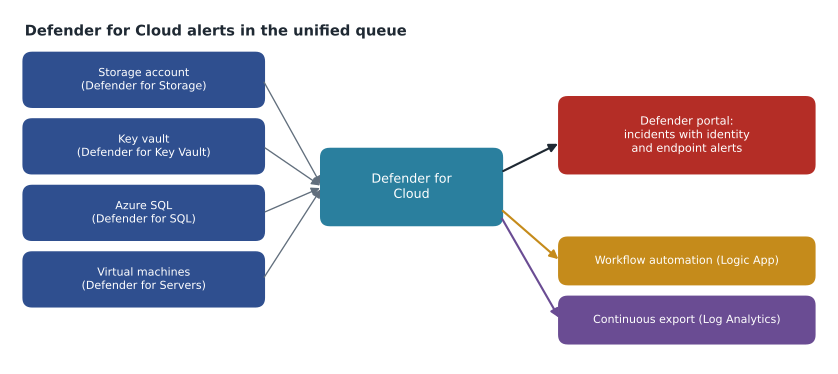
Defender for Cloud alerts appear in the Defender for Cloud pages in the Azure portal, and they also flow into Defender XDR, where they are correlated with other alerts into incidents in the same queue Ama works every day. Microsoft has been moving the Defender for Cloud experience itself into the Defender portal, so analysts increasingly see cloud workload alerts, recommendations and attack paths without leaving it. In the incident, cloud resources appear as assets alongside users and devices, and the alert's page shows the affected resource, the MITRE ATT&CK tactic, the details Microsoft collected, and recommended steps to mitigate and prevent.
Investigating the storage account alerts
The first alert's details showed 1,212 read and list operations between 22:47 and 23:09 from an IP address that Microsoft threat intelligence associated with anonymizing services, using a shared access signature, or SAS, token, not a Microsoft Entra identity. The second showed about 2.9 gigabytes read in that window, against a normal Saturday night of almost nothing. Both alerts were mapped to the exfiltration tactic.
A SAS token is a signed string that grants access to storage resources for a period, with the permissions written into it. Whoever holds the token has the access; there is no user to disable. So the first question was where the token had come from. The storage account's diagnostic logs, which the team sends to the Log Analytics workspace, showed the token's signed start and expiry times: it had been created in March 2026, valid for two years, with read and list permissions on the whole products container. Nobody at Harrow & Finch had created it. The outside web firm that hosts harrowfinch.com had, to let its image-processing job read product photos.
Marcus Feldt, the e-commerce manager, called the web firm on Sunday morning. Within an hour they found the token in a configuration file that a developer had pushed to a public code repository in September, while publishing a sample of their image pipeline. Automated scanners on the internet look for exactly such secrets, and someone had found it.
Cloud identities in cloud alerts
Cloud alerts often involve identities that are not people. A storage account can be read by a user, an application with a service principal, a managed identity, an account key or a SAS token, and each needs a different response. A user can be disabled and their sessions revoked. A service principal's secret or certificate can be rotated, or the application disabled. A managed identity's role assignments can be removed. An account key can be rotated, and a SAS token signed with it dies with it. The storage logs record which kind of credential each request used, which is why the first thing Nadia did on Saturday night was check the authentication type field rather than look for a user to disable.
Defender for Cloud's alert details usually include the principal or credential type, the source address and its threat intelligence, the operations and their count, and a link to the relevant logs. When the logs are not enabled, the investigation stops at the alert, so Harrow & Finch's policy is that every production storage account, key vault and database sends diagnostic logs to the Log Analytics workspace that Sentinel uses. The supplier account had been added to that policy only a month earlier, which is the only reason the team could say exactly which 1,212 blobs were read.
Worked problem
Responding to a leaked SAS token
The token grants read and list access to the products container until March 2028. It is account-key signed, so it cannot be revoked on its own. The container holds product images, supplier price files and, as it turned out, four spreadsheets of supplier contacts. What should the team do?
Show solution
- Contain: rotate the storage account key that signed the token. Every SAS signed with that key stops working at once. First confirm which systems use the key or SAS tokens signed with it, so they can be given new credentials; here only the web firm's job and one internal script did.
- Prevent recurrence: move the web firm's job to a user delegation SAS, which is signed with Microsoft Entra credentials, can be short-lived and can be revoked, or better, to a managed identity with a role assignment. Then turn off shared key authorization on the account, so account-key SAS tokens cannot be created at all.
- Scope: use the storage logs to list exactly which blobs the address read. The 2.9 gigabytes were mostly product images, which are public on the website anyway, plus all twelve supplier price files and the four contact spreadsheets.
- Assess: give the list to the privacy officer and to the buyers, because price files are commercially sensitive and contact sheets contain personal information.
- Ask the web firm to remove the secret from the repository history, and to check what else it can reach.
- Record the incident, link the storage log query, and classify it as a true positive.
Answer: Rotate the signing key to kill the token, move the job to a managed identity or user delegation SAS, disable shared key access, scope exactly what was read, assess the data with privacy and the business, and have the vendor remove the secret.
# Blobs read by the suspicious address, from the storage logs (summarized)
read = {
    "product images": (1_180, 2_841.0),     # (count, megabytes)
    "supplier price files": (12, 38.4),
    "supplier contact sheets": (4, 1.6),
    "readme and index files": (16, 0.2),
}
total_count = sum(c for c, _ in read.values())
total_mb = sum(m for _, m in read.values())
print(f"{total_count} blobs, {total_mb:,.1f} MB read")
for kind, (c, mb) in read.items():
    print(f"  {kind:<24} {c:>5} blobs  {mb / total_mb * 100:5.1f} in 100 of the data")
sensitive = read["supplier price files"][0] + read["supplier contact sheets"][0]
print(f"Sensitive blobs to assess: {sensitive}")1212 blobs, 2,881.2 MB read product images 1180 blobs 98.6 in 100 of the data supplier price files 12 blobs 1.3 in 100 of the data supplier contact sheets 4 blobs 0.1 in 100 of the data readme and index files 16 blobs 0.0 in 100 of the data Sensitive blobs to assess: 16
What this code does
The program adds up the blobs and megabytes the suspicious address read in each category, taken from the storage logs. It prints the totals, the share of the data in each category and the number of sensitive blobs. The output shows 1,212 blobs and 2,881.2 megabytes, almost all of it product images (98.6 in 100 of the data), and 16 sensitive blobs, the price files and contact sheets, that needed a proper assessment.
Carmen concluded that the four contact sheets held business names, work phone numbers and work email addresses of supplier staff. Under PIPEDA, business contact information used to communicate with people about their work is largely outside the Act's privacy protections, but the company still notified the suppliers as a courtesy and recorded the breach in its register. The price files were the larger worry for the buyers, who warned the twelve suppliers that their prices might be in a competitor's hands.
Other Defender for Cloud alerts Ama practised on
Defender for Cloud can generate sample alerts for each plan, which create realistic test alerts on a chosen resource without any real attack. Ama generated samples for Key Vault, SQL and Resource Manager on the non-production subscription and practised the same routine on each: read the alert's details and tactic, identify the identity or token used, check the resource's logs for scope, follow the recommended mitigation, and look for the prevention step that would stop it recurring.
| Sample alert | What it would mean | First response steps |
|---|---|---|
| Unusual access to a key vault from a suspicious IP | Someone with a valid identity or token is reading secrets from an unexpected place | Identify the identity in the vault logs; revoke or rotate it; rotate the secrets read |
| Potential SQL injection | An application passes unsafe input to the database | Find the query and the application; fix the code; check what data was returned |
| Suspicious invocation of a high-risk operation in Resource Manager | An identity performed operations typical of attackers, such as listing keys of many resources | Check the identity and its sign-ins; revoke sessions; review role assignments |
| Malicious file uploaded to storage (malware scanning) | A file with a malware verdict was uploaded | Quarantine or delete the blob; find the uploader; check downstream use |
Managing alerts and automation
Defender for Cloud alerts can be suppressed with suppression rules, which match alert type, resource, IP address and other properties and dismiss matching alerts automatically, with an optional expiry. Workflow automation can trigger an Azure Logic App when an alert or recommendation matches conditions, for example to post high-severity cloud alerts to the security team's Teams channel or open a ticket. Continuous export sends alerts and recommendations to a Log Analytics workspace or Event Hubs for longer retention and reporting, and email notifications go to subscription owners and nominated contacts. With the unified platform, many teams handle automation for cloud alerts through Sentinel automation rules and playbooks in the Defender portal instead, which MSAZ-341 covers.
Nadia added one item to the incident's lessons-learned task: the storage account had allowed shared key access since it was created, which is the default. Renata's team added an Azure Policy assignment to audit storage accounts with shared key access allowed and planned to deny it on new accounts in production from January 2027. The fix that matters most, she said, is rarely the one made during the incident.
Common mistakes
MistakeDisabling a user stops access through a SAS token.
InsteadA SAS token has no user; rotate the signing key, or revoke a user delegation SAS, to stop it.
MistakeDefender for Cloud alerts must be worked in the Azure portal.
InsteadThey flow into Defender XDR incidents in the Defender portal alongside other alerts.
MistakeIf most of the data read was public, the incident is minor.
InsteadScope every item: a few sensitive files among many public ones still need assessment.
MistakeSuppression rules are the best fix for repeated cloud alerts.
InsteadSuppress only confirmed benign patterns; fix the configuration behind real ones.
Summary and key terms
- Defender for Cloud combines posture management with workload protection plans for servers, storage, databases, key vaults, Resource Manager and more.
- Its alerts flow into Defender XDR incidents, with cloud resources as assets.
- Investigate cloud alerts by identifying the identity or token, checking resource logs for scope, and following mitigation and prevention steps.
- Account-key SAS tokens cannot be revoked individually; rotate the key, and prefer managed identities or user delegation SAS.
- Sample alerts let analysts practise safely.
- Suppression rules, workflow automation, continuous export and notifications manage cloud alerts; Sentinel automation is an alternative in the unified platform.
- Cloud workload protection
- Threat detection for running cloud resources such as servers, storage and databases.
- Shared access signature (SAS)
- A signed token granting time-limited access to storage resources.
- User delegation SAS
- A SAS signed with Microsoft Entra credentials, which can be short-lived and revoked.
- Shared key authorization
- Access to storage using the account keys, which also sign account-key SAS tokens.
- Sample alert
- A test alert Defender for Cloud generates for practice without a real attack.
- Workflow automation
- A Defender for Cloud feature that runs a Logic App when alerts or recommendations match conditions.
Practice problems
Work each problem on paper first, then reveal the answer to check.
What did the two storage alerts report?
Show answer
Access from a suspicious IP address and an unusual amount of data extracted, both using a SAS token.
Where had the token come from?
Show answer
The web firm created it and a developer pushed it to a public code repository in a configuration file.
How was the token stopped?
Show answer
By rotating the storage account key that signed it.
How many sensitive blobs needed assessment?
Show answer
Sixteen: twelve price files and four contact sheets.
What prevention step did Renata's team add?
Show answer
An Azure Policy to audit storage accounts that allow shared key access, with denial planned for new production accounts.
Lesson quiz · 5 questions
Score 60% or more to complete this lesson.
Create a free account to save your progress, take quizzes and earn a certificate.