
MSAZ-309 · Lesson 7 of 12 · 21 min
Review: AI capabilities
▶ Video coming soon A video version of this lesson is on the way.
The third skill group, implementing AI capabilities in database solutions, is worth 25 to 30 parts in 100. It is the newest material in the outline and the area where Hana scored lowest on the diagnostic. By the time she reaches this review in the spring she will have finished MSAZ-301, which teaches the group in depth. This lesson is a revision map. It lists the decisions the exam expects, the functions it names, and the details most often used to separate right answers from plausible wrong ones.
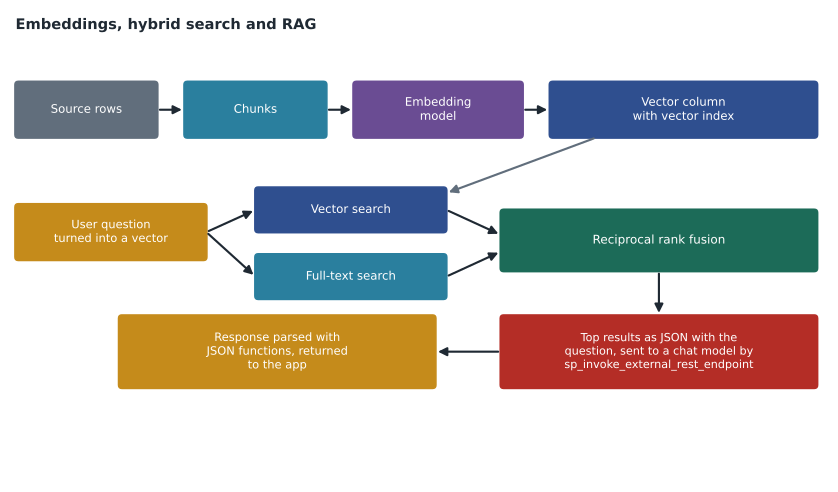
The group has three areas: models and embeddings, intelligent search, and retrieval-augmented generation (RAG). They build on each other. Embeddings are created by a model, stored as vectors, searched by distance, and the search results are sent back to a model to produce an answer.
Evaluating and creating external models
An external model is a database object that describes an AI model endpoint the engine can call. CREATE EXTERNAL MODEL names the location (an HTTPS endpoint), the API format (such as Azure OpenAI, OpenAI or Ollama, with ONNX Runtime for local models on Windows), the model type (EMBEDDINGS is the type used for AI_GENERATE_EMBEDDINGS), the model name and a credential. Creating one needs the CREATE EXTERNAL MODEL permission; using it needs EXECUTE on the model. The feature applies to SQL Server 2025, Azure SQL Database, SQL database in Fabric and Managed Instance with the always-up-to-date update policy.
Evaluating a model is a listed skill. The criteria in the outline are multimodal support (text and images), multilanguage support, model size and structured output. A larger embedding model often gives better search quality but produces longer vectors, which cost more storage and slower search. A model that supports many languages matters if product reviews arrive in French and English. Structured output, such as a model that returns JSON matching a schema, matters for RAG answers that an app must parse. A question about a bilingual product list with a small storage budget is testing whether the candidate weighs these together rather than picking the biggest model.
Embedding maintenance and chunking
Embeddings go stale when the source text changes. The outline lists seven ways to keep them current: table triggers, change tracking, Azure Functions with the SQL trigger binding, Azure Logic Apps, change data capture, change event streaming and Microsoft Foundry. A trigger that calls a model inside the insert would slow every write and fail the write if the model is unavailable, so it is rarely the best answer. Change tracking with a scheduled job suits batches, such as refreshing product embeddings every few minutes. The Functions SQL trigger runs code soon after changes and suits near-real-time refresh with custom logic. CES pushes events for many consumers. The exam usually wants the method that meets the freshness requirement without adding work to the write path.
Choosing columns is a skill of its own. An embedding should include the text that carries meaning for the search: a product's name, description and key attributes, not its internal ID or price. Long text must be split into chunks, because models have input limits and because one vector for a whole manual blurs its meaning. Chunks are often a few hundred tokens with some overlap, so a sentence cut at a boundary still appears whole in one chunk. AI_GENERATE_CHUNKS can split text inside the engine. Each chunk is stored as its own row with a reference to the source document.
Vector data and functions
The vector data type stores an array of numbers, declared with its number of dimensions, such as vector(1536). Values are stored in an optimized binary format and shown as JSON arrays. Four functions are named: VECTOR_DISTANCE returns the distance between two vectors with a chosen metric; VECTOR_NORMALIZE scales a vector to length one; VECTORPROPERTY returns properties such as dimensions; and VECTOR_SEARCH finds the nearest vectors using a vector index. The three metrics are cosine, euclidean and dot. Cosine distance is one minus the cosine similarity, so it runs from 0 for identical direction to 2 for opposite direction. For vectors normalized to length one, cosine and dot product give the same order of results, which is why many models' vectors can be searched with either.
import math

def cosine_distance(a, b):
    dot = sum(x * y for x, y in zip(a, b))
    norm_a = math.sqrt(sum(x * x for x in a))
    norm_b = math.sqrt(sum(y * y for y in b))
    return 1 - dot / (norm_a * norm_b)

question = [0.9, 0.1, 0.2]
reviews = {
    "Pan warped on high heat": [0.8, 0.2, 0.1],
    "Lid fits perfectly":      [0.1, 0.9, 0.3],
    "Handle came loose":       [0.6, 0.1, 0.7],
}
for text, vec in sorted(reviews.items(), key=lambda kv: cosine_distance(question, kv[1])):
print(f"{cosine_distance(question, vec):.3f} {text}")0.013 Pan warped on high heat 0.198 Handle came loose 0.729 Lid fits perfectly
What this code does
The program compares a short question vector with three review vectors, each only three numbers long so the arithmetic is easy to follow. For each pair it measures how closely the two point in the same direction and turns that into a distance, where 0 means the same direction. It prints the reviews from closest to farthest, which is the order a vector search would return them in.
Real embeddings have hundreds or thousands of dimensions, but the idea is the same: the smaller the distance, the more alike the meanings. In the result, the warped-pan review is closest to the question, the loose handle next, and the lid review farthest.
Exact and approximate search
Exact nearest neighbour search (ENN, also called kNN) compares the query vector with every stored vector. It is always correct but slows down as the table grows. Approximate nearest neighbour search (ANN) uses an index, in SQL a DiskANN vector index, to find very close matches quickly without checking every row. It may occasionally miss a true nearest neighbour, which is measured as recall. The rule of thumb: for small tables, up to tens of thousands of rows, or when perfect accuracy is required, ENN with VECTOR_DISTANCE in an ORDER BY is fine. For large tables with latency targets, ANN with a vector index and VECTOR_SEARCH is the answer.
Vector indexes and VECTOR_SEARCH are generally available in Azure SQL Database, SQL database in Fabric and Managed Instance with the always-up-to-date policy, and in preview in SQL Server 2025, where PREVIEW_FEATURES must be on. An index is created with CREATE VECTOR INDEX and a metric; VECTOR_SEARCH uses it only when the query asks for the same metric on the same column. Current syntax uses SELECT TOP (n) WITH APPROXIMATE over VECTOR_SEARCH and orders by its distance column. A table with a vector index cannot be truncated, and the current index version needs at least 100 rows before it can be created. Questions may test any of those details.
DECLARE @q vector(1536) = AI_GENERATE_EMBEDDINGS(N'pan warped after heating' USE MODEL ReviewEmbedder);

SELECT TOP (10) WITH APPROXIMATE r.ReviewId, r.Title, s.distance
FROM VECTOR_SEARCH(
        TABLE = catalog.ProductReview AS r,
        COLUMN = Embedding,
        SIMILAR_TO = @q,
        METRIC = 'cosine') AS s
ORDER BY s.distance;
Full-text, vector and hybrid search
Full-text search matches words and phrases, with stemming and ranking, and is excellent for exact terms such as a product code SKU-48213 or a brand name. Vector search matches meaning and finds 'the pan bent when hot' for a query about warping, even though no words are shared, but it can miss exact codes. Hybrid search runs both and combines the results. The outline names reciprocal rank fusion (RRF) as the combining method. Each result gets a score of one over (k plus its rank) in each list, with k usually 60, and the scores are added. A document that ranks well in both lists rises to the top; one that appears in only one list still counts.
k = 60
full_text = ["SKU-48213 manual", "Warranty terms", "Pan care guide"]
vector    = ["Pan care guide", "Warped pan review", "SKU-48213 manual"]

scores = {}
for ranking in (full_text, vector):
    for rank, doc in enumerate(ranking, start=1):
        scores[doc] = scores.get(doc, 0) + 1 / (k + rank)

for doc, score in sorted(scores.items(), key=lambda kv: -kv[1]):
print(f"{score:.5f} {doc}")0.03227 SKU-48213 manual 0.03227 Pan care guide 0.01613 Warranty terms 0.01613 Warped pan review
What this code does
The program takes two ranked lists of documents, one from a word search and one from a meaning search. Every document earns a small score from each list it appears in, larger when it is near the top, using one divided by sixty plus its position. The scores from both lists are added, and the printout shows the combined order, where documents found by both searches come first.
The SKU manual and the care guide appear in both lists, so they rise to the top; the warranty terms and the warped-pan review each appear only once. Evaluating search, the last skill in this area, means measuring how often the right documents appear in the top results for a set of test questions, and how long queries take, before and after a change such as adding a vector index or switching to hybrid search.
Retrieval-augmented generation
RAG answers a question by first retrieving relevant data and then asking a language model to answer using only that data. In the database, the steps named in the outline are: identify suitable use cases; build a prompt; convert the retrieved rows to JSON, usually with FOR JSON or JSON_ARRAYAGG; send the prompt and data to a chat model with sp_invoke_external_rest_endpoint; and extract the answer from the JSON response with JSON_VALUE or OPENJSON. Good use cases have a body of trusted data the model was not trained on, such as Finch Rewards' current offers, store hours and policies. Poor use cases need exact arithmetic or must never produce wrong text, such as calculating a member's balance, which plain T-SQL does better.
sp_invoke_external_rest_endpoint calls an HTTPS endpoint and returns the status and response. It is on by default in Azure SQL Database and SQL database in Fabric, and must be enabled in SQL Server 2025 and Managed Instance. The caller needs EXECUTE ANY EXTERNAL ENDPOINT, and a database scoped credential can supply a managed identity. In Azure SQL the endpoint must be on an allowed list of Azure service domains. The default timeout is 30 seconds. A return value of 0 means the HTTP call returned a 2xx status. Securing the model endpoint with managed identity, covered in lesson 5, applies here too.
Worked problem
ENN or ANN?
Finch Rewards wants semantic search over 2,400 offer descriptions in Azure SQL Database. Results must be returned in under 200 milliseconds and must always include the truly closest offers. Later, the same feature will search 9 million product review chunks. What search method fits each case?
Show solution
- 2,400 vectors is a small set; comparing every vector with VECTOR_DISTANCE is fast and always exact.
- The requirement to always include the truly closest offers favours exact search.
- 9 million chunks is large; scanning every vector would be too slow for an interactive search.
- A DiskANN vector index with VECTOR_SEARCH and TOP (n) WITH APPROXIMATE gives fast results with high recall.
Answer: Use exact search with VECTOR_DISTANCE for the 2,400 offers, and approximate search with a vector index and VECTOR_SEARCH for the 9 million review chunks, measuring recall to confirm quality.
Common mistakes
MistakeVector search always finds exact product codes better than full-text search.
InsteadFull-text search is better for exact terms; vector search finds meaning. Hybrid search combines them.
MistakeAn approximate vector index is always the right choice.
InsteadFor small tables or when exact results are required, exact search with VECTOR_DISTANCE is simpler and correct.
MistakeA table trigger that calls the embedding model is the best way to keep embeddings fresh.
InsteadIt slows every write and fails writes when the model is down; use change tracking, the Functions trigger or CES.
MistakeVECTOR_SEARCH is generally available on every platform.
InsteadIt is generally available in Azure SQL Database, Fabric and Managed Instance with always-up-to-date, and a preview in SQL Server 2025.
MistakeRAG is the best way to calculate a member's points balance.
InsteadExact calculations belong in T-SQL; RAG suits questions answered from trusted text.
Summary and key terms
- External models describe AI endpoints; creating them needs CREATE EXTERNAL MODEL, and using them needs EXECUTE on the model.
- Evaluate models by modality, languages, size and structured output; keep embeddings fresh without slowing writes.
- Embed meaningful columns, chunk long text with overlap, and store each chunk with a reference to its source.
- Know VECTOR_DISTANCE, VECTOR_NORMALIZE, VECTORPROPERTY and VECTOR_SEARCH, and the cosine, euclidean and dot metrics.
- Use exact search for small or must-be-exact cases and ANN with a vector index for large tables; combine full-text and vector results with RRF.
- RAG retrieves data, converts it to JSON, calls a model with sp_invoke_external_rest_endpoint and parses the response.
- Embedding
- A vector of numbers produced by a model that represents the meaning of text or another input.
- Cosine distance
- One minus the cosine similarity of two vectors; 0 means the same direction.
- ANN
- Approximate nearest neighbour search, which uses an index to find close vectors quickly with high but not perfect recall.
- ENN
- Exact nearest neighbour search, which compares the query with every stored vector.
- Reciprocal rank fusion
- A method of combining ranked lists by adding one over k plus the rank from each list.
- Retrieval-augmented generation
- Answering a question by retrieving relevant data and asking a model to answer using it.
Practice problems
Work each problem on paper first, then reveal the answer to check.
Which function finds nearest vectors using a vector index?
Show answer
VECTOR_SEARCH.
What value of k is usually used in reciprocal rank fusion?
Show answer
60.
Why is full-text search still needed alongside vector search?
Show answer
It matches exact terms such as product codes that vector search can miss.
What must be turned on to use VECTOR_SEARCH in SQL Server 2025?
Show answer
The PREVIEW_FEATURES database scoped configuration.
Which procedure sends a prompt to a chat model from T-SQL?
Show answer
sp_invoke_external_rest_endpoint.
Lesson quiz · 5 questions
Score 60% or more to complete this lesson.
Create a free account to save your progress, take quizzes and earn a certificate.