
MSAZ-309 · Lesson 5 of 12 · 21 min
Review: securing database solutions
▶ Video coming soon A video version of this lesson is on the way.
Security is half of the second skill group, which is worth 35 to 40 parts in 100. On DP-800 it is security from a developer's point of view. A database administrator exam asks who manages keys and audits; a developer exam asks which feature an application needs, what it means for the queries the application runs, and how to connect services to each other without passwords. Hana studied most of these features in the MSAZ-281 clinic. This review sets out the decisions the exam is likely to test and the detail that most often decides them.
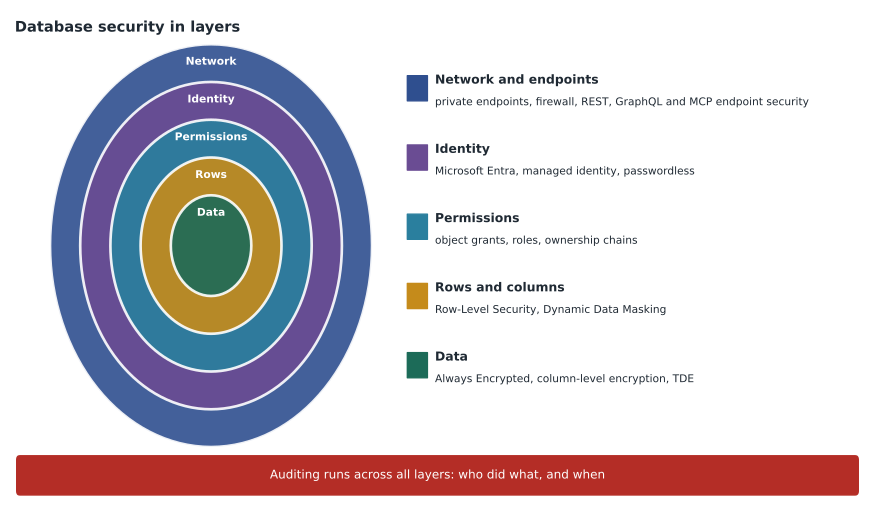
The data security area lists eight skills: encryption, including Always Encrypted and column-level encryption; Dynamic Data Masking; Row-Level Security; object-level permissions; secure database access, including passwordless authentication; auditing; securing model endpoints, including with managed identity; and securing GraphQL, REST and MCP endpoints.
Encryption: what each option protects against
Three kinds of encryption appear in questions, and the right one depends on who the data must be protected from. Transparent data encryption (TDE) encrypts data files and backups at rest. It protects against someone who steals a disk or a backup file, but anyone who can query the database sees plaintext. TDE is on by default in Azure SQL Database, so it is rarely the answer to a developer question unless the scenario is about backups or storage.
Always Encrypted encrypts chosen columns in the client driver, so the database engine never sees the plaintext or the keys. It protects against database administrators, cloud operators and anyone with full access to the server. The cost is that the engine cannot do most operations on the encrypted values. Deterministic encryption allows equality comparisons, joins and grouping; randomized encryption is stronger but allows none of those. Always Encrypted with secure enclaves lets the engine perform richer operations, such as range comparisons and pattern matching, inside a protected memory area. The application must connect with a driver that supports Always Encrypted and must be able to reach the column master key, typically in Azure Key Vault.
Column-level encryption with T-SQL functions such as ENCRYPTBYKEY and DECRYPTBYKEY encrypts values with keys held in the database. The engine can decrypt them for any user who has permission to open the key, so it protects against people without that permission but not against administrators. It also requires changing queries to call the decrypt function. The exam usually prefers Always Encrypted when the requirement says administrators or the cloud provider must not see the data.
| Requirement | Best fit | Why |
|---|---|---|
| Stolen backup files must be unreadable | TDE | It encrypts files and backups at rest |
| DBAs must never see card numbers | Always Encrypted | Keys stay with the client; the engine sees only ciphertext |
| Look up a member by exact encrypted email | Always Encrypted, deterministic | Deterministic encryption allows equality searches |
| Search encrypted values by range | Always Encrypted with secure enclaves | Enclaves allow richer operations on protected data |
| Only users with a key permission can read a column, inside T-SQL | Column-level encryption with ENCRYPTBYKEY | The engine decrypts for principals allowed to open the key |
Dynamic Data Masking
Dynamic Data Masking (DDM) hides part or all of a column's value in query results for users who lack the UNMASK permission. Masks include default, email, partial and random. A support agent can see m•••@example.com instead of a full address. The underlying data is unchanged, and users with UNMASK see real values. UNMASK can be granted for the whole database or, more finely, at schema, table or column level.
The key exam point is that DDM is not encryption and not a strong barrier. A user who can run ad hoc queries can sometimes infer masked values, for example by filtering on the first letters of the Email column and narrowing the results step by step. So DDM suits reducing casual exposure in an application's screens and reports, while Always Encrypted or permissions suit real protection. A question that asks for the simplest way to hide most of a phone number from support staff without changing the application points to DDM. A question that says data must be protected from privileged users does not.
Row-Level Security
Row-Level Security (RLS) filters which rows a user can see or change, using a security policy that applies an inline table-valued predicate function to a table. Filter predicates silently remove rows from reads. Block predicates stop inserts, updates or deletes that would break the rule, and there are separate block predicates for after insert, after update, before update and before delete. The predicate function usually compares a column in the row with something about the session, such as USER_NAME() or a value set with sp_set_session_context.
In Finch Rewards, store managers should see only their own store's transactions. An RLS policy on PointsTransaction with a filter predicate comparing StoreId with a store ID set in SESSION_CONTEXT does this without changing every query. The application sets the session context after connecting, using a read-only key so the value cannot be changed later in the session. A common wrong answer adds a WHERE clause to each stored procedure, which works until someone writes a new query and forgets it.
CREATE FUNCTION security.fn_StoreFilter (@StoreId int)
RETURNS TABLE WITH SCHEMABINDING
AS RETURN SELECT 1 AS ok
   WHERE @StoreId = CAST(SESSION_CONTEXT(N'StoreId') AS int)
      OR IS_MEMBER('rewards_admin') = 1;
GO
CREATE SECURITY POLICY security.StorePolicy
    ADD FILTER PREDICATE security.fn_StoreFilter(StoreId) ON rewards.PointsTransaction,
    ADD BLOCK PREDICATE security.fn_StoreFilter(StoreId) ON rewards.PointsTransaction AFTER INSERT
    WITH (STATE = ON);
Object-level permissions and ownership chains
Permissions are granted on objects such as tables, views, procedures, functions, schemas and external models. GRANT gives a permission, DENY explicitly blocks it and overrides grants, and REVOKE removes a grant or a deny. Granting on a schema covers every object in it, including those created later. Roles group permissions; the application's user is added to a role rather than granted permissions one by one.
Ownership chaining lets an application use a view or procedure without permission on the tables underneath, as long as the objects share an owner. This is the standard way to expose only what an application needs. EXECUTE on a procedure that updates PointsTransaction lets the app post points without UPDATE on the table. The chain breaks when objects have different owners, or when a procedure uses dynamic SQL, because dynamic SQL is checked against the caller's permissions. A procedure that uses dynamic SQL may need EXECUTE AS, or a certificate signature, to work without granting table permissions.
Passwordless access and managed identity
The outline asks for secure database access, including passwordless authentication. In Azure, that means Microsoft Entra authentication. An app running on App Service, Functions, Container Apps or a virtual machine can use a managed identity, which Azure creates and rotates. In the database, the developer creates a contained user from the external provider, CREATE USER [app-name] FROM EXTERNAL PROVIDER, and grants it a role. The connection string uses an authentication setting such as Active Directory Managed Identity or Active Directory Default, and contains no password.
The same idea secures model endpoints. When the database calls an Azure OpenAI or Microsoft Foundry endpoint, through an external model or sp_invoke_external_rest_endpoint, it can authenticate with the server's managed identity through a database scoped credential whose identity is 'Managed Identity'. The model resource then grants that identity a role such as Cognitive Services OpenAI User. No API key is stored in the database. On SQL Server 2025 outside Azure, the server must be connected to Azure Arc to have a managed identity. A question that offers storing the API key in a table, or in a stored procedure's text, is offering a wrong answer.
Securing REST, GraphQL and MCP endpoints
Data API builder (DAB) exposes tables, views and stored procedures as REST and GraphQL endpoints, and recent versions can also act as an MCP server. Securing those endpoints is a listed skill. The pieces are: authentication, usually Microsoft Entra ID through the configured provider; roles in the DAB configuration, with each entity granting actions such as read or create to specific roles; field-level include and exclude lists, so sensitive columns never leave the database; and database policies, which add a filter such as @item.MemberId eq @claims.memberId so a caller sees only their own rows.
The anonymous role should get only what is truly public, such as the list of stores and their opening hours. Member data needs an authenticated role and an item-level policy. The connection from DAB to the database should use a managed identity with the least privilege needed. Behind all of this sits the network layer: private endpoints and firewall rules so the database cannot be reached except through the intended path.
Auditing
Auditing records database events to a storage account, a Log Analytics workspace or Event Hubs. In Azure SQL Database it can be set at the server level, which covers every database on the logical server, or at the database level. The default audit action groups capture successful and failed logins and batch completions. Auditing answers 'who did what and when', which is what compliance questions usually want. Ledger answers a different question, 'has this data been altered', and Microsoft Defender for SQL looks for threats such as SQL injection patterns. If a question asks for a record of every query a support user runs, auditing is the answer; if it asks to detect unusual access, Defender is.
Credentials, keys and Entra-only authentication
Several security features depend on objects that are easy to forget in a question. A database scoped credential stores the identity, or the secret, the engine uses to reach an outside resource, such as a model endpoint or a storage account. Creating one with a secret requires a database master key to protect that secret; a credential that uses a managed identity stores no secret. External models, external tables and sp_invoke_external_rest_endpoint all refer to credentials by name, so an ordering question about any of them usually starts with the master key or the credential.
Microsoft Entra-only authentication turns off SQL authentication on a logical server or managed instance, so every connection must use an Entra identity. It is the strongest way to meet a requirement that no passwords be used to connect, because it removes the option entirely rather than relying on everyone to avoid it. For developers working locally, the connection setting Active Directory Default lets the same code use the developer's own Entra sign-in on a laptop and the app's managed identity in Azure, which is why it often appears in correct answers about passwordless access across environments.
Worked problem
Choosing a protection for member email
Finch Rewards support agents must see members' email addresses in a masked form, but must be able to look members up when the member reads out their full address on the phone. Database administrators may see full values. What is the simplest design that meets the requirements?
Show solution
- Support needs to search by the full value, so encryption that blocks equality searches would not work for them unless deterministic.
- Administrators may see full values, so protection from administrators is not required.
- Dynamic Data Masking with the email mask hides most of each address in results for users without UNMASK.
- A query such as WHERE Email = @email still finds the row, because masking changes only what is shown, not what is stored.
Answer: Apply a Dynamic Data Masking email mask to the Email column and do not grant UNMASK to the support role. Agents see a masked address but can still find the member by exact value; administrators, who have UNMASK, see full values.
Common mistakes
MistakeTDE protects data from database administrators.
InsteadTDE protects files and backups at rest; anyone who can query sees plaintext. Use Always Encrypted for protection from administrators.
MistakeDynamic Data Masking encrypts the masked column.
InsteadDDM only changes how values are shown to users without UNMASK; stored data is unchanged.
MistakeRandomized Always Encrypted columns can be used in equality searches.
InsteadOnly deterministic encryption allows equality comparisons, unless secure enclaves are used.
MistakeOwnership chaining works for dynamic SQL inside a procedure.
InsteadDynamic SQL is checked against the caller's permissions, so the chain breaks.
MistakeStore the model API key in a configuration table so the database can call the endpoint.
InsteadUse a managed identity through a database scoped credential; no key is stored.
Summary and key terms
- TDE protects files and backups; Always Encrypted protects from privileged users; column-level encryption protects from users without key permission.
- Deterministic Always Encrypted allows equality searches; secure enclaves allow richer operations.
- Dynamic Data Masking hides values from users without UNMASK but is not a strong barrier.
- Row-Level Security uses predicate functions and security policies to filter and block rows.
- Ownership chains let apps use views and procedures without table permissions; dynamic SQL breaks the chain.
- Use managed identities for databases, model endpoints and DAB; secure DAB endpoints with roles, field lists and policies; audit for who did what.
- Always Encrypted
- Client-side column encryption in which the database engine never sees plaintext or keys.
- Deterministic encryption
- Encryption that always produces the same ciphertext for a value, allowing equality comparisons.
- Dynamic Data Masking
- A feature that masks column values in results for users without the UNMASK permission.
- Security policy
- The object that applies Row-Level Security predicates to tables.
- Managed identity
- An identity Azure creates and rotates for a resource, used to authenticate without stored secrets.
- Database policy (DAB)
- A rule in a Data API builder entity that filters items, such as limiting a caller to their own rows.
Practice problems
Work each problem on paper first, then reveal the answer to check.
Which encryption protects against cloud operators and DBAs?
Show answer
Always Encrypted.
What permission lets a user see unmasked values?
Show answer
UNMASK.
What two kinds of predicate does Row-Level Security support?
Show answer
Filter predicates and block predicates.
Why might a stored procedure with dynamic SQL fail for a user who can execute it?
Show answer
Dynamic SQL breaks the ownership chain, so the user needs permission on the underlying objects unless EXECUTE AS or signing is used.
How should a database authenticate to an Azure OpenAI endpoint?
Show answer
With a managed identity through a database scoped credential, granted a role on the model resource.
Lesson quiz · 5 questions
Score 60% or more to complete this lesson.
Create a free account to save your progress, take quizzes and earn a certificate.