
MSAZ-309 · Lesson 6 of 12 · 21 min
Review: optimizing and deploying
▶ Video coming soon A video version of this lesson is on the way.
The rest of the second skill group covers three areas: optimizing database performance, CI/CD with SQL Database Projects, and integrating SQL solutions with Azure services. Hana's diagnostic answers were weakest here, especially on SQL Database Projects and Data API builder, so this review is the longest of the four. It follows the outline area by area and gives, for each skill, the choice the exam is likely to test.
Recommending database configurations
Configuration questions describe a workload and ask for settings. The usual levers are the service tier and compute size, the database compatibility level, database scoped configurations such as MAXDOP and the legacy cardinality estimator, and features such as Query Store and automatic tuning. The compatibility level controls which optimizer behaviours and language features are available; a new feature that needs a recent level, such as some intelligent query processing features, will not work until the level is raised. Raising it can change plans, so the safe practice is to capture a Query Store baseline first, raise the level, and use Query Store to force a previous plan for any query that regresses.
For Azure SQL Database, the serverless compute tier suits intermittent development and test databases, and provisioned compute suits steady production use. Hyperscale suits very large databases and fast scaling of reads. These are DP-300 decisions as well, but on DP-800 they tend to appear inside a developer's scenario, such as which tier lets the Finch Rewards test database pause overnight.
Isolation levels and concurrency
The outline asks for data integrity and consistency through isolation levels and concurrency controls. The isolation levels are READ UNCOMMITTED, READ COMMITTED, REPEATABLE READ, SERIALIZABLE and SNAPSHOT, plus READ COMMITTED with row versioning, known as RCSI. Azure SQL Database turns RCSI on by default, so readers do not block writers and writers do not block readers; a reader sees the last committed version of each row as of the start of its statement. SNAPSHOT isolation gives a transaction-wide consistent view and must be allowed on the database and requested by the session.
| Level | Dirty reads | Non-repeatable reads | Phantoms | Typical use |
|---|---|---|---|---|
| READ UNCOMMITTED | Possible | Possible | Possible | Rough counts where accuracy does not matter |
| READ COMMITTED (locking) | No | Possible | Possible | Older SQL Server default |
| READ COMMITTED with RCSI | No | Possible | Possible | Default in Azure SQL Database; readers do not block |
| REPEATABLE READ | No | No | Possible | Rows read must not change during the transaction |
| SERIALIZABLE | No | No | No | Strict ranges, such as checking a balance and then spending it |
| SNAPSHOT | No | No | No | Consistent reports without blocking writers; update conflicts possible |
Concurrency controls also include optimistic patterns. A rowversion column lets an app detect that a row changed since it was read: the update includes WHERE RowVer = @originalRowVer and checks the row count. Hana used this in the redemption screen so two agents cannot redeem the same offer for a member at once. A unique constraint on (MemberId, OfferId) is the final guard. The exam likes answers that let the database enforce rules rather than relying on application timing.
Evaluating query performance
Four tools are named: execution plans, dynamic management views, Query Store and Query Performance Insight. An actual execution plan shows operators, estimated and actual row counts and warnings such as implicit conversions or missing index suggestions. A large gap between estimated and actual rows suggests stale statistics, a parameter-sensitive plan or a predicate the optimizer cannot estimate. DMVs such as sys.dm_exec_requests, sys.dm_exec_query_stats and sys.dm_db_index_usage_stats show what is running now, what has run and how indexes are used. Query Store keeps history of queries, plans and runtime statistics and can force a plan. Query Performance Insight in the Azure portal presents Query Store data for Azure SQL Database as charts of top queries by CPU, duration and execution count.
A typical question gives a symptom and asks for the first tool. 'Which query used the most CPU over the last week?' is a Query Store or Query Performance Insight question. 'What is blocking session 87 right now?' is a DMV question. 'Why does this query scan when it should seek?' is an execution plan question.
Blocking and deadlocks
Blocking happens when one session holds a lock another needs; it ends when the first session commits or rolls back. Long transactions, missing indexes that force large scans, and transactions left open by an app are the usual causes. sys.dm_exec_requests shows a blocking_session_id. The fixes are to keep transactions short, add indexes so fewer rows are locked, and use row versioning so readers do not take shared locks.
A deadlock happens when two sessions each hold a lock the other needs. The engine detects it and ends one session with error 1205. Deadlock graphs are captured by the system_health extended events session and can be read in Azure SQL Database through its event data. Fixes include accessing tables in the same order in every procedure, keeping transactions short, and adding indexes so updates touch fewer rows. The application should catch error 1205 and retry the transaction, which is a pattern questions sometimes test directly.
SQL Database Projects and CI/CD
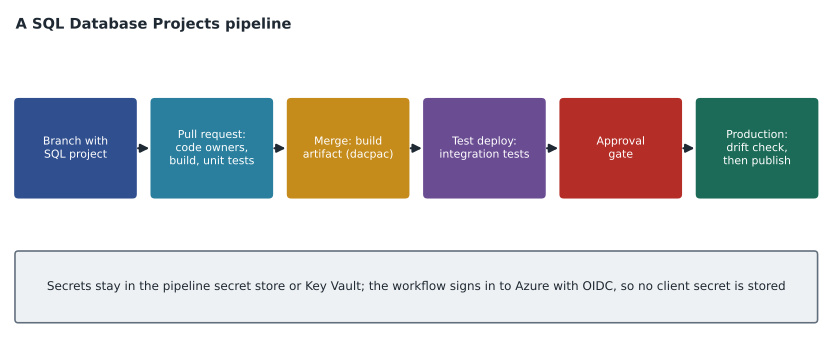
A SQL Database Project holds the database schema as source code: one file per object, plus settings, pre- and post-deployment scripts and references. Building the project validates the code and produces a dacpac, a package describing the desired schema. Deploying compares the dacpac with a target database and generates the changes needed, which SqlPackage or a pipeline task then runs. The SDK-style project format, based on the Microsoft.Build.Sql SDK, works with dotnet build on any operating system and is the format the outline names. Microsoft.Build.Sql reached general availability with version 1.0 in March 2025.
Testing has two layers. Unit tests check single objects, such as whether a procedure posts the right number of points, and can run against a SQL Server container in a few minutes on every pull request. Integration tests check the whole database with realistic data and other services, and suit a nightly run or a test stage after merge. Reference or static data, such as the Tier table's three rows, belongs in source control as a post-deployment script that uses MERGE or an idempotent insert, so every environment gets the same values.
Source control and branching follow normal Git practice. Each change happens on a branch, a pull request triggers the build and tests, and code owners must review changes to sensitive paths. In the Finch Rewards repository, a CODEOWNERS file requires the DBA team to approve any change under the Tables folder. Merge conflicts in SQL projects are easier than in migration scripts, because each object has its own file and the conflict is in the object definition itself.
Secrets never go in the repository. The pipeline signs in to Azure with OpenID Connect (OIDC) federation, so no client secret is stored at all, or reads secrets from the pipeline's secret store or Key Vault. Deployment pipeline controls include branch protection rules, required reviewers, environment approvals before production, and code owners. Schema drift, meaning changes made directly to a database outside the project, is detected by comparing the database with the project, for example with a SqlPackage DeployReport or a schema comparison, before each deployment or on a schedule.
dotnet build FinchRewards.Database/FinchRewards.Database.sqlproj -c Release
sqlpackage /Action:DeployReport /SourceFile:bin/Release/FinchRewards.Database.dacpac \
  /TargetConnectionString:"Server=tcp:hf-sql-rewards-prod.database.windows.net;Database=finchrewards;Authentication=Active Directory Default" \
  /OutputPath:drift-report.xml
Data API builder
Data API builder (DAB) reads a JSON configuration file and exposes database objects as REST and GraphQL endpoints. Each entity in the file maps to a table, view or stored procedure, and sets permissions by role. The outline lists configuring entities for REST and GraphQL, including caching, pagination, searching and filtering; configuring endpoints; exposing stored procedures and views, including GraphQL relationships; and deploying DAB.
Key details: REST endpoints support the filter, orderby, select and first query options in the query string, each written with a leading dollar sign as in OData, and pagination returns a nextLink. GraphQL relationships connect entities so a client can request a member and their redemptions in one query. Caching can be turned on globally and per entity with a time to live in seconds. Stored procedures are exposed with their parameters and are usually given only the execute action. DAB can run in a container on Azure Container Apps, in App Service, or as part of Static Web Apps database connections, and can use a managed identity for its database connection.
Monitoring and change handling
For monitoring, the outline names Azure Monitor configurations, including Application Insights and Log Analytics. Application Insights traces requests through the app and DAB, and shows dependencies such as calls to the database or to a model endpoint. Log Analytics collects diagnostic logs and metrics from the database, such as query wait statistics, for querying with KQL. A question about finding which API call made a slow database query points to Application Insights end-to-end tracing; a question about alerts on database CPU over time points to metrics and Log Analytics.
The last skill lists five ways to handle data changes. Change tracking records which rows changed, but not the values, and suits apps that sync by asking 'what changed since version N'. Change data capture (CDC) records the changed values in change tables, read by polling. Change event streaming (CES) pushes changes as events to Azure Event Hubs with very little delay, and is a preview. The Azure Functions SQL trigger binding runs a function when rows change, using change tracking underneath. Azure Logic Apps can react to changes with low-code workflows. The exam asks which fits a scenario: near-real-time events to many consumers suggests CES, a lightweight sync suggests change tracking, a full audit of values suggests CDC, and running custom code on each change suggests the Functions trigger.
| Requirement | Method | Reason |
|---|---|---|
| Mobile app syncs changed offers since its last check | Change tracking | Lightweight; returns keys of changed rows since a version |
| Analytics needs the before and after values of every change | Change data capture | Stores changed values in change tables |
| Several services must receive change events within seconds | Change event streaming | Pushes events to Event Hubs; preview |
| Run a small function when a member changes tier | Azure Functions SQL trigger | Calls code on changes, built on change tracking |
| Office staff want an email when a store record changes | Azure Logic Apps | Low-code workflow with connectors |
Fixing a regressed plan
When a query that used to be fast becomes slow after a plan change, Query Store can force the earlier plan while the cause is investigated. Query Store hints go a step further and attach options, such as a MAXDOP limit or a compatibility level, to one query without changing its code, which is useful when the code belongs to an app that cannot be changed quickly. Parameter sensitive plan optimization, available at compatibility level 160 and above, lets the engine keep more than one plan for a query whose best plan depends on the parameter values, which reduces the old problem of one plan fitting some calls badly.
Worked problem
Fixing a deadlock
Two procedures deadlock several times a day. uspPostPurchase updates MemberBalance and then inserts into PointsTransaction. uspReversePurchase deletes from PointsTransaction and then updates MemberBalance. What change most directly removes the deadlock, and what should the app do in the meantime?
Show solution
- The two procedures take locks on the same two tables in opposite orders.
- If one session holds a lock on MemberBalance and wants PointsTransaction while the other holds PointsTransaction and wants MemberBalance, neither can continue.
- Changing uspReversePurchase to update MemberBalance first gives both procedures the same order.
- Until the fix is deployed, the app should catch error 1205 and retry the transaction.
Answer: Make both procedures access the tables in the same order, MemberBalance first, so they queue instead of deadlocking. Keep the transactions short and have the app retry on error 1205.
Common mistakes
MistakeRCSI must be turned on manually in Azure SQL Database.
InsteadAzure SQL Database uses read committed snapshot isolation by default.
MistakeQuery Store shows what is blocking a session right now.
InsteadUse DMVs such as sys.dm_exec_requests for current activity; Query Store holds history.
MistakeReference data should be inserted by hand in each environment.
InsteadKeep it in source control as an idempotent post-deployment script.
MistakeThe pipeline should keep a client secret in the repository so it can sign in.
InsteadUse OIDC federation or the pipeline secret store; never commit secrets.
MistakeChange tracking records the old and new values of each change.
InsteadChange tracking records which rows changed; CDC records the values.
Summary and key terms
- Configuration questions turn on tier, compatibility level, database scoped settings, Query Store and automatic tuning.
- Know which anomalies each isolation level allows; Azure SQL Database uses RCSI by default; rowversion supports optimistic concurrency.
- Use execution plans, DMVs, Query Store and Query Performance Insight for different questions; fix deadlocks with consistent access order and retries.
- SQL Database Projects build a dacpac; test with unit tests on pull requests and integration tests later; keep reference data in post-deployment scripts.
- Protect pipelines with branch rules, code owners, approvals, OIDC and drift checks.
- Configure DAB entities, permissions, caching and relationships; pick change tracking, CDC, CES, the Functions trigger or Logic Apps by requirement.
- RCSI
- Read committed snapshot isolation, in which readers see the last committed row version and do not take shared locks.
- dacpac
- A package produced by building a SQL Database Project that describes the desired database schema.
- Schema drift
- Changes made directly to a database that are not in its source-controlled project.
- Data API builder
- A tool that exposes database objects as REST and GraphQL endpoints from a JSON configuration file.
- Change event streaming
- A preview feature that pushes database changes as events to Azure Event Hubs.
- Deadlock
- Two sessions each waiting for a lock the other holds; the engine ends one with error 1205.
Practice problems
Work each problem on paper first, then reveal the answer to check.
Which tool answers 'what used the most CPU last week'?
Show answer
Query Store or Query Performance Insight.
What error number does a deadlock victim receive?
Show answer
1205.
What does building a SQL Database Project produce?
Show answer
A dacpac.
How should reference data be kept in a SQL project?
Show answer
In source control, in an idempotent post-deployment script.
Which change method pushes events to Event Hubs?
Show answer
Change event streaming.
Lesson quiz · 5 questions
Score 60% or more to complete this lesson.
Create a free account to save your progress, take quizzes and earn a certificate.