
MSAZ-300 · Lesson 8 of 12 · 21 min
SQL database projects
▶ Video coming soon A video version of this lesson is on the way.
By the eighth session the Finch Rewards schema had 27 tables, 9 views, 6 functions, 22 stored procedures and 2 triggers, and Hana had been applying changes to the test server by running scripts from a folder called sql-changes. The folder had 63 files, some with dates in their names and some without, and nobody could say with certainty which of them had been run against which database. Liam's StockLine changes were worse: they lived in a wiki page. Elena's answer was to stop treating the database as a sequence of scripts and start treating it as code. A SQL database project describes the desired state of the database as a set of CREATE statements, builds it into a single artifact and lets a tool work out what to change in each target. DP-800 places this work in its second skill group, with source control and pipelines, which lesson 9 covers.
Declarative and migration approaches
There are two broad ways to manage database changes. In the migration-based approach, developers write ordered change scripts, such as 0042_add_preferences.sql, and a tool records which scripts each database has run. In the declarative, or state-based, approach, developers keep one CREATE script per object describing how it should look now, and a comparison engine generates the ALTER statements needed to bring each database to that state. SQL database projects are declarative. Their strength is that the source always shows the whole database as it should be, so a reviewer can read one file to see a table, and the build catches broken references before anything is deployed. Their weak spot is changes the engine cannot infer, such as a column rename or splitting a table, which need extra care, covered below.
| Question | Migration scripts | SQL database project |
|---|---|---|
| What is in source control? | An ordered list of change scripts | One CREATE script per object: the desired state |
| How is a target updated? | Run the scripts it has not run yet | Compare the model with the target and generate a script |
| What does a reviewer read? | The change itself | The object as it will be, and the generated script |
| What catches broken references? | Running the scripts | The build, before deployment |
| Renames and data moves | Written by hand in the script | Refactor log entries and pre- or post-deployment scripts |
SDK-style projects
A SQL database project is a folder of .sql files with a project file, ending in .sqlproj, that says how to build them. The modern format is the SDK-style project, built with the Microsoft.Build.Sql SDK, which reached general availability as version 1.0 in March 2025. It builds with the same dotnet build command as other .NET projects, on Windows, macOS or Linux, which is what lets a pipeline build it on any hosted agent. The SQL Database Projects support in Visual Studio Code works with SDK-style projects, and Visual Studio's support for them was in preview when Microsoft announced the SDK's general availability; the older SQL Server Data Tools projects remain supported.
<Project Sdk="Microsoft.Build.Sql/1.0.0">
  <PropertyGroup>
    <Name>FinchRewards.Database</Name>
    <DSP>Microsoft.Data.Tools.Schema.Sql.SqlAzureV12DatabaseSchemaProvider</DSP>
    <RunSqlCodeAnalysis>True</RunSqlCodeAnalysis>
  </PropertyGroup>
  <ItemGroup>
    <PostDeploy Include="Scripts\PostDeployment.sql" />
  </ItemGroup>
</Project>
Every object goes in its own file, usually in folders by schema and type: rewards/Tables/Member.sql, rewards/Views/vMemberCard.sql and so on. A file contains only the CREATE statement for its object, with no IF EXISTS checks and no ALTER statements, because the project describes state, not steps. The target platform property matters: Azure SQL Database, Managed Instance, SQL Server 2025 and SQL database in Fabric each support slightly different features, and the build fails if the code uses something the target does not support. Building for Azure SQL Database caught one of Hana's scripts that used a cross-database query, which Azure SQL Database does not allow.
dotnet new install Microsoft.Build.Sql.Templates
dotnet new sqlproj -n FinchRewards.Database -tp SqlAzureV12
dotnet build FinchRewards.Database/FinchRewards.Database.sqlproj
#   -> bin/Debug/FinchRewards.Database.dacpac
The build and the dacpac
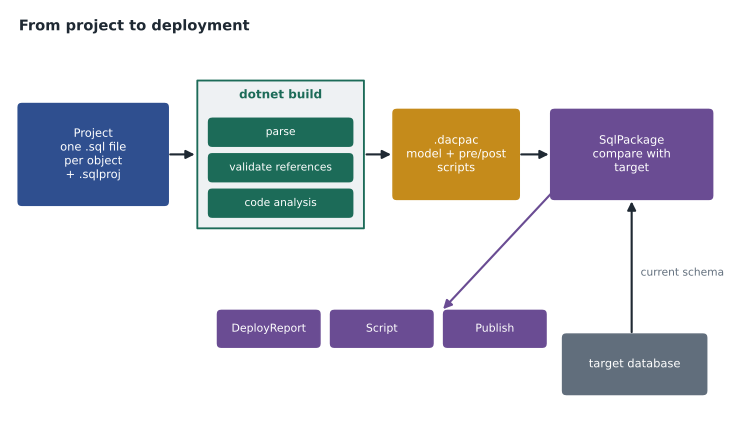
Building a project does three things. It parses every script and builds a model of the database: every table, column, key, view and procedure and how they refer to each other. It validates the model, so a view that refers to a column that does not exist, or a procedure that calls a missing function, fails the build with an error that names the file and line. And it writes the model to a .dacpac, a data-tier application package, which is a zip file containing the model as XML plus any pre- and post-deployment scripts. The dacpac is the artifact a pipeline deploys; it contains no table data.
Code analysis runs during the build when RunSqlCodeAnalysis is true. The built-in rules flag design and performance problems such as SELECT * in a procedure, a WHERE clause that wraps a column in a function and cannot use an index, or a procedure name that starts with sp_, which makes SQL Server search master first. Rules can be raised to errors, so the build fails, or switched off with a reason. Hana made the SELECT * rule an error for Finch Rewards, so the build fails on it, and added unnamed constraints, the habit from lesson 1, to the pull request checklist, because the built-in rules do not cover it.
Deploying with SqlPackage
SqlPackage is the command-line tool that works with dacpacs. Its main actions are Publish, which updates a target to match the dacpac; Script, which writes the update as a T-SQL script without running it; DeployReport, which writes an XML report of the changes Publish would make; Extract, which creates a dacpac from an existing database; and Export and Import, which work with .bacpac files that include data. A pipeline usually runs DeployReport and Script first, so a person can see the changes, and Publish after approval.
sqlpackage /Action:Script \
  /SourceFile:FinchRewards.Database.dacpac \
  /TargetConnectionString:"Server=tcp:hf-sql-rewards-test-cc.database.windows.net;Database=finchrewards;Authentication=Active Directory Default;" \
  /Profile:test.publish.xml \
  /OutputPath:deploy-finchrewards-test.sql
Deployment options decide how cautious the comparison engine is. BlockOnPossibleDataLoss, true by default, stops a deployment that would drop a column with data in it or narrow a column in a way that could truncate values. DropObjectsNotInSource, false by default, controls whether objects in the target that are not in the project are dropped; setting it true makes the project the only truth but can remove things someone added by hand, such as an index a DBA created during an incident. Options are kept in a publish profile, an XML file in the project, with one profile for each environment.
Elena asked what happens when someone changes the test database directly instead of through the project, for example by adding an index during a performance problem. That is schema drift: the target no longer matches any version in source control. DeployReport and schema comparison show it, because the generated changes include undoing the manual one. Elena's pipeline runs a drift check against production every night with DeployReport and alerts the team if the report is not empty, so a hand-made change becomes a pull request instead of a surprise.
Renames and the refactor log
Because the project describes state, renaming a column looks to the comparison engine exactly like dropping one column and adding another, which would lose the data. The project tools handle renames with a refactor log: when a developer renames an object with the rename command in the editor, the tool records the rename in a .refactorlog file, and the deployment uses sp_rename instead of drop and add. Hana tested this by renaming Member.HomeStoreId to PreferredStoreId; the generated script contained one sp_rename and no data loss. When she renamed a column by editing the file by hand, the build still succeeded, but the deployment stopped with BlockOnPossibleDataLoss, which is the safety net working as intended.
Pre- and post-deployment scripts and reference data
Some data belongs with the schema: the tier names and thresholds, the reason codes, the list of stores. DP-800 calls this reference or static data and expects it to be in source control. The usual way is a post-deployment script, run after every deployment, that uses MERGE or an INSERT ... WHERE NOT EXISTS so it can run any number of times with the same result. A pre-deployment script runs before the schema changes and suits data moves that a change needs, such as copying values out of a column about to change type. Only one pre- and one post-deployment script can be in a project, but each can include others with the :r command.
-- Scripts/PostDeployment.sql
:r .\ReferenceData\Tier.sql
:r .\ReferenceData\ReasonCode.sql

-- ReferenceData/Tier.sql: safe to run on every deployment
MERGE rewards.Tier AS t
USING (VALUES ('S', 'Sparrow', 1, 0),
              ('F', 'Finch',   2, 2500),
              ('K', 'Kestrel', 3, 10000)) AS s (TierCode, TierName, TierRank, MinPoints)
   ON t.TierCode = s.TierCode
WHEN MATCHED AND (t.TierName <> s.TierName OR t.TierRank <> s.TierRank OR t.MinPoints <> s.MinPoints)
    THEN UPDATE SET TierName = s.TierName, TierRank = s.TierRank, MinPoints = s.MinPoints
WHEN NOT MATCHED BY TARGET
    THEN INSERT (TierCode, TierName, TierRank, MinPoints)
         VALUES (s.TierCode, s.TierName, s.TierRank, s.MinPoints);
References and testing
A project can reference another project, a dacpac or a NuGet package. Finch Rewards references the master database's dacpac so that system views such as sys.objects resolve during the build, and it will reference a shared project that holds the common audit schema used by Finch Rewards and StockLine. Package references, introduced with the SDK, let a team publish a database model as a versioned NuGet package and depend on a specific version of it, as application developers do with libraries.
Testing a database project happens at two levels. Unit tests check one procedure or function in isolation, usually by deploying the dacpac to a throwaway database, inserting known rows, running the code and comparing the result; the open-source tSQLt framework is one common way to write them in T-SQL, and tests can also be written in the application's test framework. Integration tests deploy the whole schema and run the API's own tests against it. Hana's first unit tests cover the rules most likely to be broken by a careless change: uspPostPurchase earns 73 points for a Kestrel member spending 49.99 dollars, a redemption that would make a balance negative fails, and a retried receipt changes nothing.
Elena also showed Hana how to start a project from a database that already exists. SqlPackage's Extract action creates a dacpac from a live database, and the project tools can turn that into a folder of CREATE scripts, one per object, which becomes the first commit. Liam will do this for StockLine in January 2027: extract the current schema, build it, fix the warnings code analysis reports, and from then on make every change through the project. The first build of an old database usually reports dozens of problems, such as references to objects that no longer exist, and each has to be fixed or deliberately suppressed before the project can be trusted.
Worked problem
Is the post-deployment script safe to run twice?
The test database's Tier table has rows S Sparrow 1 0 and F Finch 2 2000. The project's MERGE contains S Sparrow 1 0, F Finch 2 2500 and K Kestrel 3 10000. Work out what the first deployment changes and what a second deployment immediately afterwards changes.
Show solution
- Row S matches with identical values, so the WHEN MATCHED condition is false: no change.
- Row F matches but MinPoints differs (2000 against 2500): one update.
- Row K does not exist in the target: one insert.
- First deployment: 1 update and 1 insert. The table now equals the source.
- Second deployment: every row matches with identical values and none is missing, so 0 changes.
Answer: The first run makes one update and one insert; a second run changes nothing, so the script is idempotent.
Common mistakes
MistakePut ALTER TABLE statements in the project when a column changes.
InsteadProject files hold CREATE statements for the desired state; the comparison engine writes the ALTERs.
MistakeRename a column by editing its file.
InsteadUse the rename command so the refactor log records it; otherwise the change looks like drop and add.
MistakeA dacpac contains the data, so it can restore a database.
InsteadA dacpac holds the schema model and scripts; a bacpac holds data.
MistakeDropObjectsNotInSource should always be true in production.
InsteadIt can drop hand-made objects without warning; detect drift and review it instead.
MistakeReference data can be inserted with plain INSERT in the post-deployment script.
InsteadIt must be safe to run every time; use MERGE or INSERT ... WHERE NOT EXISTS.
Summary and key terms
- SQL database projects are declarative: one CREATE script per object describes the desired state.
- SDK-style projects use Microsoft.Build.Sql, generally available since March 2025, and build with dotnet build.
- The build validates references, runs code analysis and produces a .dacpac.
- SqlPackage publishes, scripts or reports the difference between a dacpac and a target.
- BlockOnPossibleDataLoss and publish profiles control how cautious a deployment is.
- Drift is any change made outside the project; DeployReport finds it.
- Renames go through the refactor log; reference data goes in idempotent post-deployment scripts.
- SQL database project
- A set of .sql files and a .sqlproj file that describe a database's desired state.
- SDK-style project
- A project built with the Microsoft.Build.Sql SDK and the dotnet build command.
- dacpac
- A package containing a database's schema model and deployment scripts, without table data.
- SqlPackage
- The command-line tool that publishes, scripts, reports on and extracts dacpacs.
- Publish profile
- An XML file of deployment options for one target environment.
- Schema drift
- Differences between a deployed database and the version in source control.
- Refactor log
- A file recording renames so deployments use sp_rename instead of drop and create.
Practice problems
Work each problem on paper first, then reveal the answer to check.
What does the build catch that running scripts by hand does not?
Show answer
Broken references and code analysis problems, before anything is deployed.
Which SqlPackage action writes the change script without running it?
Show answer
Script.
What stops a deployment from dropping a column that holds data?
Show answer
The BlockOnPossibleDataLoss option, true by default.
How did Elena make manual changes visible?
Show answer
A nightly DeployReport against production that alerts when it is not empty.
Why does the Tier MERGE update only when values differ?
Show answer
So repeated deployments make no changes and do not fire triggers or write to the log needlessly.
Lesson quiz · 5 questions
Score 60% or more to complete this lesson.
Create a free account to save your progress, take quizzes and earn a certificate.