
MSAZ-300 · Lesson 12 of 12 · 21 min
A development case study
▶ Video coming soon A video version of this lesson is on the way.
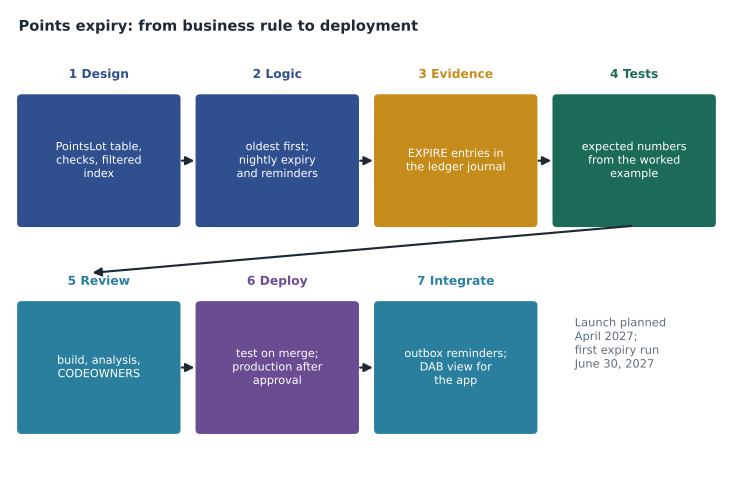
The last design session, on November 10, 2026, was a rehearsal. Marketing had approved one more rule for the relaunch of Finch Rewards: points expire 24 months after they are earned, the oldest points are used first when a member redeems, and members get a reminder 30 days before any points expire. Elena asked Hana to build the whole feature the way the team will build every feature from now on, using each lesson in this course, while Liam reviewed it as if he were the code owner. This lesson follows the feature from the business rule to a deployed change in the test environment. The production launch of the new Finch Rewards API is planned for April 2027, and the first expiry run for June 30, 2027.
1. Turning the rule into a design
The rule sounds simple and is not. Points do not carry an earned date once they are in a balance; a member with 1,600 points does not know which of them are old. Expiry needs to know, for every member, how many of the points earned in each month are still unspent. Hana considered computing it from the full history every night, replaying all earnings and redemptions oldest first, and rejected it: 30 million transactions replayed nightly is a lot of work to produce a few thousand expiries. Instead she designed a lot table. Every earning creates a lot with its points and its expiry date; every redemption consumes points from the member's oldest open lots; the expiry job closes lots whose date has passed and posts an EXPIRE transaction for whatever they still hold.
CREATE TABLE rewards.PointsLot
(
    LotId          bigint IDENTITY(1,1) NOT NULL,
    MemberId       bigint NOT NULL,
    SourceTxnId    bigint NOT NULL,
    EarnedOn       date NOT NULL,
    ExpiresOn      date NOT NULL,
    PointsEarned   int NOT NULL,
    PointsLeft     int NOT NULL,
    CONSTRAINT PK_PointsLot PRIMARY KEY CLUSTERED (LotId),
    CONSTRAINT FK_PointsLot_Member FOREIGN KEY (MemberId) REFERENCES rewards.Member (MemberId),
    CONSTRAINT FK_PointsLot_Txn FOREIGN KEY (SourceTxnId) REFERENCES rewards.PointsTransaction (TxnId),
    CONSTRAINT UQ_PointsLot_Source UNIQUE (SourceTxnId),
    CONSTRAINT CK_PointsLot_Expiry CHECK (ExpiresOn = DATEADD(month, 24, EarnedOn)),
    CONSTRAINT CK_PointsLot_Left CHECK (PointsLeft BETWEEN 0 AND PointsEarned)
);
CREATE INDEX IX_PointsLot_Open
    ON rewards.PointsLot (MemberId, EarnedOn, LotId)
    INCLUDE (PointsLeft)
    WHERE PointsLeft > 0;
Every constraint traces to lesson 1. The unique constraint on SourceTxnId makes the lot for a purchase impossible to create twice, so the retry from lesson 5 stays harmless. The check on ExpiresOn puts the 24-month rule in the database where no writer can get it wrong. The filtered index holds only lots with points left, which after a year of operation will be a small fraction of all lots, and it is ordered the way redemptions consume them: oldest first within a member. Elena asked one question during review: what if marketing changes the period to 18 months for new points? The answer was that the check would change in a new release and existing lots would keep their stored dates, which is the behaviour marketing wants.
2. Writing the logic
The consumption logic runs inside uspRedeemOffer from lesson 5. After lowering the balance, it walks the member's open lots oldest first and takes points from each until the redemption is covered. Hana wrote it as one set-based UPDATE using a window function, from lesson 3, to compute how many points each lot gives: the running total of PointsLeft over the member's open lots tells each lot how much of the redemption has already been covered by older lots.
WITH OpenLots AS (
    SELECT LotId, PointsLeft,
           SUM(PointsLeft) OVER (ORDER BY EarnedOn, LotId
                                 ROWS BETWEEN UNBOUNDED PRECEDING AND CURRENT ROW) AS RunTotal
    FROM rewards.PointsLot
    WHERE MemberId = @MemberId AND PointsLeft > 0
)
UPDATE l
SET PointsLeft = l.PointsLeft - x.Take
FROM rewards.PointsLot AS l
JOIN OpenLots AS o ON o.LotId = l.LotId
CROSS APPLY (SELECT CASE WHEN o.RunTotal <= @Cost THEN o.PointsLeft            -- fully used
                         WHEN o.RunTotal - o.PointsLeft < @Cost
                              THEN @Cost - (o.RunTotal - o.PointsLeft)        -- partly used
                         ELSE 0 END AS Take) AS x
WHERE x.Take > 0;from datetime import date
# Lots for one member: (earned on, points). Redemptions use the oldest points first.
lots = [[date(2024, 11, 15), 800], [date(2025, 2, 10), 600],
[date(2025, 6, 1), 1200], [date(2026, 3, 3), 500]]
redemptions = [(date(2025, 8, 20), 1000), (date(2026, 5, 2), 500)]
for when, cost in redemptions:
left = cost
for lot in lots:
take = min(lot[1], left)
lot[1] -= take
left -= take
if left == 0:
break
print("open lots after redemptions:")
for earned, pts in lots:
if pts:
print(f" earned {earned} {pts:5d} points expires {earned.replace(year=earned.year + 2)}")
print("balance:", sum(p for _, p in lots))
run = date(2027, 6, 30)
expiring = sum(p for e, p in lots if e.replace(year=e.year + 2) <= run)
print(f"points expiring in the run on {run}:", expiring)open lots after redemptions: earned 2025-06-01 1100 points expires 2027-06-01 earned 2026-03-03 500 points expires 2028-03-03 balance: 1600 points expiring in the run on 2027-06-30: 1100
What this code does
The program starts from four batches of points a member earned on different dates and two later redemptions. For each redemption it takes points from the oldest batch first, moving to the next batch only when the older one is empty. It then lists the batches that still hold points, with the date each will expire 24 months after it was earned, shows the remaining balance of 1,600 and works out how many points the planned expiry run on June 30, 2027 will remove. The same numbers become the expected results in the unit test.
The expiry job is a nightly procedure, uspExpirePoints, that finds open lots whose ExpiresOn has passed, posts one EXPIRE transaction per member for their total, sets those lots' PointsLeft to zero and lowers the balance, all in one transaction per batch of 1,000 members so that locks are short. It writes each member's expiry to the outbox from lesson 11. A second procedure, uspQueueExpiryReminders, runs a day earlier and writes reminders for points expiring in exactly 30 days. Both use XACT_ABORT, TRY...CATCH and THROW, and both are safe to run twice on the same day, because a closed lot has no points left to expire and a reminder row has a unique key on member and expiry date.
3. History and evidence
Lesson 6 decided which tables keep history. PointsLot changes on every redemption, so making it temporal would bring back the history growth Elena avoided by moving the balance out of Member. It is not temporal; the points transactions already record every change. The EXPIRE transactions go to the append-only ledger table, rewards.PointsJournal, along with purchases, returns and redemptions, so the finance team's monthly verification covers expiries too. Malcolm Reyes's team will see a new line in the liability report: points expired in the month, which reduce the liability.
4. Tests
Hana wrote the tests before the procedures were finished, using the numbers from the worked example. The redemption test loads the four lots and two redemptions and checks that the open lots afterwards hold 1,100 and 500 points. The expiry test sets the date to June 30, 2027 and checks that exactly 1,100 points expire, one EXPIRE transaction is posted, the balance falls to 500 and one outbox row is written. Three edge cases got their own tests: a redemption that exactly empties a lot, a member with no open lots, and running the expiry job twice on the same day, which must change nothing the second time.
| Test | Setup | Expected result |
|---|---|---|
| Oldest points used first | 4 lots, redemptions of 1,000 and 500 | Open lots hold 1,100 (June 2025) and 500 (March 2026) |
| Expiry on the planned date | Same member, run on June 30, 2027 | 1,100 points expire; balance 500; one outbox row |
| Exact lot | Redeem 800 against a lot of 800 | Lot left at 0; next lot untouched |
| No open lots | Member with balance 0 | Redemption fails with the balance check; no lot changes |
| Run twice | Run expiry twice on the same day | Second run posts nothing and writes no outbox rows |
5. Review and pipeline
Hana opened the pull request with the new table, the three procedures, the changes to uspRedeemOffer, a pre-deployment script and the tests. The build passed code analysis on the first try. Because the change added a table, the CODEOWNERS rule from lesson 9 required Elena's review. She asked for two changes. The first was a migration step: existing members already have balances but no lots, so the release needs a one-time script that creates opening lots from each member's history, oldest first, with the earned dates real history supports. Hana added it as a separate, reviewed procedure that runs once after deployment rather than as a post-deployment script, because it is not reference data and must not run on every deployment. The second was a comment in the redemption procedure explaining the window calculation, because the next developer would not have attended the session.
Liam used Copilot, set up as in lesson 10, to explain the window calculation back to him in plain language before he approved it, and then checked its explanation against the worked example. It was right. It also suggested replacing the CROSS APPLY with a cursor that loops over lots, which would be easier to read and far slower for members with many lots; he declined. The pull request merged on the second day, the pipeline deployed it to the test database six minutes later, and the deployment report showed exactly what was expected: one new table, one new index, three new procedures and one altered procedure.
6. Integration
The reminders reach members through the outbox and fn-finch-notify, from lesson 11, in batches of 500. The app needs to show each member what will expire and when, so Hana added a view, rewards.vExpiringPoints, listing open lots that expire in the next 90 days, and an entity for it in the Data API builder configuration with read permission for the authenticated role and a filter on the caller's own member ID. No API code was written for the screen at all.
| Lesson | What it contributed to the feature |
|---|---|
| 1. Tables, keys and constraints | PointsLot with named keys, checks and a filtered index |
| 2. Data types | date for earned and expiry dates; int for points |
| 3. Advanced T-SQL | The running total that allocates a redemption across lots |
| 4. Views, functions and procedures | uspExpirePoints, uspQueueExpiryReminders, vExpiringPoints |
| 5. Transactions and error handling | Batched transactions, XACT_ABORT, TRY...CATCH and safe reruns |
| 6. Temporal and ledger tables | EXPIRE entries in the append-only ledger journal; no temporal history on lots |
| 8 and 9. Projects and CI/CD | Build, code analysis, CODEOWNERS review and automatic test deployment |
| 10. Copilot | An explanation checked against known numbers; a poor suggestion declined |
| 11. REST and Data API builder | Reminders through the outbox; the expiring-points screen through DAB |
What comes next
The feature now runs in the test environment against anonymized data. Before the April 2027 launch, the opening-lot migration will be rehearsed twice against copies of production, Carmen Ortiz will review the reminder wording, and the finance team will confirm the liability report. Hana plans to sit DP-800 in June 2027, after MSAZ-281's security and tuning work and MSAZ-301's AI features, and the exam-readiness review in MSAZ-309. The Finch Rewards repository, with its project, tests and pipeline, is the best study material she has: almost every skill in the design and development group of the outline is somewhere in it.
Worked problem
How many points expire, and what is left?
A member earned 800 points on November 15, 2024, 600 on February 10, 2025, 1,200 on June 1, 2025 and 500 on March 3, 2026. They redeemed 1,000 points on August 20, 2025 and 500 on May 2, 2026. Redemptions use the oldest points first, and points expire 24 months after they are earned. How many points remain in each lot, and how many expire in the run on June 30, 2027?
Show solution
- First redemption, 1,000 points: the November 2024 lot gives all 800, and the February 2025 lot gives 200, leaving it 400.
- Second redemption, 500 points: the February 2025 lot gives its last 400, and the June 2025 lot gives 100, leaving it 1,100.
- Open lots: June 2025 with 1,100 points (expires June 1, 2027) and March 2026 with 500 (expires March 3, 2028).
- \[800 + 600 + 1\,200 + 500 - 1\,000 - 500 = 1\,600\]
- On June 30, 2027 only the June 2025 lot has passed its expiry date, so 1,100 points expire and 500 remain.
Answer: 1,100 points remain from June 2025 and 500 from March 2026; the run on June 30, 2027 expires 1,100 points and leaves a balance of 500.
Common mistakes
MistakeCompute expiry by replaying every member's full history each night.
InsteadKeep lots with points left so the nightly job touches only what can expire.
MistakeLoad opening lots in the post-deployment script.
InsteadPost-deployment scripts run on every deployment; a one-time migration is a separate, reviewed step.
MistakeAccept Copilot's cursor rewrite because it is easier to read.
InsteadReadable but slow; keep the set-based statement and add a comment.
MistakeMake PointsLot temporal for a full audit trail.
InsteadIt changes on every redemption; the transactions and ledger journal already record each change.
MistakeTest only the normal case.
InsteadTest exact boundaries, empty cases and reruns, using worked examples with known answers.
Summary and key terms
- Turn a business rule into tables and constraints first; here, lots with a 24-month expiry check.
- Allocate redemptions oldest first with a set-based running total, not a loop.
- Batch nightly jobs into short transactions and make them safe to rerun.
- Choose history deliberately: ledger for financial evidence, no temporal history on fast-changing rows.
- Write tests from worked examples with known answers, including edge cases.
- Let the pull request, build, code owners and pipeline carry every change, including one-time migrations.
- Reuse the outbox and Data API builder to integrate without new API code.
- Points lot
- A record of points earned at one time, with how many are left and when they expire.
- First in, first out (FIFO)
- Using the oldest units first, here the oldest points when a member redeems.
- Opening balance migration
- A one-time step that creates starting records, such as lots, for existing data.
- Edge case
- An input at the boundary of a rule, such as a redemption that exactly empties a lot.
Practice problems
Work each problem on paper first, then reveal the answer to check.
Why did Hana design a lot table instead of replaying history?
Show answer
Replaying 30 million transactions nightly is costly; lots let the job touch only open points.
Which constraint enforces the 24-month rule?
Show answer
CK_PointsLot_Expiry, which requires ExpiresOn to equal EarnedOn plus 24 months.
Why is the opening-lot migration not in the post-deployment script?
Show answer
It must run once, not on every deployment, and it is data migration, not reference data.
How many points expire for the example member on June 30, 2027?
Show answer
1,100.
Why was PointsLot not made a temporal table?
Show answer
It changes on every redemption, which would create large history for little value.
Lesson quiz · 5 questions
Score 60% or more to complete this lesson.
Create a free account to save your progress, take quizzes and earn a certificate.