
MSAZ-300 · Lesson 10 of 12 · 21 min
GitHub Copilot for database development
▶ Video coming soon A video version of this lesson is on the way.
Hana had been using GitHub Copilot in Visual Studio Code for the API code since the summer, and in the tenth session she asked Elena whether it could help with the database too. Elena's answer was yes, with conditions, and Sunil Rao, the IT security manager, came to set them. DP-800 has a whole skill area on designing and implementing SQL solutions with AI-assisted tools: understanding the security impact, enabling GitHub Copilot and Copilot in Fabric, configuring the model and the Model Context Protocol tools in a chat session, writing instruction files and connecting to MCP servers. This lesson covers each, with the rules Harrow & Finch adopted.
Where Copilot works with databases
Three tools matter for DP-800. GitHub Copilot in Visual Studio Code works with the SQL Server extension for VS Code, which connects to SQL Server, Azure SQL and SQL database in Fabric and adds database context to Copilot chat, so questions about a connected database can draw on its schema. GitHub Copilot in SQL Server Management Studio 22 became generally available in March 2026; it helps write, explain, fix and tune T-SQL, offers code completions in the query editor and can follow database instructions that describe business rules and naming conventions. Copilot in Microsoft Fabric is a separate Microsoft product that works inside Fabric's SQL database, warehouse and notebook editors and is enabled by the Fabric administrator for capacities in a tenant.
GitHub Copilot in VS Code and SSMS needs a GitHub Copilot subscription, the same one a developer uses for application code, and for business accounts the organization's administrators control which features and models are allowed. Harrow & Finch has Copilot Business for its developers. Sunil's team set the organization policies before the database work began: public code matching is blocked, the models allowed in chat are the ones the security review approved, and the preview features that send data to third-party services are off until they are reviewed.
| Tool | Where it runs | What it knows about | Turned on by |
|---|---|---|---|
| GitHub Copilot in VS Code | Editor and chat in VS Code, with the SQL Server extension | Open files, the repository, and the connected database's schema when asked | A Copilot subscription and organization policies |
| GitHub Copilot in SSMS 22 | Query editor and chat in SSMS | The current connection and database, and database instructions | Installing the Copilot component and signing in to GitHub |
| Copilot in Fabric | Fabric SQL database, warehouse and notebook editors | Items in the Fabric workspace | The Fabric administrator, per tenant and capacity |
Modes, models and tools
A Copilot chat session has three settings that change what it can do. The mode decides how much it acts on its own: in ask mode it answers and suggests code that the developer copies, in edit mode it proposes changes to files that the developer accepts or rejects, and in agent mode it plans a task, runs tools, edits files and runs commands, asking for confirmation at the steps the settings require. The model decides which language model answers, from the list the organization allows; different models trade speed against depth. The tools decide what the session can reach: built-in tools such as reading the workspace or running a terminal command, and tools offered by MCP servers.
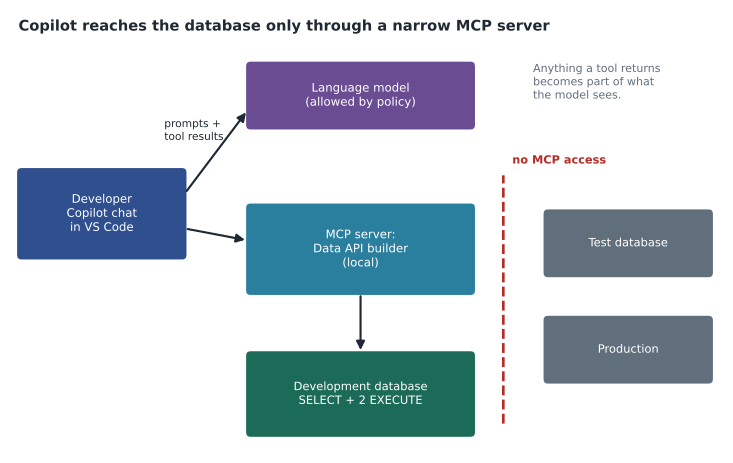
Elena's guidance for database work was to use ask mode for exploring and explaining, edit mode for changes to project files, and agent mode only in the development database, never with a connection to test or production. An agent that can run SQL can also run the wrong SQL. In VS Code, each tool can be switched on or off per chat session, and the settings decide which tools need confirmation before they run; for any tool that executes SQL against a database, confirmation stays on.
The Model Context Protocol
The Model Context Protocol, MCP, is an open standard for connecting AI assistants to tools and data. An MCP server offers a set of tools, each described by a name, a purpose and its parameters, and an MCP client, such as Copilot chat in VS Code, can call them during a conversation. For databases, an MCP server might offer tools to list tables, describe a table, read rows or run a query. DP-800 names two kinds of endpoint: Microsoft SQL Server, through an MCP server such as the one Data API builder can host in front of a database, and a Fabric lakehouse, through Fabric's MCP support.
An MCP server is configured in the client with its address or the command that starts it, and how it authenticates. In VS Code the configuration can live in the repository, in a file such as .vscode/mcp.json, so every developer gets the same servers, or in personal settings. Hana's repository configures one server for the development database, using Data API builder, which exposes only the entities its configuration lists, with read permission on most and execute permission on two procedures. The MCP tools therefore reach exactly what Data API builder allows, not the whole database. Lesson 11 covers Data API builder's configuration in more detail.
{
  "servers": {
    "finchrewards-dev": {
      "type": "http",
      "url": "http://localhost:5000/mcp"
    }
  }
}
Instruction files
An instruction file tells Copilot the team's conventions so every developer gets suggestions that fit the project. In a GitHub repository the file .github/copilot-instructions.md applies to chat requests in that repository, and files ending .instructions.md in .github/instructions can apply to particular paths, for example only to .sql files. Instructions are plain Markdown: short, specific statements about naming, style, required patterns and things to avoid. In SSMS, database instructions do a similar job for a database, describing its business rules and conventions so Copilot's guidance matches them.
---
applyTo: "src/FinchRewards.Database/**/*.sql"
---
# Finch Rewards database conventions
- Target is Azure SQL Database. Do not use cross-database queries or SQL Agent.
- Every object goes in its own file as a CREATE statement; no ALTER, no IF EXISTS.
- Name every constraint: PK_, FK_, UQ_, CK_, DF_ followed by table and column.
- Points are int, money is decimal(10,2), times are datetime2(3) in UTC.
- Procedures start with SET NOCOUNT ON and SET XACT_ABORT ON and use TRY...CATCH with THROW.
- Never write SELECT *. Never use NOLOCK.
- Treat MemberId as internal; APIs use PublicId.
Hana tested the file by asking Copilot to write a procedure that closes a member account. Without the instructions it produced a procedure with no error handling, an unnamed default constraint in a new column and a SELECT * to fetch the member. With them, the procedure followed the pattern from lesson 5 and named its objects. It still needed review: it updated the member row but did not record the closure date the privacy policy requires, because nothing in the instructions mentioned it. Instructions improve suggestions; they do not replace knowing the rules.
The security impact
Sunil's review listed the risks DP-800 means by the security impact of AI-assisted tools, and the controls for each. The first is data leaving the organization. Prompts, the code in context and anything a tool returns are sent to the model. If an MCP tool reads 50 member rows, those names and emails are part of the conversation. That is why the MCP server points only at the development database, which holds synthetic data, and why connecting Copilot to production is not allowed at all.
The second is excessive permission. A tool acts with the permissions of its connection, so a connection with db_owner gives the assistant db_owner. The Data API builder role for development has SELECT on the entities it exposes and EXECUTE on two procedures, nothing else. The third is generated code that is wrong or unsafe: a query that is not sargable, a procedure that builds dynamic SQL by concatenating user input, a missing WHERE clause on an UPDATE. Every suggestion goes through the same pull request, build, code analysis and review as code a person wrote, and the person who accepts it is responsible for it.
The fourth is prompt injection: text inside the data that tries to give the assistant instructions. A member's display name could contain a sentence telling an assistant to run a statement; if a tool returns that name to an agent, the agent might act on it. Tool confirmation for anything that changes data, read-only roles and keeping agents away from real data limit the damage. The fifth is secrets: a developer pasting a connection string with a password into chat sends it to the model. The pipeline from lesson 9 already removed passwords, and the team rule is that credentials never go into a prompt.
| Risk | Example | Control at Harrow & Finch |
|---|---|---|
| Data sent to the model | An MCP tool returns real member rows | MCP only for the development database with synthetic data |
| Excessive permission | The tool's connection is db_owner | Data API builder role with SELECT and two EXECUTE grants |
| Wrong or unsafe code | Dynamic SQL built from user input | Pull request, build, code analysis and human review |
| Prompt injection | Instructions hidden in a display name | Confirmation for data-changing tools; no agent on real data |
| Secrets in prompts | A connection string pasted into chat | No passwords exist; a rule against credentials in prompts |
| Unapproved models or features | A preview feature sending data elsewhere | Organization policies for models and features |
Copilot in Fabric
The Finch Data Hub, the analytics platform planned for 2027, will run on Microsoft Fabric, and Keiko Tanabe's analysts will use Copilot in Fabric there. It is enabled by Fabric administrators in the tenant settings, and its prompts are processed in line with the tenant's data residency settings or, if an administrator allows it, in another geography. In a SQL database in Fabric it can write and explain queries and suggest code completions, working with the items and permissions of the user. Because it works with the user's own access, the controls are the same as for any analyst: least privilege on the workspace and items, and review before anything a query changes goes to production.
Worked problem
Is the generated query sargable?
Copilot suggested this filter for members who joined in 2025: WHERE YEAR(JoinedOn) = 2025. Member has an index on JoinedOn, and about 61,000 of the 412,000 members joined in 2025. Explain the problem and rewrite the filter, and estimate how many rows each version reads if the index is used for the rewritten one.
Show solution
- Wrapping the column in YEAR() means the engine must compute YEAR for every row before comparing, so it cannot seek in the index: it reads all 412,000 rows.
- Rewrite as a range on the bare column: WHERE JoinedOn >= '2025-01-01' AND JoinedOn < '2026-01-01'.
- The range can seek to the first 2025 date and read only those rows: about 61,000.
- \[\frac{412\,000}{61\,000} \approx 6.8\]
- The rewrite reads about one seventh of the rows. Adding 'write sargable predicates; never wrap indexed columns in functions' to the instruction file stops the suggestion recurring.
Answer: The YEAR() version scans all 412,000 rows; the range version seeks and reads about 61,000, roughly 6.8 times fewer. Review generated code as you would anyone's.
Common mistakes
MistakeCopilot only sees the line being typed, so it cannot send data anywhere.
InsteadPrompts, code in context and tool results are sent to the model; plan for it.
MistakeGive the MCP server's connection db_owner so every tool works.
InsteadTools act with the connection's permissions; grant only what the tools need.
MistakeAgent mode is safe with a production connection if the developer watches.
InsteadKeep agents on development data; one wrong statement on production is enough.
MistakeInstruction files guarantee correct code.
InsteadThey improve suggestions; review, the build and tests still decide.
MistakePasting a connection string into chat is fine because chat is private.
InsteadCredentials never go into prompts; use identities without passwords.
Summary and key terms
- GitHub Copilot works with databases in VS Code (with the SQL Server extension) and SSMS 22; Copilot in Fabric works inside Fabric.
- Chat sessions have a mode (ask, edit, agent), a model and a set of tools.
- MCP servers offer tools to clients; for databases, connect them only to development data with narrow permissions.
- Instruction files such as .github/copilot-instructions.md and path-specific .instructions.md files encode team conventions.
- Security impacts include data sent to the model, excessive permissions, unsafe code, prompt injection and secrets in prompts.
- Every suggestion goes through the same review, build and tests as human code.
- GitHub Copilot
- An AI coding assistant that suggests code and answers questions in editors such as VS Code and SSMS.
- Agent mode
- A chat mode in which the assistant plans a task and runs tools and edits, with confirmations.
- Model Context Protocol (MCP)
- An open standard that lets AI clients call tools offered by servers.
- MCP server
- A program that offers tools, such as database queries, to an MCP client.
- Instruction file
- A Markdown file that gives Copilot the project's conventions and rules.
- Prompt injection
- Text in data or content that tries to make an AI assistant follow instructions it should not.
Practice problems
Work each problem on paper first, then reveal the answer to check.
Why does the Finch Rewards MCP server use Data API builder instead of a direct database connection?
Show answer
Data API builder exposes only the entities and permissions its configuration lists.
Which file gives Copilot repository-wide instructions in GitHub?
Show answer
.github/copilot-instructions.md.
Why did Copilot's closure procedure still miss the closure date?
Show answer
The rule was not in the instructions or the context; review caught it.
What is prompt injection, in a database context?
Show answer
Instructions hidden in data, such as a display name, that an assistant might follow when a tool returns them.
Who enables Copilot in Fabric?
Show answer
Fabric administrators, in the tenant settings.
Lesson quiz · 5 questions
Score 60% or more to complete this lesson.
Create a free account to save your progress, take quizzes and earn a certificate.