
MSAZ-281 · Lesson 9 of 12 · 21 min
Index design and maintenance
▶ Video coming soon A video version of this lesson is on the way.
StockLine has 214 indexes. Walt knows the story behind about half of them. Some were created by the original developers in 2009, some by a consultant during a slow Christmas in 2014, some by Walt himself after reading a missing-index suggestion, and at least eleven by a vendor's support engineer whose names all start with IX_TEMP_. Elena wants the migration to be the moment the index set is cleaned up, because every index costs storage, slows every insert and update to its table, and needs maintenance, and in Azure all three show up on the bill or the resource limits. This session is about choosing indexes deliberately and keeping them healthy.
How rowstore indexes work
A rowstore index is a balanced tree of pages, sorted by the index key. A clustered index stores the table's rows themselves in key order at its leaf level, so a table has at most one. A nonclustered index stores the key columns plus a pointer back to the row, which is the clustered index key if the table has one. When a query can find what it needs by walking the tree to a small range of leaf pages, that is a seek; when it must read every leaf page, that is a scan. A seek on an index that does not contain every column the query needs must then look up the rest from the clustered index, row by row, which is a key lookup and becomes expensive when there are many rows.
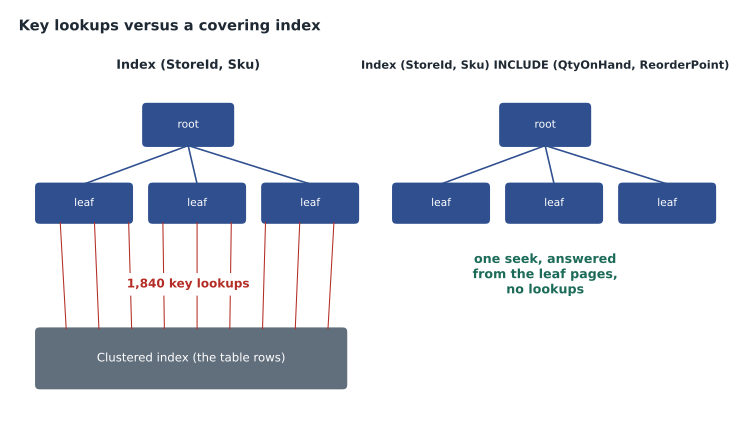
A covering index contains every column a query needs, either as key columns or as included columns. Included columns are stored only at the leaf level, so they make the index bigger but do not change its sort order or its usefulness for seeks. The classic pattern is to put the columns used for filtering and joining in the key, the most selective first when the queries use equality, and the columns only returned in the INCLUDE list.
-- The till lookup: stock for one store, filtered by SKU prefix
SELECT Sku, QtyOnHand, ReorderPoint
FROM stock.StockLevel
WHERE StoreId = 12 AND Sku LIKE 'PNT-%';

CREATE NONCLUSTERED INDEX IX_StockLevel_Store_Sku
ON stock.StockLevel (StoreId, Sku)
INCLUDE (QtyOnHand, ReorderPoint)
WITH (ONLINE = ON);
Other kinds of index
A filtered index has a WHERE clause and covers only some rows. It is small and cheap to maintain, and suits queries that always target a known subset, such as open orders or members with unredeemed points. A unique index enforces that no two rows share a key, which documents a business rule and gives the optimizer useful information. A columnstore index stores data by column, compressed, in row groups of up to about a million rows, and reads only the columns a query needs. It suits large analytical scans and aggregations, such as a year of sales by store, and is less suited to single-row lookups. A clustered columnstore index makes the whole table columnar; a nonclustered columnstore index can sit on a rowstore table to speed reporting without changing how the tills write. DP-800 also lists vector indexes for similarity search, which Hana covers in her AI-focused material; for this course it is enough to know they exist and need the same thinking about cost and use.
| Index type | Best for | Cost to watch |
|---|---|---|
| Clustered rowstore | The main access path; ranges on the key | A wide key makes every nonclustered index wider |
| Nonclustered rowstore | Seeks for specific queries | Slows writes; key lookups if not covering |
| Covering (with INCLUDE) | Frequent queries returning a few extra columns | Bigger leaf pages |
| Filtered | Queries on a known subset of rows | Only used when the query's filter matches |
| Clustered columnstore | Large scans and aggregations | Poor for frequent single-row updates |
| Nonclustered columnstore | Reporting on an operational table | Extra storage and write overhead |
Finding missing and unused indexes
The optimizer records indexes it wished it had in the missing index DMVs, with the columns, the number of times they would have helped and an estimated improvement. Query Store and execution plans show the same suggestions. They are useful hints and dangerous instructions. The suggestions ignore indexes that already exist and nearly match, they never suggest included columns in a sensible order, and they do not weigh the cost of maintaining the index. Walt's rule, borrowed from Elena, is to treat each suggestion as a question: which query needs this, how often does it run, and could an existing index be widened instead?
The opposite question matters as much: which indexes are never used? sys.dm_db_index_usage_stats counts seeks, scans, lookups and updates for each index since the last restart. An index with thousands of updates and no seeks or scans over a full business cycle is pure cost. The counters reset when the instance restarts or the database fails over, so Walt captures them weekly into a table before deciding anything. He also checks for duplicate indexes, which have the same key columns in the same order, and overlapping ones, where one index's key is the start of another's.
SELECT OBJECT_NAME(i.object_id) AS table_name, i.name AS index_name,
       ISNULL(u.user_seeks, 0) + ISNULL(u.user_scans, 0) + ISNULL(u.user_lookups, 0) AS reads,
       ISNULL(u.user_updates, 0) AS writes
FROM sys.indexes AS i
LEFT JOIN sys.dm_db_index_usage_stats AS u
       ON u.object_id = i.object_id AND u.index_id = i.index_id AND u.database_id = DB_ID()
WHERE OBJECTPROPERTY(i.object_id, 'IsUserTable') = 1 AND i.type_desc = 'NONCLUSTERED'
ORDER BY reads ASC, writes DESC;
Fragmentation, reorganize and rebuild
As rows are inserted, updated and deleted, index pages split and the logical order of pages drifts from their physical order; pages may also end up half empty. sys.dm_db_index_physical_stats reports the fragmentation and the average page fullness. Reorganizing an index compacts and reorders its leaf pages in place, is always online, can be stopped at any time without losing work, and uses few resources. Rebuilding creates the index anew, removing all fragmentation and updating its statistics with a full scan; it can run online in Azure SQL Database, Managed Instance and Enterprise edition, and resumable index rebuilds can be paused and resumed, which suits large indexes and short maintenance windows.
Old guidance said to reorganize between 5 and 30 in 100 fragmentation and rebuild above 30. Microsoft's current guidance is more cautious: on modern storage, logical fragmentation matters much less than it did on spinning disks, and many workloads see no benefit from frequent rebuilds while paying for them in log generation and resource use. Low page density, meaning pages that are mostly empty, wastes memory and IO and is the better reason to act. In Azure SQL Database, a big rebuild also generates a lot of transaction log, which counts against the tier's log rate limit and can slow the workload while it runs. Walt's maintenance plan for the test environments therefore rebuilds only indexes with low page density or measured performance problems, reorganizes columnstore indexes to compress open row groups, and keeps the job on a schedule run by elastic jobs or SQL Server Agent, which MSAZ-282 covers.
SELECT OBJECT_NAME(ps.object_id) AS table_name, i.name AS index_name,
       ps.avg_fragmentation_in_percent AS fragmentation,
       ps.avg_page_space_used_in_percent AS page_fullness, ps.page_count
FROM sys.dm_db_index_physical_stats(DB_ID(), NULL, NULL, NULL, 'SAMPLED') AS ps
JOIN sys.indexes AS i ON ps.object_id = i.object_id AND ps.index_id = i.index_id
WHERE ps.page_count > 1000
ORDER BY ps.avg_page_space_used_in_percent ASC;

ALTER INDEX IX_StockLevel_Store_Sku ON stock.StockLevel
    REBUILD WITH (ONLINE = ON, RESUMABLE = ON, MAX_DURATION = 60 MINUTES);
Statistics
The optimizer chooses plans from statistics: histograms of the values in a column or index key, with up to 200 steps, and density information about how many distinct values there are. Out-of-date statistics lead to wrong row estimates and poor plans. By default, auto create statistics and auto update statistics are on, and an update is triggered when enough rows have changed, a threshold that on current versions grows more slowly than the table for large tables. Auto update statistics asynchronously lets queries continue with the old statistics while the update runs in the background, which avoids a pause on a busy table. Statistics can also be updated by hand with UPDATE STATISTICS, with a full scan or a sample, and an index rebuild updates the statistics of that index with a full scan.
Walt's nightly StockLine job used to update all statistics with a full scan, taking 40 minutes. On the test instance he changes it to update only statistics whose modification counter, shown in sys.dm_db_stats_properties, has passed a threshold, with a sample for the largest tables and a full scan for the few where sampling has produced bad estimates before. The job now takes six minutes and the plans are the same.
Database integrity checks
DBCC CHECKDB verifies the logical and physical integrity of every object in a database. On SQL Server on a VM, running it regularly is the DBA's job, as it always was, because corruption from storage problems is otherwise discovered only when a query fails or a restore is needed. On Managed Instance and Azure SQL Database, the service runs its own integrity checks and checks backups, and Microsoft's engineers respond to detected corruption. DBAs can still run DBCC CHECKDB, and DP-300 expects them to know how, but on the platform services it is a second line of assurance rather than the only one. On the StockLine test instance, Walt runs it weekly with PHYSICAL_ONLY to keep the cost down, and a full check monthly.
Choosing the clustered index key
The clustered index key is the most important index decision for a table, because every nonclustered index carries it. A good clustering key is narrow, unique, unchanging and, for tables that grow by inserts, ever-increasing, so new rows go at the end. An identity integer or a sequence value fits all four. A random GUID is unique and unchanging but neither narrow nor increasing, so inserts land all over the index and cause page splits. StockLine's SaleLine table uses a bigint identity, which is ideal. Its old Customer table uses a 36-character text GUID as the clustered key, which makes every nonclustered index on it wider than it needs to be, and the migration plan changes it.
Worked problem
What does one extra index cost on writes?
stock.StockLevel receives about 2,400,000 updates a day from tills and deliveries, and each update changes QtyOnHand. There are seven nonclustered indexes on the table, and QtyOnHand appears, as a key or included column, in four of them. A vendor suggestion would add an eighth index with QtyOnHand included. How many index row changes a day does each update cause now, and how many after the new index, counting the clustered index too?
Show solution
- Each update changes the row in the clustered index: 1 change.
- It must also change every nonclustered index containing QtyOnHand: 4 today.
- \[(1 + 4) \times 2{,}400{,}000 = 12{,}000{,}000 \text{ index row changes a day}\]
- With the eighth index including QtyOnHand: 1 + 5 = 6 changes per update.
- \[6 \times 2{,}400{,}000 = 14{,}400{,}000\]
- That is 2,400,000 more index row changes a day, a fifth more than now, each adding log and IO.
Answer: Today 12 million index row changes a day; with the new index 14.4 million. Walt asks the vendor which query needs it, finds an existing index that covers it with one more included column, and widens that instead.
Common mistakes
MistakeMore indexes always make a database faster.
InsteadEach index speeds some reads but slows every write to its table and needs maintenance.
MistakeMissing index suggestions should be created as given.
InsteadTreat them as hints; check existing indexes, column order, included columns and write cost first.
MistakeEvery index above 30 in 100 fragmentation must be rebuilt nightly.
InsteadOn modern storage, rebuild for low page density or measured problems; rebuilds cost log and resources.
MistakeDBCC CHECKDB is pointless on Azure SQL Database.
InsteadThe service checks integrity too, but CHECKDB still works and is useful as a second check.
Summary and key terms
- Clustered indexes store rows in key order; nonclustered indexes point back to them, and missing columns cause key lookups.
- Covering indexes put filter and join columns in the key and returned columns in INCLUDE.
- Filtered, unique and columnstore indexes each suit particular patterns; columnstore suits large scans and aggregations.
- Missing index DMVs give hints; index usage statistics reveal unused indexes, but reset on restart.
- Reorganize is light and online; rebuild is thorough, can be online and resumable, and costs log; act on page density and measured need.
- Statistics drive plan choice; update them by need, and run DBCC CHECKDB on VMs as a duty and on platform services as extra assurance.
- Clustered index
- An index whose leaf level holds the table rows in key order.
- Nonclustered index
- A separate sorted structure of key columns with pointers to the rows.
- Key lookup
- A fetch from the clustered index for columns a nonclustered index does not contain.
- Included column
- A non-key column stored at the leaf level of a nonclustered index to make it covering.
- Columnstore index
- An index that stores and compresses data by column, suited to analytical scans.
- Page density
- How full index pages are on average; low density wastes memory and IO.
- Statistics
- Histograms and density information the optimizer uses to estimate row counts.
Practice problems
Work each problem on paper first, then reveal the answer to check.
What is the difference between a key column and an included column?
Show answer
Key columns define sort order and support seeks; included columns are stored only at the leaf to cover queries.
Why are index usage statistics captured regularly into a table?
Show answer
They reset when the instance restarts or fails over, so a full business cycle needs saved snapshots.
Name two advantages of a resumable online rebuild.
Show answer
It can be paused and resumed, and the index stays available during the rebuild.
What does asynchronous auto update of statistics change?
Show answer
Queries continue with old statistics while the update runs in the background.
Who is responsible for integrity checks on SQL Server on an Azure VM?
Show answer
The customer's DBA, using DBCC CHECKDB.
Lesson quiz · 5 questions
Score 60% or more to complete this lesson.
Create a free account to save your progress, take quizzes and earn a certificate.