
MSAZ-281 · Lesson 5 of 12 · 21 min
Dynamic data masking and row-level security
▶ Video coming soon A video version of this lesson is on the way.
Grace Oduya, the store operations director, has a request for Hana. Store managers want to see Finch Rewards activity for their own store in a new dashboard, so they can thank regular customers and spot unusual redemptions. Carmen Ortiz has two conditions. Managers must see only their own store's members, and they must not see full email addresses or phone numbers, only enough to recognize a customer at the till. Elena points out that the database can enforce both conditions itself, so that a mistake in the dashboard cannot break them: row-level security for the first, dynamic data masking for the second.
Dynamic data masking
Dynamic data masking changes what a query returns for users who are not allowed to see a column in full. The stored data is untouched; the masking happens on the way out, in the result set. A user without the UNMASK permission who selects a masked email column sees something like aXXX@XXXX.com instead of the address. A user with UNMASK, or an administrator, sees the real value. Masks are defined on columns with a masking function, and they can be added to an existing table without changing any application code.
| Masking function | What a non-privileged user sees | Example |
|---|---|---|
| default() | A fixed value for the data type: XXXX for text, 0 for numbers, 1900-01-01 for dates | Date of birth shows 1900-01-01 |
| email() | First letter, then XXX@XXXX.com | m.sharma@example.com shows mXXX@XXXX.com |
| partial(prefix, padding, suffix) | The chosen number of first and last characters with custom padding between | Phone 204-555-0187 shows XXX-XXX-0187 with partial(0, 'XXX-XXX-', 4) |
| random(low, high) | A random number in the range | Points balance shows a random value from 1 to 9 |
| datetime(part) | Only the chosen part of a date or time | Join date shows only the year |
ALTER TABLE rewards.Member ALTER COLUMN Email
    ADD MASKED WITH (FUNCTION = 'email()');
ALTER TABLE rewards.Member ALTER COLUMN Phone
    ADD MASKED WITH (FUNCTION = 'partial(0,"XXX-XXX-",4)');
ALTER TABLE rewards.Member ALTER COLUMN DateOfBirth
    ADD MASKED WITH (FUNCTION = 'default()');

-- The support team may see phone numbers in full, but nothing else
GRANT UNMASK ON rewards.Member(Phone) TO support_agents;
UNMASK can be granted at several levels: the whole database, a schema, a table or a single column. The granular grants let Harrow & Finch give the contact centre's support agents full phone numbers, which they need to call members back, without giving them email addresses or dates of birth. Members of db_owner and the server administrators always see unmasked data, which is one more reason to keep db_owner small.
What masking does not do
Dynamic data masking is a presentation control, not encryption, and Elena is careful to say so in front of Sunil. A user who can run arbitrary queries can often infer masked values. If the user can filter on a masked column, a query that asks for phone numbers beginning with 204-555-01 returns rows, and repeated guesses can reveal the value one digit at a time. Masking also does not stop a user with permission to change data from overwriting it, and it does not protect data copied out by someone who can see it unmasked. Microsoft's guidance is to use masking to reduce casual exposure, such as in dashboards and support screens, alongside permissions and auditing, and to use Always Encrypted for data that must be protected from privileged users.
For the store managers' dashboard, that limitation is acceptable. The managers reach the data only through a reporting view that the dashboard queries with fixed filters, they cannot run their own SQL, and every query is audited, which lesson 6 sets up. Masking stops the dashboard from showing full contact details on a screen near the till, where customers might see them.
Row-level security
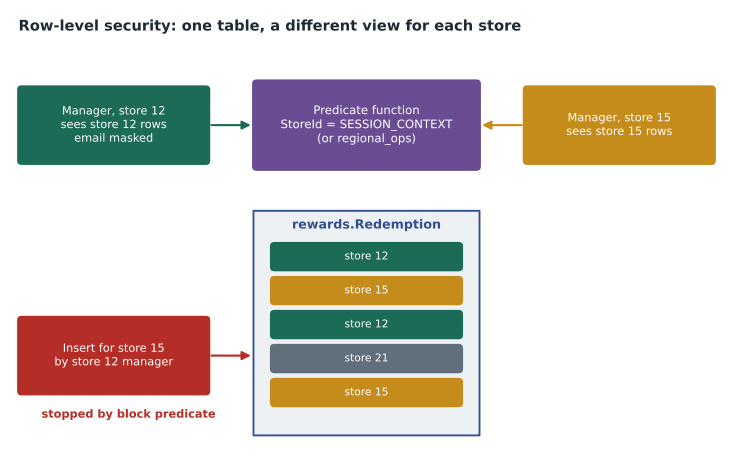
Row-level security restricts which rows a user can read or change, based on who the user is. It works with two objects. A predicate function is an inline table-valued function that takes column values from a row and returns a row, meaning allowed, or nothing, meaning not allowed. A security policy attaches the function to a table as a filter predicate, a block predicate or both. Once the policy is on, the engine adds the predicate to every query against the table automatically, whatever tool or application runs it. A store manager who selects from the table, or from a view on it, sees only the rows the function allows.
A filter predicate silently removes rows from reads: SELECT, UPDATE and DELETE simply do not see rows the user is not allowed. A block predicate prevents writes that would break the rule: it can stop a user from inserting a row for another store, or from updating a row so that it moves to another store. Without a block predicate, a user could insert a row they are then unable to see, which is confusing at best and a way to plant data at worst.
Who is the user?
The predicate needs to know who is asking. When people connect with their own identities, the function can compare a column with USER_NAME() or look the user up in a mapping table. Many applications, though, connect as one identity, such as a managed identity, and know the real user only inside the application. For that case, the application sets a value in SESSION_CONTEXT after opening the connection, and the predicate reads it. The dashboard service authenticates the manager with Entra, looks up their store, and calls sp_set_session_context with a key of StoreId and the read_only flag set, so that nothing later in the session can change it.
CREATE SCHEMA security;
GO
CREATE FUNCTION security.fn_store_predicate(@StoreId int)
RETURNS TABLE WITH SCHEMABINDING
AS RETURN
    SELECT 1 AS allowed
    WHERE @StoreId = CAST(SESSION_CONTEXT(N'StoreId') AS int)
       OR IS_MEMBER('regional_ops') = 1;
GO
CREATE SECURITY POLICY security.StorePolicy
    ADD FILTER PREDICATE security.fn_store_predicate(StoreId) ON rewards.Redemption,
    ADD BLOCK PREDICATE security.fn_store_predicate(StoreId) ON rewards.Redemption AFTER INSERT,
    ADD BLOCK PREDICATE security.fn_store_predicate(StoreId) ON rewards.Redemption AFTER UPDATE
WITH (STATE = ON);-- Run by the dashboard service after it identifies the manager
EXEC sp_set_session_context @key = N'StoreId', @value = 12, @read_only = 1;
SELECT RedemptionId, MemberId, RewardCode, RedeemedAt FROM rewards.Redemption;Designing predicates that perform
Because the predicate runs for every row a query touches, a slow predicate makes every query slow. The function should be inline and schema-bound, should avoid calling other functions or touching many tables, and should compare columns that are indexed. The StoreId column on the Redemption table is the leading column of an index, so the engine can seek straight to one store's rows. Elena warns about one trap: a predicate that looks up the user in a mapping table with a join is fine if the mapping table is small and indexed, but a predicate that scans a large table for every row can turn a one-second report into a one-minute report.
Row-level security also interacts with other features. The DBA who created the policy and members of db_owner are not exempt unless the predicate says so; the predicate above lets the regional_ops role see everything by design, and it lets nobody else, including Walt. To troubleshoot, Walt either joins regional_ops temporarily through Privileged Identity Management or switches the policy off in the test database. Indexed views on a table with a security policy are not allowed, and some features, such as certain kinds of change tracking, need care. Side-channel attacks are possible too: a carefully written query that causes a divide-by-zero error only for certain hidden rows can reveal that they exist, so row-level security, like masking, is combined with restricting who can run arbitrary queries.
| Requirement | Feature | Why |
|---|---|---|
| Managers see only their own store's rows | Row-level security filter predicate | The engine adds the rule to every query |
| Managers cannot write rows for another store | Row-level security block predicate | Stops inserts and updates that break the rule |
| Full email and phone hidden on screens | Dynamic data masking | Changes results without changing data |
| Support agents may call members back | UNMASK on the Phone column only | Granular unmasking |
| ID numbers hidden even from DBAs | Always Encrypted | Keys and plaintext stay off the server |
Testing the policies
Security rules that live in the database should be tested like code. Hana writes a short test script that runs in the test database after every deployment. It impersonates a sample user for each role with EXECUTE AS, sets session context for a store where needed, runs the queries the dashboard and support screens use, and compares the counts and the visible columns with expected values. If a developer changes the predicate function or drops a mask by mistake, the test fails before the change reaches production. The script also tries the actions that should fail, such as inserting a redemption for another store, and checks that they do.
The tests catch one real mistake in the first week. A developer adds a new column, ManagerNote, to the Member table for free-text comments. It is not masked, and the store managers' view selects every column. The test that compares visible columns with an approved list flags it, Carmen decides the column should be masked with default(), and the approved list is updated. Without the test, the first anyone would have known was a manager reading a support note about a customer at the till.
Choosing between the controls
Masking, row-level security, permissions and encryption overlap, and choosing among them is a common exam theme. Permissions decide whether a principal can touch an object or column at all. Row-level security decides which rows of an object a principal sees or changes. Masking decides how much of a value appears in results for principals allowed to query the column. Always Encrypted decides whether the server, and therefore anyone with server access, can see the value at all. A good design uses the lightest control that meets each requirement and combines them where needed, as the dashboard does with all four.
Worked problem
How many rows does each user see?
The rewards.Redemption test table has 48,600 rows. Store 12 has 5,400 of them, store 15 has 2,700 and store 21 has 1,350; the rest belong to 20 other stores. The security policy above is on. Four sessions run SELECT COUNT(*) FROM rewards.Redemption: (A) the dashboard with session context StoreId = 12, (B) the dashboard with StoreId = 15, (C) a member of regional_ops with no session context, and (D) Walt, a member of db_owner, with no session context and not in regional_ops. What does each see?
Show solution
- Session A: the predicate allows rows where StoreId equals 12, so the count is 5,400.
- Session B: StoreId 15, so the count is 2,700.
- Session C: IS_MEMBER('regional_ops') returns 1, so every row is allowed: 48,600.
- Session D: session context is empty, so SESSION_CONTEXT returns NULL and the comparison is never true; Walt is not in regional_ops. Being db_owner does not bypass row-level security, so the count is 0.
- \[5{,}400 + 2{,}700 + 1{,}350 = 9{,}450 \text{ rows for the three named stores}\]
Answer: The counts are 5,400, 2,700, 48,600 and 0. Session D surprises Walt every time, and it is a good test that the policy is working.
Common mistakes
MistakeDynamic data masking encrypts the masked columns.
InsteadMasking only changes query results; stored data is plain, so combine it with permissions and auditing.
MistakeUsers without UNMASK cannot learn anything about masked values.
InsteadFiltering on a masked column can reveal values by inference; restrict ad hoc query access.
MistakeMembers of db_owner are exempt from row-level security.
InsteadSecurity policies apply to everyone unless the predicate makes an exception.
MistakeA filter predicate alone stops users from inserting rows for other stores.
InsteadFilter predicates affect reads; block predicates are needed to stop such writes.
Summary and key terms
- Dynamic data masking changes query results for users without UNMASK, using default, email, partial, random or datetime masks.
- UNMASK can be granted at database, schema, table or column level; db_owner and administrators always see real values.
- Masking is not encryption and can be defeated by inference; use it to reduce casual exposure.
- Row-level security uses an inline predicate function and a security policy with filter and block predicates.
- Apps that connect as one identity pass the real user through SESSION_CONTEXT, set read-only.
- Predicates must be simple and indexed, because they run for every row a query touches.
- Dynamic data masking
- A feature that hides part or all of a column's value in query results for users without UNMASK.
- UNMASK
- The permission that lets a user see the real values of masked columns.
- Row-level security
- A feature that restricts which rows users can read or write, enforced by the engine.
- Predicate function
- An inline table-valued function that decides whether a row is allowed.
- Security policy
- The object that attaches predicate functions to tables and turns them on or off.
- Block predicate
- A predicate that prevents inserts, updates or deletes that would violate the rule.
- SESSION_CONTEXT
- Key-value pairs set for a connection that predicates and code can read.
Practice problems
Work each problem on paper first, then reveal the answer to check.
What does a user without UNMASK see for an email column masked with email()?
Show answer
The first letter followed by XXX@XXXX.com.
Why set session context with read_only = 1?
Show answer
So no later code in the same session can change the value the predicate trusts.
What is the difference between a filter predicate and a block predicate?
Show answer
A filter predicate hides rows from reads; a block predicate stops writes that break the rule.
Name one way a user could infer a masked value.
Show answer
Repeatedly filtering on the masked column with guessed values, such as LIKE patterns.
Why should the predicate's column be indexed?
Show answer
The predicate is applied to every row a query touches, so an index lets the engine seek instead of scan.
Lesson quiz · 5 questions
Score 60% or more to complete this lesson.
Create a free account to save your progress, take quizzes and earn a certificate.