
MSAZ-281 · Lesson 6 of 12 · 21 min
Auditing and Defender for SQL
▶ Video coming soon A video version of this lesson is on the way.
Sunil Rao's sign-off checklist for a production database has three questions after encryption and access. Can we prove who did what? Will we notice if something suspicious happens? Can we show which columns hold sensitive data? For StockLine on its old server, the answers were a C2 audit trace that filled a disk in 2018 and was switched off, nothing, and a spreadsheet from 2020. In the first week of December 2026, Elena and Walt set up the Azure answers on the two test environments, so that Sunil can review them before the year ends.
Classifying sensitive data first
Auditing and threat detection both work better when the database knows which columns are sensitive. Data discovery and classification, built into Azure SQL Database and Managed Instance, scans column names and suggests labels such as Confidential and Highly Confidential, with information types such as contact information, national identifiers, date of birth and financial data. A DBA reviews the suggestions, accepts or changes them, and adds any the scanner missed. The labels are stored as metadata on the columns and can also be set with T-SQL.
Harrow & Finch aligns the database labels with the Microsoft Purview sensitivity labels that Sunil's team already uses for documents: Public, General, Confidential and Highly Confidential. In the Finch Rewards database, Email and Phone are labelled Confidential with the contact information type, DateOfBirth and IdNumber are labelled Highly Confidential, and the points ledger is General. Once columns are labelled, audit records show when a query touched classified columns, and the classification dashboard gives Carmen a list she can check against the privacy register instead of the 2020 spreadsheet.
ADD SENSITIVITY CLASSIFICATION TO rewards.Member.Email, rewards.Member.Phone
WITH (LABEL = 'Confidential', INFORMATION_TYPE = 'Contact Info', RANK = MEDIUM);

ADD SENSITIVITY CLASSIFICATION TO rewards.MemberId.IdNumber
WITH (LABEL = 'Highly Confidential', INFORMATION_TYPE = 'National ID', RANK = HIGH);

SELECT SCHEMA_NAME(o.schema_id) AS schema_name, o.name AS table_name,
       c.name AS column_name, sc.label, sc.information_type, sc.rank_desc
FROM sys.sensitivity_classifications AS sc
JOIN sys.objects AS o ON sc.major_id = o.object_id
JOIN sys.columns AS c ON sc.major_id = c.object_id AND sc.minor_id = c.column_id;
Auditing in Azure SQL Database
Auditing records database events to a log the DBA cannot quietly edit. In Azure SQL Database, auditing is turned on at the logical server, the database, or both. Server-level auditing applies to every database on the server, including new ones, and is the usual choice; database-level auditing adds a separate policy for one database. If both are on, both write records, so turning on both by habit doubles the volume. The default audit action groups capture successful and failed logins and every batch that completes, which covers most investigations. A policy can be narrowed to particular action groups, or extended with schema or object actions such as SELECT on one table.
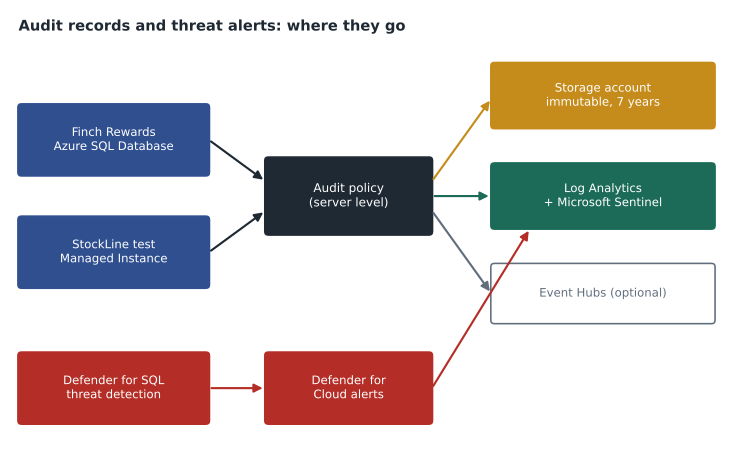
Audit logs can be written to three destinations, in any combination: an Azure Storage account, where records are kept as files for as long as the retention period says; a Log Analytics workspace, where they can be queried with Kusto Query Language and joined with other logs; and Event Hubs, for streaming to a security information and event management system. Harrow & Finch sends server audits to the Log Analytics workspace that Microsoft Sentinel uses, so that Ama Boateng's analysts can query database activity alongside sign-ins, and to a storage account with immutable storage for long-term retention, because an auditor may ask for a record from years ago.
az sql server audit-policy update \
  --resource-group rg-rewards-test-cc --name hf-sql-rewards-test-cc \
  --state Enabled --lats Enabled \
  --lawri /subscriptions/0f3c6e1a-2b9d-4c51-8e77-5a6f1d2c9b30/resourceGroups/rg-security-cc/providers/Microsoft.OperationalInsights/workspaces/law-hf-security \
  --bsts Enabled --storage-account sthfauditlogscc --retention-days 0
Auditing on Managed Instance and SQL Server
Managed Instance uses the SQL Server audit model: a server audit object defines where records go, and server and database audit specifications choose which events to record. The destination is a URL in Azure Blob Storage or, through diagnostic settings, Log Analytics and Event Hubs. SQL Server on a VM uses the same T-SQL objects with a file or the Windows event log as the target. Walt is at home with this model, because it is how he would have audited StockLine on premises if the disk had been big enough, and his first audit specification on the test instance records changes to permissions and every SELECT against the payroll-related tables that StockLine still holds.
CREATE SERVER AUDIT StockLineAudit
    TO URL (PATH = 'https://sthfauditlogscc.blob.core.windows.net/sqlaudit', RETENTION_DAYS = 0);
ALTER SERVER AUDIT StockLineAudit WITH (STATE = ON);

USE StockLine;
CREATE DATABASE AUDIT SPECIFICATION StockLineSensitive
    FOR SERVER AUDIT StockLineAudit
    ADD (SELECT ON SCHEMA::hr BY public),
    ADD (DATABASE_PERMISSION_CHANGE_GROUP),
    ADD (DATABASE_ROLE_MEMBER_CHANGE_GROUP)
    WITH (STATE = ON);
Reading audit records
In Log Analytics, Azure SQL audit records appear in a table of diagnostic events, and a few Kusto queries answer most questions. Who signed in from an unusual address? Which statements touched the Highly Confidential columns this week? Which failed logins came in bursts? Walt keeps his first queries short and adds filters one at a time, checking each result before going further, which is the same habit he has with T-SQL.
AzureDiagnostics
| where Category == "SQLSecurityAuditEvents"
| where TimeGenerated > ago(7d)
| where succeeded_s == "false" and action_name_s == "DATABASE AUTHENTICATION FAILED"
| summarize Failures = count() by client_ip_s, bin(TimeGenerated, 1h)
| order by Failures desc
Microsoft Defender for SQL
Auditing records what happened; it does not tell anyone that something unusual is happening. Microsoft Defender for SQL, part of Microsoft Defender for Cloud, adds two capabilities. Vulnerability assessment scans the database configuration against a set of security rules and reports findings, such as a firewall rule open to a wide range, a user with excessive permissions, or auditing switched off, each with remediation steps. A baseline lets the DBA accept findings that are intentional, so later scans show only changes. Advanced threat protection watches database activity and raises alerts for patterns such as possible SQL injection, sign-ins from unusual locations or Azure regions, brute-force attempts, and access by an unfamiliar principal or application.
Defender for SQL is a paid plan, enabled per subscription for Azure SQL resources, and separately for SQL Server on machines, which covers SQL Server on Azure VMs and servers connected through Azure Arc. Sunil enables it on the production subscriptions and on hf-nonprod for the duration of the migration rehearsals, because test copies of StockLine will contain real data during the final rehearsal in 2027. Alerts flow to Defender for Cloud and into Sentinel, where Ama's team handles them. Lesson 1's emphasis on Entra-only authentication matters here too: fewer password logins means fewer brute-force alerts to investigate.
| Tool | Question it answers | Where results go |
|---|---|---|
| Data discovery and classification | Which columns are sensitive? | Column metadata, audit records, classification report |
| Auditing | Who did what, and when? | Storage, Log Analytics, Event Hubs |
| Vulnerability assessment | Is the configuration weak anywhere? | Defender for Cloud recommendations |
| Advanced threat protection | Is something suspicious happening now? | Defender for Cloud alerts, Sentinel incidents |
| Ledger | Has anyone tampered with the data? | Database digests in immutable storage |
| Change tracking or change data capture | Which rows changed since a point? | Tables inside the database |
Ledger
Some records must be provably untouched. The points ledger in Finch Rewards is a candidate: if a dispute reaches the customer complaints team, Harrow & Finch wants to show that nobody altered a member's history afterwards, not even a DBA. The ledger feature in Azure SQL Database, Managed Instance and SQL Server 2022 makes tables tamper-evident. Each transaction on a ledger table is hashed into a chain, the database periodically produces a digest of that chain, and the digests can be stored automatically in immutable Azure storage or Azure Confidential Ledger. A verification procedure later recomputes the hashes and compares them with the stored digests; any change made outside normal transactions shows up as a mismatch.
Ledger tables come in two kinds. An updatable ledger table allows updates and deletes but keeps every earlier version of each row in a history table, so the full sequence of changes is visible. An append-only ledger table allows only inserts, which suits event logs. Hana makes PointsLedger an append-only ledger table, because points are never edited, only added or reversed with a new row. Ledger is a choice made when a table is created; an existing table cannot be converted in place, and once a table is a ledger table it cannot be turned back into an ordinary one.
Change tracking and change data capture
The DP-300 outline also mentions tracking data changes, which is a different need from ledger. Change tracking records which rows changed since a given version, without the old values, and is light enough for applications that synchronize data, such as the store tablets that cache member tiers. Change data capture reads the transaction log and writes the full before and after values of changed rows into change tables, which suits feeding a data platform; Ines Duarte plans to use it to send StockLine sales changes to the Finch Data Hub. Neither is an audit: both record what changed in the data, not who looked at it.
Retention and immutability
Audit records are only useful if they still exist when someone asks for them and nobody could have changed them. Harrow & Finch's records policy, which Carmen maintains, keeps security audit records for seven years. A Log Analytics workspace can keep data for a long time, but long retention there is more expensive than storage, so the team keeps 90 days in the workspace for investigation and the full seven years in the storage account. That account has a time-based immutability policy on the audit container, so blobs cannot be modified or deleted until their retention period ends, even by an account owner.
Access to the audit data needs the same care as access to the database. Analysts in Sunil's team read audit records in Log Analytics through a workspace role, not through the storage account, and only two people can manage the storage account's immutability settings. DBAs can read the audit records about their own databases but cannot change the audit policy without a change ticket, so the people being audited are not the people who can switch the audit off.
Worked problem
How much audit data will Log Analytics receive?
Walt estimates the Finch Rewards production database will run about 1,200 batches a minute at peak and 300 a minute on average over a day, with about 20,000 sign-ins a day. Each audit record is about 1.5 KB once ingested. Using the daily average, how much audit data would the default action groups send to Log Analytics per day and per 30-day month?
Show solution
- Batches per day at the average rate: 300 × 60 × 24 = 432,000.
- Add the sign-ins: 432,000 + 20,000 = 452,000 records a day.
- \[452{,}000 \times 1.5 \text{ KB} = 678{,}000 \text{ KB} \approx 0.68 \text{ GB per day}\]
- Over 30 days: 0.678 × 30 ≈ 20.3 GB a month.
- Recording SELECT statements only for classified tables, instead of every batch, would cut this sharply; Walt notes it as an option once Sunil has seen a month of data.
Answer: About 0.68 GB a day, or roughly 20 GB a month, before any narrowing of the audit policy. Elena asks him to put the estimate in the cost plan, with clearly labelled illustrative ingestion prices.
Common mistakes
MistakeTurning on both server and database auditing is safer.
InsteadBoth write records, doubling volume and cost; use server-level auditing unless one database needs a different policy.
MistakeAuditing will alert the team when an attack starts.
InsteadAuditing records events; advanced threat protection in Defender for SQL raises alerts.
MistakeLedger prevents DBAs from changing data.
InsteadLedger makes tampering detectable through hash verification; it does not block authorized changes.
MistakeChange data capture records who read the data.
InsteadChange data capture records data changes from the log; auditing records who did what.
Summary and key terms
- Data discovery and classification labels sensitive columns, which audit records and reports can then use.
- Azure SQL Database auditing is set at the server or database and writes to storage, Log Analytics or Event Hubs.
- Managed Instance and SQL Server use server audits and audit specifications.
- Defender for SQL adds vulnerability assessment and advanced threat protection, with alerts in Defender for Cloud.
- Ledger tables make tampering evident through hash chains and stored digests; append-only tables accept inserts only.
- Change tracking and change data capture record data changes for synchronization and pipelines, not access.
- Data discovery and classification
- A built-in feature that suggests and stores sensitivity labels and information types for columns.
- Audit action group
- A predefined set of events, such as successful logins or completed batches, that an audit records.
- Vulnerability assessment
- A scan of database configuration against security rules, with findings and a baseline.
- Advanced threat protection
- Detection of suspicious database activity, such as SQL injection or unusual sign-ins.
- Ledger table
- A table whose changes are hashed into a verifiable chain so that tampering can be detected.
- Change data capture
- A feature that records before and after values of changed rows from the transaction log.
Practice problems
Work each problem on paper first, then reveal the answer to check.
Why is server-level auditing usually preferred in Azure SQL Database?
Show answer
It covers every database on the server, including new ones, with one policy.
Name the three audit destinations for Azure SQL Database.
Show answer
Azure Storage, Log Analytics, and Event Hubs.
What does a vulnerability assessment baseline do?
Show answer
It records accepted findings so later scans report only changes.
What is the difference between an updatable and an append-only ledger table?
Show answer
Updatable allows updates and deletes with history kept; append-only allows inserts only.
Why would Ines use change data capture rather than auditing?
Show answer
She needs the changed data values for a pipeline, not a record of who acted.
Lesson quiz · 5 questions
Score 60% or more to complete this lesson.
Create a free account to save your progress, take quizzes and earn a certificate.