
MSAZ-190 · Lesson 12 of 12 · 22 min
Exam day, results and next certifications
▶ Video coming soon A video version of this lesson is on the way.
Theo's AZ-900 appointment is at nine on a Saturday morning in mid-January 2027, at a test centre across town. On the Thursday before, Renata gives the group her exam-day checklist, the one she has used for every exam she has taken. "Nothing on it is clever," she says. "That is the point. On the day, you want to make no decisions except the ones the questions ask for." This lesson follows the plan for Theo's test centre exam and Ama's online exam in February, then looks at what happens after the exam: reading the result, sharing a certification, planning a retake if needed, and choosing what to study next. All the exam days in this lesson are still in the future as of November 2026, so they are written as plans.
The day before
The day before an exam is for consolidation, not new material. Theo plans a short review of his one-page summaries and his top mistakes log entries in the morning, then nothing after early afternoon. He checks his confirmation email for the address, the arrival instructions and any rules about what to bring, and he lays out his ID, the same one whose name matches his Learn profile exactly. He checks the weather and the route. He goes to bed at his usual time; a full night's sleep helps recall more than an extra hour of review.
Ama's checklist for her online exam adds several items. She runs Pearson VUE's system test again on her laptop, on the same network she will use, at the same time of day as her appointment. She clears her desk completely, including the whiteboard she usually keeps beside her monitor, and moves it out of arm's reach. She unplugs her second monitor and turns it away. She tells her neighbours that she needs quiet in the morning and puts a sign on her door. She charges her phone, which she will need for the check-in photos and then must keep out of reach but within earshot.
| Check | Test centre | Online |
|---|---|---|
| ID matching the Learn profile name exactly | Yes | Yes; name-change forms not accepted |
| Confirmation email read | Arrival time, address, rules | Check-in window, launch link |
| Equipment | Provided by the centre | System test passed on the day, same computer and network |
| Room | Provided | Walled, closed door, no one else, clear desk, extra monitors unplugged |
| Phone | In a locker | Used for check-in photos, then out of reach but audible |
| Timing | Arrive early as the confirmation says | Check in from 30 minutes before; closes 15 minutes after |
The morning of the exam
Eat a normal breakfast and drink some water, but not so much that you need a break: the exam clock keeps running during breaks, and questions you have seen lock behind you. Take your one-page summaries if you want a last look before leaving, but put them away once you arrive. At a test centre, staff check your ID, take a photo, ask you to store your belongings, explain the rules and seat you. Online, you start check-in in the window, photograph your ID, your face and your workspace, wait for a greeter to review them and a proctor to start the exam, and put your phone away when told.
Once the exam begins, use the routine from Lessons 3, 6 and 11: read the instructions screen fully, note the item count, work out your checkpoints, and then take each item as it comes. Answer every item before marking it. Apply the slow-item rule. At the end, go to the review screen, answer anything left, and revisit marked items for specific reasons only.
If something goes wrong
At a test centre, if your computer freezes or the room becomes noisy, raise your hand and tell the staff at once. Online, if your connection drops, stay where you are and do not open anything else; Microsoft's online exam page says the proctor will try to contact you by chat and then by phone. If you have not heard from a proctor within 30 minutes of checking in, Microsoft suggests using Pearson VUE's online support chat. In either case, make sure a case is opened with Pearson VUE. Microsoft's retake policy says the usual waiting period can be waived only for internet or equipment failures during the exam, and only when a Pearson VUE case number is provided.
The result
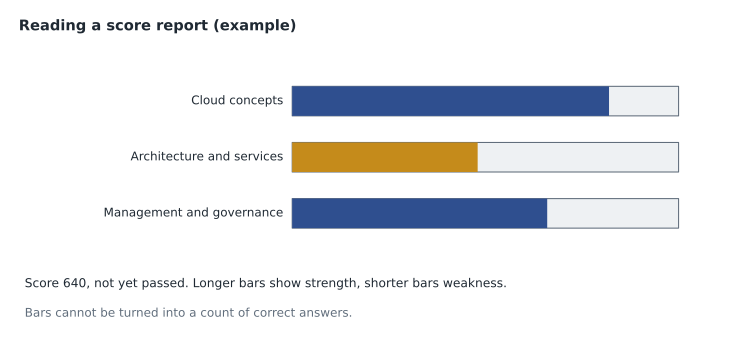
Microsoft's scoring page says that for most exams you will have results within minutes of finishing, and that your score appears in your Learn profile within 24 hours. The score report shows your overall score on the 1 to 1,000 scale, whether you passed, and a bar chart of performance by skill area. Longer bars show strength and shorter bars weakness, but Microsoft is clear that the bars cannot be used to calculate how many questions you answered correctly in a section or overall, and the report does not list which questions you missed. Save a copy of the report either way.
Nerves on the day
Almost everyone is nervous before an exam, and a little tension helps concentration. Too much narrows attention and slows reading. A few simple habits keep it in check. Arrive or check in early enough that you are not rushing. Before you start, take three slow breaths and read the instructions screen fully; the exam time does not start until the exam itself begins. When you meet a hard item early on, remind yourself that everyone meets several and that the passing standard allows for them, then apply the slow-item rule. If your mind goes blank, look away from the screen for a few seconds, breathe out slowly and reread only the final sentence of the question. And do not try to judge how you are doing as you go; most people are poor judges of their own performance mid-exam, and many who pass leave convinced they failed.
After a pass
When you pass, the certification appears on your Learn profile, where you can view it, download a certificate and share a transcript with an employer. Microsoft also issues digital badges that you can claim and share on professional networking sites; follow the instructions on your profile or in the email you receive. Add the certification to your résumé with its full name, such as Microsoft Certified: Azure Fundamentals, and the month you earned it. Because fundamentals certifications do not expire, there is nothing to renew. Tell your manager, too: at Harrow & Finch, each certification is recorded in the Skylight skills plan, which helps decide who works on which part of the migration.
After a fail
Failing a fundamentals exam is common and recoverable. Start with the score report: the shortest bars show where to focus. Compare them with your study plan and your mistakes log to work out whether the problem was knowledge in a particular area, or exam technique, such as running out of time or falling into traps. Then rebuild a short plan, often two to four weeks, weighted heavily toward the weak areas, with at least one timed rehearsal before rebooking. Remember the retake waits: 24 hours after the first failure and 14 days between later attempts, with at most five attempts in 12 months. A 24-hour gap is allowed, but rebooking the next day without changing anything rarely changes the result.
Worked problem
Building a retake plan from a score report
Suppose, as an illustration, that a candidate's AZ-900 report shows 640, with a long bar for cloud concepts, a short bar for architecture and services and a medium bar for management and governance. Their mistakes log shows repeated confusion about storage redundancy and compute options, and they finished with no time to review. What should the retake plan contain?
Show solution
- Focus first on architecture and services, the largest area and the shortest bar: storage services and redundancy, compute options, networking basics.
- Spend some time on management and governance, the medium bar, especially the RBAC, Policy and locks distinctions.
- Keep brief spaced reviews of cloud concepts so the strong area stays strong.
- Practise pacing: two timed rehearsals using the checkpoints and slow-item rule from Lesson 6.
- Rebook after the plan is complete, two to three weeks later rather than the next day.
Answer: A short, weighted plan aimed at the weakest large area, plus timed practice to fix pacing, then rebook.
Choosing the next certification
A fundamentals certification is a foundation for a role-based one. The natural next steps depend on the job. For Azure administration, the associate administrator certification is the usual next goal, and an Azure developer certification suits people who write code. For AI, Microsoft offers an associate certification for AI engineers. For data, there are associate certifications for analytics engineering and data engineering with Microsoft Fabric and for data analysis with Power BI. For security, there are associate certifications for security operations, identity and access administration, and Azure security engineering. Microsoft retires and replaces role-based exams regularly, so check the current exam codes on Microsoft Learn's certification pages before you plan, and remember that role-based certifications are renewed each year with a free online assessment.
Applied Skills credentials are another option. They are earned by completing a hands-on lab assessment on a specific task, such as deploying a particular kind of solution, and they can be a good bridge between a fundamentals certification and a role-based one. Many people also add a second fundamentals certification in a neighbouring area: an administrator might add SC-900, a developer AZ-900. There is no single right path; choose the one that matches the work you do or want to do next.
| Fundamentals | Common next steps (check current exam codes) |
|---|---|
| AZ-900 | Azure administrator associate; Azure developer associate |
| AI-901 | AI engineer associate; Applied Skills in AI solutions |
| DP-900 | Power BI data analyst associate; Fabric analytics engineer or data engineer associate |
| SC-900 | Security operations analyst, identity and access administrator, or Azure security engineer associate |
The group's plan
Renata ends the last session of the year by asking each of the four to write down three things on a card: the date of their exam, what they will do the evening before, and what they will study next if they pass. Theo writes the Saturday in January, "one-page summaries, then a film", and the administrator associate certification. Keiko writes her February date, "nothing after lunch", and the Power BI data analyst certification. Ama writes her February date, "system test twice", and the security operations analyst certification. Hana writes "booking opens December 10", "explain every code sample aloud" and the AI engineer certification. Renata collects the cards and promises to hand them back after the last exam. "Whatever happens on the day," she says, "you will know exactly what to do next. That is what readiness means."
Common mistakes
MistakeStudying new topics the evening before.
InsteadReview summaries and the mistakes log, then rest.
MistakeSkipping the system test on exam day for an online exam.
InsteadRun it again on the same computer, place and network.
MistakeLeaving the room or opening other apps when an online exam disconnects.
InsteadStay put, wait for the proctor and make sure a Pearson VUE case is opened.
MistakeTrying to count correct answers from the score report bars.
InsteadThe bars show relative strength only.
MistakeRebooking the day after a fail with no change in study.
InsteadBuild a short plan aimed at the weakest areas, with timed practice.
Summary and key terms
- The day before: light review, check the confirmation and ID, prepare the room or route, sleep normally.
- Online exams need the system test on the day, a cleared and closed room, and the phone out of reach but audible.
- If something goes wrong, tell staff or the proctor and make sure a Pearson VUE case is opened.
- Results usually appear within minutes and on the Learn profile within 24 hours; the report shows a score, pass or fail and bars by skill area.
- After a pass, share the certification and badge; fundamentals certifications do not expire.
- After a fail, use the bars and mistakes log to build a short weighted plan, respecting the retake waits.
- Next steps are role-based or Applied Skills credentials chosen for the work you do; check current exam codes.
- Score report
- The result document showing overall score, pass or fail and performance by skill area.
- Transcript
- The record of exams and certifications on a Learn profile, which can be shared.
- Digital badge
- An online credential image that can be claimed and shared on professional sites.
- Applied Skills
- Microsoft credentials earned through a hands-on lab assessment on a specific task.
- Pearson VUE case
- A support record opened with the exam provider about a problem during an exam.
- Retake plan
- A short study plan built from a score report before rebooking.
Practice problems
Work each problem on paper first, then reveal the answer to check.
What should the day before an exam contain?
Show answer
Light review, checks of ID, confirmation and room or route, and normal sleep.
When do most Microsoft exam results appear?
Show answer
Within minutes of finishing, and on the Learn profile within 24 hours.
Can the score report bars tell you how many questions you got right?
Show answer
No. They show relative strength only.
What is needed to waive a retake wait after an equipment failure?
Show answer
A Pearson VUE case number from the time of the problem.
Do fundamentals certifications need renewal?
Show answer
No. They do not expire.
What is an Applied Skills credential?
Show answer
A credential earned by completing a hands-on lab assessment on a specific task.
How should a candidate respond to a fail?
Show answer
Use the score report and mistakes log to build a short, weighted plan with timed practice, then rebook.
Lesson quiz · 5 questions
Score 60% or more to complete this lesson.
Create a free account to save your progress, take quizzes and earn a certificate.