
MSAZ-102 · Lesson 4 of 12 · 18 min
Microsoft Purview and governance
▶ Video coming soon A video version of this lesson is on the way.
Two days after the budget meeting, Sunil Rao, the IT security manager, stopped by Renata's desk with a printout of the privacy section of the company's annual report. "We say here that we know where our customers' personal information is and who can see it," he said. "On premises, I could point at three servers and say that is where it lives. With Skylight, the data is going to be spread across databases, file shares, the loyalty app and whatever the analysts build next year. How do we keep that promise?" Renata's answer was that it depends on what kind of governance he meant. Some of it is about controlling Azure resources, and some is about understanding and protecting the data inside them. This lesson covers the second kind, through Microsoft Purview, and the next three lessons cover the first.
What governance means in the cloud
Governance is the set of rules, processes and tools an organization uses to make sure its technology is used in ways that meet its goals, its obligations and its tolerance for risk. In the cloud, governance answers questions such as: Which regions may we use? Who may create resources, and what kinds? How much may each team spend? Where is our sensitive data, who can see it and how long must we keep it? Without governance, the speed and convenience of the cloud can produce a sprawl of resources nobody owns, costs nobody expected and data nobody can find.
Microsoft's guidance for cloud adoption, the Cloud Adoption Framework, treats governance as an ongoing discipline rather than a one-time project. Organizations define policies, put tools in place to enforce and monitor them, and review them as the cloud estate grows. Azure provides several governance tools for resources, including Azure Policy, resource locks, role-based access control, management groups and Cost Management. For data, the main tool is Microsoft Purview.
What Microsoft Purview is
Microsoft Purview is a family of data governance, data security and compliance solutions. It is not a single feature of Azure; it covers data in Azure, on premises, in other clouds and in software-as-a-service applications such as Microsoft 365. Its solutions are reached through a unified Microsoft Purview portal. The AZ-900 skills outline asks you to describe its purpose, so the key idea is that Purview helps an organization know what data it has, where it is, how sensitive it is and how it must be handled.
Purview's solutions fall into three broad groups. Data governance helps an organization discover, describe and understand its data across many systems. Data security helps protect sensitive data wherever it goes, with labels, loss prevention and insider risk tools. Data compliance helps meet legal and regulatory obligations with auditing, legal discovery, retention and assessment tools. Many of the security and compliance tools were previously known as Microsoft 365 compliance features, which is why organizations that already use Microsoft 365, as Harrow & Finch does, often have some of them in use already.
| Group | Examples of Purview solutions | Question it helps answer |
|---|---|---|
| Data governance | Data Map, Unified Catalog, data quality | What data do we have, where is it, and can people find and trust it? |
| Data security | Information Protection with sensitivity labels, Data Loss Prevention, Insider Risk Management | How do we stop sensitive data from leaking or being misused? |
| Data compliance | Audit, eDiscovery, Compliance Manager, Data Lifecycle Management, Records Management | How do we meet legal duties and prove it? |
Data governance: the Data Map and the Unified Catalog
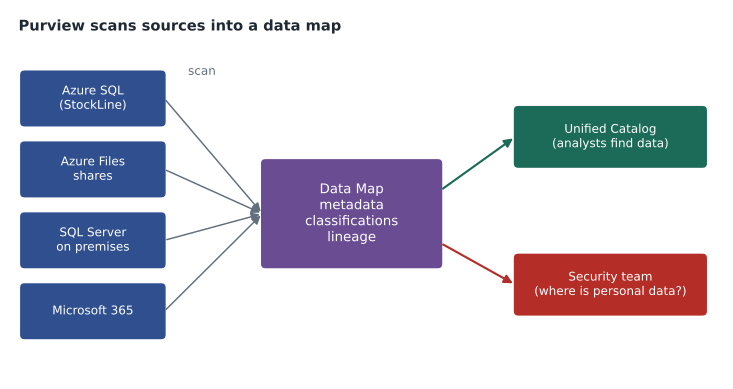
The foundation of Purview's governance tools is the Data Map. Purview connects to registered data sources, such as Azure SQL databases, Azure Storage accounts, SQL Server instances on premises, other cloud storage and many software services, and scans them. A scan collects metadata: the names of databases, tables, columns and files, their structure and where they live. Scans can also classify data by looking for patterns, such as email addresses, phone numbers, postal codes or credit card numbers, and record which columns appear to hold sensitive information. The Data Map can also capture lineage, showing how data flows from a source through processing steps into a report.
On top of the Data Map, the Unified Catalog helps people find and use data. Data owners publish curated data products, add business descriptions and link terms from a shared business glossary, so that everyone means the same thing by words such as active customer or net sales. Analysts search the catalog to find trusted data instead of copying spreadsheets, and governance teams track data quality and ownership. Keiko Tanabe was the most enthusiastic person at Harrow & Finch when she saw this. Half her week went into explaining which of four slightly different sales tables was the real one.
Sunil's question about personal information is exactly the kind of thing the Data Map helps with. Once the StockLine database, the loyalty app's database and the Azure Files shares are registered and scanned, Purview can show which columns and files appear to contain customer names, email addresses and phone numbers, in which data stores, in which regions. That inventory does not protect the data by itself, but it tells the security team where protection is needed and helps the company answer privacy questions under PIPEDA and provincial laws such as Quebec's.
Theo wrote a tiny script to show the idea of classification. It looks for simple patterns in sample values, the way a classifier flags a column as probably containing email addresses. Real classifiers are far more sophisticated and use confidence levels, but the principle is the same: look at the data, recognize patterns and record what was found.
import re
samples = {
    "contact": ["ana@example.com", "lee@example.org", "n/a"],
    "phone":   ["204-555-0143", "204-555-0178", "unknown"],
    "sku":     ["HF-10422", "HF-88310", "HF-00017"],
}
patterns = {
    "Email address": r"[^@ ]+@[^@ ]+[.][a-z]+",
    "Phone number":  r"[0-9]{3}-[0-9]{3}-[0-9]{4}",
}
for column, values in samples.items():
    found = [name for name, p in patterns.items()
             if sum(bool(re.fullmatch(p, v)) for v in values) >= 2]
print(f"{column:8s} -> {', '.join(found) if found else 'no sensitive pattern'}")contact -> Email address phone -> Phone number sku -> no sensitive pattern
What this code does
Looks at sample values from three data columns and checks each against simple text patterns for email addresses and phone numbers. Columns where the patterns match are labelled with the kind of sensitive information they appear to hold, and the product-code column is marked as not sensitive. This imitates, very simply, how a data classification tool scans data to find personal information.
Data security: labels and loss prevention
Knowing where sensitive data is leads to the next step: protecting it. Sensitivity labels in Microsoft Purview Information Protection let an organization mark documents, emails and some data assets with labels such as Public, Internal, Confidential and Highly Confidential. Labels can simply mark content, or they can apply protection such as encryption and restrictions on who can open or forward it. Because the protection travels with the file, it still applies when the file is copied to a laptop or emailed outside the company.
Data Loss Prevention (DLP) policies detect sensitive information, such as payment card numbers or health card numbers, in places such as email, Teams chats, SharePoint, OneDrive and devices, and can warn users, block sharing or alert administrators. Insider Risk Management looks for risky patterns of behaviour by people inside the organization, such as downloading unusual amounts of data before leaving the company, while protecting privacy with safeguards on who can see the results. Sunil already had DLP rules in Microsoft 365 for payment card numbers; Purview lets similar thinking extend to the data Skylight moves into Azure.
Data compliance: audit, discovery, retention and assessment
Compliance tools help organizations meet obligations and prove that they have. Audit records user and administrator activity across services so that investigators can answer who did what and when. eDiscovery helps legal teams find, hold and export content relevant to lawsuits or investigations. Data Lifecycle Management and Records Management apply retention policies, so content is kept as long as the law or company policy requires and deleted when it should be. Compliance Manager tracks the organization's progress against regulations and standards with assessments, recommended improvement actions and a compliance score.
Retention matters for a retailer. Harrow & Finch must keep certain financial and employment records for set periods under federal and provincial rules, and it also wants to delete customer data it no longer needs, which reduces the damage any breach could do. A retention policy that deletes old loyalty data automatically after the agreed period is a governance control, just as much as a policy that blocks the wrong region.
Purview and the other governance tools
Purview does not replace Azure's resource governance tools, and they do not replace it. Azure Policy can require that a storage account uses encryption, is in an allowed region and has public access disabled; Purview can tell you that the storage account contains customer phone numbers and that a file of them was shared outside the company. Resource locks stop the database from being deleted; Purview's retention policies decide how long records inside it are kept. Role-based access control decides who can manage the database; sensitivity labels and DLP decide what can happen to the data once someone has it.
Renata's summary for Sunil fitted on a sticky note. "Policy, locks and RBAC govern the containers. Purview governs what is inside them." Sunil asked Ama Boateng, the analyst on his team, to register the StockLine test database and the pilot Azure Files share as the first Purview sources in December, and to report what the first scans found. That work is planned, not done, and the scans will need the right permissions on each data source before they can run.
| Need | Tool |
|---|---|
| Allow only approved regions for resources | Azure Policy |
| Prevent a production database from being deleted | Resource lock |
| Control who can manage a resource | Azure role-based access control |
| Find which data stores hold customer email addresses | Microsoft Purview Data Map |
| Mark a document Confidential and encrypt it | Purview Information Protection sensitivity label |
| Keep records for seven years, then delete them | Purview Data Lifecycle Management or Records Management |
| Track progress against a regulation | Purview Compliance Manager |
Starting small with data governance
Data governance programs often fail by trying to describe everything at once. Renata and Sunil agreed a smaller start. First, register and scan the data stores that hold customer and employee personal information, because those carry the most legal risk. Second, name an owner for each of those data stores, someone in the business rather than in IT, who decides who may use the data and for what. Third, agree four sensitivity labels and apply them to the documents and data stores that matter most. Only after those steps work would they extend scanning to the rest of the estate.
The first data owner named was Keiko Tanabe for the sales reporting data, and the second was the loyalty program manager for the Finch Rewards data. Each owner will review the Purview scan results for their data stores when the first scans run in December, confirm or correct the classifications, and record how long the data should be kept. That review is where governance stops being a technology project and becomes part of how the business runs.
Worked problem
Choosing tools for a requirement
The audit committee asks Harrow & Finch to show that (a) customer data is only stored in approved regions, (b) the company knows which systems hold customer data and (c) customer data is deleted when no longer needed. Which tools address each part?
Show solution
- (a) is about where resources may be created, so Azure Policy with an allowed locations rule enforces it.
- (b) is about knowing what data is in which system, so Purview scanning and the Data Map provide the inventory.
- (c) is about the lifetime of data, so Purview retention policies, plus deletion jobs in applications that manage their own data, apply.
Answer: Azure Policy for regions, the Purview Data Map for the inventory, and retention policies for deletion.
Common mistakes
MistakeThinking Purview is a feature only for Azure resources.
InsteadPurview covers data across Azure, on premises, other clouds and software services such as Microsoft 365.
MistakeExpecting Purview to stop someone deploying to the wrong region.
InsteadThat is Azure Policy; Purview governs data, not resource deployment.
MistakeAssuming a scan protects data.
InsteadScanning and classification create an inventory; labels, DLP and access controls protect.
MistakeTreating governance as a one-time setup.
InsteadPolicies and inventories need regular review as the estate grows.
Summary and key terms
- Governance is the rules, processes and tools that keep technology use aligned with goals, obligations and risk tolerance.
- Microsoft Purview is a family of data governance, data security and data compliance solutions covering data in Azure, on premises, other clouds and Microsoft 365.
- Its Data Map scans sources for metadata, classifications and lineage, and the Unified Catalog makes trusted data discoverable.
- Sensitivity labels and DLP protect data, while Audit, eDiscovery, retention and Compliance Manager support compliance.
- Purview works alongside Azure Policy, locks and RBAC, which govern resources.
- Governance
- Rules, processes and tools that keep technology use within goals and obligations.
- Microsoft Purview
- A family of data governance, security and compliance solutions.
- Data Map
- Purview's inventory of data sources, metadata, classifications and lineage built by scanning.
- Classification
- Identifying the type of data, such as email addresses, by recognizing patterns.
- Lineage
- A record of how data moves from sources through processing to its uses.
- Sensitivity label
- A label that marks and can protect content according to its sensitivity.
- Data Loss Prevention
- Policies that detect and restrict the sharing of sensitive information.
Practice problems
Work each problem on paper first, then reveal the answer to check.
What are the three main groups of Purview solutions?
Show answer
Data governance, data security and data compliance.
What does a Purview scan collect?
Show answer
Metadata about data sources, and optionally classifications and lineage.
Which tool would stop a resource from being created outside approved regions?
Show answer
Azure Policy.
Lesson quiz · 5 questions
Score 60% or more to complete this lesson.
Create a free account to save your progress, take quizzes and earn a certificate.