
MSAZ-102 · Lesson 10 of 12 · 18 min
Infrastructure as code with ARM templates and Bicep
▶ Video coming soon A video version of this lesson is on the way.
The StockLine landing zone was built in September by hand. Renata and Theo created the resource groups, the virtual network, the subnets, the network security groups, the storage account and the first VMs through the portal, carefully, following a checklist. In November, when the developers asked for an identical test environment, Theo spent a day reproducing it and still got two things wrong: one subnet had a different address range and one network security group was missing a rule. "That is why we do not build production by hand," Renata said. "In December we rebuild the landing zone from code, and then we can build it again, exactly the same, as many times as we like." This lesson explains what that means.
What infrastructure as code means
Infrastructure as code (IaC) is the practice of describing infrastructure, such as networks, virtual machines, storage and their settings, in files that a tool reads to create and update the real resources. Instead of a checklist of portal clicks, the environment is defined in text files stored in version control, reviewed like software and deployed automatically. The files become the single source of truth for what the environment should look like.
IaC brings several benefits. Consistency: the test, staging and production environments are built from the same definitions, so they match. Repeatability: an environment can be rebuilt after a disaster, or copied for a new project, in minutes. Review and history: every change is a change to a file, so it can be reviewed before it happens and traced afterwards. Speed: deployments that took a day by hand take minutes. Fewer errors: the mistakes Theo made in the test environment cannot happen when the definitions are reused rather than retyped.
Declarative and imperative approaches
There are two styles of describing infrastructure. An imperative approach lists the steps to take: create this resource group, then create this network, then add this subnet. The scripts in lesson 8 were imperative. A declarative approach describes the end state you want: this resource group should exist and contain a network with these subnets. The tool works out what needs to be done to reach that state from whatever exists now.
Declarative definitions have an important property: they are idempotent, meaning that deploying the same definition twice produces the same result as deploying it once. If the network already matches the definition, nothing changes; if one setting differs, only that setting is changed. An imperative script run twice may try to create things that already exist and fail, or create duplicates. Azure's native IaC tools, ARM templates and Bicep, are declarative.
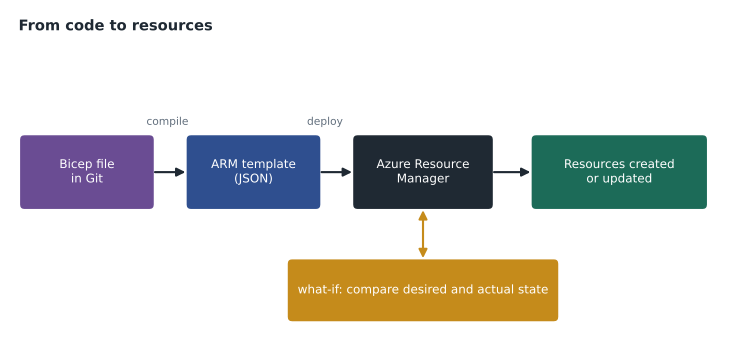
Azure Resource Manager and deployments
Lesson 8 introduced Azure Resource Manager as the management layer for every Azure tool. Resource Manager is also the deployment engine for IaC. It organizes resources in resource groups, subscriptions and management groups, and it understands dependencies: a VM's network interface needs the subnet to exist first, so Resource Manager creates them in the right order and runs independent steps at the same time. Each deployment is recorded in the deployment history of its scope, with its inputs and results, which helps in troubleshooting.
Deployments can target a resource group, a subscription, a management group or the tenant, depending on what they create. A landing zone deployment might create resource groups and policy assignments at the subscription or management group scope, while an application deployment usually targets a single resource group.
ARM templates
An ARM template is a JSON file that defines the resources to deploy. It has a schema reference that tells tools which version of the format it uses, and up to five main sections. Parameters are values supplied at deployment time, such as the environment name or the VM size, so one template can be reused. Variables are values calculated inside the template, such as a name built from parameters. Resources lists the resources to deploy, each with its type, API version, name, location and properties. Outputs return values after deployment, such as the address of a new storage account. Templates can also use functions to build values, such as the location of the resource group being deployed into.
{
  "contentVersion": "1.0.0.0",
  "parameters": {
    "storageName": { "type": "string" },
    "location": { "type": "string", "defaultValue": "[resourceGroup().location]" }
  },
  "resources": [
    {
      "type": "Microsoft.Storage/storageAccounts",
      "apiVersion": "2023-05-01",
      "name": "[parameters('storageName')]",
      "location": "[parameters('location')]",
      "sku": { "name": "Standard_ZRS" },
      "kind": "StorageV2",
      "tags": { "cost-center": "4100", "env": "test" },
      "properties": { "minimumTlsVersion": "TLS1_2", "allowBlobPublicAccess": false }
    }
  ]
}
ARM templates are powerful but wordy. Their JSON syntax, with expressions written inside square brackets as strings, is hard to read and easy to get wrong in larger files. Many templates in the wild are hundreds or thousands of lines long. The portal's Export template option, mentioned in lesson 8, generates ARM templates from existing resources, which is a useful way to learn the format but usually produces templates that need cleaning up before reuse.
Bicep
Bicep is a language created by Microsoft for writing Azure IaC more simply. A Bicep file describes the same resources as an ARM template but with a much cleaner syntax: no brackets around expressions, automatic handling of many dependencies, comments, and a way to split large deployments into reusable modules. When you deploy a Bicep file, the Bicep tooling compiles it into an ARM template, and Resource Manager deploys that template. Bicep therefore supports every resource type and API version that ARM templates support, as soon as they are available.
param storageName string
param location string = resourceGroup().location

resource files 'Microsoft.Storage/storageAccounts@2023-05-01' = {
  name: storageName
  location: location
  sku: { name: 'Standard_ZRS' }
  kind: 'StorageV2'
  tags: { 'cost-center': '4100', env: 'test' }
  properties: {
    minimumTlsVersion: 'TLS1_2'
    allowBlobPublicAccess: false
  }
}

output blobEndpoint string = files.properties.primaryEndpoints.blob
Bicep files are deployed with the same tools as templates. The Azure CLI and Azure PowerShell both understand Bicep directly, and the Bicep extension for Visual Studio Code provides syntax checking, completion and a visual view of the resources and their links. Unlike some other IaC tools, Bicep does not keep a separate state file; Resource Manager itself is the record of what exists.
az deployment group what-if \
  --resource-group rg-stockline-test-cc \
  --template-file storage.bicep \
  --parameters storageName=sthfstocklinetest01

az deployment group create \
  --resource-group rg-stockline-test-cc \
  --template-file storage.bicep \
  --parameters storageName=sthfstocklinetest01
Safe deployments: what-if and deployment modes
Before deploying, the what-if operation shows which resources would be created, changed or deleted, and which properties would change, without making any changes. It is the IaC equivalent of reading a change before approving it, and at Harrow & Finch every production deployment must include a what-if result in its change request.
Resource group deployments run in one of two modes. In incremental mode, the default, Resource Manager creates and updates the resources in the template and leaves any other resources in the resource group alone. In complete mode, it also deletes resources in the resource group that are not in the template, which keeps a group exactly matching its definition but is dangerous if someone has added resources by hand. Resource locks still apply, so a locked resource will not be deleted by a complete-mode deployment. Microsoft also offers deployment stacks, which manage a set of resources as a unit and can clean up resources removed from the definition in a more controlled way.
Teams usually deploy IaC through pipelines in tools such as GitHub Actions or Azure Pipelines. A change to a Bicep file is proposed in a pull request, reviewed, checked automatically, previewed with what-if and then deployed. Policy definitions, initiatives and locks can be deployed the same way, so governance is also code. Many organizations also use Terraform, a popular third-party IaC tool that works across several clouds; the AZ-900 exam focuses on Microsoft's native tools, but the ideas are the same.
| ARM template | Bicep | |
|---|---|---|
| Language | JSON | Bicep language, compiled to ARM JSON |
| Readability | Verbose; expressions inside strings | Concise; comments and modules |
| Resource support | All Azure resource types | All Azure resource types, through ARM |
| State file | None; Resource Manager is the record | None; Resource Manager is the record |
| Deployed with | Portal, CLI, PowerShell, pipelines | CLI, PowerShell, pipelines (compiled automatically) |
Theo wrote a small script to understand idempotence. It compares a desired state with the current state and lists only the changes needed, which is roughly what a what-if preview does.
desired = {"sku": "Standard_ZRS", "minimumTlsVersion": "TLS1_2", "allowBlobPublicAccess": False, "env": "test"}
current = {"sku": "Standard_LRS", "minimumTlsVersion": "TLS1_2", "allowBlobPublicAccess": True,  "env": "test"}

def what_if(desired, current):
    return {k: (current.get(k), v) for k, v in desired.items() if current.get(k) != v}

changes = what_if(desired, current)
for prop, (old, new) in changes.items():
    print(f"~ {prop}: {old} -> {new}")
current.update(desired)                       # deploy
print("Changes on a second deployment:", what_if(desired, current) or "none")~ sku: Standard_LRS -> Standard_ZRS ~ allowBlobPublicAccess: True -> False Changes on a second deployment: none
What this code does
Compares the desired settings of a storage account, as written in a template, with its current settings and lists only the properties that would change, similar to a what-if preview before a deployment. The first comparison shows the two changes it would make. Running it again after the changes shows nothing left to change, which is what makes template deployments repeatable.
Planning the December rebuild
Renata's plan for rebuilding the StockLine landing zone from code has four stages. First, write Bicep modules for the reusable parts: a virtual network with its subnets and network security groups, a storage account with the company's standard settings, a virtual machine with its disk, network interface and monitoring agent, and the resource group with its tags and Delete lock. Second, write a main Bicep file for each environment that uses those modules with different parameters: test, staging and production. Third, deploy the test environment from code alongside the hand-built one and compare them with what-if until they match. Fourth, deploy staging and production through a pipeline that requires a pull request, a review and a what-if result before any change.
The plan also changes how people work. After the rebuild, nobody should change the production landing zone through the portal except in an emergency, and any emergency change must be written back into the code within a day so the code and the real environment do not drift apart. Drift, the gradual difference between what the code describes and what actually exists, is the main risk of IaC done halfway. Running what-if regularly against production shows any drift as a list of unexpected changes.
Theo was nervous about learning a new language, but the Bicep extension's completion and error checking helped, and so did the portal's Export template option, which gave him the JSON for the existing resources to compare with. By mid-November he had written the storage account and virtual network modules and deployed them to a scratch resource group, ready for the December work.
Version control is the other half of the practice. The Bicep files live in the team's Git repository with the scripts from lesson 8 and the policy definitions from lesson 5. Every change has an author, a reviewer and a message explaining why, so six months later anyone can see when a subnet was widened and who approved it.
Worked problem
Deployment mode
The StockLine test resource group holds a VM, a disk, a network interface and a storage account, all defined in a Bicep file, plus a storage account a developer created by hand last week. Theo deploys the Bicep file unchanged in incremental mode, then in complete mode. What happens each time?
Show solution
- Incremental: everything in the file already matches, so nothing changes, and the hand-made storage account is left alone.
- Complete: Resource Manager deletes resources in the group that are not in the file, so the hand-made storage account would be deleted, unless it is locked.
- A what-if preview before the complete-mode deployment would have shown that deletion.
Answer: Incremental mode changes nothing; complete mode deletes the hand-made storage account unless a lock prevents it.
Common mistakes
MistakeRebuilding environments by following a portal checklist.
InsteadDescribe them in Bicep or ARM templates so they can be rebuilt identically.
MistakeDeploying to production without a preview.
InsteadRun what-if and review the changes first.
MistakeUsing complete mode on a resource group people also change by hand.
InsteadUse incremental mode or bring every resource into the code first.
MistakeThinking Bicep needs its own state file or misses new resource types.
InsteadIt compiles to ARM templates, so Resource Manager is the record and all types are supported.
Summary and key terms
- Infrastructure as code describes infrastructure in files that tools use to create and update resources, giving consistency, repeatability, review and speed.
- Declarative definitions describe the desired end state and are idempotent.
- Azure Resource Manager deploys resources at resource group, subscription, management group or tenant scope, handles dependencies and keeps deployment history.
- ARM templates are JSON files with parameters, variables, resources and outputs; Bicep is a simpler language that compiles to ARM templates.
- What-if previews changes, incremental mode leaves other resources alone, and complete mode deletes resources not in the template.
- Infrastructure as code
- Defining infrastructure in files that tools deploy automatically.
- Declarative
- Describing the desired end state rather than the steps to reach it.
- Idempotent
- Producing the same result however many times it is applied.
- ARM template
- A JSON file defining Azure resources for Resource Manager to deploy.
- Bicep
- A Microsoft language for Azure IaC that compiles to ARM templates.
- What-if
- A preview of the changes a deployment would make.
- Complete mode
- A deployment mode that deletes resources in the group that are not in the template.
Practice problems
Work each problem on paper first, then reveal the answer to check.
What does Bicep become before Resource Manager deploys it?
Show answer
An ARM template in JSON.
Which deployment mode is the default for resource groups?
Show answer
Incremental.
Name two benefits of infrastructure as code.
Show answer
Any two of consistency, repeatability, review and history, speed and fewer manual errors.
Lesson quiz · 5 questions
Score 60% or more to complete this lesson.
Create a free account to save your progress, take quizzes and earn a certificate.