
MSAZ-102 · Lesson 1 of 12 · 19 min
Factors that affect cost in Azure
▶ Video coming soon A video version of this lesson is on the way.
On the morning of November 3, 2026, Dana Whitcombe, the chief financial officer of Harrow & Finch Home Supply, forwarded the company's first full Azure invoice to Renata Kowal with one line: "Is this what Skylight is going to cost every month?" The October bill was modest by data centre standards, but it was well above the estimate Theo Marchand had prepared during the pilot. Renata booked a meeting room, drew three columns on the whiteboard and wrote her usual question across the top: "Who pays, who patches, who gets paged?" Today the answer to the first part mattered most. "Before we argue about the total," she said, "we need to understand what Azure actually charges for. Every line on that invoice comes from a small set of factors, and once you know them, the bill stops being a surprise."
This course is the second half of the Azure Fundamentals path. MSAZ-101 explained cloud concepts and the core architecture of Azure: regions, subscriptions, resource groups, compute, networking, storage and identity. This course covers the management and governance part of the AZ-900 skills outline: how costs arise and are controlled, how an organization sets rules for its cloud, how resources are deployed and managed, and how they are monitored. The lessons follow Theo and Renata through the next phase of Project Skylight at Harrow & Finch's head office in Winnipeg.
The consumption model, revisited
Azure uses consumption-based pricing: you pay for what you use, when you use it, rather than buying hardware up front. That simple idea has a consequence that surprises many first-time customers. On premises, a server that sits idle costs nothing extra once it has been bought. In Azure, an idle virtual machine that is still running keeps charging by the hour. Cost becomes an operational concern, not just a purchasing decision, and the people who build and run systems influence it every day.
Each billable thing in Azure is measured by a meter. A virtual machine has meters for compute hours; a managed disk has a meter for its provisioned size and tier; a storage account has meters for capacity, transactions and data retrieval; a VPN gateway has a meter for each hour it exists. The invoice is the sum of every meter's usage multiplied by its rate. When Renata and Theo opened the detailed usage file for October, they found more than a hundred meters, but most of the money came from a handful of them.
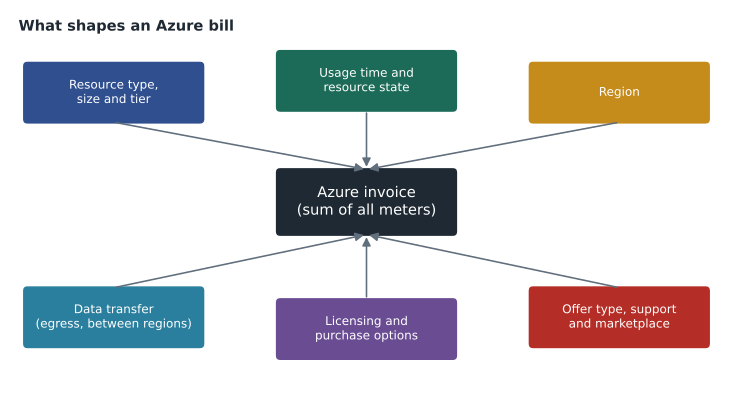
Resource type, size and tier
The first factor is simply what you deploy. Different services are priced in different ways: virtual machines by the hour according to their size, Azure SQL Database by compute and storage, App Service by the plan that hosts the apps, Azure Functions by executions and running time on a consumption plan, and storage by capacity and operations. Within each service, the size or tier you choose matters a great deal. A virtual machine with eight virtual CPUs costs roughly eight times as much as a similar one with a single virtual CPU, and a premium storage tier costs more per gigabyte than a standard one.
Storage has its own set of choices. Redundancy is one: locally redundant storage keeps three copies in one data centre, zone-redundant storage spreads copies across availability zones, and geo-redundant options also copy data to the paired region. Each step up in protection costs more. Access tier is another: hot storage has a higher capacity price but cheap access, cool and cold tiers are cheaper to keep but cost more to read, and the archive tier is the cheapest to keep but slow and expensive to retrieve. Transactions also count, so an application that makes millions of small reads can cost more than its stored data suggests.
Harrow & Finch's October invoice showed one clear example. The developers had created their test virtual machines with premium SSD managed disks because that was the default in a template they had copied. Premium disks are a sensible choice for production databases, but the test machines barely used them. Changing them to standard SSD disks cut that line by more than half without any noticeable change for the developers.
Usage time and resource state
Most compute charges depend on how long something runs. A virtual machine that runs 24 hours a day for a 30-day month accrues 720 hours. The same machine running only during a 10-hour business day, five days a week, accrues about 217 hours. For workloads that are only needed during working hours, such as development and test environments, schedules that shut machines down overnight and on weekends are one of the simplest savings available.
The state of a virtual machine matters. When you stop and deallocate a VM in Azure, the compute meter stops, because Azure releases the underlying hardware. When a VM is only shut down from inside the operating system, it can remain allocated, and the compute meter keeps running. Even a deallocated VM still costs something: its managed disks keep their capacity charge, and a static public IP address keeps its charge. Deleting a VM does not automatically delete its disks, network interfaces or public IP addresses either, so cleaning up after experiments needs care. Theo found four orphaned disks from September tests still on the October invoice.
Some resources charge for every hour they exist, whether or not traffic flows through them. The Harrow & Finch VPN gateway, created on October 13, is one: it is billed per hour of provisioning, plus data transfer. That is not a mistake; it is the price of keeping the tunnel to head office ready at all times. But it is a reason to think carefully before creating gateways, firewalls and similar always-on resources in test subscriptions.
Region
Prices for the same service vary between regions. Running a resource in one region can cost more or less than in another because of local costs for power, land, taxes and demand. For Harrow & Finch, the choice of Canada Central as the primary region was driven by data residency policy and closeness to the stores rather than price, but Theo still compared prices before choosing the paired region for backups. Not every service or virtual machine size is available in every region, which can also influence the design.
Region also affects how data moves. Placing an application in one region and its database in another adds data transfer charges and latency, so related resources are usually kept together. The decision about region is one of the few cost factors that is hard to change later, because moving a running workload between regions takes planning.
Data transfer
Network traffic is one of the least obvious cost factors. As a general rule, inbound data transfer into Azure data centres is free, while outbound data transfer to the internet is charged once you pass a small free allowance. Traffic between Azure regions is also charged, and traffic between availability zones in the same region may be charged as well. Traffic within the same virtual network and zone is generally not charged for transfer, though services such as VPN gateways and firewalls charge for the traffic they process.
In October, the server team had tested copying a large file share from Azure Files back to head office over the internet to see how long a restore would take. The copy worked, but it moved several terabytes out of Azure, and the outbound transfer showed up clearly on the invoice. Renata did not object to the test, which answered an important question about recovery time, but she wanted the cost to be expected rather than discovered. "Egress is the line people forget," she said. "Anything that pulls data out of Azure every night needs to be in the estimate."
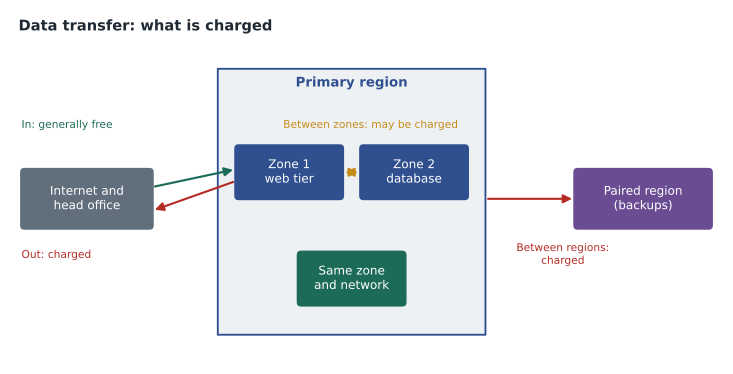
| Traffic | General rule | Harrow & Finch example |
|---|---|---|
| Into Azure from the internet | Generally not charged | Uploading backups to Azure Files |
| Out of Azure to the internet | Charged after a small free allowance | Copying a file share back to head office |
| Between Azure regions | Charged | Replicating backups to Canada East |
| Between availability zones | May be charged | A web tier in zone 1 talking to a database in zone 2 |
| Through a VPN gateway | Gateway hours plus data processed | The head office tunnel |
Licensing and purchase options
Software licences are part of many Azure prices. A Windows Server virtual machine includes the cost of the Windows licence in its hourly rate, and an Azure SQL Database includes SQL Server licensing. Organizations that already own Windows Server or SQL Server licences with Software Assurance, or qualifying subscription licences, can use Azure Hybrid Benefit to apply those licences in Azure and pay only for the underlying compute. Harrow & Finch has Software Assurance on its SQL Server licences, so the StockLine database estimate looked very different once Theo applied the benefit.
How you commit also matters. Pay-as-you-go is the default: no commitment, the full rate for every hour used. Azure Reservations let you commit to a specific resource type, such as a virtual machine family in a region, for one or three years in return for a substantial discount. An Azure savings plan for compute commits to a fixed amount of compute spending per hour across many services and regions, giving a smaller discount but more flexibility. Spot virtual machines use spare Azure capacity at a deep discount, but Azure can evict them at short notice, so they suit interruptible jobs such as batch processing rather than the StockLine database.
These options are not exclusive. A common pattern is to reserve the steady base load that runs all the time, use a savings plan for compute that changes shape, keep pay-as-you-go for anything new or uncertain, and use spot capacity where interruptions do not matter. Renata's rule for Skylight was simple: nothing gets reserved until it has run in production for at least a month and the team knows its real size.
Subscription type, support and marketplace
The offer type of a subscription affects prices. Pay-as-you-go subscriptions, Enterprise Agreements, Microsoft Customer Agreements bought directly or through a partner, and special offers such as free trial credits and dev/test pricing all have different terms. Dev/test pricing, available to customers with the right agreements and Visual Studio subscriptions, removes licence charges for some software in non-production subscriptions, which is why Harrow & Finch created hf-nonprod as a separate subscription with that offer type.
Support plans are another line item. Basic support, which covers billing and subscription questions, is included for every customer. Paid plans add technical support with faster response times and are priced by plan. Finally, the Azure Marketplace sells third-party products, such as firewall appliances or specialized software, that run in Azure. Their charges usually include the publisher's software price on top of the Azure infrastructure they run on, and they appear on the Azure invoice.
Billing also varies by country. Customers in Canada can be billed in Canadian dollars, and the exchange rate used for prices set in other currencies is fixed by Microsoft for periods of time rather than changing daily. Taxes are applied according to where the billing account is located. Theo noted these points in his estimate but did not try to predict them precisely.
Worked problem
Working out a VM's monthly compute cost
A test virtual machine has an illustrative pay-as-you-go rate of 0.40 dollars per hour. It ran all month in October (744 hours, since October has 31 days). If it had been deallocated outside a 10-hour business day on 22 working days, how much compute cost would have been avoided? Ignore disks and network.
Show solution
- Cost running all month: 744 hours times 0.40 dollars is 297.60 dollars.
- Hours needed with a schedule: 22 days times 10 hours is 220 hours.
- Cost with the schedule: 220 times 0.40 dollars is 88.00 dollars.
- Savings: 297.60 minus 88.00 is 209.60 dollars, about 70 cents of every dollar spent on compute.
Answer: About 209.60 dollars of compute would have been avoided. The disks would still have been billed.
Theo wrote a short Python script to compare the purchase options for the StockLine application server, using illustrative rates rather than real prices. The point was not the exact figures but the shape of the comparison.
hours = 730                    # average hours in a month
payg = 0.80                    # illustrative pay-as-you-go rate per hour
reserved_1yr = payg * 0.62     # illustrative 1-year reservation rate
reserved_3yr = payg * 0.42     # illustrative 3-year reservation rate
with_hybrid = payg - 0.25      # illustrative rate after Azure Hybrid Benefit removes the licensing cost

options = {
    "Pay-as-you-go": payg,
    "Pay-as-you-go with Hybrid Benefit": with_hybrid,
    "1-year reservation": reserved_1yr,
    "3-year reservation": reserved_3yr,
}
for name, rate in options.items():
print(f"{name:36s} {rate * hours:8.2f} dollars a month")Pay-as-you-go 584.00 dollars a month Pay-as-you-go with Hybrid Benefit 401.50 dollars a month 1-year reservation 362.08 dollars a month 3-year reservation 245.28 dollars a month
What this code does
Compares the monthly cost of running one virtual machine under four pricing options, using illustrative rates: pay-as-you-go, pay-as-you-go with the Azure Hybrid Benefit (which removes the licence cost if you already own the licence), a 1-year reservation and a 3-year reservation. Each rate is multiplied by the hours in a month. The output shows that committing for longer gives the lowest monthly cost.
Common mistakes
MistakeAssuming a shut-down VM costs nothing.
InsteadStop and deallocate it to end compute charges; disks and static public IP addresses still cost money.
MistakeIgnoring outbound data transfer.
InsteadEstimate any regular flow of data out of Azure or between regions.
MistakeReserving capacity for a brand-new workload.
InsteadRun it first, measure its real size, then reserve the steady part.
MistakeLeaving orphaned disks and IP addresses after deleting a VM.
InsteadCheck the resource group for leftovers and delete what is no longer needed.
Summary and key terms
- Azure bills by meters, so cost depends on what you deploy, how big it is and how long it runs.
- Region, storage redundancy and tier, transactions and outbound or cross-region data transfer all change the price.
- Licences are included in many rates, but Azure Hybrid Benefit lets existing licences be reused.
- Reservations and savings plans trade commitment for discounts, spot VMs offer cheap interruptible capacity, and subscription offer type, support plans and marketplace products add their own charges.
- Meter
- A measured unit of usage, such as compute hours or gigabytes stored, that Azure multiplies by a rate.
- Deallocate
- Stopping a VM so Azure releases its compute hardware and stops the compute charge.
- Egress
- Data transferred out of Azure, which is generally charged.
- Azure Hybrid Benefit
- A licensing benefit that applies eligible existing licences to Azure resources.
- Reservation
- A one- or three-year commitment to a resource type in return for a lower rate.
- Savings plan for compute
- A commitment to spend a fixed amount per hour on compute across services, for a discount.
- Spot VM
- A deeply discounted VM using spare capacity that Azure can evict at short notice.
Practice problems
Work each problem on paper first, then reveal the answer to check.
Why can an idle VM still be expensive in Azure?
Show answer
Because a running or allocated VM keeps accruing compute hours whether or not it does useful work.
Which is generally free: inbound or outbound data transfer?
Show answer
Inbound data transfer into Azure.
Name two charges that continue after a VM is deallocated.
Show answer
Its managed disks and any static public IP address.
Lesson quiz · 5 questions
Score 60% or more to complete this lesson.
Create a free account to save your progress, take quizzes and earn a certificate.