
JS-290 · Lesson 7 of 12 · 26 min
Building the front end
▶ Video coming soon A video version of this lesson is on the way.
Odalys has been waiting for Tuesday, April 17. Through Sprint 1 she built the shell of the web app against the API contract, with a fake server that returned canned responses, and on Monday the real claim endpoint arrived on staging. This week the screens meet real data for the first time, and the team's weekly demo to Lucy and Rosa will be the first one where something can actually be claimed. The lesson follows how the front end is organized, how it gets and changes data, how it handles flaky connections, and how it stays accessible and fast.
Rescue Runs is a React application in the food-hub monorepo, in apps/rescue, built with Vite and served from /rescue/ on Theo's server behind the CDN, exactly like the volunteer portal. It uses the same libraries at the same versions: React 19.3, React Router 8 for routes and TanStack Query 5 for server data. It also uses the studio's small component library from WEB-230, with its accessible disclosure, dialog and status components, so the team does not rebuild what Sana has already tested with Beatrix.
Screens for four kinds of user
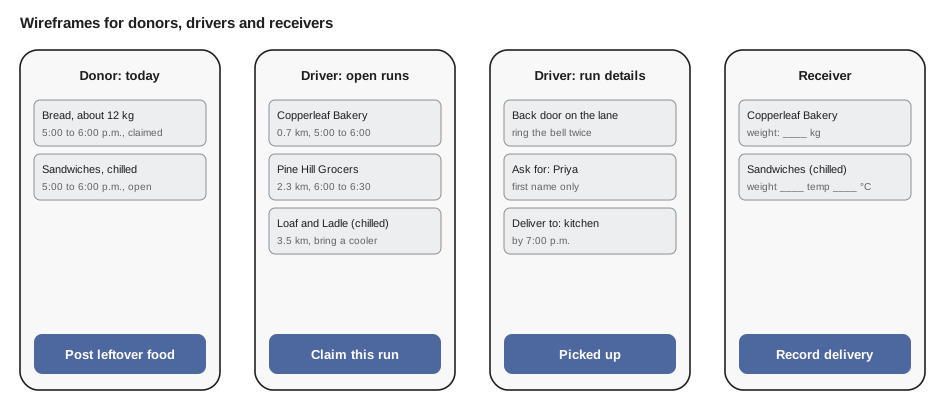
The story map gives four groups of screens, one per kind of user, and the router shows a different start page depending on the role in the caller's token. A person who is both a driver and a receiver, as several warehouse volunteers are, gets a simple switch between the two. Odalys sketches each screen on paper first, then in a quick wireframe, and shows the wireframes to Wendy and to Copperleaf's shift lead before writing any code.
| Route | Who | Purpose |
|---|---|---|
| /rescue/ | Everyone | Start page for the caller's role |
| /rescue/offers/new | Donor staff | Post an offer in under a minute |
| /rescue/donor/today | Donor staff | Today's offers and who is coming |
| /rescue/runs | Driver | Open runs near the start area, with filters |
| /rescue/runs/:runId | Driver | Instructions, contact first name, pickup button |
| /rescue/me | Driver | My runs today and this week |
| /rescue/receive | Receiver | Runs on their way; record weight and temperature |
| /rescue/coordinator | Lucy | Unclaimed runs by day, assign a driver, monthly totals |
Components that show, components that fetch
The team follows the split from JS-220 between components that only show data and components that get it. A presentational component such as OfferCard receives an offer and a function to call, and renders the same output every time it gets the same props. It knows nothing about the API, so it can be shown in every state, open, claimed, chilled, almost expired, in tests and in Sana's design review, without a server. The page component above it fetches data with TanStack Query and passes it down.
function OfferCard({ offer, units, onClaim }) {
  const weight = units === 'metric' ? `about ${offer.estKg} kg` : `about ${Math.round(offer.estKg * 2.20462)} lb`;
  const distance = units === 'metric' ? `${offer.km.toFixed(1)} km` : `${(offer.km / 1.609).toFixed(1)} mi`;
  return (
    <article className="offer-card" aria-labelledby={`offer-${offer.id}`}>
      <h3 id={`offer-${offer.id}`}>{offer.donor}</h3>
      <p>{offer.window}, {distance} away</p>
      <p>{offer.category}, {weight}{offer.chilled ? ', chilled: bring a cooler' : ''}</p>
      <button type="button" onClick={() => onClaim(offer.id)} disabled={offer.status !== 'open'}>
        {offer.status === 'open' ? 'Claim this run' : 'Already claimed'}
      </button>
    </article>
  );
}

const offer = { id: 41, donor: 'Copperleaf Bakery', window: 'Today 5:00 to 6:00 p.m.', km: 2.3, category: 'bakery', estKg: 12, chilled: false, status: 'open' };
What this code does
OfferCard takes an offer, the units to display and a function to call when the button is pressed, and it renders the same markup every time it gets the same props. Weight and distance are converted for display only, so the offer object keeps the stored units. The article is labelled by its heading, which gives screen reader users a named region for each offer as they move through the list.
<article class="offer-card" aria-labelledby="offer-41">
  <h3 id="offer-41">Copperleaf Bakery</h3>
  <p>Today 5:00 to 6:00 p.m., 2.3 km away</p>
  <p>bakery, about 12 kg</p>
  <button type="button">Claim this run</button>
</article>
What this code does
React renders an article with a heading, two lines of detail and a real button element. The aria-labelledby attribute points at the heading's id, and nothing of the click handler appears in the HTML, because react-dom attaches it in the browser.
Sana's review of the card in Sprint 2 changes two things. The chilled warning was first shown only as a blue snowflake icon, which tells a screen reader user nothing and relies on colour; it is now written out in words, with the icon beside it. And the disabled button for a claimed run originally had no explanation, so its text now says *Already claimed* rather than just greying out *Claim this run*.
Server data with TanStack Query
Data from the API is server state: it belongs to the server, it can change without the user doing anything, and the screen only holds a copy. TanStack Query manages that copy. Each query has a query key, an array that identifies the data, and the library caches results by key, refetches them when they may be stale, and shares them between components that ask for the same key. The team keeps keys in one factory so that a typo cannot create two caches for the same data, and so that invalidation after a change is written in one place.
// Query keys from one factory, and which keys each change invalidates.
const keys = {
  offers: (filters) => ['offers', 'list', filters],
  run: (id) => ['runs', 'detail', id],
  myRuns: () => ['me', 'runs'],
  coordinatorDay: (date) => ['runs', 'day', date],
};

const invalidates = {
  claim: () => [['offers'], ['me', 'runs'], ['runs', 'day']],
  pickup: (id) => [keys.run(id), ['me', 'runs'], ['runs', 'day']],
  postOffer: () => [['offers']],
};

const startsWith = (key, prefix) => prefix.every((part, i) => JSON.stringify(key[i]) === JSON.stringify(part));

const cached = [
  keys.offers({ area: 'north-end' }), keys.offers({ area: 'downtown' }),
  keys.run(901), keys.myRuns(), keys.coordinatorDay('2029-04-24'),
];
for (const action of ['claim', 'pickup', 'postOffer']) {
  const prefixes = invalidates[action](901);
  const hit = cached.filter((k) => prefixes.some((p) => startsWith(k, p)));
  console.log(action.padEnd(10), hit.map((k) => JSON.stringify(k)).join(' '));
}claim ["offers","list",{"area":"north-end"}] ["offers","list",{"area":"downtown"}] ["me","runs"] ["runs","day","2029-04-24"]
pickup ["runs","detail",901] ["me","runs"] ["runs","day","2029-04-24"]
postOffer ["offers","list",{"area":"north-end"}] ["offers","list",{"area":"downtown"}]What this code does
The keys object builds every query key, and the invalidates object lists the key prefixes each action makes stale. TanStack Query matches invalidation by prefix, so the startsWith helper copies that rule to show which cached entries each action would refetch. Claiming refreshes both offer lists, the driver's own runs and Lucy's day view, while posting an offer refreshes only the offer lists.
ADR 0007 from lesson 3 becomes three options on the open-runs query: refetch every 60 seconds, do not refetch while the tab or app is hidden, and refetch as soon as it becomes visible again. A driver who opens the app after an hour sees fresh data immediately, and a phone left in a pocket does not use battery or data asking for offers nobody is looking at.
import { useQuery, useMutation, useQueryClient } from '@tanstack/react-query';
import { keys, invalidates } from '../api/keys.js';
import { getOffers, claimOffer } from '../api/client.js';
import { OfferCard } from '../components/OfferCard.jsx';
import { Status } from '@food-hub/ui';

export function OpenRunsPage({ area, units }) {
  const queryClient = useQueryClient();
  const offers = useQuery({
    queryKey: keys.offers({ area }),
    queryFn: ({ signal }) => getOffers({ area }, { signal }),
    staleTime: 30_000,
    refetchInterval: 60_000,
    refetchIntervalInBackground: false,
    refetchOnWindowFocus: true,
  });
  const claim = useMutation({
    mutationFn: claimOffer,
    onSettled: () => invalidates.claim().forEach((queryKey) => queryClient.invalidateQueries({ queryKey })),
  });

  if (offers.isPending) return <Status>Loading open runs</Status>;
  if (offers.isError) return <Status tone="error">Could not load runs. Check your connection and try again.</Status>;
  return (
    <main>
      <h1>Open runs near {area}</h1>
      <Status>{claim.isSuccess ? 'Run claimed. It is in My runs.' : ''}</Status>
      {claim.isError && <Status tone="error">{claim.error.detail}</Status>}
      <ul className="offer-list">
        {offers.data.items.map((offer) => (
          <li key={offer.id}>
            <OfferCard offer={offer} units={units} onClaim={(id) => claim.mutate(id)} />
          </li>
        ))}
      </ul>
    </main>
  );
}
What this code does
The page asks TanStack Query for the open offers in the driver's area, refetching every minute only while the page is visible, and passes each offer to the presentational card. Claiming is a mutation whose onSettled step invalidates the keys listed in the factory, whether the claim succeeded or failed, so the list always reflects the server. Results and errors are announced through the shared Status component, which is a polite live region, so screen reader users hear what happened.
Optimistic updates, carefully
When Wendy taps *Claim this run*, the request usually takes under half a second, but in a car park it can take five. Odalys first made the button wait, which felt broken. The alternative is an optimistic update: the screen shows the run as claimed immediately and rolls back if the server refuses. That is the right choice for most actions in the app, but the team decides claiming is a special case. A claim can fail for a good reason, someone else got there first, and a driver who sees *claimed* and drives off before the rollback arrives would turn up for food that is not theirs. So claiming shows a clear pending state, *Claiming...*, and only marking a pickup, which cannot conflict, is optimistic.
// A reducer for one run card: pending claims, optimistic pickups, and rollbacks.
function cardReducer(state, event) {
  switch (event.type) {
    case 'claim/start': return { ...state, pending: 'claim' };
    case 'claim/ok': return { ...state, pending: null, status: 'claimed' };
    case 'claim/fail': return { ...state, pending: null, message: event.detail };
    case 'pickup/start': return { ...state, previous: state.status, status: 'picked_up', pending: 'pickup' };
    case 'pickup/ok': return { ...state, pending: null, previous: undefined };
    case 'pickup/fail': return { ...state, pending: null, status: state.previous, previous: undefined, message: event.detail };
    default: return state;
  }
}

let s = { status: 'open', pending: null };
const events = [
  { type: 'claim/start' }, { type: 'claim/fail', detail: 'Someone has already claimed this run.' },
  { type: 'claim/start' }, { type: 'claim/ok' },
  { type: 'pickup/start' }, { type: 'pickup/fail', detail: 'No connection. We will try again.' },
];
for (const e of events) {
  s = cardReducer(s, e);
  console.log(e.type.padEnd(13), s.status.padEnd(10), s.pending ?? '-', s.message ? '| ' + s.message : '');
}claim/start open claim claim/fail open - | Someone has already claimed this run. claim/start open claim | Someone has already claimed this run. claim/ok claimed - | Someone has already claimed this run. pickup/start picked_up pickup | Someone has already claimed this run. pickup/fail claimed - | No connection. We will try again.
What this code does
The reducer is a pure function from the current card state and an event to the next state, which makes every transition easy to test. A claim waits in a pending state and only becomes claimed when the server agrees, while a pickup changes the status immediately and remembers the previous one so it can roll back. The printed sequence shows a failed claim, a successful one, and an optimistic pickup that is rolled back when the request fails.
Working without a signal
Two donors have no mobile signal at their back doors, which is why offline pickup moved up to a must-have in lesson 2. ADR 0006 settles the design: the rescue app reuses the portal's outbox from JS-250. When the driver taps *Picked up*, the app writes the action to IndexedDB with the time it happened and a new idempotency key, shows it as done, and the service worker sends queued actions when the connection returns. The server accepts the offline timestamp as the pickup time, as long as it is within the run's window plus two hours and not in the future, and the idempotency key makes a double send harmless.
// Drain an outbox in order; stop at the first network failure; drop actions the server refused.
async function drain(outbox, send) {
  const sent = [], refused = [];
  while (outbox.length) {
    const item = outbox[0];
    const r = await send(item);
    if (r === 'network') break; // try again later, keep order
    outbox.shift();
    (r === 'ok' ? sent : refused).push(item.key);
  }
  return { sent, refused, waiting: outbox.map((i) => i.key) };
}

const outbox = [
  { key: 'k1', action: 'pickup', run: 901, at: '2029-04-24T17:12:00-04:00' },
  { key: 'k2', action: 'pickup', run: 905, at: '2029-04-24T18:40:00-04:00' },
  { key: 'k3', action: 'release', run: 907, at: '2029-04-24T18:41:00-04:00' },
];
const replies = { k1: 'ok', k2: 'refused', k3: 'network' };
drain(outbox, async (item) => replies[item.key]).then((r) => console.log(r));{ sent: [ "k1" ], refused: [ "k2" ], waiting: [ "k3" ] }What this code does
The drain function sends queued actions one at a time in the order they happened, removing each one the server answers. A network failure stops the loop and leaves the rest in the outbox, so actions are never sent out of order. An action the server refuses, here a pickup recorded outside the allowed time, is removed and reported, so the app can tell the driver instead of retrying it forever.
Refused actions need a human answer. If the server refuses an offline pickup, the run card shows a message asking the driver to call Lucy, with her number, because something unusual happened that the app cannot fix by itself.
Units, times and language
The same build serves both countries' sites. At start-up the app reads /rescue/config.json, a runtime configuration file from JS-260, which tells it the units to show and the kitchen's time zone. All pickup windows are stored by the API as timestamps with offsets and shown in the kitchen's local time, formatted with the browser's Intl.DateTimeFormat, so a driver whose phone is set to another time zone still sees the time on the donor's clock. Labels are written once, in plain language that Lucy and Wendy have checked, and kept in one file so that changes do not require hunting through components.
// Show a pickup window in the kitchen's time zone, whatever the phone's own setting.
function windowLabel(startIso, endIso, timeZone, locale) {
  const t = new Intl.DateTimeFormat(locale, { timeZone, hour: 'numeric', minute: '2-digit' });
  const d = new Intl.DateTimeFormat(locale, { timeZone, weekday: 'long', month: 'long', day: 'numeric' });
  const start = new Date(startIso), end = new Date(endIso);
  return `${d.format(start)}, ${t.format(start)} to ${t.format(end)}`;
}

const start = '2029-04-24T21:00:00Z', end = '2029-04-24T22:00:00Z';
console.log(windowLabel(start, end, 'America/Toronto', 'en-CA'));
console.log(windowLabel(start, end, 'America/Chicago', 'en-US'));Tuesday, April 24, 5:00 p.m. to 6:00 p.m. Tuesday, April 24, 4:00 PM to 5:00 PM
What this code does
Two formatters are built with the kitchen's time zone, one for the time and one for the date, and both format the same stored instants. The timestamps are in UTC, and the formatter converts them to local time, so the same offer shows as 5:00 in the eastern zone and 4:00 in the central zone. Using the browser's built-in Intl formatting handles daylight saving time and local conventions without a date library.
Accessible and fast by default
Every new screen meets the Definition of Done's accessibility item before review: real buttons and links, labels on every field, errors linked to their fields and announced, focus moved to the main heading after navigation, as Sana asked for in the portal in JS-220, and targets at least 24 by 24 CSS pixels, the WCAG 2.2 minimum, though the main buttons are much larger for gloved hands in winter. The weight field uses inputmode decimal so phones show a number keyboard, and the temperature field accepts negative values for frozen food.
Performance follows the budgets from JS-250. The first screen must stay under 120 kB of compressed JavaScript; the first build is 96 kB, mostly React and TanStack Query, and the coordinator screens, which only Lucy uses, are split into a separately loaded chunk. Images that donors attach are resized on the phone to at most 1,600 pixels on the long side before upload, which keeps a typical photo under 300 kB.
Worked problem
Budget check after Sprint 2
The build report after Sprint 2 shows the first-screen chunks: React and react-dom 58 kB, TanStack Query 13 kB, React Router 15 kB, the component library 7 kB and the app code 19 kB, all compressed. Is the 120 kB budget met? Odalys wants to add a date-picker library of 14 kB to the first screen. What would the total be?
Show solution
- Current total: 58 + 13 + 15 + 7 + 19 = 112 kB.
- Budget: 120 kB, so 8 kB of headroom remains.
- With the date picker: 112 + 14 = 126 kB, which is 6 kB over the budget.
- Options: load the picker only on the donor form, or use the native date and time inputs, which cost nothing.
Answer: The first screen is 112 kB, within the 120 kB budget, but the picker would push it to 126 kB. The team uses native inputs, which also work better with screen readers, and the CI budget check from JS-250 stays green.
Common mistakes
MistakeLetting presentational components fetch their own data.
InsteadFetch in page components and pass data down, so cards can be shown in every state without a server.
MistakeWriting query keys by hand in each component.
InsteadBuild keys in one factory and list each action's invalidations in one place.
MistakeMaking every action optimistic.
InsteadUse optimistic updates only where the server cannot reasonably refuse; show a pending state for claims.
MistakeRetrying a refused offline action forever.
InsteadStop on network failures, drop and report actions the server refused.
MistakeShowing times in the phone's own time zone.
InsteadFormat stored instants in the kitchen's time zone with Intl.DateTimeFormat.
Summary and key terms
- The Rescue Runs web app reuses the portal's stack and the studio's accessible component library.
- Screens are grouped by role and sketched with users before coding.
- Presentational components render props; page components fetch with TanStack Query, using keys from one factory and invalidations listed per action.
- Polling every 60 seconds only while visible implements ADR 0007.
- Claims wait for the server because they can conflict, while pickups are optimistic with rollback.
- Offline pickups go to an outbox that drains in order, stops on network failures and reports refused actions.
- Runtime configuration sets units and time zone, and stored instants are formatted in the kitchen's zone.
- Accessibility and performance budgets are checked on every screen.
- Presentational component
- A component that only renders the props it receives and does not fetch data.
- Server state
- Data that belongs to the server and that the screen holds only a copy of.
- Query key
- The array that identifies a cached query in TanStack Query.
- Invalidation
- Marking cached data as stale so that it is fetched again.
- Optimistic update
- Showing the result of an action before the server confirms it, and rolling back if it fails.
- Reducer
- A pure function that takes a state and an event and returns the next state.
- Outbox
- A local queue of actions waiting to be sent when a connection is available.
- Runtime configuration
- Settings read by the app when it starts rather than built into the code.
Practice problems
Work each problem on paper first, then reveal the answer to check.
Why does OfferCard not fetch its own data?
Show answer
So it can be shown and tested in every state without a server, and reused wherever offers appear.
Why are claims not optimistic?
Show answer
A claim can be refused because someone else got there first, and a driver who saw claimed might drive off before the rollback.
What does the outbox do when the network fails halfway?
Show answer
It stops and keeps the remaining actions in order for the next attempt.
Why format pickup times in the kitchen's time zone?
Show answer
So every driver sees the time on the donor's clock, whatever their phone is set to.
Try it yourself
Claim reducer
Complete reduce(state, event) for these events: claim/start sets pending to claim; claim/ok clears pending and sets status to claimed; claim/fail clears pending and sets message to event.detail. Unknown events return the state unchanged.
Return new objects; do not change state.
function reduce(state, event) {
  return state;
}

let s = { status: 'open', pending: null };
for (const e of [{ type: 'claim/start' }, { type: 'claim/fail', detail: 'Taken' }, { type: 'claim/start' }, { type: 'claim/ok' }, { type: 'other' }]) {
  s = reduce(s, e);
  console.log(s.status, s.pending, s.message ?? '');
}
Try it yourself
Outbox order
Complete drainSync(outbox, replies). outbox is a list of keys in order and replies maps each key to ok, refused or network.
Process keys in order: ok goes to sent, refused goes to refused, and network stops processing, leaving that key and the rest in waiting. Return { sent, refused, waiting }.
function drainSync(outbox, replies) {
  return { sent: [], refused: [], waiting: outbox };
}

console.log(JSON.stringify(drainSync(['a', 'b', 'c', 'd'], { a: 'ok', b: 'refused', c: 'network', d: 'ok' })));
console.log(JSON.stringify(drainSync(['a', 'b'], { a: 'ok', b: 'ok' })));
Lesson quiz · 5 questions
Score 60% or more to complete this lesson.
Create a free account to save your progress, take quizzes and earn a certificate.