
JS-290 · Lesson 10 of 12 · 27 min
Deployment
▶ Video coming soon A video version of this lesson is on the way.
On Tuesday, May 15, Rescue Runs goes to staging with real accounts for the first time, and a week later, on Tuesday, May 22, to production. The dates were chosen in lesson 4 and they hold, which Mira credits mostly to the fact that the team did not have to invent anything about deployment. In JS-260, Gareth and Mira built a pipeline for the partner order service, the board and the portal, and wrote down how a Node service is built, configured, released, checked, monitored and rolled back on Theo's server. Rescue Runs follows that runbook with its own names. This lesson walks through it once more, with the decisions that were specific to rescue.
Theo is the person who will be woken if something goes wrong, so he sets the bar: he will accept the new service on his server only if running it is a copy of running the partner service. Same pipeline shape, same folder layout, same kind of systemd unit, same health checks, same log format, same alert routes. Anything different must be in an ADR, and there are only two such differences, both small.
Configuration, validated at start-up
The service reads its settings from environment variables, which Theo's systemd unit loads from a file only the service's account can read. Following the JS-260 rule, the service validates its whole configuration when it starts, and refuses to start if anything is missing or wrong. There are no defaults for addresses or secrets, because a default that works on a laptop is exactly the kind of setting that quietly reaches production. The Sep 15, 2028 board outage, when the partner service started without its board signing secret and showed a blank screen in Rosa's kitchen for forty minutes, is the reason this rule exists.
import { z } from 'zod';

const Config = z.strictObject({
  NODE_ENV: z.enum(['development', 'test', 'staging', 'production']),
  PORT: z.coerce.number().int().min(1024).max(65535),
  DATABASE_URL: z.url({ protocol: /^postgres(ql)?$/ }),
  DB_POOL_MAX: z.coerce.number().int().min(1).max(10),
  PORTAL_TOKEN_ISSUER: z.url(),
  PORTAL_TOKEN_KEYS: z.string().min(40),
  MAIL_OUTBOX_DIR: z.string().startsWith('/'),
  UNITS: z.enum(['metric', 'us']),
  KITCHEN_TIME_ZONE: z.string().includes('/'),
});

const r = Config.safeParse(Object.fromEntries(Object.entries(process.env).filter(([k]) => k in Config.shape)));
if (!r.success) {
  console.error('Refusing to start. Configuration problems:');
  for (const i of r.error.issues) console.error(`  ${i.path.join('.') || '(config)'}: ${i.message}`);
  process.exit(1);
}
console.log(`config ok: ${r.data.NODE_ENV}, port ${r.data.PORT}, pool ${r.data.DB_POOL_MAX}, units ${r.data.UNITS}`);
What this code does
The schema lists every setting the service needs with its type and limits, and coerces the numbers, which arrive from the environment as strings. Only variables named in the schema are read, so the rest of the environment is ignored rather than refused. If anything fails, the service prints each problem and exits with status 1, which systemd reports as a failed start, so a bad configuration never reaches a running service.
$ node --env-file=staging.env config.mjs
config ok: staging, port 3200, pool 10, units metric
$ node --env-file=broken.env config.mjs
Refusing to start. Configuration problems:
  PORT: Too small: expected number to be >=1024
  DATABASE_URL: Invalid URL
  DB_POOL_MAX: Too big: expected number to be <=10
  PORTAL_TOKEN_KEYS: Invalid input: expected string, received undefined
  MAIL_OUTBOX_DIR: Invalid string: must start with "/"
  UNITS: Invalid option: expected one of "metric"|"us"
The broken file in that run contains every mistake the team has made at least once: a privileged port, the wrong database scheme, a pool bigger than Theo's allocation of 10, a forgotten key, a relative outbox path and a unit that does not exist. Each produces one clear line, and the service never starts. Theo's comment on the review was that a service which refuses to start is a gift; one that starts wrong is a page in the middle of the night.
The pipeline
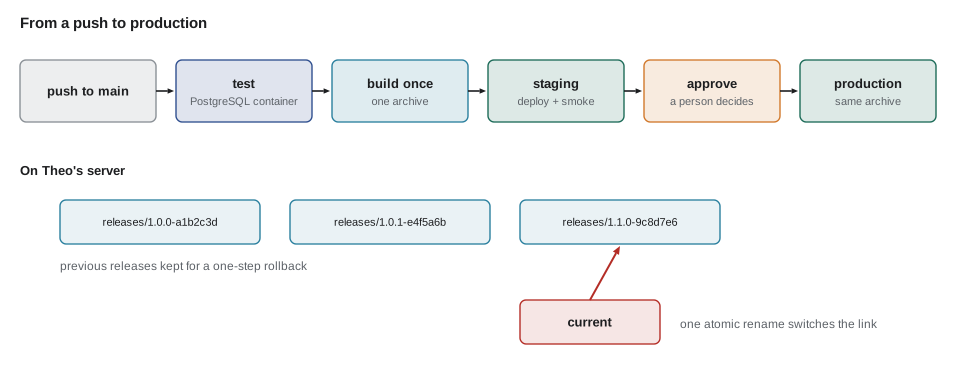
The workflow for rescue-runs is a copy of the partner service's workflow from JS-260, with the job names changed. It runs the tests with a PostgreSQL service container, builds the service and the web app once into versioned archives, deploys them to staging automatically, runs the smoke tests there, and then waits. Production deployment needs an approval from one of the required reviewers, Theo, Gareth or Mira, and it deploys the exact archives that passed on staging, never a fresh build. Actions are pinned to full commit SHAs, and the cloud steps use short-lived OIDC credentials, so the only stored secret is the SSH deploy key.
name: rescue-runs
on:
  push:
    branches: [main]
    paths: ['services/rescue-runs/**', 'apps/rescue/**', 'packages/riverside-data/**']
permissions:
  contents: read
concurrency:
  group: rescue-runs-deploy
  cancel-in-progress: false
jobs:
  test:
    runs-on: ubuntu-24.04
    services:
      postgres:
        image: postgres:18-bookworm
        env: { POSTGRES_PASSWORD: test }
        ports: ['5432:5432']
        options: --health-cmd pg_isready --health-interval 5s --health-retries 10
    steps:
      - uses: actions/checkout@08eba0b27e820071cde6df949e0beb9ba4906955 # v4.3.0
      - uses: actions/setup-node@49933ea5288caeca8642d1e84afbd3f7d6820020 # v4.4.0
        with: { node-version-file: .nvmrc, cache: npm }
      - run: npm ci && npm audit signatures
      - run: npm run -w services/rescue-runs migrate && npm test -w services/rescue-runs -w apps/rescue
        env: { DATABASE_URL: 'postgres://postgres:test@localhost:5432/postgres' }
  build:
    needs: test
    runs-on: ubuntu-24.04
    steps:
      - uses: actions/checkout@08eba0b27e820071cde6df949e0beb9ba4906955 # v4.3.0
      - uses: actions/setup-node@49933ea5288caeca8642d1e84afbd3f7d6820020 # v4.4.0
        with: { node-version-file: .nvmrc, cache: npm }
      - run: npm ci && npm run build -w apps/rescue && scripts/package.sh rescue-runs
      - uses: actions/upload-artifact@ea165f8d65b6e75b540449e92b4886f43607fa02 # v4.6.2
        with: { name: rescue-release, path: dist/rescue-runs-*.tar.gz }
  deploy-staging:
    needs: build
    environment: staging
    runs-on: ubuntu-24.04
    steps:
      - uses: actions/download-artifact@d3f86a106a0bac45b974a628896c90dbdf5c8093 # v4.3.0
        with: { name: rescue-release }
      - run: scripts/deploy.sh staging rescue-runs && scripts/smoke.sh https://staging.riverside-food-hub.example/rescue/
  deploy-production:
    needs: deploy-staging
    environment: production
    runs-on: ubuntu-24.04
    steps:
      - uses: actions/download-artifact@d3f86a106a0bac45b974a628896c90dbdf5c8093 # v4.3.0
        with: { name: rescue-release }
      - run: scripts/deploy.sh production rescue-runs && scripts/smoke.sh https://riverside-food-hub.example/rescue/
What this code does
The workflow runs only when files that affect Rescue Runs change, and a concurrency group makes deployments queue instead of overlapping. Tests run against a real PostgreSQL container, the build job produces one archive, and both deploy jobs download that same archive, so production gets exactly what staging tested. The production job belongs to an environment that requires an approving reviewer, which is where a person decides to release.
Releases, switched atomically
On Theo's server each release is unpacked into its own folder, named with its version and commit, and a symbolic link called current points at the release in use. Switching to a new release means pointing the link at a new folder in one atomic step, then restarting the service. Rolling back means pointing it at the previous folder. The previous three releases are kept, so a rollback never needs a rebuild. The deploy script below is the same one the partner service uses, run here on a scratch folder to show what it does.
$ mkdir -p srv/rescue-runs/releases/1.0.0-a1b2c3d srv/rescue-runs/releases/1.0.1-e4f5a6b
$ echo "1.0.0" > srv/rescue-runs/releases/1.0.0-a1b2c3d/VERSION; echo "1.0.1" > srv/rescue-runs/releases/1.0.1-e4f5a6b/VERSION
$ ln -sfn releases/1.0.0-a1b2c3d srv/rescue-runs/current && cat srv/rescue-runs/current/VERSION
1.0.0
$ ln -sfn releases/1.0.1-e4f5a6b srv/rescue-runs/current.new && mv -T srv/rescue-runs/current.new srv/rescue-runs/current
$ readlink srv/rescue-runs/current && cat srv/rescue-runs/current/VERSION
releases/1.0.1-e4f5a6b
1.0.1
$ ls srv/rescue-runs/releases
1.0.0-a1b2c3d
1.0.1-e4f5a6b
What this code does
The session creates two release folders, points current at the first, then switches to the second by creating a new link beside it and renaming it over the old one. Renaming is atomic on Linux, so at every instant current points either at the old release or at the new one, never at nothing. Both releases stay on disk, so rolling back is the same two commands pointing at the older folder.
The second ADR-level difference from the partner service concerns migrations. Rescue's schema changes during the pilot will be frequent, so the deploy script runs pending migrations before switching the link, inside a transaction, after Theo's point-in-time recovery has taken a fresh snapshot. Every migration must work with both the old and the new release running, which is the expand-and-contract rule from lesson 5, so the switch can happen while drivers are using the app.
Is it alive, and is it ready?
The service has the two health endpoints from JS-260. /healthz answers *the process is running* and is used by systemd's watchdog. /healthz/ready answers *the service can do its job*: it checks that the database answers within half a second, that the token keys are loaded, that the outbox folder is writable and that the release version matches the one the deploy script expects. Theo's web server sends traffic to a newly started release only after it reports ready, and the smoke test checks ready before anything else. The board outage taught everyone that a process that is alive but not ready is the most dangerous state of all.
# /etc/systemd/system/rescue-runs.service
[Unit]
Description=Rescue Runs API
After=network-online.target
Wants=network-online.target

[Service]
Type=simple
User=rescue
Group=rescue
WorkingDirectory=/srv/rescue-runs/current/services/rescue-runs
EnvironmentFile=/etc/rescue-runs/env
ExecStart=/usr/bin/node src/server.js
Restart=on-failure
RestartSec=5
NoNewPrivileges=true
ProtectSystem=strict
ProtectHome=true
ReadWritePaths=/srv/mail-outbox/rescue /srv/rescue-runs/uploads
PrivateTmp=true

[Install]
WantedBy=multi-user.target
What this code does
The unit runs the service as its own unprivileged account from the current release folder, with settings from an environment file that only that account and Theo can read. Restart on failure brings it back after a crash, but a configuration error keeps failing, which is what the alerts watch for. The protection settings make the file system read-only except for the two folders the service needs to write, which is least privilege applied to the operating system.
Who sees it first: a pilot behind a flag
Production on May 22 does not mean everyone uses it on May 22. The pilot starts on Monday, June 4, after demo day, with three donors, Copperleaf Bakery, Pine Hill Grocers and Loaf and Ladle, and eight drivers who volunteered. A feature flag decides who sees Rescue Runs: donors on the pilot list see the new posting screen, and everyone else keeps phoning Lucy as before. The flag also supports a percentage rollout for drivers, using a stable hash of the driver's id so that each driver always gets the same answer, the technique JS-260 used for the board layout.
// A pilot flag: named donors, plus a stable percentage of drivers.
function hash32(text) {
  let h = 2166136261;
  for (const ch of text) { h ^= ch.codePointAt(0); h = Math.imul(h, 16777619); }
  return h >>> 0;
}
const flag = { donors: ['copperleaf', 'pine-hill', 'loaf-and-ladle'], driverShare: 40 };

function enabled(user) {
  if (user.role === 'donor') return flag.donors.includes(user.donor);
  if (user.role === 'driver') return hash32('rescue-pilot:' + user.id) % 100 < flag.driverShare;
  return user.role === 'coordinator';
}

const users = [
  { role: 'donor', donor: 'copperleaf' }, { role: 'donor', donor: 'north-market' },
  ...['d-101', 'd-102', 'd-103', 'd-104', 'd-105', 'd-106'].map((id) => ({ role: 'driver', id })),
  { role: 'coordinator', id: 'lucy' },
];
for (const u of users) console.log(`${u.role.padEnd(11)} ${(u.donor ?? u.id).padEnd(12)} ${enabled(u) ? 'pilot' : 'not yet'}`);donor copperleaf pilot donor north-market not yet driver d-101 not yet driver d-102 pilot driver d-103 pilot driver d-104 pilot driver d-105 pilot driver d-106 not yet coordinator lucy pilot
What this code does
Donors are enabled by name, so the three pilot businesses can be added or removed by editing one list. Drivers are enabled by an FNV-1a hash of a fixed prefix and their id, taken modulo 100, which gives each driver a stable number from 0 to 99 that does not change between visits. Raising the share later enables more drivers without ever switching off someone who already had it.
Watching it in production
Monitoring copies the partner service. Logs are structured JSON with the release, a request id and a trace id. The error tracker receives exceptions tagged with the release, with personal data scrubbed. Theo's monitor calls /healthz/ready every minute, and a synthetic check signs in as a test donor on production every fifteen minutes, posts an offer marked as a test, sees it in a test driver's list and withdraws it. The service level objective is the same as the board's: 99.5 in 100 requests succeed over a rolling 28 days.
// Error budget for a 99.5 in 100 objective over 28 days.
const objective = 0.995;
const requests28d = 182400; // expected at pilot scale
const budget = Math.round(requests28d * (1 - objective));

const failedSoFar = 214;
const daysElapsed = 10;
const expectedByNow = Math.round(budget * (daysElapsed / 28));
console.log(`budget: ${budget} failed requests in 28 days`);
console.log(`used: ${failedSoFar} of ${budget} (${Math.round((failedSoFar / budget) * 100)} in 100) after ${daysElapsed} days`);
console.log(`a steady pace would have used about ${expectedByNow} by now`);
console.log(failedSoFar > expectedByNow ? 'burning faster than planned: look before releasing more' : 'within budget');budget: 912 failed requests in 28 days used: 214 of 912 (23 in 100) after 10 days a steady pace would have used about 326 by now within budget
What this code does
The error budget is the number of failed requests the objective allows: half a request in every hundred, over the expected 28-day traffic. Comparing the failures so far with the share of the budget a steady pace would have used shows whether the service is burning through it too quickly. When the budget is burning fast, the team slows down releases and fixes reliability first, which is how an objective turns into a decision.
Alerts follow the multi-window burn-rate rule from JS-260, so that a short blip does not wake anyone but a real problem does within minutes. For the first two weeks of the pilot, alerts go to Mira and Gareth in working hours and to Theo only if the service is not ready for more than ten minutes, because nobody's food depends on Rescue Runs yet. Lucy still has her spreadsheet and the phone.
Launch day
Production day, Tuesday, May 22, follows a written checklist, and the team rehearses it on staging the Friday before. It is a deliberately boring day. The release that goes out is 1.0.0, the same archive that has run on staging for a week. The migrations run in 3 seconds against an empty schema. The smoke tests pass. Theo watches the logs for an hour, sees only the synthetic checks, and goes back to his own work.
// The launch checklist: every item must be true to go.
const checks = [
  ['review report signed by Lucy', true],
  ['no high or critical findings open', true],
  ['release 1.0.0 ran on staging for 5 days without a page', true],
  ['backups and point-in-time recovery tested on staging', true],
  ['rollback rehearsed: switch back and forth on staging', true],
  ['pilot flag lists only the three donors', true],
  ['runbook and contacts in the repository', false],
  ['Lucy has the coordinator account and Theo has the alerts', true],
];
const missing = checks.filter(([, ok]) => !ok).map(([name]) => name);
for (const [name, ok] of checks) console.log(`${ok ? '[x]' : '[ ]'} ${name}`);
console.log(missing.length ? `NO GO: ${missing.length} item open` : 'GO');[x] review report signed by Lucy [x] no high or critical findings open [x] release 1.0.0 ran on staging for 5 days without a page [x] backups and point-in-time recovery tested on staging [x] rollback rehearsed: switch back and forth on staging [x] pilot flag lists only the three donors [ ] runbook and contacts in the repository [x] Lucy has the coordinator account and Theo has the alerts NO GO: 1 item open
What this code does
The checklist is a list of named conditions, each either done or not, and the decision is GO only when every one is true. Printing each item with a box makes the list easy to read aloud in the launch meeting. The example shows the state on Friday morning, when the runbook was still waiting for its last section, which is the subject of the next lesson.
Worked problem
How much risk does a rollback carry?
A bad release reaches production and fails 30 in 100 requests until it is rolled back. At pilot scale the service handles about 6,500 requests a day, spread over 13 busy hours. The team needs 4 minutes to notice from the alert and 1 minute to switch the link back. How many requests fail, and how much of a 28-day budget of 912 failed requests is that?
Show solution
- Requests per minute in busy hours: 6,500 ÷ (13 × 60) ≈ 8.3.
- Minutes of failure: 4 + 1 = 5, so about 8.3 × 5 ≈ 42 requests are affected.
- Failed requests: 30 in 100 of 42 ≈ 12.5, about 13.
- Share of the budget: 13 ÷ 912 ≈ 0.014, about 1 in 100 of the budget.
Answer: About 13 requests fail, roughly 1 in 100 of the month's error budget. Fast detection and a one-step rollback keep the cost of a bad release small, which is why the team rehearses the rollback instead of hoping not to need it.
Common mistakes
MistakeGiving settings defaults so the service always starts.
InsteadValidate all configuration at start-up and refuse to start if anything is missing or wrong.
MistakeBuilding again for production after testing on staging.
InsteadBuild once and deploy the same archive everywhere.
MistakeReplacing files in place during a deployment.
InsteadUnpack each release into its own folder and switch a symbolic link atomically.
MistakeTreating a running process as a healthy service.
InsteadSend traffic only after a readiness check confirms the service can do its job.
MistakeLaunching to everyone on the first production day.
InsteadStart a pilot behind a feature flag and widen it as confidence grows.
Summary and key terms
- Rescue Runs is deployed as a copy of the partner service's runbook from JS-260.
- Configuration comes from an environment file and is validated at start-up, with no defaults for addresses or secrets.
- The pipeline tests against a real PostgreSQL, builds once, deploys the same archive to staging and then, after an approval, to production, with pinned actions and short-lived credentials.
- Releases live in versioned folders, and a symbolic link is switched atomically, so rollback is one step.
- Migrations follow expand and contract and run after a fresh snapshot.
- Liveness and readiness are separate checks, and traffic goes only to ready releases.
- A systemd unit runs the service with least privilege.
- A feature flag limits the pilot to three donors and a stable share of drivers.
- Monitoring uses structured logs, synthetic checks, a 99.5 in 100 objective and burn-rate alerts.
- Launch follows a rehearsed go or no-go checklist.
- Start-up validation
- Checking a service's whole configuration when it starts and refusing to run if it is wrong.
- Build once, deploy many
- Building one release archive and deploying that same archive to every environment.
- Atomic switch
- Changing which release is live in one indivisible step, such as renaming a symbolic link.
- Readiness check
- A health check that confirms a service can do its job, not just that it is running.
- Feature flag
- A setting that turns a feature on or off for chosen users without a new release.
- Pilot
- A limited first use of a system by a small group of real users.
- Service level objective
- A target for reliability, such as a share of requests that must succeed over a period.
- Error budget
- The number of failures a service level objective allows over its period.
Practice problems
Work each problem on paper first, then reveal the answer to check.
Why does the service refuse to start with a bad configuration?
Show answer
A service that starts with a wrong setting fails later and less clearly, as the board outage showed.
Why does production deploy the archive that ran on staging instead of a new build?
Show answer
So production runs exactly what was tested.
What makes switching releases atomic?
Show answer
Renaming a new symbolic link over the old one, which happens in one step.
How does the pilot flag keep drivers' answers stable?
Show answer
It uses a hash of each driver's id, which always gives the same number from 0 to 99.
Try it yourself
Error budget left
Complete budgetLeft(objective, requests, failed). The budget is requests times (1 - objective), rounded to a whole number.
Return the number of failed requests still allowed, or 0 if the budget is used up.
function budgetLeft(objective, requests, failed) {
  return 0;
}

console.log(budgetLeft(0.995, 182400, 214));
console.log(budgetLeft(0.995, 182400, 1000));
console.log(budgetLeft(0.999, 50000, 20));
Try it yourself
Required settings
Complete problems(env). The required settings are PORT, DATABASE_URL and UNITS.
Return a list of messages: NAME is missing for each absent setting, PORT must be 1024 to 65535 if PORT is present but not a whole number in that range, and UNITS must be metric or us if UNITS is present but not one of those.
function problems(env) {
  return [];
}

console.log(problems({ PORT: '3200', DATABASE_URL: 'postgres://db/foodhub', UNITS: 'metric' }));
console.log(problems({ PORT: '80', UNITS: 'imperial' }));
console.log(problems({}));
Lesson quiz · 5 questions
Score 60% or more to complete this lesson.
Create a free account to save your progress, take quizzes and earn a certificate.