
JS-210 · Lesson 9 of 12 · 26 min
End-to-end testing with Playwright
▶ Video coming soon A video version of this lesson is on the way.
On Tuesday, November 16, Gareth lists everything the tests so far have not touched: the HTML page itself, the CSS that hides the remove button, the module that wires the buttons to the order, the build that bundles it all and the browser that runs it. "Every unit can be right and the page can still be broken," he says. "A wrong path in the script tag, and the tablet shows a page of dead buttons. The last kind of test opens the real page in a real browser and uses it."
That kind of test is an end-to-end test, often shortened to E2E. This lesson uses Playwright, the end-to-end testing tool Brightwater has chosen for all three Food Hub projects. It explains what end-to-end tests are for, how Playwright drives browsers, how locators and web-first assertions avoid timing problems, how tests stay isolated, how to debug a failure with traces, and how to keep a suite of browser tests fast and trustworthy.
What end-to-end tests are for
An end-to-end test drives the finished application the way a person does: it opens the page, presses buttons, types into fields and checks what appears. It exercises everything at once, from the HTML and CSS to the bundle, the browser and, in some setups, the real server. That is its strength and its weakness. It catches problems no unit test can see, such as a missing file or a button covered by another element, but it is slower, needs more setup and, when it fails, the cause could be anywhere.
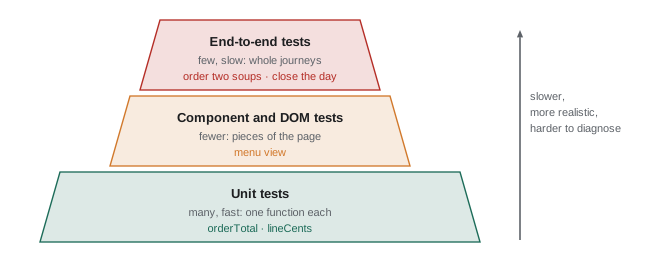
The test pyramid is the usual guide to the balance. Most tests should be fast unit tests, a smaller number should test components and pages with a simulated or real DOM, and a few end-to-end tests should cover the critical paths, the journeys that must never break. For the counter page, Gareth and Mira list three: taking an order and seeing the right total, removing an item, and closing the day so that the tally is saved for Rosa's report. Everything else is tested lower down.
How Playwright works
Playwright is an open-source project from Microsoft. Its test runner, @playwright/test, starts real browsers and controls them through their automation protocols. It ships with three browser engines: Chromium, the engine of Chrome and Edge; Firefox; and WebKit, the engine of Safari. A test can run in all three, so a bug that appears only in Safari can be caught on Mira's Linux laptop. Playwright releases a new minor version about once a month; version 1.65 came out on November 12, 2026.
Each test gets a fresh browser context, an isolated browser profile with its own cookies, storage and cache, created in milliseconds. One test's saved tally cannot leak into another, and tests can run in parallel in separate contexts of the same browser. The page fixture that each test receives is a new tab in its own context.
// Two tests that touch saved storage, run with shared storage and with a fresh context each.
const tests = [
  ['saves the tally when the day closes', (storage) => { storage.set('tally', '14 orders'); return storage.get('tally') === '14 orders'; }],
  ['a new day starts with no tally', (storage) => storage.get('tally') === undefined],
];

function runAll(order, freshContext) {
  const shared = new Map();
  return order.map((i) => {
    const [name, fn] = tests[i];
    const storage = freshContext ? new Map() : shared;
    return (fn(storage) ? 'pass ' : 'FAIL ') + name;
  });
}

console.log('shared storage, order 1-2: ', runAll([0, 1], false).join(' | '));
console.log('shared storage, order 2-1: ', runAll([1, 0], false).join(' | '));
console.log('fresh context, order 1-2: ', runAll([0, 1], true).join(' | '));shared storage, order 1-2: pass saves the tally when the day closes | FAIL a new day starts with no tally shared storage, order 2-1: pass a new day starts with no tally | pass saves the tally when the day closes fresh context, order 1-2: pass saves the tally when the day closes | pass a new day starts with no tally
What this code does
Each test receives a storage object, standing in for the browser's localStorage. With shared storage, the second test passes or fails depending on whether the first one ran before it, which is the classic sign of tests that depend on each other. With a fresh Map for every test, as Playwright's browser contexts provide, both tests pass in any order.
npm init playwright@latest
npx playwright install --with-deps
What this code does
The first command adds @playwright/test to the project and writes a configuration file and an example test, asking a few questions on the way. The second downloads the browser builds that this version of Playwright is tested with, plus the system libraries they need on Linux. Browsers are downloaded separately because each Playwright version is tied to particular browser builds.
A first end-to-end test
Mira's first test opens the counter page, orders two soups and a cookie, and checks the order list and the total. She runs it against a cut-down copy of the page, built with esbuild as in Lesson 3 and served by a small local web server, so that the output below is real.
import { test, expect } from "@playwright/test";

test("adds two soups and a cookie to the order", async ({ page }) => {
  await page.goto("/");
  await page.getByRole("button", { name: "Soup of the day" }).click();
  await page.getByRole("button", { name: "Soup of the day" }).click();
  await page.getByRole("button", { name: "Oatmeal cookie" }).click();

  const order = page.getByRole("list", { name: "Order" });
  await expect(order.getByRole("listitem")).toHaveText(["2 × Soup of the day", "1 × Oatmeal cookie"]);
  await expect(page.locator("#total")).toHaveText("11.87");
});

test("starts with an empty order", async ({ page }) => {
  await page.goto("/");
  await expect(page.getByRole("listitem")).toHaveCount(0);
  await expect(page.locator("#total")).toHaveText("0.00");
});
What this code does
Each test receives a fresh page, opens the counter page and acts through role-based locators, just as a user would press the buttons. The expect calls are web-first assertions: they keep checking until the list and the total show the expected text or five seconds pass. The total is found by its id here; a role or label would be better, and Mira adds a label to the output element the same week.
npx playwright test --reporter=listRunning 2 tests using 1 worker ✓ 1 [chromium] › e2e/order.spec.js:3:1 › adds two soups and a cookie to the order (278ms) ✓ 2 [chromium] › e2e/order.spec.js:14:1 › starts with an empty order (109ms) 2 passed (1.4s)
What this code does
Playwright starts the local web server named in its configuration, runs both tests in Chromium and reports each one with its file, line, name and time. Lines printed by the web server are left out. The whole run, including starting the browser, takes under two seconds.
To see what a failure looks like, Mira changes the expected total to a value one cent too low and runs the tests again.
npx playwright test --reporter=listRunning 2 tests using 1 worker
✘ 1 [chromium] › e2e/order.spec.js:3:1 › adds two soups and a cookie to the order (5.3s)
✓ 2 [chromium] › e2e/order.spec.js:14:1 › starts with an empty order (161ms)
1) [chromium] › e2e/order.spec.js:3:1 › adds two soups and a cookie to the order ─────────
Error: expect(locator).toHaveText(expected) failed
Locator: locator('#total')
Expected: "11.86"
Received: "11.87"
Timeout: 5000ms
Call log:
- Expect "toHaveText" with timeout 5000ms
- waiting for locator('#total')
9 × locator resolved to <output id="total">11.87</output>
- unexpected value "11.87"
> 11 | await expect(page.locator("#total")).toHaveText("11.86");
| ^
1 failed
1 passed (7.5s)What this code does
Playwright's list reporter shows a cross for the failed test and a tick for the other. For the failure it prints the locator, the expected and received values, and a call log showing that it re-checked the total nine times over five seconds before giving up. The code frame points at the exact assertion.
Locators and auto-waiting
A locator describes how to find an element, such as page.getByRole('button', { name: 'Sandwich' }). It does not find anything when it is created. Each time an action or assertion uses it, Playwright looks for the element again, so a locator keeps working even if the page re-renders the button. Playwright's locators mirror Testing Library's queries: getByRole, getByLabel, getByText, getByPlaceholder, getByAltText, getByTitle and getByTestId, plus locator() for CSS selectors when nothing else fits.
Before every action, Playwright auto-waits: it waits until the element exists, is visible, is stable rather than moving, can receive events and is enabled. Only then does it click. Assertions on locators, such as toHaveText and toBeVisible, are web-first assertions: they retry until the condition holds or a timeout passes, five seconds by default. Together these remove the main cause of unreliable browser tests in older tools, where a test would click a button a moment before it appeared.
// A fake page that changes over time, and a web-first assertion that retries.
let clock = 0;
const page = {
  text() {
    if (clock < 200) return 'Loading…';
    if (clock < 450) return 'Total: 0.00';
    return 'Total: 11.55';
  },
};
async function tick(ms) { clock += ms; }

async function toHaveText(getText, expected, { timeout = 5000, interval = 100 } = {}) {
  const log = [];
  for (let waited = 0; waited <= timeout; waited += interval) {
    const actual = getText();
    log.push(`${String(clock).padStart(4)} ms: ${actual}`);
    if (actual === expected) return { pass: true, log };
    await tick(interval);
  }
  return { pass: false, log };
}

const first = await toHaveText(() => page.text(), 'Total: 11.55');
console.log(first.pass ? 'passed' : 'failed', 'after', first.log.length, 'checks');
console.log(first.log.join('\n'));
clock = 0;
const second = await toHaveText(() => page.text(), 'Total: 11.56', { timeout: 800 });
console.log(second.pass ? 'passed' : 'failed', 'after', second.log.length, 'checks; last seen:', second.log.at(-1).trim());passed after 6 checks 0 ms: Loading… 100 ms: Loading… 200 ms: Total: 0.00 300 ms: Total: 0.00 400 ms: Total: 0.00 500 ms: Total: 11.55 failed after 9 checks; last seen: 800 ms: Total: 11.55
What this code does
The fake page's text changes as its clock moves on, like a page that loads and then updates. toHaveText checks the text, and if it does not match yet it advances the clock and checks again, keeping a log, until the timeout. The first assertion passes on the sixth check; the second can never pass, so it fails with a log of what it saw, much like Playwright's call log.
The rule that follows is short: never add fixed waits such as page.waitForTimeout(1000) to make a test pass. A fixed wait is either too long, slowing every run, or too short on a slow day. Wait for the thing itself, with a web-first assertion.
Configuration
Playwright reads playwright.config.ts at the root of the project. It sets where the tests are, the address of the site, which browsers to use, how many times to retry a failed test and how to start the web server the tests need.
import { defineConfig, devices } from '@playwright/test';

export default defineConfig({
  testDir: './e2e',
  fullyParallel: true,
  forbidOnly: !!process.env.CI,
  retries: process.env.CI ? 2 : 0,
  reporter: process.env.CI ? [['list'], ['html', { open: 'never' }]] : 'list',
  use: {
    baseURL: 'http://localhost:4173',
    trace: 'on-first-retry',
  },
  projects: [
    { name: 'chromium', use: { ...devices['Desktop Chrome'] } },
    { name: 'tablet-safari', use: { ...devices['iPad (gen 7)'] } },
  ],
  webServer: {
    command: 'npm run build && npm run preview -- --port 4173',
    url: 'http://localhost:4173',
    reuseExistingServer: !process.env.CI,
  },
});
What this code does
The webServer block builds the counter page and starts Vite's preview server, which serves the production build from dist, so the tests check what will really be deployed. Two projects run every test in desktop Chromium and in WebKit emulating an iPad, close to the counter tablet. On the CI server, failed tests are retried twice, a trace is recorded on the first retry and a test accidentally left marked test.only fails the run.
The devices list gives each project a realistic screen size, touch support and user agent. Emulation is not the same as a real device, but it catches most layout and touch problems, and Rosa's own tablet is still checked by hand before each release.
Debugging failures
When an end-to-end test fails, the question is what the page looked like at that moment. Playwright offers several ways to see it.
- Traces. With trace: 'on-first-retry', a retried test records a trace: every action, a DOM snapshot before and after it, screenshots, console messages and network requests. npx playwright show-trace opens it in the Trace Viewer, where Mira can step through the test and inspect the page at each point.
- UI mode. npx playwright test --ui opens an interactive window that runs tests, shows each step and watches files, which is useful while writing tests.
- Debug mode. npx playwright test --debug opens a visible browser and pauses before each action.
- Code generation. npx playwright codegen opens a browser and writes test code as you click around the page, with role-based locators. It is a good starting point, though the generated test always needs tidying.
- The HTML report. On the CI server, the html reporter writes a report with every failure, its error, screenshot and trace, which Lesson 11 keeps as an artifact of the run.
Flaky tests
A flaky test sometimes passes and sometimes fails on the same code. Flakiness is the main reason teams stop trusting end-to-end tests, because once a failure might be noise, people start ignoring real failures too. Common causes are fixed waits, tests that depend on each other or on shared data, animations, real network calls to services outside the test's control and tests that assume an order of events.
Retries are a safety net, not a cure. Playwright reports a test that failed and then passed on retry as flaky, separately from passed and failed, so the problem is visible. Brightwater treats every flaky report as a bug to fix within the week.
// Classify each test from the outcome of its attempts, as Playwright does.
function classify(attempts) {
  if (attempts[0] === 'pass') return 'passed';
  if (attempts.includes('pass')) return 'flaky';
  return 'failed';
}

const run = {
  'adds two soups and a cookie': ['pass'],
  'removes an item': ['fail', 'pass'],
  'closes the day and saves the tally': ['fail', 'fail', 'fail'],
  'starts with an empty order': ['pass'],
};
const counts = { passed: 0, flaky: 0, failed: 0 };
for (const [name, attempts] of Object.entries(run)) {
  const result = classify(attempts);
  counts[result]++;
  console.log(result.padEnd(7), name, `(${attempts.length} attempt${attempts.length > 1 ? 's' : ''})`);
}
console.log(counts);
console.log(counts.failed > 0 ? 'The run fails.' : 'The run passes' + (counts.flaky ? ', with flaky tests to fix.' : '.'));passed adds two soups and a cookie (1 attempt)
flaky removes an item (2 attempts)
failed closes the day and saves the tally (3 attempts)
passed starts with an empty order (1 attempt)
{ passed: 2, flaky: 1, failed: 1 }
The run fails.What this code does
classify looks at the results of each attempt at a test: passing first time is passed, failing every attempt is failed, and failing then passing on a retry is flaky. The run as a whole fails only if a test failed on every attempt. Counting flaky tests separately keeps unreliable tests visible even when the run passes.
// A simulated test that depends on a race: does the total update before the check?
function makeRandom(seed) {
  return () => { seed = (seed * 1664525 + 1013904223) % 4294967296; return seed / 4294967296; };
}
const random = makeRandom(42);

function fixedWaitTest() {
  const renderTime = 80 + random() * 60;   // the page takes 80 to 140 ms to update
  const waited = 120;                       // the test waits a fixed 120 ms, then checks once
  return waited >= renderTime;
}
function webFirstTest() {
  const renderTime = 80 + random() * 60;
  return renderTime <= 5000;                // keeps checking for up to 5 seconds
}

let fixedPasses = 0, webFirstPasses = 0;
for (let i = 0; i < 50; i++) { if (fixedWaitTest()) fixedPasses++; if (webFirstTest()) webFirstPasses++; }
console.log('fixed 120 ms wait: passed', fixedPasses, 'of 50 runs');
console.log('web-first check: passed', webFirstPasses, 'of 50 runs');fixed 120 ms wait: passed 33 of 50 runs web-first check: passed 50 of 50 runs
What this code does
A seeded random number generator gives the same sequence on every run, so the experiment is repeatable. In each simulated run the page takes between 80 and 140 milliseconds to update. The test that waits a fixed 120 milliseconds and checks once passes only when the page happens to be quick, while the test that keeps checking passes every time.
Test data and the server
The counter page's end-to-end tests run against the production build, but not against the Food Hub's real data. The menu comes from a small test fixture, and since the April pilot the page sends orders to Theo's server, so the tests need a server too. Playwright can intercept network requests with page.route and answer them, much as Mock Service Worker does in unit tests, which keeps most end-to-end tests fast and independent of the server.
test('shows an error if the order cannot be sent', async ({ page }) => {
  await page.route('**/api/v1/orders', (route) =>
    route.fulfill({ status: 503, contentType: 'application/problem+json', body: JSON.stringify({ title: 'Service Unavailable' }) }),
  );
  await page.goto('/');
  await page.getByRole('button', { name: 'Sandwich' }).click();
  await page.getByRole('button', { name: 'Send order' }).click();
  await expect(page.getByRole('alert')).toHaveText('The order could not be sent. Please try again.');
});
What this code does
page.route intercepts requests to the orders endpoint and answers them with a 503 error in the problem details format Theo's API uses. The test then sends an order and checks that the page shows a helpful message in an alert. Testing this against a real server would mean breaking the server on purpose.
A separate, very small set of tests runs nightly against the staging copy of Theo's server with real requests, to prove that the page and the server agree. Those are the only tests that need the network, and they are kept apart so that a server problem never blocks a front-end change.
Common mistakes
MistakeWrite end-to-end tests for every feature.
InsteadCover the critical journeys end to end and test the details with faster unit and component tests.
MistakeAdd waitForTimeout when a test is unreliable.
InsteadUse web-first assertions that wait for the condition itself; fixed waits cause flakiness.
MistakeRetries fix flaky tests.
InsteadRetries hide them. Playwright reports flaky tests separately so they can be fixed.
MistakeTests can share a logged-in page to save time.
InsteadEach test gets its own browser context. Share setup with fixtures or saved storage state, not with test order.
MistakeTesting in Chromium is enough for a page used on an iPad.
InsteadAdd a WebKit project, and still check the real tablet by hand before releases.
Summary and key terms
- End-to-end tests drive the finished application in a real browser as a user would.
- They catch problems no unit test can see but are slower and harder to diagnose, so the test pyramid keeps them few and focused on critical paths.
- Playwright, from Microsoft, controls Chromium, Firefox and WebKit, gives each test a fresh isolated browser context and runs tests in parallel.
- Locators such as getByRole describe how to find elements and are resolved again on every use.
- Actions auto-wait for elements to be ready, and web-first assertions such as toHaveText retry until they pass or time out, so fixed waits are never needed. playwright.config.ts sets the test folder, base URL, browser projects, retries, reporters and a web server, ideally serving the production build.
- Traces, UI mode, debug mode, codegen and the HTML report help debug failures.
- A test that passes only on retry is reported as flaky and should be fixed. page.route answers network requests so that most tests do not need the real server.
- end-to-end test
- A test that drives the whole application through its user interface in a real browser.
- test pyramid
- A guide to having many unit tests, fewer component tests and few end-to-end tests.
- critical path
- A user journey that must never break, such as taking an order.
- browser context
- An isolated browser profile with its own storage, created fresh for each Playwright test.
- locator
- A description of how to find an element, resolved again each time it is used.
- auto-waiting
- Playwright waiting for an element to be ready before acting on it.
- web-first assertion
- An assertion that retries until the page meets the condition or a timeout passes.
- trace
- A recording of a test run with actions, DOM snapshots, screenshots and network requests.
- flaky test
- A test that sometimes passes and sometimes fails on the same code.
- fixture
- Setup that Playwright provides to a test, such as a fresh page.
Practice problems
Work each problem on paper first, then reveal the answer to check.
Why does each Playwright test get a new browser context?
Show answer
So that cookies, storage and cache from one test cannot affect another, and tests can run in parallel.
What does Playwright check before clicking a button?
Show answer
That it exists, is visible, is stable, can receive events and is enabled.
A test fails, then passes on retry. How does Playwright report it?
Show answer
As flaky.
Why should the webServer in the configuration serve the production build?
Show answer
So the tests check the bundled files that will really be deployed.
How can an end-to-end test check the page's handling of a server error without breaking the server?
Show answer
Intercept the request with page.route and fulfil it with an error response.
Try it yourself
Retry until it passes
Complete expectSoon(check, attempts) so that it calls check() up to attempts times and returns the number of the attempt on which it first returned true.
If check never returns true, throw Error('still failing after N attempts') with the right number. Between attempts, call advance() so the fake page can change.
let t = 0;
const advance = () => { t += 100; };
const totalShown = () => (t >= 300 ? '11.55' : '0.00');

function expectSoon(check, attempts) {
  return check() ? 1 : 0;
}

console.log(expectSoon(() => totalShown() === '11.55', 10));
t = 0;
try { expectSoon(() => totalShown() === '11.56', 5); } catch (err) { console.log(err.message); }
Try it yourself
Summarize a run
Each test result lists its attempts, such as ['fail', 'pass']. Complete summarize(results) so that it returns a line like 1 failed, 1 flaky, 2 passed, leaving out any category with a count of 0.
A test that passed on its first attempt is passed, one that passed on a later attempt is flaky and one that never passed is failed. List the categories in the order failed, flaky, passed.
function summarize(results) {
  return results.length + ' tests';
}

console.log(summarize([['pass'], ['fail', 'pass'], ['fail', 'fail', 'fail'], ['pass']]));
console.log(summarize([['pass'], ['pass']]));
console.log(summarize([['fail', 'fail', 'pass']]));
Lesson quiz · 5 questions
Score 60% or more to complete this lesson.
Create a free account to save your progress, take quizzes and earn a certificate.