
JS-210 · Lesson 2 of 12 · 27 min
npm, packages and package.json
▶ Video coming soon A video version of this lesson is on the way.
On Thursday, October 21, Gareth opens the counter page project and shows Mira the one file every JavaScript project has at its root: package.json. "This is the project's identity card and its instruction sheet," he says. "It says what the project is called, which packages it needs, which versions are allowed and which commands people run. If it is wrong, every tool after it is wrong too."
This lesson explains packages, the npm command-line tool, the package.json file, version numbers and ranges, the lock file and the supply-chain risks that come with installing other people's code. By the end of the session the counter page should have a package.json that Gareth is happy to build the rest of the block on.
Packages and the registry
A package is a folder of code with a package.json file that gives it a name and a version. Packages are published to a registry, a server that stores every version ever released. The public npm registry is the default; companies can also run private registries. When a project needs a package, a package manager downloads the right version from the registry and puts it in a folder called node_modules inside the project.
Node.js comes with the npm command-line tool. Two others are common: pnpm, which saves disk space by storing each package version once and linking it into projects, and Yarn. All three read the same package.json and install from the same registry. Brightwater uses npm because it is already installed with Node.js and every developer knows it; the commands in this course are npm's, and the ideas are the same in the others.
| Command | What it does |
|---|---|
| npm init | Creates a new package.json by asking a few questions |
| npm install | Installs everything package.json lists, and updates the lock file if needed |
| npm install name | Adds a package as a dependency and installs it |
| npm install --save-dev name | Adds a package as a development dependency |
| npm ci | Installs exactly what the lock file lists, after deleting node_modules; used on servers |
| npm run name | Runs a script defined in package.json |
| npm test | Short for npm run test |
| npx name | Runs a command from an installed package, or downloads it to run once |
| npm outdated | Lists dependencies with newer versions available |
| npm audit | Checks installed packages against a database of known vulnerabilities |
Reading package.json
Gareth's version of the counter page's package.json, with the tools this block will add, looks like this. It is JSON, so every key is in double quotes and there are no comments or trailing commas.
{
  "name": "counter-page",
  "version": "1.4.0",
  "private": true,
  "type": "module",
  "engines": {
    "node": ">=24"
  },
  "scripts": {
    "dev": "vite",
    "build": "tsc --noEmit && vite build",
    "lint": "eslint .",
    "format": "prettier --write .",
    "format:check": "prettier --check .",
    "test": "vitest run",
    "test:watch": "vitest",
    "test:e2e": "playwright test"
  },
  "dependencies": {
    "riverside-data": "^2.3.0"
  },
  "devDependencies": {
    "@eslint/js": "^10.0.1",
    "@playwright/test": "^1.65.0",
    "eslint": "^10.1.0",
    "prettier": "^3.9.0",
    "typescript": "^7.0.0",
    "vite": "^8.0.0",
    "vitest": "^4.1.0"
  }
}
What this code does
The first block names the project, gives its version, marks it private so it can never be published by accident, and says its files are ES modules. The scripts block gives short names to the commands the team runs every day. The two dependency blocks list the packages the project needs, each with a range of acceptable versions.
| Field | Meaning |
|---|---|
| name | The package name; lowercase, no spaces; must be unique on the registry if published |
| version | The project's own version number, in semantic versioning form |
| private | true stops npm publish from publishing the package |
| type | "module" makes .js files ES modules (import and export); without it Node.js treats them as CommonJS |
| engines | The versions of Node.js the project supports |
| scripts | Named commands run with npm run |
| dependencies | Packages the code needs when it runs |
| devDependencies | Packages needed only to develop, build or test, such as linters and test runners |
| exports | For libraries: which files other projects may import, used by riverside-data |
The split between dependencies and devDependencies matters most for libraries. When the counter page installs riverside-data, npm installs riverside-data's dependencies too, but not its devDependencies, because the counter page does not need riverside-data's test runner. For an application such as the counter page, the split mostly documents intent: the code that ships to the tablet uses riverside-data, and everything else is a tool.
Scripts
The scripts block is the project's menu of commands. Instead of remembering that the format check is prettier --check . or that the build first runs the type checker, everyone types npm run format:check or npm run build. Scripts also find tools installed in the project's node_modules, so nobody needs a tool installed globally on their computer, and everyone runs the same version.
npm runLifecycle scripts included in counter-page@1.4.0:
test
node --test
available via `npm run-script`:
lint
eslint .
format
prettier --write .
format:check
prettier --check .
build
esbuild src/main.js --bundle --minify --sourcemap --outdir=distWhat this code does
Running npm run with no script name lists every script in package.json. npm treats test as a lifecycle script, so it appears first; the rest follow in the order they are written. This output is from a cut-down copy of the counter page used in this lesson's examples.
Script names are free text, but conventions help the next developer. Brightwater uses dev for the development server, build for a production build, lint, format, format:check, test for unit tests and test:e2e for browser tests. Lesson 11 runs the same scripts on the continuous integration server, so a script that works on a laptop works there too.
Semantic versioning
Every published package version has a number such as 2.3.1. Almost all JavaScript packages follow semantic versioning, or semver, which gives each of the three numbers a meaning.
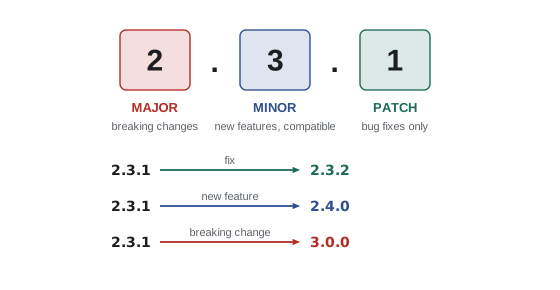
- Major: goes up when a release breaks existing code, for example by removing a function or changing what it returns. The minor and patch numbers go back to zero.
- Minor: goes up when a release adds features without breaking anything. The patch number goes back to zero.
- Patch: goes up for bug fixes that change nothing else.
Versions below 1.0.0 are a special case: semver treats them as unstable, and many packages make breaking changes in minor releases while they are at 0.x. A version can also carry a pre-release label after a hyphen, such as 3.0.0-beta.2, which sorts before 3.0.0 itself.
function parse(version) {
  const [core, pre = null] = version.split('-');
  const [major, minor, patch] = core.split('.').map(Number);
  return { major, minor, patch, pre };
}
function compare(a, b) {
  const x = parse(a), y = parse(b);
  for (const part of ['major', 'minor', 'patch']) {
    if (x[part] !== y[part]) return x[part] - y[part];
  }
  if (x.pre === y.pre) return 0;
  if (x.pre === null) return 1;   // a release sorts after its pre-releases
  if (y.pre === null) return -1;
  return x.pre < y.pre ? -1 : 1;
}

const versions = ['2.10.0', '2.3.1', '3.0.0-beta.2', '2.3.0', '3.0.0', '2.9.4'];
console.log(versions.toSorted(compare).join('  '));
console.log('2.10.0 > 2.9.4?', compare('2.10.0', '2.9.4') > 0);
console.log('As plain strings:', versions.toSorted().join(' '));2.3.0 2.3.1 2.9.4 2.10.0 3.0.0-beta.2 3.0.0 2.10.0 > 2.9.4? true As plain strings: 2.10.0 2.3.0 2.3.1 2.9.4 3.0.0 3.0.0-beta.2
What this code does
parse splits a version into its three numbers and an optional pre-release label, and compare checks major, then minor, then patch as numbers. A plain string sort puts 2.10.0 before 2.3.0 because it compares characters, which is wrong for versions. The pre-release rule is simplified here; the real rules compare dot-separated parts one at a time.
Version ranges
A dependency in package.json is usually not one exact version but a range of acceptable versions. The two symbols that matter most are the caret and the tilde.
| Range | Allows | Example matches for 2.3.0 | Rejects |
|---|---|---|---|
| 2.3.0 | Exactly that version | 2.3.0 | Everything else |
| ^2.3.0 | Same major, at least 2.3.0 | 2.3.0, 2.3.7, 2.4.0, 2.19.1 | 2.2.9, 3.0.0 |
| ~2.3.0 | Same major and minor, at least 2.3.0 | 2.3.0, 2.3.7 | 2.4.0, 3.0.0 |
| >=2.3.0 <3.0.0 | Written out in full; same as ^2.3.0 | 2.3.0 to 2.x | 3.0.0 and above |
| ^0.4.2 | For 0.x, caret allows only patches | 0.4.2, 0.4.9 | 0.5.0 |
| * | Any version | Everything | Nothing; avoid it |
npm install adds new dependencies with a caret by default, which trusts the package to follow semver: any later minor or patch release in the same major version should work. The tilde is more cautious and accepts only patch releases. Both rules are easy to write as code.
const parse = (v) => v.split('.').map(Number);
const atLeast = (v, min) => {
  const a = parse(v), b = parse(min);
  for (let i = 0; i < 3; i++) if (a[i] !== b[i]) return a[i] > b[i];
  return true;
};
function caret(v, base) {
  const [M, m] = parse(base), [vM, vm] = parse(v);
  if (!atLeast(v, base)) return false;
  return M > 0 ? vM === M : vM === 0 && vm === m;
}
function tilde(v, base) {
  const [M, m] = parse(base), [vM, vm] = parse(v);
  return atLeast(v, base) && vM === M && vm === m;
}

for (const v of ['2.2.9', '2.3.0', '2.3.7', '2.4.0', '3.0.0']) {
  console.log(v.padEnd(6), '^2.3.0', caret(v, '2.3.0') ? 'yes' : 'no ', '  ~2.3.0', tilde(v, '2.3.0') ? 'yes' : 'no');
}
console.log('0.5.0 in ^0.4.2?', caret('0.5.0', '0.4.2'));2.2.9 ^2.3.0 no ~2.3.0 no 2.3.0 ^2.3.0 yes ~2.3.0 yes 2.3.7 ^2.3.0 yes ~2.3.0 yes 2.4.0 ^2.3.0 yes ~2.3.0 no 3.0.0 ^2.3.0 no ~2.3.0 no 0.5.0 in ^0.4.2? false
What this code does
atLeast checks that a version is not older than the base of the range. caret then requires the same major version, except below 1.0.0, where it also requires the same minor version. tilde always requires the same major and minor, so it accepts only patch releases.
Ranges are a promise that depends on the people publishing the package. Most follow semver carefully, but a minor release can still break something by accident. That is one reason for the lock file.
The lock file
When npm installs packages, it records the exact version of every package it chose, including the packages that your dependencies depend on, in a file called package-lock.json. The next npm install on another computer reads the lock file and installs the same versions, even if newer ones have been published in between. Without the lock file, two developers who install a week apart could end up with different code in node_modules and different bugs.
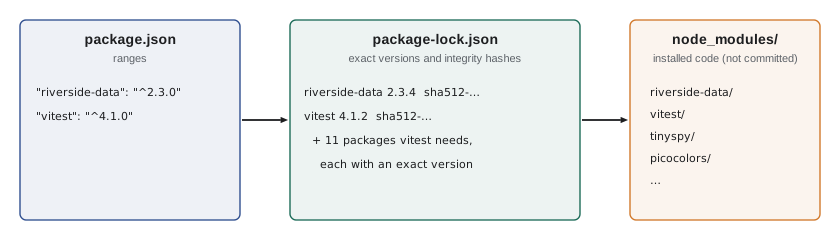
The lock file goes into version control with the rest of the project. node_modules does not: it is large, it can be rebuilt from the lock file at any time, and it may contain files built for one operating system. Every project at Brightwater has node_modules in its .gitignore file.
There are two install commands for two situations. npm install is for developers: it installs what package.json asks for and updates the lock file if package.json has changed. npm ci, for continuous integration, is for servers and fresh checkouts: it deletes node_modules, installs exactly what the lock file says and fails if the lock file and package.json disagree. The second behaviour is what a build server needs, because it should never quietly pick new versions.
Direct and indirect dependencies
The counter page lists one dependency and seven development dependencies, but node_modules holds far more than eight packages. Each package has dependencies of its own, called transitive or indirect dependencies, and those have dependencies too. npm reads the whole tree and installs one copy of each version that is needed, sharing copies where the ranges allow.
// A tiny made-up registry: each package lists the packages it depends on.
const registry = {
  'counter-page': ['riverside-data', 'vitest'],
  'riverside-data': [],
  vitest: ['tinyspy', 'expect-lite', 'picocolors'],
  'expect-lite': ['picocolors', 'diff-lite'],
  tinyspy: [],
  picocolors: [],
  'diff-lite': [],
};

function install(root) {
  const installed = new Set();
  const order = [];
  function visit(name, depth) {
    console.log('  '.repeat(depth) + name + (installed.has(name) ? ' (already installed)' : ''));
    if (installed.has(name)) return;
    installed.add(name);
    order.push(name);
    for (const dep of registry[name]) visit(dep, depth + 1);
  }
  visit(root, 0);
  return order.length - 1;
}

console.log('Packages installed:', install('counter-page'));counter-page
riverside-data
vitest
tinyspy
expect-lite
picocolors
diff-lite
picocolors (already installed)
Packages installed: 6What this code does
install walks the dependency tree depth first, printing each package indented by its depth. A Set remembers what has been installed, so picocolors, which two packages need, is installed once and marked the second time. The count leaves out the project itself.
Real trees are much bigger. A project with a test runner, a bundler and a linter can easily have several hundred packages in node_modules. That is normal, but it is also why the next section matters.
Supply-chain safety
Every package in node_modules is code written by someone else that runs on your computer when you install, build or test. Most of it is written by careful volunteers, but attackers have published packages with names one letter away from popular ones, taken over abandoned packages and, in a few well-known cases, stolen maintainers' passwords to publish poisoned releases of widely used packages. This is called a supply-chain attack, because it reaches you through the chain of packages you depend on.
Brightwater's rules reduce the risk without making the work impossible.
- Add dependencies on purpose. Before adding a package, check who maintains it, when it was last released, how many projects use it and whether a few lines of your own code would do instead.
- Commit the lock file and use npm ci on servers, so that a new release cannot slip into a build unnoticed.
- Review lock file changes in pull requests. A small change to package.json that adds forty packages to the lock file deserves a question.
- Run npm audit regularly, and update packages with known vulnerabilities. Lesson 11 runs it in continuous integration.
- Wait before taking brand-new releases. Poisoned releases are usually found and removed within hours or days. pnpm 11, released in April 2026, waits by default until a version is at least a day old before installing it; with npm, teams get the same effect by reviewing update pull requests rather than accepting them instantly.
- Be careful with install scripts. Some packages run a script when they are installed. pnpm asks you to approve packages that run build scripts; with npm, a reviewer should notice a new dependency that has one.
npm auditfound 0 vulnerabilities
What this code does
npm audit compares the exact versions in the lock file with a public database of known vulnerabilities and prints a summary. When it finds a problem it names the package, the severity and, if one exists, the version that fixes it. The output shown is what a clean project prints.
riverside-data as a package
The counter page and the dashboard both depend on riverside-data. Its package.json is a little different, because it is a library: it lists the files that other projects may import in an exports field, so that internal files stay private, and it has no development server or browser tests of its own. Since June 2027 it has been written in TypeScript and published with type declarations, as JS-130 explained.
{
  "name": "riverside-data",
  "version": "2.3.0",
  "private": true,
  "type": "module",
  "exports": {
    ".": {
      "types": "./dist/index.d.ts",
      "default": "./dist/index.js"
    }
  },
  "files": ["dist"],
  "scripts": {
    "build": "tsc",
    "lint": "eslint .",
    "test": "vitest run"
  },
  "devDependencies": {
    "eslint": "^10.1.0",
    "typescript": "^7.0.0",
    "vitest": "^4.1.0"
  }
}
What this code does
exports says that importing riverside-data gives the compiled dist/index.js, with its type declarations beside it, and nothing else. files lists what goes into the package when it is packed, so tests and source files stay out. The library has no runtime dependencies at all, which makes it easy for the counter page and the dashboard to share.
Each release of riverside-data follows semver. When Mira adds the heap from the algorithms block, a new feature that breaks nothing, the version goes from 2.2.0 to 2.3.0. If she ever renames an exported function, the version must go to 3.0.0, and the counter page's ^2.3.0 range will keep it on the 2.x line until someone updates it on purpose.
function bump(version, kind) {
  let [major, minor, patch] = version.split('.').map(Number);
  if (kind === 'major') { major++; minor = 0; patch = 0; }
  else if (kind === 'minor') { minor++; patch = 0; }
  else if (kind === 'patch') { patch++; }
  else throw new Error('Unknown kind: ' + kind);
  return [major, minor, patch].join('.');
}

const changes = [
  ['fix: shift times near midnight', 'patch'],
  ['feat: add MinHeap', 'minor'],
  ['fix: peek on an empty heap returns undefined', 'patch'],
  ['feat!: rename fold() to normalizeName()', 'major'],
];
let version = '2.2.0';
for (const [message, kind] of changes) {
  version = bump(version, kind);
  console.log(version.padEnd(6), message);
}2.2.1 fix: shift times near midnight 2.3.0 feat: add MinHeap 2.3.1 fix: peek on an empty heap returns undefined 3.0.0 feat!: rename fold() to normalizeName()
What this code does
bump raises one part of a version and resets the parts after it, following the semver rules. The list of changes uses short commit messages, and the exclamation mark marks a breaking change, a convention many teams follow. Running the list shows how riverside-data's version would move through two fixes, a feature and a breaking rename.
npm version minorv1.5.0
What this code does
npm version raises the version in package.json and package-lock.json by the named kind, here minor, and prints the new version. In a Git repository it also creates a commit and a tag for the release. The output is from the lesson's copy of the counter page at 1.4.0.
Common mistakes
MistakeCommitting node_modules makes builds reliable.
InsteadCommit package-lock.json instead. node_modules is large, can be rebuilt exactly with npm ci and may contain files built for one operating system.
Mistake^2.3.0 means version 2.3.0 or anything newer.
InsteadIt means at least 2.3.0 but below 3.0.0. A new major version is never included.
MistakeVersion strings can be compared as text.
Instead'2.10.0' < '2.9.0' as text. Compare the three numbers in order.
Mistakenpm install and npm ci do the same thing.
Insteadnpm install can update the lock file; npm ci installs exactly what it says and fails if it disagrees with package.json.
MistakeA test runner belongs in dependencies.
InsteadTools used only to develop, build or test belong in devDependencies.
Summary and key terms
- A package is a folder of code with a package.json giving it a name and version; packages are published to a registry and installed into node_modules by a package manager such as npm, pnpm or Yarn. package.json holds the name, version, module type, supported Node.js versions, scripts and dependency lists.
- Scripts give short names to the team's commands and find tools in node_modules.
- Semantic versioning uses major for breaking changes, minor for compatible features and patch for fixes.
- A caret range allows later minor and patch releases in the same major version; a tilde allows only patches; 0.x versions are treated as unstable. package-lock.json records the exact version of every package, including transitive dependencies, and is committed; node_modules is not. npm install is for developers; npm ci installs exactly from the lock file for servers.
- Supply-chain attacks reach projects through dependencies, so add packages on purpose, review lock file changes, run npm audit and avoid installing releases the moment they appear.
- package.json
- The file at the root of a project that names it and lists its scripts and dependencies.
- dependency
- A package that a project needs to run.
- development dependency
- A package needed only to develop, build or test a project.
- transitive dependency
- A package that is installed because another dependency needs it.
- semantic versioning
- A version scheme of MAJOR.MINOR.PATCH, where each part signals the kind of change.
- caret range
- A range such as ^2.3.0 that accepts later minor and patch versions in the same major version.
- tilde range
- A range such as ~2.3.0 that accepts only later patch versions.
- lock file
- A file, package-lock.json for npm, that records the exact version of every installed package.
- npm ci
- An install command that uses the lock file exactly, for servers and clean checkouts.
- supply-chain attack
- An attack that reaches a project through malicious code in one of its dependencies.
Practice problems
Work each problem on paper first, then reveal the answer to check.
Which versions does ~1.8.2 accept?
Show answer
1.8.2 and later 1.8.x patch versions, but not 1.9.0.
Does ^0.6.1 accept 0.7.0?
Show answer
No. For 0.x versions the caret allows only patch releases.
A fix that changes nothing else is released for riverside-data 2.3.0. What is the new version?
Show answer
2.3.1.
Why does CI use npm ci rather than npm install?
Show answer
It installs exactly what the lock file lists and fails if package.json and the lock file disagree, so builds are repeatable.
Where does Prettier belong in package.json?
Show answer
In devDependencies, because it is only used while developing.
Try it yourself
Does the range allow it?
Complete satisfiesCaret(version, range) for ranges such as '^2.3.0'. It should return true when the version is at least the base version and has the same major number.
For a base whose major version is 0, the minor number must match too, so '^0.4.2' accepts '0.4.9' but not '0.5.0'.
function satisfiesCaret(version, range) {
  const base = range.slice(1);
  return version >= base;
}

const checks = [['2.3.0', '^2.3.0'], ['2.10.1', '^2.3.0'], ['3.0.0', '^2.3.0'], ['2.2.9', '^2.3.0'], ['0.4.9', '^0.4.2'], ['0.5.0', '^0.4.2']];
for (const [v, r] of checks) console.log(v, r, satisfiesCaret(v, r));
Try it yourself
Find the dev tools
A new developer has put every package in dependencies. Complete splitDeps(pkg, tools) so that it returns a new object with the packages named in tools moved to devDependencies and the rest left in dependencies.
Keep the version ranges, and do not change the object passed in.
function splitDeps(pkg, tools) {
  return pkg;
}

const pkg = { name: 'office-dashboard', dependencies: { 'riverside-data': '^2.3.0', vite: '^8.0.0', vitest: '^4.1.0', 'chart-lite': '^1.2.0' } };
const result = splitDeps(pkg, ['vite', 'vitest', 'eslint']);
console.log(JSON.stringify(result.dependencies));
console.log(JSON.stringify(result.devDependencies));
console.log('original unchanged:', Object.keys(pkg.dependencies).length === 4);
Lesson quiz · 5 questions
Score 60% or more to complete this lesson.
Create a free account to save your progress, take quizzes and earn a certificate.