
JS-210 · Lesson 3 of 12 · 29 min
Bundlers and build tools
▶ Video coming soon A video version of this lesson is on the way.
On Tuesday, October 26, Gareth opens the network panel of the browser's developer tools on the counter page and reloads it. The page loads its HTML, a stylesheet and then fourteen separate JavaScript files, one for each module, each waiting for the one that imports it. "On the studio's connection this is fine," he says. "On the counter tablet, on the Food Hub's Wi-Fi, at noon, it is not. Today we let a build tool turn those fourteen files into one."
The dashboard has used Vite since the TypeScript block. The counter page has been served as plain modules, with the TypeScript compiler writing one JavaScript file for each source file. This lesson explains what a bundler does, what a build tool adds, how the development server differs from the production build, and how Mira moves the counter page onto the same setup as the dashboard.
Why bundle?
Browsers have understood ES modules since about 2018, so a page can load a module and let it import others. That works, but it has costs for a real site.
- Many requests. Each import is another request, and a module's imports are only discovered once it has loaded, so the browser fetches the files in waves. On a slow or busy network every wave adds a delay.
- Unused code. A module may export ten functions when the page uses two. Without help, the browser downloads all ten.
- Large files. Source code has comments, long names and spaces that help people but not the browser.
- Code the browser cannot run. TypeScript, JSX and some newer syntax must be turned into plain JavaScript first.
- Caching. A browser should keep files it has already downloaded, but must fetch a new copy as soon as the file changes.
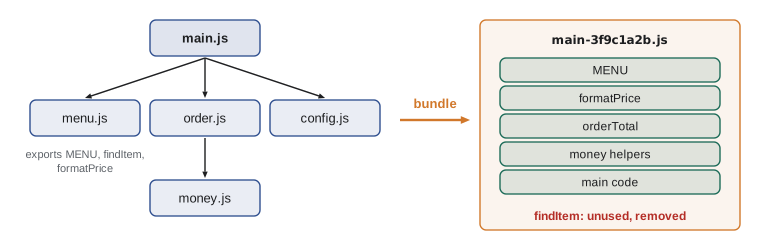
A bundler solves the first three problems. It starts at an entry point, such as src/main.js, follows every import to build a module graph, and writes out one file, or a few, containing all of the code that is needed in an order that works. A build tool wraps a bundler with the rest: turning TypeScript into JavaScript, handling CSS and images, naming files for caching and running a development server.
A bundler in thirty lines
Real bundlers are complicated, but the core idea fits in a short program. Each module is a piece of code with a list of the modules it needs. The bundler visits the graph from the entry point, puts each module after the modules it depends on, and joins them into one script in which each module is a function.
const modules = {
  'main.js': { deps: ['menu.js', 'order.js'], code: "const { MENU } = require('menu.js'); const { orderTotal } = require('order.js'); log(MENU.length + ' items, total ' + orderTotal([4.5, 1.5]));" },
  'menu.js': { deps: [], code: "exports.MENU = ['soup', 'sandwich', 'cookie'];" },
  'order.js': { deps: ['money.js'], code: "const { round2 } = require('money.js'); exports.orderTotal = (prices) => round2(prices.reduce((a, b) => a + b, 0));" },
  'money.js': { deps: [], code: "exports.round2 = (n) => Math.round(n * 100) / 100;" },
};

function bundle(entry) {
  const order = [];
  const seen = new Set();
  (function visit(name) {
    if (seen.has(name)) return;
    seen.add(name);
    modules[name].deps.forEach(visit);
    order.push(name);
  })(entry);
  const parts = order.map((name) => `defs[${JSON.stringify(name)}] = function (require, exports) { ${modules[name].code} };`);
  return { order, source: 'const defs = {};\n' + parts.join('\n') };
}

const { order, source } = bundle('main.js');
console.log('Order:', order.join(' -> '));
console.log('Bundle size:', source.length, 'characters');

// Run the bundle with a tiny module loader.
const run = new Function('log', source + `
  const cache = {};
  function require(name) {
    if (!cache[name]) { cache[name] = {}; defs[name](require, cache[name]); }
    return cache[name];
  }
  require('main.js');`);
run(console.log);Order: menu.js -> money.js -> order.js -> main.js Bundle size: 579 characters 3 items, total 6
What this code does
bundle visits each module's dependencies before the module itself, so money.js comes before order.js and both come before main.js. Each module's code is wrapped in a function that receives require and exports, and all of them are joined into one source string. The last part runs that string with a tiny loader, proving that one file can do the work of four.
This is roughly what bundlers did ten years ago, and some still produce output like it. Modern bundlers go further: because ES modules use static import and export statements, a bundler can see exactly which exports each module uses and leave the rest out, then hoist all of the modules into one scope so that the wrapper functions disappear.
Tree shaking
Leaving out unused exports is called tree shaking: the bundler shakes the module graph and the dead leaves fall off. It works because import statements are static. A bundler can read import { MENU, formatPrice } from './menu.js' and know that findItem is never used, without running anything.
const exportsOf = {
  'menu.js': ['MENU', 'findItem', 'formatPrice'],
  'order.js': ['orderTotal', 'lineCents'],
  'config.js': ['TAX_RATE', 'OPENING_HOURS'],
};
const importsOf = {
  'main.js': { 'menu.js': ['MENU', 'formatPrice'], 'order.js': ['orderTotal'], 'config.js': ['TAX_RATE'] },
  'order.js': {},
};
// order.js uses its own lineCents inside orderTotal.
const internalUses = { 'order.js:orderTotal': ['lineCents'] };

const used = new Set();
for (const imports of Object.values(importsOf)) {
  for (const [file, names] of Object.entries(imports)) {
    for (const name of names) {
      used.add(file + ':' + name);
      for (const inner of internalUses[file + ':' + name] ?? []) used.add(file + ':' + inner);
    }
  }
}
for (const [file, names] of Object.entries(exportsOf)) {
  const kept = names.filter((n) => used.has(file + ':' + n));
  const dropped = names.filter((n) => !used.has(file + ':' + n));
  console.log(file.padEnd(10), 'keep', kept.join(', ').padEnd(22), 'drop', dropped.join(', ') || '-');
}menu.js keep MENU, formatPrice drop findItem order.js keep orderTotal, lineCents drop - config.js keep TAX_RATE drop OPENING_HOURS
What this code does
The program records every export that some module imports, plus anything an imported function uses inside its own file. It then compares that set with each file's exports and lists what a bundler would keep and what it would drop. lineCents is kept even though main.js never imports it, because orderTotal calls it.
Tree shaking has limits. If a module does something when it is imported, such as adding an event listener or changing a global, the bundler must keep that code even if none of its exports are used. Such code has side effects. Libraries can declare "sideEffects": false in package.json to promise that importing them does nothing on its own, which lets bundlers drop more. riverside-data makes that promise, and its tests make sure it stays true.
A real build
Mira tries the idea on a cut-down copy of the counter page with esbuild, a fast bundler written in Go that Vite has used for years. The command names the entry point, asks for bundling, minifying and a source map, and says where to write the result.
npx esbuild src/main.js --bundle --outdir=dist
npx esbuild src/main.js --bundle --minify --sourcemap --outdir=distdist/main.js 1.5kb ⚡ Done in 58ms dist/main.js 826b dist/main.js.map 3.0kb ⚡ Done in 44ms
What this code does
The first command bundles without minifying, so the output is readable; the second removes spaces and shortens local names, and writes a source map beside the bundle. esbuild prints the size of every file it writes and how long the build took. These sizes come from the lesson's cut-down copy of the page.
The readable bundle shows tree shaking at work. findItem, which nothing imports, is gone. Each original file appears as a commented section, and the whole thing is wrapped in one function so that its names do not leak into the page's global scope.
(() => {
  // src/menu.js
  var MENU = [
    { id: "soup", name: "Soup of the day", price: 4.5 },
    { id: "sandwich", name: "Sandwich", price: 5.25 },
    { id: "cookie", name: "Oatmeal cookie", price: 1.5 }
  ];
  function formatPrice(amount, currencySymbol = "", showCents = true) {
    if (!showCents) {
      return currencySymbol + Math.round(amount);
    }
    return currencySymbol + amount.toFixed(2);
  }

  // src/order.js
  function lineCents(item) {
    return Math.round(item.price * 100) * item.qty;
  }
  // ... the rest of order.js, config.js and main.js follow
})();
What this code does
This is the start of the unminified bundle esbuild wrote. The modules have been hoisted into one function, their export statements have gone and only the functions that are used remain. The comment lines show which source file each part came from.
The minified version is the same program in 826 bytes: every unneeded space removed and local names shortened to single letters. It is unreadable, which is why the source map matters. A source map is a file that records, for each position in the bundle, the file, line and column it came from. When the browser's developer tools find a source map, they show errors and breakpoints in the original files, so Mira can debug the counter page as she wrote it.
(()=>{var i=[{id:"soup",name:"Soup of the day",price:4.5},{id:"sandwich",name:"Sandwich",price:5.25},{id:"cookie",name:"Oatmeal cookie",price:1.5}];function c(t,e="",n=!0){return n?e+t.toFixed(2):e+Math.round(t)}function a(t){return Math.round(t.price*100)*t.qty}What this code does
This is the first part of the minified bundle. The menu, formatPrice and lineCents are all there, but with one-letter names, true written as !0 and the if statement turned into a shorter conditional expression. Minifiers make these changes only when the program's behaviour stays exactly the same.
Vite
esbuild is a bundler; Vite is a build tool built around bundlers. Vite 8, released on March 12, 2026, uses Rolldown, a bundler written in Rust, for both development and production, and the Oxc compiler to turn TypeScript and JSX into JavaScript. Earlier versions used esbuild during development and Rollup for production builds; Vite 8 replaced the two with one bundler and converts most older esbuild settings automatically. It needs Node.js 20.19 or 22.12 and later.
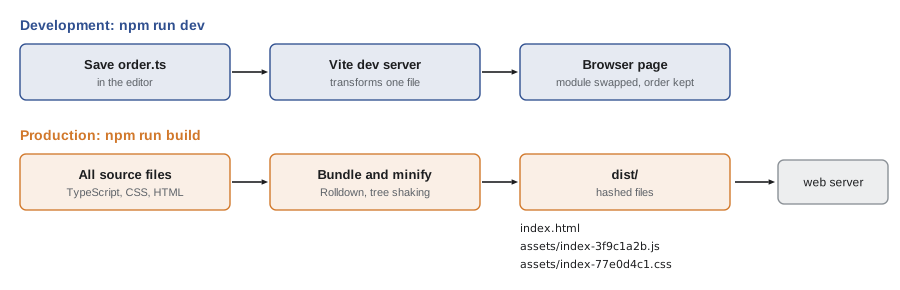
Vite gives a project two modes, and the difference between them is the most important idea in this lesson.
| Development server (npm run dev) | Production build (npm run build) | |
|---|---|---|
| Purpose | Fast feedback while writing code | Small, fast files for real users |
| Output | Served from memory; nothing written to disk | Files written to dist/ |
| Modules | Served separately, transformed on request | Bundled into a few files |
| Minified | No | Yes |
| Changes | Hot module replacement updates the page in place | Run the build again |
| Source maps | Always | Optional; usually on for Brightwater projects |
| File names | Original names | Names with a content hash |
The development server starts in well under a second, because it does not bundle the whole project first. When the browser asks for a module, Vite transforms just that file and sends it. When Mira saves a file, hot module replacement sends only the changed module to the open page, which swaps it in without a full reload, so the counter page keeps its current order while she adjusts the code.
// Vite's defaults, written out, compared with the counter page's settings.
const viteDefaults = { root: '.', outDir: 'dist', assetsDir: 'assets', sourcemap: false, minify: true, port: 5173 };
const counterPage = { sourcemap: true, port: 5180 };

const settings = { ...viteDefaults, ...counterPage };
for (const [key, value] of Object.entries(settings)) {
  const changed = key in counterPage ? '  (changed)' : '';
  console.log(key.padEnd(10), String(value).padEnd(6) + changed);
}root . outDir dist assetsDir assets sourcemap true (changed) minify true port 5180 (changed)
What this code does
Vite merges a project's settings over its defaults, much as object spread does here. Only the settings the counter page changes need to appear in its configuration file; everything else keeps Vite's default. The output marks the two settings Mira changes.
In a real project those overrides go in a configuration file. Mira's file for the counter page is short, because Vite's defaults suit a small site.
import { defineConfig } from "vite";

export default defineConfig({
  server: { port: 5180 },
  build: {
    sourcemap: true,
  },
});
What this code does
defineConfig is a helper that gives the editor type information for every Vite option. The counter page changes the development server's port, so it does not clash with the dashboard on 5173, and turns on source maps for the production build. Everything else uses Vite's defaults.
Content hashes and caching
A browser keeps a cache of files it has downloaded, and a server can tell it to keep a file for a long time, such as a year. That makes repeat visits fast, but it creates a problem: if Mira fixes a bug in main.js and the tablet's browser has the old main.js cached for a year, the fix never arrives.
Build tools solve this by putting a content hash in each file name, such as index-3f9c1a2b.js. The hash is a short fingerprint calculated from the file's contents. If the contents change, the hash and therefore the name change, so the browser sees a new file and downloads it. If the contents do not change, the name stays the same and the cached copy is used. The HTML page, which is small and always checked for changes, points to the current names.
// FNV-1a, a simple hash, turned into 8 hexadecimal digits.
function hash(text) {
  let h = 0x811c9dc5;
  for (let i = 0; i < text.length; i++) {
    h ^= text.charCodeAt(i);
    h = Math.imul(h, 0x01000193) >>> 0;
  }
  return h.toString(16).padStart(8, '0');
}
const fileName = (name, contents) => name.replace(/\.js$/, '') + '-' + hash(contents) + '.js';

const v1 = "export const OPENS = '11:30';";
const v2 = "export const OPENS = '11:30';";
const v3 = "export const OPENS = '11:30'; // checked";
console.log(fileName('config.js', v1));
console.log(fileName('config.js', v2), '(same contents, same name)');
console.log(fileName('config.js', v3), '(one comment added, new name)');config-917054b0.js config-917054b0.js (same contents, same name) config-c5d0b0c3.js (one comment added, new name)
What this code does
hash runs through the characters of a file and mixes each one into a 32-bit number, then prints it as eight hexadecimal digits. Identical contents always give the same name, while even a one-comment change gives a completely different one. Real build tools use stronger hashes, but the effect on file names is the same.
Environment variables and modes
Some values differ between development and production, such as the address of Theo's server. Vite reads them from environment variables, which can be set in files named .env, .env.development and .env.production. Only variables whose names start with VITE_ are passed to the browser code, as import.meta.env.VITE_NAME, so that secrets on the build machine are not copied into the bundle by accident. Even so, anything in browser code can be read by anyone who opens the page, so real secrets never go into a front-end project at all.
// src/api-base.ts
export const API_BASE: string = import.meta.env.VITE_API_BASE ?? "/api/v1";

// .env.development
// VITE_API_BASE=http://localhost:8080/api/v1
What this code does
In development, VITE_API_BASE points at Theo's server running on Mira's own computer; in production it is not set, so the code falls back to the same-site path /api/v1. Vite replaces import.meta.env.VITE_API_BASE with the actual value when it builds, so the bundle contains a plain string.
Types and the build
Since the TypeScript block, the counter page has relied on tsc to check types and write JavaScript. Vite turns TypeScript into JavaScript by removing the types, which is very fast, but it does not check them. That is a deliberate split: type checking the whole project is slower, and the development server should stay instant. So the build script runs tsc --noEmit first to check every file without writing any, and stops if there is a type error, before Vite bundles. Editors check types as you type, and Lesson 11 runs the same check on the continuous integration server.
Worked problem
Planning the counter page's build
Mira lists what npm run build must do for the counter page and in what order. The page should not be built if any type is wrong, the bundle must be minified with a source map, and the tablet must always receive the latest code.
Show solution
- Check types first: tsc --noEmit reads every file and reports errors without writing output. If it fails, the && in the script stops the build.
- Bundle with Vite: vite build follows the imports from index.html, removes the types, tree-shakes, minifies and writes hashed files to dist/.
- Source maps: build.sourcemap: true writes a .map file beside each bundle so that errors reported from the tablet can be traced to the original line.
- Caching: because the file names contain content hashes, the server can tell browsers to cache assets for a year, and index.html, which is not cached for long, points at the new names after each release.
Answer: The script is "build": "tsc --noEmit && vite build", with sourcemap: true in vite.config.ts and long-lived caching for the assets folder.
Common mistakes
MistakeThe development server shows what users get.
InsteadThe dev server serves unbundled, unminified modules. Run npm run build and preview the dist folder before a release.
MistakeVite checks TypeScript types.
InsteadVite only removes types. Run tsc --noEmit, or rely on the editor and CI, to check them.
MistakeMinified code cannot be debugged.
InsteadGenerate source maps, and the browser's developer tools show the original files.
MistakeAny environment variable is safe to read in browser code.
InsteadAnything in browser code is public. Vite only exposes variables starting with VITE_, and secrets never belong in a front-end bundle.
MistakeTree shaking removes every unused line.
InsteadIt removes unused exports, but must keep code with side effects. Libraries help by declaring sideEffects: false.
Summary and key terms
- A bundler follows imports from an entry point to build a module graph and writes one file or a few with the code in a working order.
- Bundling reduces the number of requests, tree shaking drops unused exports, and minifying shrinks the code without changing what it does.
- A source map links the bundle back to the original files for debugging.
- A build tool such as Vite adds TypeScript handling, CSS and asset handling, a development server and production builds.
- Vite 8, released in March 2026, uses the Rust bundler Rolldown and the Oxc compiler.
- The development server transforms modules on request and uses hot module replacement; the production build bundles, minifies and writes hashed files to dist.
- Content hashes in file names let browsers cache files for a long time and still get changes at once.
- Only VITE_ environment variables reach browser code, and secrets never belong there.
- Vite removes types without checking them, so builds run tsc --noEmit first.
- bundler
- A tool that combines modules into a small number of files by following their imports.
- entry point
- The module where a bundler starts following imports.
- module graph
- The network of modules and the imports that connect them.
- tree shaking
- Removing exports that no module imports.
- side effect
- Something a module does just by being imported, such as changing a global.
- minify
- To rewrite code into a smaller form that behaves the same.
- source map
- A file that maps positions in generated code back to the original source.
- hot module replacement
- Replacing a changed module in a running page without a full reload.
- content hash
- A short fingerprint of a file's contents, used in its name for caching.
- build tool
- A tool that wraps a bundler with a development server, transforms and production builds.
Practice problems
Work each problem on paper first, then reveal the answer to check.
Why can a bundler tell that findItem is unused without running the code?
Show answer
ES module imports are static, so it can read exactly which names each module imports.
What is the difference between npm run dev and npm run build in a Vite project?
Show answer
dev serves transformed modules from memory with hot updates; build bundles and minifies into hashed files in dist.
What does a source map let you do?
Show answer
Debug and read error positions in the original files instead of the minified bundle.
Why do built file names contain a hash?
Show answer
So a changed file gets a new name and bypasses the browser's cache, while unchanged files stay cached.
Why does the build script run tsc --noEmit before vite build?
Show answer
Vite removes types without checking them; tsc checks them and stops the build on an error.
Try it yourself
Name a file by its contents
Complete hashedName(path, contents) so that 'assets/main.js' with some contents becomes 'assets/main-xxxxxxxx.js', where the eight characters come from the hash function given.
Keep the folder and the file extension, and put the hash before the extension. It should work for .css files too.
function hash(text) {
  let h = 0x811c9dc5;
  for (let i = 0; i < text.length; i++) { h ^= text.charCodeAt(i); h = Math.imul(h, 0x01000193) >>> 0; }
  return h.toString(16).padStart(8, '0');
}

function hashedName(path, contents) {
  return path + '-' + hash(contents);
}

console.log(hashedName('assets/main.js', 'console.log(1);'));
console.log(hashedName('assets/style.css', 'body { margin: 0; }'));
console.log(hashedName('index.js', ''));
Try it yourself
Bundle in dependency order
buildOrder(graph, entry) should return the modules a bundler must include, each one after all of the modules it imports, starting from entry.
Modules that are not reachable from the entry, such as old-menu.js, must not appear, and no module may appear twice.
const graph = {
  'main.js': ['menu.js', 'order.js'],
  'menu.js': ['money.js'],
  'order.js': ['money.js', 'config.js'],
  'money.js': [],
  'config.js': [],
  'old-menu.js': ['money.js'],
};

function buildOrder(graph, entry) {
  return Object.keys(graph);
}

console.log(buildOrder(graph, 'main.js').join(' -> '));
console.log(buildOrder(graph, 'order.js').join(' -> '));
Lesson quiz · 5 questions
Score 60% or more to complete this lesson.
Create a free account to save your progress, take quizzes and earn a certificate.