
JAVA-250 · Lesson 9 of 12 · 26 min
Queries with JPQL
▶ Video coming soon A video version of this lesson is on the way.
Odile Branscombe, Second Gear's general manager, had collected the questions the rental desks asked ShopBook every week, and on Friday, November 19, she sent Hamza the list: which bikes are booked on a given day, how many bookings each kind of bike had last month, which customers book cargo bikes, and the next twenty bookings in date order. em.find answers none of them, because each needs a query, not a lookup by key. JPA's own query language is the Jakarta Persistence Query Language, JPQL. This lesson shows how it differs from SQL, how to bind parameters, how to join through relationships, how to project results into records, how to aggregate and page, and when to reach for the Criteria API or plain SQL instead.
JPQL is about entities, not tables
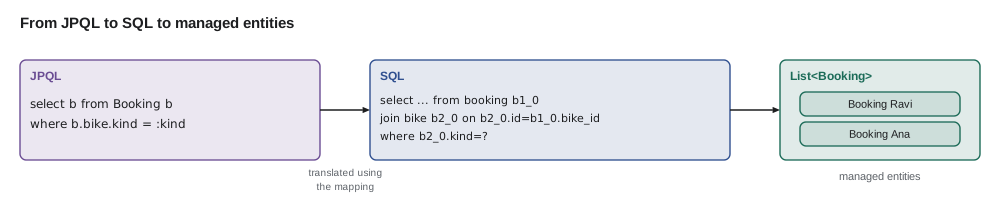
JPQL looks like SQL, and that is deliberate, but it works on the entity model: it names entity classes and their fields, not tables and columns, and it follows relationships with dots. SELECT b FROM Booking b WHERE b.bike.kind = :kind reads as "the bookings whose bike's kind is the given kind"; the provider knows from the mapping that Booking lives in the booking table and that b.bike means a join on bike_id, and it writes the SQL for the database in use. Results are managed entities, which arrive in the persistence context like objects from find.
| JPQL | SQL it means |
|---|---|
| SELECT p FROM Part p | SELECT every mapped column FROM part |
| WHERE p.reorderAt > p.quantity | WHERE reorder_at > quantity |
| b.bike.kind | A join from booking to bike, then bike.kind |
| JOIN b.bike k | JOIN bike k ON k.id = b.bike_id |
| WHERE p.code = :code | WHERE code = ?, with the value bound |
| SELECT COUNT(b) FROM Booking b | SELECT count(b.id) FROM booking b |
| ORDER BY b.startDate | ORDER BY start_date |
In code, a query is created with em.createQuery, which takes the JPQL string and, for a TypedQuery, the result class. Parameters are bound by name with setParameter, and getResultList or getSingleResult runs it. Since JPA 2.2, getResultStream returns a Stream. Hibernate 7 also checks the query against the mapping when it is created, so a misspelled field name fails at once with a clear message rather than as an SQL error later.
public List<Booking> bookedOn(LocalDate day) {
    return em.createQuery("""
            SELECT b FROM Booking b
            WHERE b.startDate <= :day AND b.endDate >= :day
            ORDER BY b.bike.tag
            """, Booking.class)
        .setParameter("day", day)
        .getResultList();
}

public Optional<Part> byCode(String code) {
    return em.createQuery("SELECT p FROM Part p WHERE p.code = :code", Part.class)
        .setParameter("code", code)
        .getResultStream()
        .findFirst();
}
What this code does
Text blocks keep multi-line JPQL readable without string concatenation. The :day parameter appears twice but is bound once by name, which is one reason named parameters are easier to maintain than positional ones. getResultStream with findFirst gives an Optional, avoiding getSingleResult, which throws NoResultException when nothing matches.
Named parameters are bound by the provider, which turns them into the positional placeholders that JDBC understands, exactly as in lesson 3. JPQL built by concatenating user input is as open to injection as SQL built that way, so the rule does not change: values always go in parameters. The example below shows what a provider does with named parameters: it replaces each :name with ? and records the order, so a name used twice becomes two positions with the same value.
import java.util.*;
import java.util.regex.*;

public class Main {
    record Prepared(String sql, List<Object> values) {}

    static Prepared bind(String query, Map<String, Object> params) {
        Matcher m = Pattern.compile(":([A-Za-z]\\w*)").matcher(query);
        StringBuilder sql = new StringBuilder();
        List<Object> values = new ArrayList<>();
        while (m.find()) {
            String name = m.group(1);
            if (!params.containsKey(name)) throw new IllegalArgumentException("No value for parameter :" + name);
            values.add(params.get(name));
            m.appendReplacement(sql, "?");
        }
        m.appendTail(sql);
        return new Prepared(sql.toString(), values);
    }

    public static void main(String[] args) {
        String q = "select ... from booking where start_date <= :day and end_date >= :day and customer <> :who";
        Prepared p = bind(q, Map.of("day", "2027-10-16", "who", "Theo"));
        System.out.println(p.sql());
        for (int i = 0; i < p.values().size(); i++) System.out.println("  ?" + (i + 1) + " = " + p.values().get(i));

        try {
            bind("select ... from part where code = :code", Map.of("cod", "BELL"));
        } catch (IllegalArgumentException e) {
            System.out.println(e.getMessage());
        }
    }
}select ... from booking where start_date <= ? and end_date >= ? and customer <> ? ?1 = 2027-10-16 ?2 = 2027-10-16 ?3 = Theo No value for parameter :code
What this code does
Each :name is replaced by a question mark, and its value is added to the list in the order the names appear, so :day fills positions 1 and 2. A misspelled parameter name is reported before any SQL is sent. Hibernate does the same work internally before handing a PreparedStatement to JDBC.
SELECT b.bike_tag, b.customer, b.start_date, b.end_date
FROM booking b
WHERE b.start_date <= '2027-10-16' AND b.end_date >= '2027-10-16'
ORDER BY b.bike_tag;
What this code does
The SQL equivalent of bookedOn for October 16, run on the sample data. Theo's two-day booking and Ana's one-day booking both cover the day, because a one-day booking is stored with the same start and end date.
| bike_tag | customer | start_date | end_date |
|---|---|---|---|
| SG-0003-CI | Theo | 2027-10-16 | 2027-10-17 |
| SG-0007-AR | Ana | 2027-10-16 | 2027-10-16 |
Odile spotted a gap at once. The counter screen lets the desk staff take an open booking, with no end date yet, for a customer who will phone when they know their return day, and the new ShopBook design stores the missing date as NULL. Today's table declares end_date NOT NULL, so Hamza tried the design on a copy, booking_draft, which CREATE TABLE ... AS SELECT makes without the constraint. A comparison with NULL is neither true nor false but unknown, so WHERE drops the row, and an open booking disappears from the day's list although the bike is out. The script below adds an open booking to the copy and runs the same query against it.
CREATE TABLE booking_draft AS SELECT * FROM booking;
INSERT INTO booking_draft VALUES (6, 'SG-0012-TA', 'Priya', '2027-10-15', NULL);
What this code does
Priya's tandem booking started on October 15 and has no end date. The query still returns only Theo and Ana, because end_date >= '2027-10-16' is unknown for her row.
| bike_tag | customer |
|---|---|
| SG-0003-CI | Theo |
| SG-0007-AR | Ana |
The fix treats a missing end date as "still out". JPQL supports COALESCE, which returns its first argument that is not null, so the condition becomes COALESCE(b.endDate, :day) >= :day. JPQL also has the other common SQL functions, including CONCAT, LOWER, UPPER, LENGTH, ABS, CURRENT_DATE and, since JPA 3.1, EXTRACT for the parts of a date.
CREATE TABLE booking_draft AS SELECT * FROM booking;
INSERT INTO booking_draft VALUES (6, 'SG-0012-TA', 'Priya', '2027-10-15', NULL);
What this code does
With COALESCE, an open booking counts as ending on the day being checked, so Priya's tandem now appears with Theo and Ana. The same rule written in JPQL works on every database Hibernate supports.
| bike_tag | customer |
|---|---|
| SG-0003-CI | Theo |
| SG-0007-AR | Ana |
| SG-0012-TA | Priya |
Joins
A path such as b.bike.kind joins implicitly. An explicit JOIN gives the joined entity an alias, which you need for conditions on a collection or when you want to select it. Because JPQL joins follow mapped relationships, there is no ON clause listing key columns; the provider knows them. LEFT JOIN keeps entities with no match, and JPA also allows joins on any condition with JOIN ... ON for entities with no mapped relationship.
// customers who have booked a cargo bike
List<String> cargoCustomers = em.createQuery("""
        SELECT DISTINCT b.customer FROM Booking b JOIN b.bike k
        WHERE k.kind = :kind
        ORDER BY b.customer
        """, String.class)
    .setParameter("kind", Kind.CARGO)
    .getResultList();

// every bike, with or without bookings
List<Object[]> rows = em.createQuery(
        "SELECT k.tag, COUNT(b) FROM Bike k LEFT JOIN k.bookings b GROUP BY k.tag ORDER BY k.tag", Object[].class)
    .getResultList();
What this code does
The enum parameter is bound as the Java constant, and the provider stores it the way the mapping says, as the string CARGO. The second query starts from Bike and follows the bookings collection with LEFT JOIN, so bikes with no bookings appear with a count of zero. Results with several values come back as Object arrays unless you ask for a record, as the next section shows.
SELECT k.tag, k.kind, COUNT(b.id) AS bookings
FROM bike k LEFT JOIN booking b ON b.bike_tag = k.tag
GROUP BY k.tag, k.kind
ORDER BY k.tag;
What this code does
The SQL for the second query on the sample data. The LEFT JOIN keeps the four bikes nobody has booked, and COUNT(b.id) counts only matching bookings, so they show zero.
| tag | kind | bookings |
|---|---|---|
| SG-0001-CI | CITY | 0 |
| SG-0002-CI | CITY | 0 |
| SG-0003-CI | CITY | 2 |
| SG-0004-CI | CITY | 0 |
| SG-0007-AR | CARGO | 2 |
| SG-0012-TA | TANDEM | 1 |
Projections into records
Selecting whole entities is right when the program will change them. For a report it wastes memory and fills the persistence context with objects nobody will update. A projection selects only the values needed. The cleanest form is the constructor expression, SELECT NEW, which calls a constructor for each row; records are ideal, because they are exactly a named tuple of values. Since Hibernate 6 you can also pass the record class directly to createQuery and let Hibernate match the selected values to its constructor.
public record KindCount(Kind kind, long bookings) {}

List<KindCount> perKind = em.createQuery("""
        SELECT NEW ca.secondgear.shopbook.KindCount(k.kind, COUNT(b))
        FROM Booking b JOIN b.bike k
        WHERE b.startDate >= :from AND b.startDate < :to
        GROUP BY k.kind
        ORDER BY COUNT(b) DESC, k.kind
        """, KindCount.class)
    .setParameter("from", LocalDate.of(2027, 10, 1))
    .setParameter("to", LocalDate.of(2027, 11, 1))
    .getResultList();
What this code does
SELECT NEW needs the record's fully qualified name and a constructor whose parameter types match the selected values; COUNT returns a Long, so the component is long. The results are plain records, not entities, so nothing is added to the persistence context and nothing is dirty-checked. The half-open date range, from the first of the month to the first of the next, avoids problems with the last day.
The example below computes the same report in plain Java over a list of booking records, the way a test or an in-memory repository would. It is useful for checking what a query should return, and it shows what the grouping and ordering clauses mean.
import java.time.LocalDate;
import java.util.*;
import java.util.stream.*;

public class Main {
    enum Kind { CARGO, CITY, TANDEM }
    record Booking(int id, String bike, Kind kind, String customer, LocalDate start) {}
    record KindCount(Kind kind, long bookings) {}

    public static void main(String[] args) {
        List<Booking> bookings = List.of(
            new Booking(1, "SG-0007-AR", Kind.CARGO, "Ravi", LocalDate.of(2027, 10, 2)),
            new Booking(2, "SG-0012-TA", Kind.TANDEM, "Lin family", LocalDate.of(2027, 10, 2)),
            new Booking(3, "SG-0003-CI", Kind.CITY, "Mei", LocalDate.of(2027, 10, 9)),
            new Booking(4, "SG-0007-AR", Kind.CARGO, "Ana", LocalDate.of(2027, 10, 16)),
            new Booking(5, "SG-0003-CI", Kind.CITY, "Theo", LocalDate.of(2027, 10, 16)),
            new Booking(6, "SG-0007-AR", Kind.CARGO, "Ravi", LocalDate.of(2027, 11, 6)));

        LocalDate from = LocalDate.of(2027, 10, 1), to = LocalDate.of(2027, 11, 1);
        List<KindCount> perKind = bookings.stream()
            .filter(b -> !b.start().isBefore(from) && b.start().isBefore(to))        // WHERE
            .collect(Collectors.groupingBy(Booking::kind, TreeMap::new, Collectors.counting()))  // GROUP BY, COUNT
            .entrySet().stream()
            .map(e -> new KindCount(e.getKey(), e.getValue()))                       // SELECT NEW
            .sorted(Comparator.comparingLong(KindCount::bookings).reversed()
                    .thenComparing(KindCount::kind))                                 // ORDER BY
            .toList();
        perKind.forEach(System.out::println);

        List<String> cargoCustomers = bookings.stream()
            .filter(b -> b.kind() == Kind.CARGO).map(Booking::customer)
            .distinct().sorted().toList();                                           // SELECT DISTINCT ... ORDER BY
        System.out.println("Cargo customers: " + cargoCustomers);
    }
}KindCount[kind=CARGO, bookings=2] KindCount[kind=CITY, bookings=2] KindCount[kind=TANDEM, bookings=1] Cargo customers: [Ana, Ravi]
What this code does
The filter plays the WHERE clause with the half-open range, so Ravi's November booking is left out; groupingBy and counting play GROUP BY and COUNT. Sorting by count descending and then by kind gives CARGO and CITY two each, in enum order, then TANDEM. The second pipeline is the DISTINCT query of the previous section, and Ravi appears once although he booked twice.
Aggregates, single results and updates
JPQL has the usual aggregates, COUNT, SUM, AVG, MIN and MAX, with GROUP BY and HAVING. A query that returns exactly one value, such as a count, uses getSingleResult, which throws NoResultException for no rows and NonUniqueResultException for more than one. JPQL can also run bulk UPDATE and DELETE statements with executeUpdate. These go straight to the database and bypass the persistence context, so entities already loaded do not see the change; run them in their own transaction, or clear the context afterwards.
long cargoCount = em.createQuery(
        "SELECT COUNT(b) FROM Booking b WHERE b.bike.kind = :kind", Long.class)
    .setParameter("kind", Kind.CARGO)
    .getSingleResult();

int archived = em.createQuery(
        "UPDATE Booking b SET b.status = :archived WHERE b.endDate < :cutoff")
    .setParameter("archived", Status.ARCHIVED)
    .setParameter("cutoff", LocalDate.of(2027, 1, 1))
    .executeUpdate();            // bypasses the persistence context
em.clear();                       // so loaded bookings do not show stale status
What this code does
COUNT returns a Long, so the TypedQuery's class is Long.class. The bulk update changes every matching row in one statement instead of loading each booking, and returns the number of rows changed. Clearing the context afterwards stops the program from working with entities whose status in memory no longer matches the database.
Paging
Odile's next-twenty list is a page. setFirstResult and setMaxResults ask the provider to return only part of the result, and it translates them into the database's own syntax, such as LIMIT and OFFSET or FETCH FIRST. Paging only makes sense with an ORDER BY that gives a stable order; otherwise the database may return rows in a different order for each page, and some rows will appear twice and others never. Large offsets are also slow, because the database still reads and discards all the skipped rows; for deep paging, keyset paging, which asks for rows after the last key seen, scales better.
import java.util.*;

public class Main {
    record Page(int number, int firstResult, int maxResults) {}

    static Page page(int number, int size) { return new Page(number, (number - 1) * size, size); }

    static <T> List<T> slice(List<T> sorted, Page p) {
        int from = Math.min(p.firstResult(), sorted.size());
        int to = Math.min(from + p.maxResults(), sorted.size());
        return sorted.subList(from, to);
    }

    static List<Integer> afterKey(List<Integer> sorted, int lastSeen, int size) {      // keyset paging
        return sorted.stream().filter(id -> id > lastSeen).limit(size).toList();
    }

    public static void main(String[] args) {
        List<Integer> bookingIds = new ArrayList<>();
        for (int id = 101; id <= 145; id++) bookingIds.add(id);                         // 45 bookings, in id order

        int size = 20;
        int pages = (bookingIds.size() + size - 1) / size;
        System.out.println("Pages: " + pages);
        for (int n = 1; n <= pages; n++) {
            Page p = page(n, size);
            List<Integer> rows = slice(bookingIds, p);
            System.out.println("Page " + n + ": setFirstResult(" + p.firstResult() + ") setMaxResults(" + p.maxResults()
                    + ") -> " + rows.get(0) + ".." + rows.get(rows.size() - 1) + " (" + rows.size() + " rows)");
        }
        System.out.println("Keyset after 140: " + afterKey(bookingIds, 140, size));
    }
}Pages: 3 Page 1: setFirstResult(0) setMaxResults(20) -> 101..120 (20 rows) Page 2: setFirstResult(20) setMaxResults(20) -> 121..140 (20 rows) Page 3: setFirstResult(40) setMaxResults(20) -> 141..145 (5 rows) Keyset after 140: [141, 142, 143, 144, 145]
What this code does
Page n starts at offset (n − 1) × 20, so page 3 asks for rows 40 onwards and gets the last five of 45. The page count uses the round-up division from earlier lessons. The keyset version asks for ids greater than the last one shown, which a database answers from an index without reading the skipped rows.
List<Booking> next20 = em.createQuery("""
        SELECT b FROM Booking b
        WHERE b.startDate >= CURRENT_DATE
        ORDER BY b.startDate, b.id
        """, Booking.class)
    .setFirstResult(0)
    .setMaxResults(20)
    .getResultList();
What this code does
Sorting by start date alone would not be stable, because several bookings start on the same day; adding b.id as a tiebreaker gives every row a fixed place. On PostgreSQL, Hibernate turns this into SQL ending in offset ? rows fetch first ? rows only.
Named queries, Criteria and native SQL
Three other ways to query are worth knowing. A named query, declared with @NamedQuery on an entity and run with em.createNamedQuery, is checked when the persistence unit starts, so a broken query stops the program at once instead of on first use. The Criteria API builds a query from Java objects instead of a string; it is verbose, but it suits search screens where filters are added only if the user filled them in, and with Hibernate's generated metamodel the field names are checked by the compiler. A native query, em.createNativeQuery, runs plain SQL, for features JPQL does not have, such as PostgreSQL's window functions or full-text search, and can still map the results to entities or records.
CriteriaBuilder cb = em.getCriteriaBuilder();
CriteriaQuery<Booking> q = cb.createQuery(Booking.class);
Root<Booking> b = q.from(Booking.class);
List<Predicate> filters = new ArrayList<>();
if (customer != null) filters.add(cb.equal(b.get("customer"), customer));
if (kind != null)     filters.add(cb.equal(b.get("bike").get("kind"), kind));
if (from != null)     filters.add(cb.greaterThanOrEqualTo(b.get("startDate"), from));
q.select(b).where(filters.toArray(Predicate[]::new)).orderBy(cb.asc(b.get("startDate")));
List<Booking> results = em.createQuery(q).getResultList();

List<Object[]> busiest = em.createNativeQuery("""
        SELECT bike_id, count(*) AS n, rank() OVER (ORDER BY count(*) DESC) AS place
        FROM booking GROUP BY bike_id
        """).getResultList();
What this code does
The Criteria query adds a condition only for each filter the user filled in, which would need fiddly string building in JPQL. Values still travel as parameters. The native query uses a window function, rank() OVER, which plain JPQL cannot express, and returns Object arrays of columns.
Try it yourself
Bind named parameters
Complete bind so it replaces every :name in the query with ? and returns the values in the order the names appear.
The program prints the SQL and [CARGO, 2027-10-01, CARGO].
import java.util.*;
import java.util.regex.*;

public class Main {
    static List<Object> values = new ArrayList<>();

    static String bind(String query, Map<String, Object> params) {
        return query;
    }

    public static void main(String[] args) {
        String sql = bind("kind = :kind and start >= :from or spare = :kind",
                Map.of("kind", "CARGO", "from", "2027-10-01"));
        System.out.println(sql);
        System.out.println(values);
    }
}
Try it yourself
Work out a page
Write firstResult(int page, int size) for pages numbered from 1, and pageCount(int rows, int size) that rounds up.
The program prints 0 20 40, then 3 and 1.
public class Main {
    static int firstResult(int page, int size) { return 0; }
    static int pageCount(int rows, int size) { return 0; }

    public static void main(String[] args) {
        System.out.println(firstResult(1, 20) + " " + firstResult(2, 20) + " " + firstResult(3, 20));
        System.out.println(pageCount(45, 20));
        System.out.println(pageCount(20, 20));
    }
}
Common mistakes
MistakeWriting table and column names in JPQL.
InsteadName entities and fields; the provider maps them to tables and columns.
MistakeConcatenating user input into a JPQL string.
InsteadUse named parameters with setParameter.
MistakeCalling getSingleResult when there may be no match.
InsteadUse getResultStream().findFirst() to get an Optional.
MistakePaging without a stable ORDER BY.
InsteadOrder by the sort columns plus a unique key such as the id.
MistakeLoading entities for a read-only report.
InsteadSelect a record projection with SELECT NEW or a record class.
Summary and key terms
- JPQL queries entities and their fields, follows relationships with dots and explicit JOINs, and is translated to SQL by the provider using the mapping. em.createQuery with a result class gives a TypedQuery; named parameters are bound with setParameter and become JDBC placeholders, so input never becomes query text. getResultList, getResultStream and getSingleResult run the query.
- Joins need no ON clause for mapped relationships, and LEFT JOIN keeps entities with no match.
- SELECT NEW or a record class projects results into records that are not managed.
- Aggregates work with GROUP BY and HAVING, and bulk UPDATE and DELETE bypass the persistence context. setFirstResult and setMaxResults page results, which needs a stable order; keyset paging scales better for deep pages.
- Named queries are checked at startup, the Criteria API builds dynamic queries in Java, and native queries run SQL that JPQL cannot express.
- JPQL
- The Jakarta Persistence Query Language, which queries entities and their fields.
- TypedQuery
- A query whose results have a declared Java type.
- Named parameter
- A placeholder such as :day, bound by name with setParameter.
- Implicit join
- A join written as a path such as b.bike.kind.
- Projection
- A query that selects only some values rather than whole entities.
- Constructor expression
- SELECT NEW, which builds an object from each result row.
- Bulk update
- A JPQL UPDATE or DELETE that changes many rows directly, bypassing the persistence context.
- Keyset paging
- Paging by asking for rows after the last key seen, instead of by offset.
- Criteria API
- A Java API for building queries as objects.
- Native query
- A plain SQL query run through the EntityManager.
Practice problems
Work each problem on paper first, then reveal the answer to check.
What does b.bike.kind mean in JPQL?
Show answer
The kind of each booking's bike, through an implicit join.
Why was Priya missing from the October 16 result at first?
Show answer
Her end_date was null, so the comparison was unknown; COALESCE fixed it.
What type should a record component have for COUNT(b)?
Show answer
long, because COUNT returns a Long.
What must a bulk UPDATE be followed by if loaded entities will be used?
Show answer
Clearing or refreshing the persistence context.
Which offset does page 4 of 20 rows per page use?
Show answer
60.
Lesson quiz · 5 questions
Score 60% or more to complete this lesson.
Create a free account to save your progress, take quizzes and earn a certificate.