
JAVA-250 · Lesson 1 of 12 · 26 min
Databases from Java
▶ Video coming soon A video version of this lesson is on the way.
On Friday, September 17, 2027, the first session of Hamza's persistence course met where his collections course had met the winter before: in Second Gear's parts room, from 2:00 to 4:00 in the afternoon, with Ingrid working from home on Fridays and walking over. StockRoom, the tool Hamza had built in April, had run the parts room all summer. It loaded Kofi's parts list from a file when it started, kept every count in a HashMap and a few TreeMaps while it ran, and wrote the file back when Kofi closed it. That had worked until Tuesday, August 24, when the parts-room computer restarted itself for an operating system update in the middle of the afternoon. StockRoom had not been closed, so it never saved, and the eleven sales and receipts entered since the morning were gone. Kofi rebuilt them from the receipts in the cash drawer.
"Memory is where a program thinks," Ingrid said. "A database is where a business remembers." This course is about connecting Java programs to databases: the JDBC API that every Java database library is built on, the patterns that keep database code tidy, and the Jakarta Persistence API (JPA) with Hibernate, which maps objects to tables for you. The prerequisites matter here. You need the object-oriented Java of JAVA-102 and the SQL of WEB-201, because this course writes SQL constantly but does not teach it from the beginning.
What a database gives a program
A file can store data, and StockRoom's file did. A database management system adds the things a file cannot give on its own. The first is durability: once the database says a change is saved, a crash or a power cut does not lose it. The second is concurrent access: the counter computer, the parts-room computer and, later, the shop's web service can all read and change the same data at once without overwriting each other's work. The third is integrity: the database itself refuses data that breaks its rules, such as a negative quantity or a booking for a bike that does not exist. The fourth is querying: a question such as "which parts are below their reorder level" is one line of SQL instead of a loop the programmer has to write and test. The last is transactions, which let several changes succeed or fail together, the subject of lesson 4.
The example below replays what happened on August 24 in a few lines. The program keeps the stock in a map, saves a snapshot only when asked, and then loses everything since the last save when it restarts. Nothing in it is wrong as Java; the design simply has no durable place to put each change as it happens.
import java.util.*;

public class Main {
    static Map<String, Integer> stock = new TreeMap<>();
    static Map<String, Integer> savedFile = new TreeMap<>();

    static void change(String code, int by) {
        stock.merge(code, by, Integer::sum);
    }

    public static void main(String[] args) {
        stock.putAll(Map.of("TUBE-700x25", 14, "BELL", 6, "CHAIN-11", 3));
        savedFile.putAll(stock);                      // saved when StockRoom was last closed

        String[] codes = {"TUBE-700x25", "BELL", "TUBE-700x25", "CHAIN-11", "BELL", "TUBE-700x25",
                          "BELL", "TUBE-700x25", "CHAIN-11", "TUBE-700x25", "BELL"};
        int[] changes = {-1, -1, -2, -1, -1, 10, -1, -1, -1, -2, 6};
        for (int i = 0; i < codes.length; i++) change(codes[i], changes[i]);
        System.out.println("In memory before the restart: " + stock);

        stock = new TreeMap<>(savedFile);             // the computer restarts; StockRoom loads its file
        System.out.println("After the restart:            " + stock);
        System.out.println("Changes lost: " + codes.length);
    }
}In memory before the restart: {BELL=9, CHAIN-11=1, TUBE-700x25=18}
After the restart: {BELL=6, CHAIN-11=3, TUBE-700x25=14}
Changes lost: 11What this code does
The program applies eleven changes to the map, the same number Kofi lost, and the in-memory counts are correct. When the restart replaces the map with the last saved copy, all eleven changes vanish, because nothing was written anywhere durable as they happened. A database fixes this by recording each change the moment it is made.
The relational model in one page
WEB-201 taught relational databases in depth, so this is a reminder rather than a lesson. A relational database stores data in tables. Each table has named columns with types, and each row is one record. A primary key is a column, or a set of columns, whose value identifies each row uniquely; the part code is a natural primary key for Second Gear's parts, because Kofi already uses codes such as TUBE-700x25 on every bin. A foreign key is a column whose values must match the primary key of another table, which is how a database records relationships: each part names its supplier by the supplier's id, and each rental booking names the bike by its tag. Constraints such as NOT NULL, UNIQUE and CHECK state rules the database enforces on every change.
Hamza's first job was to write StockRoom's data as tables. He kept money in whole cents, as every Second Gear program had since PartsDesk, because an INTEGER column holds 899 exactly while a floating-point column would hold something slightly different. The schema below is the one the rest of the course uses, run against SQLite to produce the result tables you will see in each lesson.
CREATE TABLE supplier (
    id   INTEGER PRIMARY KEY,
    name TEXT NOT NULL UNIQUE
);
CREATE TABLE part (
    code        TEXT PRIMARY KEY,
    name        TEXT NOT NULL,
    shelf       TEXT,
    quantity    INTEGER NOT NULL CHECK (quantity >= 0),
    reorder_at  INTEGER NOT NULL,
    pack_size   INTEGER NOT NULL DEFAULT 1,
    price_cents INTEGER NOT NULL,
    supplier_id INTEGER REFERENCES supplier(id)
);
CREATE TABLE stock_movement (
    id     INTEGER PRIMARY KEY AUTOINCREMENT,
    code   TEXT NOT NULL REFERENCES part(code),
    change INTEGER NOT NULL,
    reason TEXT NOT NULL,
    at     TEXT NOT NULL
);
What this code does
Three of the five tables in the sample database: suppliers, parts and the log of stock movements. The CHECK constraint makes the database itself refuse a negative quantity, the rule StockRoom used to enforce only in Java. Every movement row names its part by code, and the REFERENCES clause makes that a foreign key.
SELECT code, name, shelf, quantity, reorder_at
FROM part
WHERE quantity < reorder_at
ORDER BY code;
What this code does
The question Kofi asks every Friday, written as one SQL query. The WHERE clause keeps only the parts whose count has fallen below the level at which he reorders, and ORDER BY sorts them by code.
| code | name | shelf | quantity | reorder_at |
|---|---|---|---|---|
| BELL | Brass bell | C-03 | 3 | 4 |
| CHAIN-11 | 11-speed chain | B-14 | 1 | 3 |
| PAD-ROAD | Road brake pads (pair) | B-07 | 3 | 5 |
The sample data matches the shop's canon: nine kinds of parts on shelves A-02 to C-03, the two suppliers, the six rental bikes (four city bikes, one cargo bike and one tandem) and a handful of bookings and movements. The real parts room has 612 kinds of parts, but nine are enough to see every idea.
Choosing a database
Databases come in two broad shapes. An embedded database runs inside the application's own process and stores its data in a local file; SQLite is the most widely used example in the world, and H2 and HSQLDB are embedded databases written in Java. A client–server database such as PostgreSQL, MySQL or SQL Server runs as a separate program, often on another machine, and many applications connect to it over the network at once. Embedded databases need no installation or administration, which makes them ideal for one computer and for tests; client–server databases handle many users, large data and security far better.
| Need | Embedded (SQLite, H2) | Client–server (PostgreSQL) |
|---|---|---|
| Installation | A library and a file | A server process to install, secure and back up |
| Users at once | One program, or a few on one machine | Many programs on many machines |
| Good for | Desktop tools, tests, small single-site systems | Web services, shared business data |
| Backups | Copy the file safely (or use its backup command) | Tools such as pg_dump and point-in-time recovery |
| Second Gear | StockStore on the parts-room computer, from January 2028 | Planned for the shop web service in JAVA-260 |
Ingrid and Hamza chose SQLite for the first version: one file, stockroom.db, on the parts-room computer, used by StockRoom's successor, which Hamza named StockStore. They agreed to write portable SQL and keep all database code behind interfaces, so that moving to PostgreSQL when the web service arrives in JAVA-260 would change configuration and a few queries, not the whole program. Lesson 11's migrations make that move repeatable.
JDBC: the standard way Java talks to databases
JDBC, Java Database Connectivity, is the standard Java API for relational databases. It is part of the JDK, in the java.sql package of the java.sql module, with a few extra types in javax.sql; Java 21 ships version 4.3 of the specification. JDBC is mostly a set of interfaces: the JDK defines what a connection, a statement and a result set can do, and each database vendor supplies a driver, a library that implements those interfaces for its database. Your code is written against the interfaces, so the same code talks to SQLite, PostgreSQL or SQL Server once the right driver is on the class path. Hibernate, Spring's JdbcTemplate, jOOQ and every other Java database library are built on JDBC underneath.
| Type | Package | What it does |
|---|---|---|
| DriverManager | java.sql | Finds the driver for a JDBC URL and opens connections |
| DataSource | javax.sql | A factory for connections, usually a pool; the preferred way in applications |
| Connection | java.sql | One session with the database; makes statements and controls transactions |
| Statement | java.sql | Runs a fixed SQL string |
| PreparedStatement | java.sql | Runs SQL with ? placeholders whose values are sent separately |
| ResultSet | java.sql | A cursor over the rows a query returns |
| SQLException | java.sql | The checked exception every JDBC method can throw |
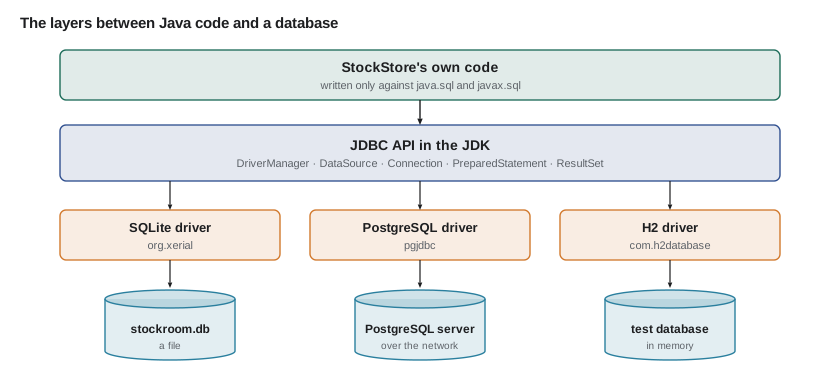
Here is the whole shape of JDBC code, the pattern every later lesson builds on. It opens a connection, prepares a query with a placeholder, binds a value, runs it and walks through the rows. Every object it opens is declared in a try-with-resources header, so all of them are closed even when something fails. It is shown as a listing because the SQLite driver is not part of the JDK; lesson 2 explains where drivers come from.
import java.sql.*;

public class LowStock {
    public static void main(String[] args) throws SQLException {
        String url = "jdbc:sqlite:stockroom.db";
        String sql = "SELECT code, quantity, reorder_at FROM part WHERE quantity < ? ORDER BY code";
        try (Connection conn = DriverManager.getConnection(url);
             PreparedStatement ps = conn.prepareStatement(sql)) {
            ps.setInt(1, 4);
            try (ResultSet rs = ps.executeQuery()) {
                while (rs.next()) {
                    System.out.println(rs.getString("code") + " " + rs.getInt("quantity"));
                }
            }
        }
    }
}
What this code does
DriverManager finds the SQLite driver from the jdbc:sqlite: prefix and opens a connection to the file. The question mark is a placeholder, filled in by setInt before the query runs, and each call to next moves the result set to the following row. With the sample data and the SQLite driver on the class path, it prints BELL 3, CHAIN-11 1, PAD-ROAD 3 and PUMP-FLOOR 2 on four lines.
How SQL types meet Java types
Every column has an SQL type, and JDBC converts between it and a Java type when you read or write. The conversions are mostly what you would expect, with two traps. First, SQL has NULL and Java's primitive int does not, so getInt returns 0 for a NULL column and you must check wasNull afterwards or read an Integer with getObject. Second, the old date classes java.sql.Date, java.sql.Time and java.sql.Timestamp predate java.time; since JDBC 4.2 you can ask for a LocalDate or LocalDateTime directly with rs.getObject("start_date", LocalDate.class), and modern drivers support it.
| SQL type | Java type to use | Notes |
|---|---|---|
| INTEGER, BIGINT | int, long (or Integer, Long when NULL is possible) | getInt returns 0 for NULL; check wasNull |
| VARCHAR, TEXT | String | getString returns null for NULL |
| NUMERIC, DECIMAL | BigDecimal | Exact decimals; never double for money |
| BOOLEAN | boolean | SQLite stores 0 and 1 |
| DATE | LocalDate | getObject(col, LocalDate.class) |
| TIMESTAMP | LocalDateTime or OffsetDateTime | Store moments in UTC or with an offset |
| BLOB, BYTEA | byte[] | Photos, files |
The JDK includes the type codes themselves, in the constants of java.sql.Types and the newer enum JDBCType, and the legacy date classes convert to and from java.time. These parts of JDBC need no driver, so they run here.
import java.sql.*;
import java.time.*;

public class Main {
    public static void main(String[] args) {
        int[] codes = {Types.INTEGER, Types.VARCHAR, Types.DECIMAL, Types.DATE, Types.TIMESTAMP};
        for (int code : codes) {
            System.out.println(code + " -> " + JDBCType.valueOf(code));
        }

        LocalDate start = LocalDate.of(2027, 10, 2);
        java.sql.Date sqlDate = java.sql.Date.valueOf(start);
        System.out.println("java.sql.Date: " + sqlDate + ", back to LocalDate: " + sqlDate.toLocalDate());

        LocalDateTime received = LocalDateTime.of(2027, 9, 14, 10, 5);
        Timestamp ts = Timestamp.valueOf(received);
        System.out.println("Timestamp: " + ts + ", back: " + ts.toLocalDateTime());
    }
}4 -> INTEGER 12 -> VARCHAR 3 -> DECIMAL 91 -> DATE 93 -> TIMESTAMP java.sql.Date: 2027-10-02, back to LocalDate: 2027-10-02 Timestamp: 2027-09-14 10:05:00.0, back: 2027-09-14T10:05
What this code does
Each type constant is just an int, and JDBCType.valueOf turns it into a readable name. java.sql.Date.valueOf and Timestamp.valueOf convert from java.time and back without changing the date or time. The trailing .0 on the Timestamp is its nanoseconds field, which the older class always prints.
Rows become objects
A query returns rows; a Java program wants objects. Turning one into the other is called mapping, and in plain JDBC you write it yourself, usually in one small method per table. Hamza already had a Part record from his testing course, with a code, a quantity, a reorder level and a pack size, so the mapping code reads each column by name and calls the record's constructor. The example below uses a list of maps to stand in for the rows a driver would return, so it runs without a database; lesson 3 does the same with a real ResultSet implementation from the JDK.
import java.util.*;

public class Main {
    record Part(String code, String name, int quantity, int reorderAt, int priceCents) {
        boolean low() { return quantity < reorderAt; }
    }

    static Part toPart(Map<String, Object> row) {
        return new Part((String) row.get("code"), (String) row.get("name"),
                (Integer) row.get("quantity"), (Integer) row.get("reorder_at"),
                (Integer) row.get("price_cents"));
    }

    public static void main(String[] args) {
        List<Map<String, Object>> rows = List.of(
                Map.of("code", "BELL", "name", "Brass bell", "quantity", 3, "reorder_at", 4, "price_cents", 650),
                Map.of("code", "CHAIN-11", "name", "11-speed chain", "quantity", 1, "reorder_at", 3, "price_cents", 3999),
                Map.of("code", "GRIPS", "name", "Lock-on grips", "quantity", 9, "reorder_at", 4, "price_cents", 1299));

        List<Part> parts = rows.stream().map(Main::toPart).toList();
        for (Part p : parts) {
            System.out.printf("%-9s %-15s %2d %s%n", p.code(), p.name(), p.quantity(), p.low() ? "LOW" : "ok");
        }
        int value = parts.stream().mapToInt(p -> p.quantity() * p.priceCents()).sum();
        System.out.println("Stock value: " + value + " cents");
    }
}BELL Brass bell 3 LOW CHAIN-11 11-speed chain 1 LOW GRIPS Lock-on grips 9 ok Stock value: 17640 cents
What this code does
Each row is a map from column name to value, the way a driver hands over a row, and toPart reads the five columns it needs and builds a record. Once the rows are records, ordinary Java such as streams and methods on the record do the rest. The stock value is 3 × 650 + 1 × 3,999 + 9 × 1,299, or 17,640 cents.
"Look how little the mapping knows," Ingrid said. "One method per table, one place to change when a column is renamed." Hamza wrote that down as the first rule of the course. The second came from the August restart: every change to stock would be written to the database the moment it happened, never saved up for later.
Try it yourself
Count what a restart loses
StockRoom saved its file only at the times listed in saves, which are positions in the list of changes: a save at position 4 means the first four changes were saved.
The computer restarted after all the changes in changes. Print how many changes were lost, which is the number made after the last save, in the form Lost 3 of 9 changes.
import java.util.*;

public class Main {
    public static void main(String[] args) {
        List<Integer> changes = List.of(-1, -2, 10, -1, -1, -1, 6, -2, -1);
        List<Integer> saves = List.of(2, 6);
        int lost = 0;   // work out the changes made after the last save
        System.out.println("Lost " + lost + " of " + changes.size() + " changes");
    }
}
Try it yourself
Map rows to records
Each map in rows is one row from the bike table, with the columns tag and kind.
Write toBike so it builds a Bike record from a row, then print the bikes of kind CARGO or TANDEM, one per line, as SG-0007-AR CARGO.
import java.util.*;

public class Main {
    record Bike(String tag, String kind) {}

    static Bike toBike(Map<String, Object> row) {
        return new Bike("?", "?");
    }

    public static void main(String[] args) {
        List<Map<String, Object>> rows = List.of(
                Map.of("tag", "SG-0001-CI", "kind", "CITY"),
                Map.of("tag", "SG-0007-AR", "kind", "CARGO"),
                Map.of("tag", "SG-0003-CI", "kind", "CITY"),
                Map.of("tag", "SG-0012-TA", "kind", "TANDEM"));
        for (Map<String, Object> row : rows) {
            Bike b = toBike(row);
            System.out.println(b.tag() + " " + b.kind());
        }
    }
}
Where the course goes
Lessons 2 to 6 are plain JDBC: drivers and connections, prepared statements and result sets, transactions, connection pools and the data access object pattern that keeps SQL in one layer. Lessons 7 to 10 are JPA and Hibernate: mapping entities and relationships, querying with JPQL, and the performance traps of lazy loading. Lesson 11 manages the schema itself with Flyway migrations, and lesson 12 builds StockStore, the persistent inventory service, which Hamza planned to build in the first week of January 2028 and show Ingrid and Kofi on Friday, January 7.
Some parts of this course cannot run in your browser or on the page, because they need a database driver or a database server. Those parts are shown as listings with their output described or shown as a representative run, and every one of them uses only standard, documented APIs. The runnable examples use only the JDK, and their output is real.
Common mistakes
MistakeKeeping changes in memory and saving them later.
InsteadWrite each change to the database when it happens.
MistakeStoring money as a double or a REAL column.
InsteadStore whole cents in an INTEGER column, or use DECIMAL with BigDecimal.
MistakeReading a nullable INTEGER column with getInt and trusting the 0.
InsteadCall wasNull afterwards, or read it with getObject as an Integer.
MistakeWriting database code against one driver's own classes.
InsteadWrite against the java.sql interfaces so the database can change.
MistakeLeaving connections and result sets open.
InsteadOpen them in try-with-resources so they are always closed.
Summary and key terms
- A database management system gives a program durability, safe concurrent access, integrity rules, queries and transactions, which a file kept in memory cannot.
- Relational databases store rows in tables; primary keys identify rows, foreign keys link tables and constraints such as NOT NULL and CHECK are enforced on every change.
- Embedded databases such as SQLite and H2 run inside the program and store a local file; client–server databases such as PostgreSQL serve many programs over a network.
- JDBC is the JDK's standard database API, in java.sql and javax.sql; vendors supply drivers that implement its interfaces.
- The core types are DriverManager, DataSource, Connection, Statement, PreparedStatement, ResultSet and SQLException.
- JDBC converts between SQL and Java types; watch NULL with primitives and read dates as java.time types.
- Mapping turns each row into an object, usually in one small method per table.
- Database management system
- Software that stores data durably and lets many programs query and change it safely.
- Durability
- The guarantee that a saved change survives a crash.
- Primary key
- A column or set of columns whose value identifies each row uniquely.
- Foreign key
- A column whose values must match the primary key of another table.
- Constraint
- A rule, such as NOT NULL or CHECK, that the database enforces on every change.
- Embedded database
- A database that runs inside the application and stores a local file, such as SQLite or H2.
- Client–server database
- A database that runs as a separate server used by many programs over a network, such as PostgreSQL.
- JDBC
- Java Database Connectivity, the JDK's standard API for relational databases.
- Driver
- A vendor library that implements the JDBC interfaces for one database.
- Mapping
- Turning database rows into objects and objects back into rows.
Practice problems
Work each problem on paper first, then reveal the answer to check.
What did StockRoom lose on August 24, and why?
Show answer
Eleven changes made since the morning, because it saved its file only when closed.
Which column makes a good natural primary key for parts?
Show answer
The part code, such as TUBE-700x25.
Name one embedded and one client–server database.
Show answer
SQLite (or H2) and PostgreSQL.
Who supplies the classes that implement Connection for SQLite?
Show answer
The SQLite JDBC driver, not the JDK.
What does getInt return for a NULL column?
Show answer
0, so check wasNull or use getObject.
Lesson quiz · 5 questions
Score 60% or more to complete this lesson.
Create a free account to save your progress, take quizzes and earn a certificate.