
JAVA-250 · Lesson 11 of 12 · 26 min
Database migrations with Flyway
▶ Video coming soon A video version of this lesson is on the way.
Leif Quarmby came back for the session on Friday, December 3, because it was about the problem that had cost his own team a weekend the year before. A developer had added a column to the test database by hand and forgotten to tell anyone, the release went to production without it, and every order failed until someone worked out what was missing. "Your schema is code," he told Hamza. "It needs versions, history and review, the same as your Java." The tool that gives it those is a migration tool, and the one most Java teams use is Flyway. This lesson explains how migrations work, how Flyway names, orders, records and checks them, and how to change a schema that already holds data, including the column rename Ingrid asked for in October.
Migrations: the schema as a series of changes
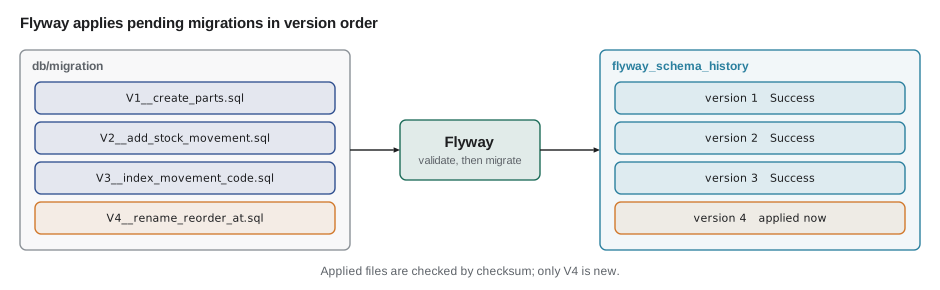
A migration is one change to the schema, written as a script and given a version: create the part table, add a supplier column, create an index. The database's schema at any moment is the result of running all migrations up to some version, in order. A migration tool keeps a table in the database itself that records which versions have run, so when the program starts, or when a deployment script runs, the tool compares the scripts it has with the history and runs only the new ones. Every copy of the database, on a laptop, in the test system and in production, is then built the same way from the same files, and the files live in Git with the code that needs them.
Flyway, now developed by Redgate, comes as a command-line tool, a Gradle and Maven plugin, and a Java library that a program can call at startup. Spring Boot runs it automatically when flyway-core is on the classpath. The open-source Community edition covers everything in this lesson; paid editions add features such as undo migrations and drift reports. Flyway 13 is current in late 2026, and since Flyway 10 support for most databases is a separate module, such as flyway-database-postgresql, added next to flyway-core. The listing shows the module StockStore will need when it moves to PostgreSQL for the web service.
dependencies {
    implementation("org.flywaydb:flyway-core:13.12.2")
    runtimeOnly("org.flywaydb:flyway-database-postgresql:13.12.2")
    runtimeOnly("org.postgresql:postgresql:42.7.13")
}
What this code does
flyway-core contains the migration engine and the Java API; the PostgreSQL module teaches it that database's details. Flyway talks to the database through the JDBC driver, like everything else in StockStore. Check the Flyway release notes for the newest 13.x version before copying the numbers.
Naming and ordering
Flyway finds migrations by their file names, by default in db/migration on the classpath (src/main/resources/db/migration in a Gradle project). A versioned migration is named V, then a version, then two underscores, then a description, then .sql: V1__create_parts.sql, V2__add_stock_movement.sql, V2.1__add_movement_reason.sql. Underscores in the description become spaces in reports. The version can have parts separated by dots, and Flyway compares those parts as numbers, so 1.10 comes after 1.9 and 1.2, not between 1.1 and 1.2 as it would alphabetically. A repeatable migration is named R__ with a description and no version; it runs after the versioned ones whenever its contents change, which suits views and stored procedures that are simplest to recreate whole.
| File name | Kind | When it runs |
|---|---|---|
| V1__create_parts.sql | Versioned | Once, when version 1 is pending |
| V1.1__add_supplier.sql | Versioned | Once, after 1 and before 2 |
| V2__add_stock_movement.sql | Versioned | Once, after 1.1 |
| R__low_stock_view.sql | Repeatable | After all versioned migrations, whenever its checksum changes |
| U2__add_stock_movement.sql | Undo (paid editions) | Only when undo is requested |
| v3-create-index.sql | Ignored | Never; the name does not match the pattern |
Numeric comparison of version parts is easy to get wrong, and getting it wrong runs migrations in the wrong order. The example below sorts version strings the way Flyway does, part by part as numbers, and compares the result with plain string sorting.
import java.util.*;
import java.util.regex.*;

public class Main {
    record Migration(String file, String version, String description) {}

    static final Pattern NAME = Pattern.compile("V([0-9]+(?:[._][0-9]+)*)__(.+)\\.sql");

    static Optional<Migration> parse(String file) {
        Matcher m = NAME.matcher(file);
        if (!m.matches()) return Optional.empty();
        return Optional.of(new Migration(file, m.group(1).replace('_', '.'), m.group(2).replace('_', ' ')));
    }

    static int compareVersions(String a, String b) {
        String[] x = a.split("\\."), y = b.split("\\.");
        for (int i = 0; i < Math.max(x.length, y.length); i++) {
            long p = i < x.length ? Long.parseLong(x[i]) : 0, q = i < y.length ? Long.parseLong(y[i]) : 0;
            if (p != q) return Long.compare(p, q);
        }
        return 0;
    }

    public static void main(String[] args) {
        List<String> files = List.of("V1.10__add_price.sql", "V2__add_stock_movement.sql", "V1__create_parts.sql",
                "V1.2__add_supplier.sql", "v3-create-index.sql", "V1.9__add_pack_size.sql");

        List<Migration> found = new ArrayList<>();
        for (String f : files) parse(f).ifPresentOrElse(found::add, () -> System.out.println("Ignored: " + f));

        List<String> alphabetical = found.stream().map(Migration::version).sorted().toList();
        System.out.println("String order:  " + alphabetical);

        found.sort((a, b) -> compareVersions(a.version(), b.version()));
        System.out.println("Flyway order:  " + found.stream().map(Migration::version).toList());
        found.forEach(m -> System.out.println("  " + m.version() + "  " + m.description()));
    }
}Ignored: v3-create-index.sql String order: [1, 1.10, 1.2, 1.9, 2] Flyway order: [1, 1.2, 1.9, 1.10, 2] 1 create parts 1.2 add supplier 1.9 add pack size 1.10 add price 2 add stock movement
What this code does
The lowercase, hyphenated file does not match the naming pattern and is ignored, which in a real project is a silent mistake worth checking for. Sorted as strings, 1.10 lands before 1.2; compared part by part as numbers, it correctly comes after 1.9. Underscores in descriptions become spaces, as in Flyway's reports.
The schema history table
Flyway records every migration it runs in a table called flyway_schema_history, created on first use. Each row holds the version, the description, the script name, a checksum of the file's contents, who ran it, when, how long it took and whether it succeeded. The checksum is the key to Flyway's safety. When Flyway runs, it first validates: it recomputes the checksum of every applied migration's file and compares it with the history. If someone has edited a migration that already ran, the checksums differ and Flyway stops with a validation error instead of letting databases built before and after the edit silently differ.
import java.nio.charset.StandardCharsets;
import java.util.*;
import java.util.zip.CRC32;

public class Main {
    record Applied(String version, String description, long checksum) {}

    static long checksum(String sql) {
        CRC32 crc = new CRC32();
        for (String line : sql.split("\\R")) crc.update(line.getBytes(StandardCharsets.UTF_8));   // line by line, ignoring line endings
        return crc.getValue();
    }

    static class Migrator {
        final List<Applied> history = new ArrayList<>();

        void migrate(SortedMap<Integer, String[]> scripts) {
            for (Applied a : history) {                                                 // validate first
                String[] s = scripts.get(Integer.parseInt(a.version()));
                if (s == null) throw new IllegalStateException("Validate failed: applied migration " + a.version() + " is missing");
                if (checksum(s[1]) != a.checksum())
                    throw new IllegalStateException("Validate failed: migration checksum mismatch for version " + a.version());
            }
            int done = 0;
            for (var e : scripts.entrySet()) {
                String v = String.valueOf(e.getKey());
                if (history.stream().anyMatch(a -> a.version().equals(v))) continue;
                history.add(new Applied(v, e.getValue()[0], checksum(e.getValue()[1])));
                System.out.println("  Migrating schema to version \"" + v + " - " + e.getValue()[0] + "\"");
                done++;
            }
            System.out.println("  Successfully applied " + done + " migration" + (done == 1 ? "" : "s") + ", now at version " + history.get(history.size() - 1).version());
        }
    }

    public static void main(String[] args) {
        SortedMap<Integer, String[]> scripts = new TreeMap<>();
        scripts.put(1, new String[]{"create parts", "CREATE TABLE part (code TEXT PRIMARY KEY, quantity INTEGER NOT NULL);"});
        scripts.put(2, new String[]{"add stock movement", "CREATE TABLE stock_movement (id INTEGER PRIMARY KEY, code TEXT, change INTEGER);"});
        Migrator db = new Migrator();
        System.out.println("First run:");
        db.migrate(scripts);

        scripts.put(3, new String[]{"index movement code", "CREATE INDEX movement_code_idx ON stock_movement (code);"});
        System.out.println("Second run:");
        db.migrate(scripts);

        scripts.put(2, new String[]{"add stock movement", "CREATE TABLE stock_movement (id INTEGER PRIMARY KEY, code TEXT, change INTEGER, reason TEXT);"});
        System.out.println("Third run, after someone edited V2:");
        try { db.migrate(scripts); } catch (IllegalStateException e) { System.out.println("  " + e.getMessage()); }
    }
}First run: Migrating schema to version "1 - create parts" Migrating schema to version "2 - add stock movement" Successfully applied 2 migrations, now at version 2 Second run: Migrating schema to version "3 - index movement code" Successfully applied 1 migration, now at version 3 Third run, after someone edited V2: Validate failed: migration checksum mismatch for version 2
What this code does
The first run applies versions 1 and 2 and records a CRC32 checksum for each, and the second run applies only the new version 3. When someone edits V2 after it has run, validation recomputes its checksum, finds that it differs from the recorded one and refuses to continue. Flyway also computes its checksum line by line with CRC32, so a change of line endings alone does not count as an edit.
$ ./gradlew flywayInfo
+-----------+---------+---------------------+------+---------------------+---------+
| Category  | Version | Description         | Type | Installed On        | State   |
+-----------+---------+---------------------+------+---------------------+---------+
| Versioned | 1       | create parts        | SQL  | 2027-11-29 19:02:11 | Success |
| Versioned | 2       | add stock movement  | SQL  | 2027-11-29 19:02:11 | Success |
| Versioned | 3       | index movement code | SQL  | 2027-12-03 18:40:57 | Success |
| Versioned | 4       | rename reorder at   | SQL  |                     | Pending |
+-----------+---------+---------------------+------+---------------------+---------+
What this code does
flyway info reads the history table and the migration files and shows where every version stands. This is representative output, trimmed to fit; the real table has a few more columns. Version 4 has a file but no history row, so it is pending and the next migrate will run it.
The rule that follows is the most important in this lesson: never edit a migration that has been applied anywhere that matters. If V2 was wrong, write V5 to fix it. The history is a record of what happened to real databases, and rewriting it makes those databases unreproducible. (On your own laptop, before anyone else has the migration, editing it and rebuilding your database is fine; Flyway's repair command updates the stored checksums when an edit was deliberate and harmless, such as a fixed comment.)
Writing migrations, and the rename
Migrations are ordinary SQL, written for the database in production, which is one reason StockStore tests its migrations against the same database type it runs on. The listing below is StockStore's first migration, which builds the schema used throughout this course, and it runs unchanged in SQLite. Later migrations add to it.
CREATE TABLE supplier2 (
    id   INTEGER PRIMARY KEY,
    name TEXT NOT NULL UNIQUE
);
CREATE TABLE part2 (
    code        TEXT PRIMARY KEY,
    name        TEXT NOT NULL,
    shelf       TEXT,
    quantity    INTEGER NOT NULL CHECK (quantity >= 0),
    reorder_at  INTEGER NOT NULL,
    pack_size   INTEGER NOT NULL DEFAULT 1,
    price_cents INTEGER NOT NULL,
    supplier_id INTEGER REFERENCES supplier2 (id)
);
What this code does
Version 1 creates the two core tables with their constraints; the CHECK on quantity is the rule from lesson 4, now enforced by the database itself. In this demonstration the tables are named supplier2 and part2 only because the sample database already holds tables with the real names. The check query reads SQLite's catalog to confirm both tables exist.
| name | type |
|---|---|
| part2 | table |
| supplier2 | table |
Ingrid's rename from lesson 6, reorder_at to reorder_level, is a good example of a change that needs thought, because the table already holds data and programs already use the old name. In a database that only one program uses, and that can stop for a moment while it is upgraded, the change is a single statement, and the DAO's column list changes in the same commit. Both PostgreSQL and SQLite (since 3.25) support RENAME COLUMN, and the data stays where it is.
ALTER TABLE part RENAME COLUMN reorder_at TO reorder_level;What this code does
The rename changes only the column's name, so the low-stock query, written with the new name, returns the same parts as the low-stock query of lesson 1. Any code still using reorder_at would now fail, which is why the migration and the DAO change go in the same commit and release.
| code | quantity | reorder_level |
|---|---|---|
| BELL | 3 | 4 |
| CHAIN-11 | 1 | 3 |
| PAD-ROAD | 3 | 5 |
When several programs share the database, or the service must keep running during a deployment, a rename has to be split into steps that each work with both the old and new code, a technique called expand and contract. First expand: add the new column, copy the data and keep both in step. Then move every program to the new column, one release at a time. Finally contract: drop the old column in a later migration, once nothing uses it. The script below shows the first and last steps.
-- V4__add_reorder_level.sql (expand)
ALTER TABLE part ADD COLUMN reorder_level INTEGER;
UPDATE part SET reorder_level = reorder_at;
-- ... later releases switch every program to reorder_level ...
-- V6__drop_reorder_at.sql (contract)
ALTER TABLE part DROP COLUMN reorder_at;
What this code does
The expand step adds the new column and copies every value; during the middle period, code writes both columns, or a trigger keeps them equal. The contract step, many releases later, drops the old column, which SQLite supports since version 3.35. The values survived both steps unchanged.
| code | reorder_level |
|---|---|
| BELL | 4 |
| CHAIN-11 | 3 |
| PAD-ROAD | 5 |
Expand and contract works because every program, old or new, finds what it needs at every step. The simulation below runs an old release, which knows only reorder_at, and a new release, which knows only reorder_level, against the table at each stage, and shows which of them can read the BELL row.
import java.util.*;

public class Main {
    static String read(Set<String> columns, Map<String, Integer> row, String column) {
        return columns.contains(column) ? String.valueOf(row.get(column)) : "FAILS (no such column)";
    }

    public static void main(String[] args) {
        Set<String> columns = new LinkedHashSet<>(List.of("code", "quantity", "reorder_at"));
        Map<String, Integer> bell = new HashMap<>(Map.of("quantity", 3, "reorder_at", 4));

        List<String> stages = List.of("before", "after expand (V4)", "after contract (V6)");
        for (String stage : stages) {
            if (stage.startsWith("after expand")) { columns.add("reorder_level"); bell.put("reorder_level", bell.get("reorder_at")); }
            if (stage.startsWith("after contract")) { columns.remove("reorder_at"); bell.remove("reorder_at"); }
            System.out.println(stage + ": columns " + columns);
            System.out.println("  old release reads reorder_at:    " + read(columns, bell, "reorder_at"));
            System.out.println("  new release reads reorder_level: " + read(columns, bell, "reorder_level"));
        }

        // a one-step rename while both releases run
        Set<String> renamed = new LinkedHashSet<>(List.of("code", "quantity", "reorder_level"));
        System.out.println("one-step rename: old release reads reorder_at: " + read(renamed, Map.of("reorder_level", 4), "reorder_at"));
    }
}before: columns [code, quantity, reorder_at] old release reads reorder_at: 4 new release reads reorder_level: FAILS (no such column) after expand (V4): columns [code, quantity, reorder_at, reorder_level] old release reads reorder_at: 4 new release reads reorder_level: 4 after contract (V6): columns [code, quantity, reorder_level] old release reads reorder_at: FAILS (no such column) new release reads reorder_level: 4 one-step rename: old release reads reorder_at: FAILS (no such column)
What this code does
Before the change only the old release works, after the expand step both do, and after the contract step only the new one does, so as long as every old release is gone before V6 runs, nothing ever fails. A one-step rename jumps straight from the first state to the last, which breaks any old release still running. That is acceptable for StockStore, which stops for upgrades, but not for a shared database.
Running Flyway
StockStore runs Flyway from its own startup code, before it creates any DAO, so the schema is always current when the program uses it. The Java API mirrors the command-line options. Some teams prefer to run migrations as a separate deployment step instead, with the CLI or the Gradle task, so that the application's database user does not need permission to change the schema; both are common, and the choice is about permissions and deployment, not about Flyway.
import org.flywaydb.core.Flyway;
import org.flywaydb.core.api.output.MigrateResult;

public final class Schema {
    public static void migrate(DataSource ds) {
        Flyway flyway = Flyway.configure()
                .dataSource(ds)
                .locations("classpath:db/migration")
                .validateOnMigrate(true)               // the default, shown for emphasis
                .load();
        MigrateResult result = flyway.migrate();
        System.out.println("Schema at version " + result.targetSchemaVersion
                + ", " + result.migrationsExecuted + " migration(s) applied");
    }
}
What this code does
The pool from lesson 5 is passed in, so Flyway borrows a connection like any other code. migrate validates, applies the pending migrations in order, each in its own transaction where the database allows it, and returns a summary. If a migration fails, PostgreSQL rolls it back completely, because its DDL is transactional; on MySQL, DDL commits implicitly, so a failed migration can leave half its changes behind.
| Command | What it does |
|---|---|
| migrate | Validates, then applies pending migrations in version order |
| info | Shows every migration and its state: applied, pending, failed or missing |
| validate | Checks applied migrations against their files without changing anything |
| baseline | Marks an existing database as being at a given version, so earlier migrations are skipped |
| repair | Removes failed entries and updates checksums to match the files |
| clean | Drops everything in the schema; disabled by default (cleanDisabled is true) |
baseline matters for StockStore's own story. StockRoom's data already existed before Flyway did, in the files described in lesson 1, and ShopBook's tables already existed in a database built by hand. For a database like ShopBook's, the team writes V1 to describe the schema as it already stands, runs baseline on the existing database so that Flyway records it as being at version 1 without running the script, and from then on adds V2, V3 and so on. New databases run V1 from scratch and end up identical. clean deserves its default: it drops every object in the schema, which is useful for a test database and a disaster for anything else, so it stays disabled outside tests.
Try it yourself
Compare versions like Flyway
Write compare(String a, String b) that compares dotted versions part by part as numbers, treating missing parts as 0, and returns a negative number, zero or a positive number.
The program sorts the versions and prints [1, 1.1, 1.2, 1.9, 1.10, 2], then 0.
import java.util.*;

public class Main {
    static int compare(String a, String b) {
        return a.compareTo(b);
    }

    public static void main(String[] args) {
        List<String> versions = new ArrayList<>(List.of("1.10", "2", "1.2", "1", "1.9", "1.1"));
        versions.sort(Main::compare);
        System.out.println(versions);
        System.out.println(compare("1.0", "1"));
    }
}
Try it yourself
List the pending migrations
Write pending(List<Integer> files, Set<Integer> applied) returning the file versions not yet applied, in ascending order.
The program prints [4, 5].
import java.util.*;

public class Main {
    static List<Integer> pending(List<Integer> files, Set<Integer> applied) {
        return List.of();
    }

    public static void main(String[] args) {
        System.out.println(pending(List.of(5, 1, 3, 2, 4), Set.of(1, 2, 3)));
    }
}
Common mistakes
MistakeEditing a migration that has already been applied.
InsteadWrite a new migration that makes the correction.
MistakeChanging test databases by hand.
InsteadMake every schema change a migration, reviewed and committed with the code.
MistakeNaming files v3-create-index.sql.
InsteadFollow V<version>__<description>.sql exactly; anything else is silently ignored.
MistakeLetting Hibernate update the schema as well.
InsteadSet schema generation to none and let Flyway own the schema.
MistakeRenaming a shared column in one step during a live deployment.
InsteadUse expand and contract: add, copy, switch the programs, then drop.
Summary and key terms
- A migration is one versioned change to the schema; a migration tool records which have run in the database and applies only new ones, so every copy of the database is built the same way from files kept in Git.
- Flyway names versioned migrations V<version>__<description>.sql and repeatable ones R__<description>.sql, finds them in db/migration and orders versions part by part as numbers.
- It records each run in flyway_schema_history with a CRC32 checksum and validates applied files against it, so an edited migration stops the run; corrections are new migrations.
- Migrations are plain SQL for the production database.
- A rename is one statement when only one program uses the database, and an expand-and-contract sequence when others do.
- Flyway runs from the CLI, Gradle or Java code; migrate, info, validate, baseline, repair and clean are its main commands, baseline adopts an existing database and clean is disabled by default.
- Migration
- One versioned change to the database schema.
- Migration tool
- A program that applies migrations in order and records which have run.
- Versioned migration
- A migration named V<version>__<description>.sql that runs once.
- Repeatable migration
- A migration named R__<description>.sql that reruns whenever it changes.
- flyway_schema_history
- The table in which Flyway records applied migrations.
- Checksum
- A number computed from a file's contents, used to detect edits.
- Validate
- Checking applied migrations against their files before migrating.
- Baseline
- Marking an existing database as being at a given version.
- Expand and contract
- Changing a shared schema in steps that each work with old and new code.
- Pending migration
- A migration file that has not yet been applied to a database.
Practice problems
Work each problem on paper first, then reveal the answer to check.
In which order does Flyway run V1.2, V1.10 and V1.9?
Show answer
1.2, 1.9, 1.10.
What happens when an applied migration file is edited?
Show answer
Validation finds a checksum mismatch and Flyway stops.
How should a mistake in an applied migration be fixed?
Show answer
With a new migration.
What does baseline do?
Show answer
Records an existing database as being at a version without running the earlier scripts.
Why does a shared column rename need expand and contract?
Show answer
So every step works with both the old and the new code while programs are upgraded one at a time.
Lesson quiz · 5 questions
Score 60% or more to complete this lesson.
Create a free account to save your progress, take quizzes and earn a certificate.