
JAVA-250 · Lesson 4 of 12 · 23 min
Transactions in JDBC
▶ Video coming soon A video version of this lesson is on the way.
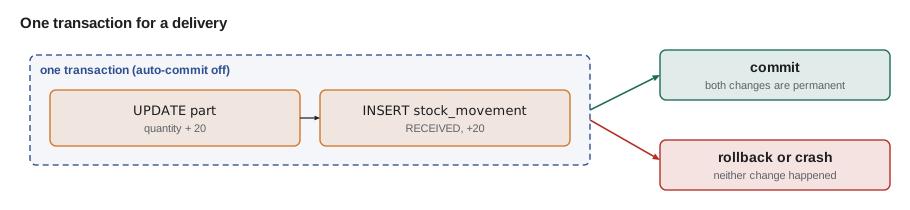
Velotek's delivery came on the morning of Friday, October 8: twenty 700x25c inner tubes and six brass bells. Receiving it in StockStore meant two writes for each part, raising the quantity in the part table and adding a RECEIVED row to stock_movement, so that the log Kofi used to answer "where did the tubes go?" would always add up to the count on the shelf. At the afternoon session Ingrid asked the question this lesson answers: "What happens if the program dies between the first write and the second?" With each statement saved on its own, the count would go up and the log would never hear about it. The cure is a transaction.
What a transaction promises
A transaction is a group of statements that the database treats as one unit. Database people describe its guarantees with the letters ACID. Atomicity means all of the statements take effect or none do; there is no state in which the quantity has changed and the movement has not. Consistency means the transaction moves the database from one valid state to another, with every constraint satisfied at the end. Isolation means transactions running at the same time do not see each other's unfinished work, to a degree you choose. Durability means that once the database reports a commit, the result survives a crash, the property StockRoom lacked in August.
Auto-commit, commit and rollback
A new JDBC connection is in auto-commit mode: each statement is its own transaction and is committed as soon as it finishes. That is right for a single statement and wrong for a group. To make several statements one transaction, call setAutoCommit(false), run the statements, and call commit(). If anything fails, call rollback(), which undoes everything since the transaction began. The pattern below is the shape of almost every transaction in plain JDBC; lesson 6 hides it inside one helper so that it is written once.
public void receive(Connection conn, String code, int quantity) throws SQLException {
    boolean oldAutoCommit = conn.getAutoCommit();
    conn.setAutoCommit(false);
    try (PreparedStatement up = conn.prepareStatement(
                 "UPDATE part SET quantity = quantity + ? WHERE code = ?");
         PreparedStatement log = conn.prepareStatement(
                 "INSERT INTO stock_movement (code, change, reason, at) VALUES (?, ?, 'RECEIVED', ?)")) {
        up.setInt(1, quantity);
        up.setString(2, code);
        if (up.executeUpdate() != 1) throw new SQLException("unknown part " + code, "02000");
        log.setString(1, code);
        log.setInt(2, quantity);
        log.setString(3, now());
        log.executeUpdate();
        conn.commit();                       // both writes become permanent together
    } catch (SQLException | RuntimeException e) {
        conn.rollback();                     // neither write happened
        throw e;
    } finally {
        conn.setAutoCommit(oldAutoCommit);
    }
}
What this code does
Turning auto-commit off starts a transaction that lasts until commit or rollback. If the part code is unknown, or the insert fails, the catch block rolls back both statements and rethrows the exception so the caller knows. The finally block restores auto-commit, which matters when the connection goes back to a pool and is reused.
The same thing can be watched in SQL. In SQLite, BEGIN starts a transaction and ROLLBACK abandons it; the script below adds twenty tubes inside a transaction, changes its mind, and then checks the count, which is back where it started.
BEGIN;
UPDATE part SET quantity = quantity + 20 WHERE code = 'TUBE-700x25';
INSERT INTO stock_movement (code, change, reason, at)
VALUES ('TUBE-700x25', 20, 'RECEIVED', '2027-10-08 10:15');
ROLLBACK;
What this code does
Both statements run inside the transaction, so the database holds the new count and the new movement until the end. ROLLBACK throws both away. The check afterwards shows the original 14 tubes and the original five movements.
| code | quantity | movements |
|---|---|---|
| TUBE-700x25 | 14 | 5 |
Rollback is not only for crashes. A transaction should also be rolled back when the program discovers that the work cannot be completed, for example when a sale would take a quantity below zero. The part table's CHECK constraint makes the database refuse that on its own, and in a transaction the refusal undoes the rest of the work too.
UPDATE part SET quantity = quantity - 5 WHERE code = 'BELL';What this code does
There are only three bells, so taking five would leave minus two. The CHECK (quantity >= 0) constraint in the table makes SQLite refuse the update, and through JDBC the refusal arrives as an SQLException; PostgreSQL reports it with SQLState 23514, a class 23 integrity error.
Error: CHECK constraint failed: quantity >= 0A transaction you can run here
The behaviour of commit and rollback is easy to model in Java, which is a good way to understand it. The class below keeps committed stock in one map and the current transaction's changes in another; reads see the transaction's own changes, commit copies them into the committed map, and rollback throws them away. A real database does far more, including surviving crashes, but the observable rules are the same.
import java.util.*;

public class Main {
    static class Store {
        private final Map<String, Integer> committed = new TreeMap<>();
        private Map<String, Integer> pending = null;           // null when no transaction is open
        private final List<String> log = new ArrayList<>();

        void begin() { pending = new TreeMap<>(committed); }
        int get(String code) { return (pending != null ? pending : committed).getOrDefault(code, 0); }
        void add(String code, int by) {
            int next = get(code) + by;
            if (next < 0) throw new IllegalStateException("CHECK failed: " + code + " would be " + next);
            pending.put(code, next);
        }
        void commit() { committed.clear(); committed.putAll(pending); pending = null; log.add("commit"); }
        void rollback() { pending = null; log.add("rollback"); }
    }

    static void sell(Store s, Map<String, Integer> order) {
        s.begin();
        try {
            order.forEach((code, qty) -> s.add(code, -qty));
            s.commit();
            System.out.println("Sold " + order);
        } catch (IllegalStateException e) {
            s.rollback();
            System.out.println("Sale refused (" + e.getMessage() + "), nothing changed");
        }
    }

    public static void main(String[] args) {
        Store s = new Store();
        s.begin(); s.add("BELL", 3); s.add("TUBE-700x25", 14); s.commit();

        sell(s, new LinkedHashMap<>(Map.of("TUBE-700x25", 2)));
        LinkedHashMap<String, Integer> big = new LinkedHashMap<>();
        big.put("TUBE-700x25", 1);
        big.put("BELL", 5);
        sell(s, big);

        System.out.println("Tubes: " + s.get("TUBE-700x25") + ", bells: " + s.get("BELL") + ", log: " + s.log);
    }
}Sold {TUBE-700x25=2}
Sale refused (CHECK failed: BELL would be -2), nothing changed
Tubes: 12, bells: 3, log: [commit, commit, rollback]What this code does
The second sale takes a tube successfully inside its transaction and then fails on the bells, because five is more than three. Rollback discards the pending map, so the tube that was taken a moment earlier is back as well. Only the first sale and the initial stock were committed, which leaves 12 tubes and 3 bells.
The lost update
Transactions also protect against a quieter problem that appears as soon as two computers share stock. On Saturdays the counter and the parts room both sell bells. Suppose each program reads the count, subtracts in Java and writes the result back. If both read before either writes, both write the same new value and one sale disappears from the count. This is called a lost update, and it was the same bug as Kofi's minus-one tube in the concurrency course, now between two computers instead of two threads.
import java.util.*;

public class Main {
    static Map<String, Integer> db = new HashMap<>(Map.of("BELL", 3));

    public static void main(String[] args) {
        // read-modify-write in Java, interleaved the unlucky way
        int counterRead = db.get("BELL");          // counter reads 3
        int partsRoomRead = db.get("BELL");        // parts room reads 3
        db.put("BELL", counterRead - 1);           // counter writes 2
        db.put("BELL", partsRoomRead - 1);         // parts room writes 2
        System.out.println("Read-modify-write: two bells sold, count says " + db.get("BELL"));

        // the database does the arithmetic: UPDATE part SET quantity = quantity - 1 WHERE code = ? AND quantity >= 1
        db.put("BELL", 3);
        System.out.println("Counter sale applied: " + sellOne("BELL"));
        System.out.println("Parts room sale applied: " + sellOne("BELL"));
        System.out.println("Atomic update: two bells sold, count says " + db.get("BELL"));
        db.put("BELL", 0);
        System.out.println("Sale with none left applied: " + sellOne("BELL"));
    }

    // models one atomic conditional UPDATE: the check and the change happen together
    static boolean sellOne(String code) {
        int q = db.get(code);
        if (q < 1) return false;                   // 0 rows updated
        db.put(code, q - 1);                       // 1 row updated
        return true;
    }
}Read-modify-write: two bells sold, count says 2 Counter sale applied: true Parts room sale applied: true Atomic update: two bells sold, count says 1 Sale with none left applied: false
What this code does
In the first half each program computes its new value from a stale read, so the second write replaces the first and the count says 2 when it should say 1. In the second half each sale is one conditional UPDATE in which the database checks and changes the value in a single step, and the program learns from the update count whether it worked. When no bells are left the UPDATE changes no rows, and the sale is refused instead of driving the count below zero.
In SQL the fix is to let the database do the arithmetic, with a condition that makes the update refuse when stock is short. executeUpdate then returns 1 for a successful sale and 0 for a refused one. Run here against the sample data, the first statement sells one road brake pad and the second, which asks for ten, changes nothing.
UPDATE part SET quantity = quantity - 1 WHERE code = 'PAD-ROAD' AND quantity >= 1;
UPDATE part SET quantity = quantity - 10 WHERE code = 'PAD-ROAD' AND quantity >= 10;
What this code does
The first update finds three pads, which is at least one, so it takes one. The second finds two, which is fewer than ten, so its WHERE clause matches no row and nothing changes. Through JDBC the two executeUpdate calls would return 1 and 0.
| code | quantity |
|---|---|
| PAD-ROAD | 2 |
When an operation needs to read, decide in Java and then write, for example to compare a price before reserving stock, the other tools are a pessimistic lock, SELECT ... FOR UPDATE in PostgreSQL, which makes other transactions wait for the row, and optimistic locking, which adds a version column and updates only WHERE version = ? the value that was read. JPA supports optimistic locking with a @Version field, which lesson 8 mentions.
Isolation levels
Complete isolation is expensive, so SQL defines four isolation levels that trade safety for concurrency. Each prevents more of the read phenomena: a dirty read sees another transaction's uncommitted change; a non-repeatable read reads the same row twice and gets different values because another transaction committed in between; a phantom read runs the same query twice and gets new rows. You set the level for a connection with setTransactionIsolation and the constants on Connection.
| Level | Dirty read | Non-repeatable read | Phantom | Notes |
|---|---|---|---|---|
| READ UNCOMMITTED | possible | possible | possible | Rarely used; PostgreSQL treats it as READ COMMITTED |
| READ COMMITTED | prevented | possible | possible | PostgreSQL's default |
| REPEATABLE READ | prevented | prevented | possible in the standard | PostgreSQL also prevents phantoms here |
| SERIALIZABLE | prevented | prevented | prevented | Behaves as if transactions ran one at a time; SQLite effectively works this way |
import java.sql.Connection;
import java.util.*;

public class Main {
    public static void main(String[] args) {
        Map<String, Integer> levels = new LinkedHashMap<>();
        levels.put("TRANSACTION_NONE", Connection.TRANSACTION_NONE);
        levels.put("TRANSACTION_READ_UNCOMMITTED", Connection.TRANSACTION_READ_UNCOMMITTED);
        levels.put("TRANSACTION_READ_COMMITTED", Connection.TRANSACTION_READ_COMMITTED);
        levels.put("TRANSACTION_REPEATABLE_READ", Connection.TRANSACTION_REPEATABLE_READ);
        levels.put("TRANSACTION_SERIALIZABLE", Connection.TRANSACTION_SERIALIZABLE);
        levels.forEach((name, value) -> System.out.printf("%-30s %d%n", name, value));

        int chosen = Connection.TRANSACTION_SERIALIZABLE;
        boolean stricter = chosen > Connection.TRANSACTION_READ_COMMITTED;
        System.out.println("SERIALIZABLE is stricter than READ COMMITTED: " + stricter);
    }
}TRANSACTION_NONE 0 TRANSACTION_READ_UNCOMMITTED 1 TRANSACTION_READ_COMMITTED 2 TRANSACTION_REPEATABLE_READ 4 TRANSACTION_SERIALIZABLE 8 SERIALIZABLE is stricter than READ COMMITTED: true
What this code does
The constants are plain ints defined in the Connection interface, so they print without any database. Each stricter level has a larger value, which is why the comparison works, although code should name the constant rather than use the number. You would pass one of them to conn.setTransactionIsolation before starting a transaction.
For StockStore, Ingrid's advice was to use the database default, write updates in the atomic style shown above, and reach for SERIALIZABLE only for the few transactions that must read, think and write, such as checking that a rental booking does not overlap another. At SERIALIZABLE the database may abort one of two conflicting transactions with SQLState 40001, and the right response is to run the whole transaction again.
Keeping transactions healthy
Transactions hold locks and other resources until they end, so keep them short. Do all the slow work, such as reading a file, calling a supplier's price service or waiting for a person to click Confirm, before the transaction begins, and run only the database statements inside it. Never leave a transaction open while waiting for user input. Make sure every path ends in commit or rollback, which the try, catch and finally pattern guarantees. Savepoints, created with conn.setSavepoint(), let a long transaction roll back part of its work and continue, but most applications never need them.
Try it yourself
Roll back a failed transfer
The method moveStock moves a quantity from one shelf bin to another inside a transaction.
It already begins the transaction and commits it. Add the missing rollback so that a failed move leaves both bins unchanged, then the program should print Moved 2: {A-02=4, B-07=8} and Refused, bins: {A-02=4, B-07=8}.
import java.util.*;

public class Main {
    static Map<String, Integer> committed = new TreeMap<>(Map.of("A-02", 6, "B-07", 6));
    static Map<String, Integer> pending;

    static void take(String bin, int n) {
        int left = pending.get(bin) - n;
        if (left < 0) throw new IllegalStateException("not enough in " + bin);
        pending.put(bin, left);
    }

    static void moveStock(String from, String to, int n) {
        pending = new TreeMap<>(committed);
        try {
            pending.put(to, pending.get(to) + n);
            take(from, n);
            committed = pending;
            System.out.println("Moved " + n + ": " + committed);
        } catch (IllegalStateException e) {
            committed = pending;   // wrong: this keeps half of the failed move
            System.out.println("Refused, bins: " + committed);
        }
    }

    public static void main(String[] args) {
        moveStock("A-02", "B-07", 2);
        moveStock("A-02", "B-07", 10);
    }
}
Try it yourself
A conditional sale
Write sell so it behaves like UPDATE part SET quantity = quantity - n WHERE code = ? AND quantity >= n: if there is enough stock, subtract n and return 1 (one row changed); otherwise change nothing and return 0.
The program sells chains three times and prints each update count and the count left.
import java.util.*;

public class Main {
    static Map<String, Integer> stock = new HashMap<>(Map.of("CHAIN-11", 3));

    static int sell(String code, int n) {
        stock.put(code, stock.get(code) - n);
        return 1;
    }

    public static void main(String[] args) {
        System.out.println(sell("CHAIN-11", 2) + " row(s), left " + stock.get("CHAIN-11"));
        System.out.println(sell("CHAIN-11", 2) + " row(s), left " + stock.get("CHAIN-11"));
        System.out.println(sell("CHAIN-11", 1) + " row(s), left " + stock.get("CHAIN-11"));
    }
}
Common mistakes
MistakeRunning related writes in auto-commit mode.
InsteadTurn auto-commit off, run the statements, then commit, or roll back on any failure.
MistakeCatching an exception inside a transaction and committing anyway.
InsteadRoll back in the catch block and rethrow.
MistakeReading a count, subtracting in Java and writing it back.
InsteadLet the database do the arithmetic in one conditional UPDATE and check the update count.
MistakeCalling slow services or waiting for a person inside a transaction.
InsteadDo slow work first and keep the transaction to the database statements.
MistakeForgetting to restore auto-commit before a pooled connection is reused.
InsteadRestore it in a finally block.
Summary and key terms
- A transaction groups statements so they succeed or fail together, with the ACID guarantees of atomicity, consistency, isolation and durability.
- JDBC connections start in auto-commit mode, where each statement commits on its own; setAutoCommit(false) starts a transaction that ends with commit() or rollback().
- The standard pattern runs the statements in try, commits at the end, rolls back and rethrows in catch, and restores auto-commit in finally.
- Constraints such as CHECK make the database refuse invalid changes, and in a transaction the refusal undoes the rest of the work.
- A lost update happens when two programs read, change in Java and write back; atomic conditional UPDATE statements, row locks or optimistic version checks prevent it.
- Isolation levels from READ UNCOMMITTED to SERIALIZABLE prevent progressively more read phenomena; serializable transactions may be aborted and must then be retried.
- Keep transactions short and never wait for a person inside one.
- Transaction
- A group of statements that the database applies completely or not at all.
- ACID
- Atomicity, consistency, isolation and durability, the guarantees of a transaction.
- Auto-commit
- The default JDBC mode in which each statement is committed on its own.
- Commit
- Ending a transaction so that its changes become permanent.
- Rollback
- Ending a transaction by undoing all of its changes.
- Lost update
- A change that disappears because another transaction wrote over it using a stale read.
- Isolation level
- A setting that controls how much concurrent transactions can see of each other.
- Dirty read
- Reading another transaction's uncommitted change.
- Optimistic locking
- Detecting conflicting updates by checking a version number when writing.
- Savepoint
- A marker inside a transaction to which part of the work can be rolled back.
Practice problems
Work each problem on paper first, then reveal the answer to check.
Why must the quantity update and the movement insert share a transaction?
Show answer
So that the log always matches the count, even if the program fails between them.
What mode is a new JDBC connection in?
Show answer
Auto-commit.
What should a catch block inside a transaction do?
Show answer
Roll back, then rethrow.
How does UPDATE ... WHERE quantity >= 1 prevent a lost update?
Show answer
The database checks and changes the value in one step.
What SQLState tells you a serializable transaction should be retried?
Show answer
40001.
Lesson quiz · 5 questions
Score 60% or more to complete this lesson.
Create a free account to save your progress, take quizzes and earn a certificate.