
ITIL-141 · Lesson 5 of 12 · 30 min
IT asset management
Larchmont spends millions of dollars a year on laptops, handheld scanners, servers, network equipment, software subscriptions and cloud services. Someone has to know what the company owns, where it is, who uses it, what it costs, when its warranty ends, whether its software is properly licensed and when it should be replaced or retired. That someone is the IT asset management practice. Where service configuration management asks "how does this component support a service?", IT asset management asks "what is this worth, what does it cost, and are we using it well and lawfully?"
This lesson covers the purpose of IT asset management, the kinds of IT assets, the asset lifecycle, total cost of ownership, software asset management and licence compliance, cloud and subscription assets, the link with configuration management, and the security, financial and environmental reasons for doing it well.
Purpose of IT asset management
In plain words, the purpose of the IT asset management practice is to plan and manage the full lifecycle of all IT assets, to help the organization maximize value, control costs, manage risks, support decision-making about purchase, reuse, retirement and disposal of assets, and meet regulatory and contractual requirements. An IT asset is any financially valuable component that can contribute to the delivery of an IT product or service.
The purpose packs in several goals that can pull in different directions. Maximizing value suggests keeping assets in use as long as possible. Managing risk suggests replacing them before they fail or fall out of support. Controlling costs suggests buying cheaply, while total cost of ownership may favour a more expensive but more reliable option. IT asset management provides the information to make these trade-offs deliberately rather than by accident.
Kinds of IT assets
IT assets fall into several broad groups. Hardware assets include end-user devices such as laptops, phones and handheld scanners; infrastructure such as servers, storage and network equipment; and peripherals such as printers and docking stations. Software assets include perpetual licences, subscriptions and software-as-a-service entitlements. Cloud assets include virtual machines, storage, databases and other resources consumed on demand. Some organizations also treat certain contracts, data sets and intellectual property as IT assets when they carry financial value and need lifecycle management.
| Asset group | Larchmont examples | Key concerns |
|---|---|---|
| End-user hardware | 1,900 laptops, 600 handheld scanners, 450 phones | Location, assignment, warranty, refresh, loss and theft |
| Infrastructure hardware | Servers, storage arrays, switches, wireless access points | Support contracts, end of life, capacity, depreciation |
| Software licences and subscriptions | Office suite, warehouse management system, design tools | Entitlements versus usage, renewals, audits |
| Cloud resources | Virtual machines, storage, managed databases | Unused resources, tagging, cost allocation |
| Mobile and IoT devices | Dock-door printers, temperature sensors in cold storage | Firmware, security, physical location |
The asset lifecycle
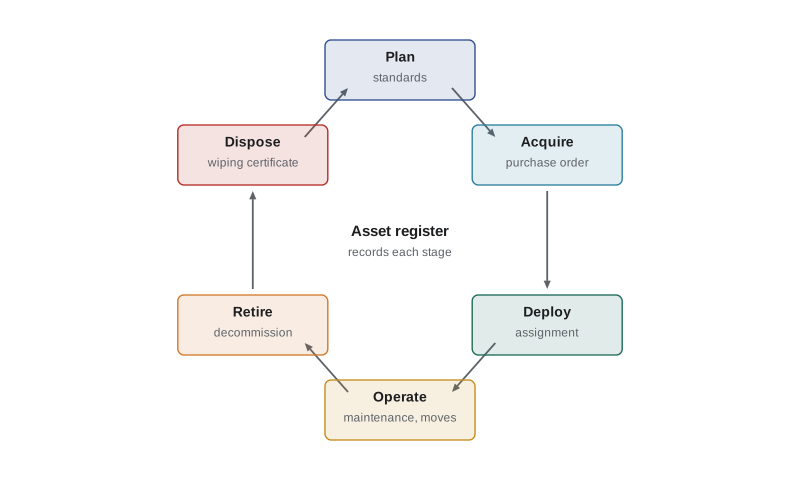
Every asset passes through a lifecycle, and IT asset management is involved at each stage. Planning identifies the need and sets standards, such as approved laptop models. Acquisition covers requisition, purchase and receipt, and is where an asset first enters the register. Deployment assigns the asset to a user or location and records it. Operation covers the period of use, including maintenance, moves, upgrades and reassignment. Retirement removes the asset from service. Disposal securely wipes data, then resells, donates, recycles or destroys the asset and records what happened to it.
Information created at the start of the lifecycle is often needed at the end. The purchase order shows the price and warranty; the deployment record shows who had the device; the disposal record proves that data was destroyed. An asset register that captures each step creates an audit trail from purchase to disposal.
The asset register
An asset register records each asset with its identifier, type and model, serial number, purchase date, cost, supplier, warranty end date, location, assigned user or owner, status, and financial attributes such as depreciation method and book value. For software, it records entitlements: what licences the organization owns and under what terms. The register is often kept in the same tool as the CMDB, and many records are shared. The difference is perspective. The CMDB focuses on configuration and relationships for service delivery; the asset register focuses on financial, contractual and lifecycle information. A laptop is both an asset and, if it matters to a service, a CI. A software licence is an asset but rarely a CI.
| Question | Answered mainly by |
|---|---|
| Which services does this server support? | Service configuration management |
| What did this server cost and what is its book value? | IT asset management |
| When does this server's support contract end? | IT asset management, shared with the CMDB |
| What will be affected if this server is changed? | Service configuration management |
| Are we licensed for every installation of this database? | IT asset management (software asset management) |
| Who is using this laptop and where is it? | Both, depending on how records are shared |
Total cost of ownership
The purchase price is only part of what an asset costs. Total cost of ownership (TCO) adds the costs of deploying, supporting, maintaining, powering, securing, insuring and eventually disposing of the asset over its useful life, minus any resale value. TCO is the right basis for comparing options. A cheap laptop that fails often, needs more support calls and must be replaced after three years may cost more over time than a more expensive model that lasts five.
Worked problem
Comparing laptop options by TCO
Option A costs $1,050, lasts 3 years, needs on average $180 of support per year and has $50 resale value. Option B costs $1,450, lasts 5 years, needs $110 of support per year and has $120 resale value. Both need $60 for setup and $25 a year for security software. Compare the annual cost of each.
Show solution
- Option A total over 3 years = 1,050 + 60 + 3 × (180 + 25) − 50 = 1,675; per year = 558.33.
- Option B total over 5 years = 1,450 + 60 + 5 × (110 + 25) − 120 = 2,065; per year = 413.00.
Answer: Option B costs about $145 less per year despite its higher price. Over 1,900 laptops that is roughly $276,000 a year, before considering productivity lost to failures.
# Annualized total cost of ownership for device options, with a simple discount rate
options = {
    # price, life (years), setup, support/yr, security/yr, resale at end
    "A: budget model":   (1050, 3, 60, 180, 25, 50),
    "B: business model": (1450, 5, 60, 110, 25, 120),
    "C: rugged model":   (2100, 6, 80, 70, 25, 200),
}
rate = 0.05   # discount rate for comparing cash flows over time

def annual_equivalent(price, life, setup, support, security, resale):
    pv = price + setup
    for y in range(1, life + 1):
        pv += (support + security) / (1 + rate) ** y
    pv -= resale / (1 + rate) ** life
    annuity = rate / (1 - (1 + rate) ** -life)       # converts present value to equal yearly cost
    return pv, pv * annuity

for name, o in options.items():
    pv, ann = annual_equivalent(*o)
    simple = (o[0] + o[2] + o[1] * (o[3] + o[4]) - o[5]) / o[1]
print(f"{name:<20} simple/yr {simple:8.2f} discounted PV {pv:9.2f} equivalent/yr {ann:8.2f}")A: budget model simple/yr 558.33 discounted PV 1625.07 equivalent/yr 596.74 B: business model simple/yr 413.00 discounted PV 2000.46 equivalent/yr 462.05 C: rugged model simple/yr 425.00 discounted PV 2512.95 equivalent/yr 495.09
The discounted figures use the time value of money covered in FIN-201: a dollar spent in year five is worth less today than a dollar spent now. The ranking usually stays the same, but discounting matters when options have very different lifespans or upfront costs. For the depreciation of assets in the financial statements, see ACCT-101 and ACCT-211; IT asset management supplies the data, while accounting rules decide the treatment.
Software asset management
Software asset management (SAM) is the part of IT asset management that deals with software. It is often the most financially significant and legally risky part. Software is licensed, not owned, and licence terms vary enormously: per user, per device, per processor core, per concurrent user, per transaction, by revenue band, with restrictions on virtualization, cloud use, geography or purpose. A small misunderstanding of terms can produce a large bill when a vendor audits.
The core activity of SAM is reconciliation: comparing entitlements (what the organization is licensed to use) with deployments or usage (what is actually installed or consumed). The result shows a shortfall, where the organization is under-licensed and exposed to audit penalties, or a surplus, where it is paying for licences nobody uses. Both are worth finding.
Worked problem
Licence reconciliation
Larchmont owns 1,800 named-user subscriptions to its office suite and 40 processor-core licences for its database software. Discovery shows 1,930 active office suite users, of whom 160 have not signed in for 90 days. The database runs on servers with 48 cores in total. What is the position for each product?
Show solution
- Office suite: 1,930 active users against 1,800 entitlements is a shortfall of 130.
- But 160 users have been inactive for 90 days; reclaiming those subscriptions would leave 1,770 users and a surplus of 30.
- Database: 48 deployed cores against 40 licensed cores is a shortfall of 8 cores, unless licence terms allow limiting the count, for example through approved partitioning.
Answer: Reclaim inactive office suite accounts to remove the shortfall, then confirm with the vendor whether the database terms count all 48 cores before buying 8 more or reconfiguring the servers.
# Reconcile software entitlements against discovered usage (invented data)
products = [
    # product, metric, entitled, deployed, inactive_90d, unit_cost_per_year
    ("Office suite", "named user", 1800, 1930, 160, 300),
    ("Database engine", "core", 40, 48, 0, 2800),
    ("Design tool", "named user", 60, 38, 5, 900),
    ("Remote support tool", "concurrent", 25, 22, 0, 400),
    ("Route planner", "named user", 120, 131, 18, 650),
]
print(f"{'product':<20}{'metric':<12}{'own':>5}{'use':>6}{'after reclaim':>15}{'position':>10}{'yearly effect':>15}")
for p, metric, own, use, idle, cost in products:
    after = use - idle
    gap = own - after
    position = "surplus" if gap >= 0 else "shortfall"
    effect = gap * cost          # positive: money that could be saved; negative: exposure to cover
print(f"{p:<20}{metric:<12}{own:>5}{use:>6}{after:>15}{position:>10}{effect:>15,}")product metric own use after reclaim position yearly effect Office suite named user 1800 1930 1770 surplus 9,000 Database engine core 40 48 48 shortfall -22,400 Design tool named user 60 38 33 surplus 24,300 Remote support tool concurrent 25 22 22 surplus 1,200 Route planner named user 120 131 113 surplus 4,550
Reconciliation depends on accurate entitlement data, which means keeping purchase records, contracts and licence terms, and on accurate usage data from discovery and sign-in logs. It also depends on understanding each vendor's rules. SAM specialists often say that the hardest part is not counting installations but interpreting contracts.
Cloud and subscription assets
Cloud services have changed IT asset management. Resources can be created in minutes by anyone with access and billed by the second. Assets no longer sit in a store room waiting to be counted; they appear and disappear continuously. Practices such as FinOps, a discipline for managing cloud spending collaboratively across finance, technology and business teams, have grown up to deal with this. Key techniques include tagging every resource with an owner, service and cost centre; reviewing unused or oversized resources; using reserved capacity or savings plans for steady workloads; and setting budgets and alerts.
Software-as-a-service subscriptions create similar challenges. Business teams may sign up for tools with a credit card, creating "shadow IT" that bypasses procurement, security review and licence management. IT asset management works with procurement and information security to discover such subscriptions, bring valuable ones under management and retire duplicates.
| Cloud cost technique | What it does | Example |
|---|---|---|
| Tagging | Links each resource to an owner, service and cost centre | Every resource tagged with service=shipment-portal |
| Rightsizing | Matches resource size to actual use | Shrinking an oversized database instance |
| Scheduling | Turns off non-production resources outside working hours | Test environments stopped overnight |
| Commitment discounts | Lowers unit price for steady usage in return for a commitment | One-year reserved capacity for steady workloads |
| Anomaly alerts | Flags unexpected spending quickly | Alert when daily spend rises 30 % above normal |
Security, privacy and disposal
You cannot protect what you do not know you have. Accurate asset data is a foundation of information security: it shows which devices need patches, which are encrypted, which hold sensitive data and which have been lost or stolen. Security frameworks such as the CIS Critical Security Controls start with inventory and control of enterprise assets and software assets for this reason. Lesson 11 returns to the link between assets and information security.
Disposal carries particular risk. Devices often hold personal or confidential data, and organizations remain responsible for it until it is securely destroyed. Under PIPEDA and provincial privacy laws, organizations must protect personal information with safeguards appropriate to its sensitivity, which includes secure destruction when devices are retired. The Canadian Centre for Cyber Security publishes guidance on sanitizing and disposing of electronic media. Environmental rules also apply: provinces run extended producer responsibility programmes for electronics, so retired devices should go to approved recyclers.
Disposal records, such as data wiping certificates and recycler receipts, should be attached to the asset record so the organization can prove each device was handled properly.
Sustainability
IT asset management increasingly supports sustainability goals. Extending device life, refurbishing and reusing equipment, choosing energy-efficient models, consolidating underused servers and turning off idle cloud resources all reduce environmental impact as well as cost. Some organizations now track the estimated carbon footprint of their devices and cloud usage alongside cost, using data from suppliers and cloud providers.
Measuring the practice
Measures for IT asset management include register accuracy from audits; the share of assets with a known owner and location; licence compliance position by product; savings from reclaimed licences and rightsized cloud resources; the share of assets disposed of with certified data destruction; the time to provision a standard device; and the share of spending under management. As with configuration management, the best measure of value is whether decisions about buying, renewing and retiring are actually made with asset data.
ITIL (Version 5) note
Published summaries of ITIL (Version 5), checked in October 2026, keep the name IT asset management and place it in the product and service management group, alongside service configuration management. The two practices continue to share data closely.
Common mistakes
MistakeComparing options on purchase price alone.
InsteadCompare total cost of ownership over the useful life, including support and disposal.
MistakeCounting installations without reading licence terms.
InsteadReconcile usage against entitlements using each vendor's actual licensing rules.
MistakeTreating the asset register and CMDB as the same thing.
InsteadShare data, but recognize that each answers different questions.
MistakeLetting cloud resources run untagged.
InsteadTag every resource with an owner, service and cost centre, and review regularly.
MistakeRecycling devices without proof of data destruction.
InsteadSanitize media to a recognized standard and attach certificates to asset records.
Summary and key terms
- IT asset management plans and manages the full lifecycle of IT assets to maximize value, control cost, manage risk and meet obligations.
- Assets include hardware, software, cloud resources and connected devices.
- The lifecycle runs from planning and acquisition to deployment, operation, retirement and secure disposal.
- Total cost of ownership, not purchase price, is the right basis for comparing options.
- Software asset management reconciles entitlements with usage to find shortfalls and surpluses.
- Cloud and subscription assets need tagging, rightsizing and continuous review.
- Accurate asset data underpins security, privacy-compliant disposal and sustainability.
- IT asset management
- The practice of planning and managing the full lifecycle of all IT assets.
- IT asset
- Any financially valuable component that can contribute to delivering an IT product or service.
- Asset register
- A record of assets with their financial, contractual and lifecycle information.
- Total cost of ownership
- All costs of an asset over its useful life, minus any resale value.
- Software asset management
- The part of IT asset management that manages software licences and usage.
- Entitlement
- The right to use software granted by a licence or subscription.
- Licence reconciliation
- Comparing software entitlements with actual deployment or usage.
- FinOps
- A collaborative discipline for managing cloud spending across finance, technology and business teams.
- Shadow IT
- Technology acquired or used without the knowledge or approval of the IT function.
- Media sanitization
- Removing data from storage media so it cannot be recovered.
Practice problems
Work each problem on paper first, then reveal the answer to check.
State the purpose of IT asset management in plain words.
Show answer
To plan and manage the full lifecycle of IT assets to maximize value, control costs, manage risks, support decisions and meet regulatory and contractual requirements.
Name the six stages of the asset lifecycle.
Show answer
Plan, acquire, deploy, operate, retire and dispose.
A device costs $900, lasts 3 years, needs $150 support a year and has no resale value. What is its simple annual cost?
Show answer
(900 + 3 × 150) ÷ 3 = 450.
What is the core activity of software asset management?
Show answer
Reconciling entitlements with actual deployment or usage.
An organization owns 500 licences and has 540 users, 70 of them inactive for 90 days. What is its position after reclaiming inactive users?
Show answer
470 users against 500 licences: a surplus of 30.
Why is the hardest part of SAM often interpreting contracts?
Show answer
Because licence metrics and restrictions vary widely and determine how usage is counted.
Give two cloud cost management techniques.
Show answer
Any two of: tagging, rightsizing, scheduling, commitment discounts, anomaly alerts.
How does a laptop differ as an asset and as a CI?
Show answer
As an asset it is tracked for cost, contract and lifecycle; as a CI it is tracked for its role in services and its relationships.
Why does information security depend on asset management?
Show answer
You cannot protect assets you do not know about; inventory shows what needs patching, encryption and monitoring.
What should be attached to an asset record at disposal?
Show answer
Proof of data destruction and records of resale, recycling or destruction.
Lesson quiz · 5 questions
Score 60% or more to complete this lesson.
Create a free account to save your progress, take quizzes and earn a certificate.