
GCP-220 · Lesson 9 of 12 · 19 min
Cloud Data Fusion and low-code integration
▶ Video coming soon A video version of this lesson is on the way.
Every month, about 60 suppliers send Birchline their cost price lists. Some send CSV files, some send spreadsheets, a few send files from their own systems with column names in a different order every time. Until now, a buyer in the merchandising team has copied them by hand into a master spreadsheet, which takes two days a month and introduces errors. On Tuesday, November 3, Ravi suggests a tool built for exactly this kind of many-sources, many-shapes integration: Cloud Data Fusion.
What Cloud Data Fusion is
Cloud Data Fusion is a fully managed data integration service with a visual interface. It is built on the open-source CDAP project. Pipelines are drawn in a browser studio by connecting nodes: a source that reads data, transforms that change it, and a sink that writes it. Data Fusion has a large library of plugins for sources and sinks, such as Cloud Storage, BigQuery, databases over JDBC, SFTP servers, and many SaaS applications, and for transforms such as joins, aggregations and data cleaning. When a pipeline runs, Data Fusion turns it into a job on a Dataproc cluster, which by default is created for the run and deleted afterwards.
The point of Data Fusion is that people who understand the data, but do not want to write Beam or Spark code, can build and maintain ETL pipelines themselves. It also records lineage, so the team can see which source fields fed which target fields, and it can run pipelines on a schedule or when triggered by another pipeline.
Editions and how it runs
Data Fusion is created as an instance in a region, and each instance has an edition. The Developer edition is a low-cost option for trying pipelines out, without the reliability features needed in production. Basic suits production batch pipelines. Enterprise adds features such as higher availability, more simultaneous pipelines and some advanced capabilities such as streaming pipelines and replication. Instances are billed per hour while they exist, whether or not pipelines are running, and the Dataproc clusters used by pipeline runs are billed separately.
| Edition | Intended for | Notes |
|---|---|---|
| Developer | Learning and building pipelines | Lowest cost; limited concurrency; not for production |
| Basic | Production batch pipelines | The usual starting point for scheduled ETL |
| Enterprise | Larger or more demanding production use | More concurrency and advanced features, including streaming and replication |
Because the instance itself has an hourly price, Data Fusion is economical when it runs many pipelines, and less so for one small monthly job. Ravi points out that the supplier price feed alone would not justify an always-on instance, but merchandising has three other feeds of the same shape waiting: stock levels from consignment partners, catalogue updates from two brands, and the marketing agency's campaign files. Together they make a reasonable case, and the team starts with a Basic instance in northamerica-northeast2.
Wrangler: cleaning by example
The transform Mateo uses most is Wrangler. It shows a sample of the data in a grid, and he cleans it by choosing actions from menus: rename this column, change this type, trim spaces, split this field, fill empty values, filter out these rows. Each action becomes a line in a recipe of directives, which runs against the full data when the pipeline runs. Because the recipe is text, it can be reviewed and copied to the pipelines for other suppliers.
rename 'Item No' sku
rename 'Unit Cost' unit_cost_text
trim sku
uppercase sku
fill-null-or-empty :currency 'CAD'
set-type :pack_qty integer
filter-rows-on condition-true unit_cost_text =~ "^\s*$"
Wrangler works well for the common cleaning operations from lesson 4. For logic that the menus do not cover, Data Fusion has transforms that run small scripts, and plugins for validation that send failing rows to an error output instead of failing the whole run.
The supplier price pipeline
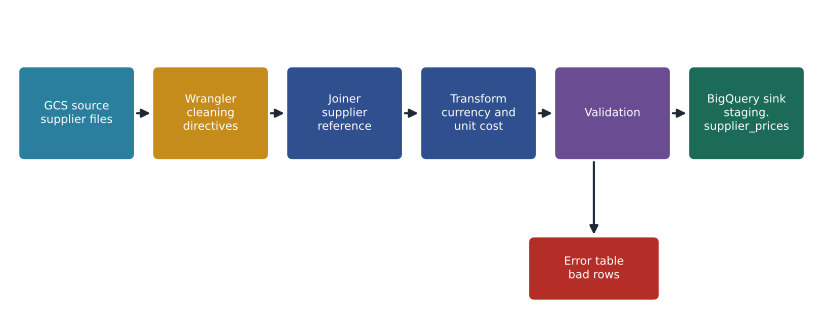
The pipeline Mateo builds over two sessions does five things. It reads every file a supplier drops into its folder in the landing bucket. It applies that supplier's Wrangler recipe to put the columns into a common layout. It joins the supplier reference table, which holds each supplier's currency and pack conventions. It converts every price to a cost per single unit in the reporting currency. And it validates the result, writing good rows to staging.supplier_prices and bad rows to an error table.
The currency step matters because about a third of Birchline's suppliers are in the United States and price in US dollars, while Birchline reports in Canadian dollars. The pipeline uses the monthly average exchange rate from the finance team's rate table, not a live rate, so that the month's cost figures match Finance's books.
Mateo writes the conversion rule in Python first, to check it on known rows before putting it into the pipeline.
# Normalize supplier prices to a cost per single unit in the reporting currency.
REPORTING = "CAD"
monthly_rate_to_cad = {"CAD": 1.0, "USD": 1.39}     # finance's October average (illustrative)

rows = [
    {"supplier": "Northfork Tents", "sku": "TNT-2P-GRN", "price": 152.00, "currency": "CAD", "pack_qty": 1},
    {"supplier": "Ridgeline Gear",  "sku": "STK-AL-08",  "price": 48.00,  "currency": "USD", "pack_qty": 8},
    {"supplier": "Ridgeline Gear",  "sku": "BTL-1L-BLU", "price": 69.00,  "currency": "USD", "pack_qty": 12},
    {"supplier": "Lakeshore Lamps", "sku": "HDL-LMP-01", "price": None,   "currency": "CAD", "pack_qty": 1},
]
good, errors = [], []
for r in rows:
    if r["price"] is None or r["pack_qty"] <= 0 or r["currency"] not in monthly_rate_to_cad:
        errors.append(r["sku"]); continue
    unit_cost = r["price"] / r["pack_qty"] * monthly_rate_to_cad[r["currency"]]
    good.append((r["sku"], round(unit_cost, 2)))

for sku, cost in good:
    print(f"{sku:11s} unit cost {cost:7.2f} {REPORTING}")
print("sent to error table:", errors)TNT-2P-GRN unit cost 152.00 CAD STK-AL-08 unit cost 8.34 CAD BTL-1L-BLU unit cost 7.99 CAD sent to error table: ['HDL-LMP-01']
What this code does
It takes four supplier price rows, each with a price for a pack of items in the supplier's currency. For every valid row it divides the pack price by the number of items in the pack and multiplies by the month's exchange rate, giving the cost of a single item in Canadian dollars. Rows with no price, an impossible pack size or an unknown currency are set aside for the error table instead of being guessed.
The test catches a real issue: Ridgeline Gear quotes tent stakes per pack of eight, which the old spreadsheet had sometimes treated as a single stake, making stakes look eight times more expensive than they were. Normalizing to a single unit removes that whole class of error.
Coping with sixty different files
The hardest part of the supplier feed is not any one file but the variety. Mateo and the buyer agree a simple structure that keeps it manageable. Each supplier gets its own folder in the landing bucket, named with the supplier code, so a pipeline run can be pointed at one supplier or all of them. File names must include the month, such as prices_2026-10.csv, so that a resent file replaces the right month instead of being loaded twice. Spreadsheets are read with Data Fusion's Excel source plugin, but suppliers are encouraged to send CSV, which removes problems with merged cells and hidden sheets.
Suppliers are grouped by the layout of their files. Twenty-two of them use the same distributor software and send identical columns, so they share one Wrangler recipe. Most of the rest fall into four other layouts, and only nine need a recipe of their own. When a supplier changes its layout, the run for that supplier fails at the validation step, the error output shows exactly which columns were not found, and the buyer contacts the supplier while the other 59 suppliers load normally. The two days of copying become about an hour a month of reviewing errors.
Replication and other Data Fusion features
Data Fusion can also do database replication, copying changes from operational databases such as MySQL, SQL Server and Oracle into BigQuery, which overlaps with Datastream. For Birchline's shop database, the team prefers Datastream, which is a dedicated serverless CDC service with no instance to keep running. Data Fusion's replication is more attractive for a team that already runs Data Fusion and wants all its integration in one place.
Other features worth knowing: pipelines can be parameterized with runtime arguments, such as the month to process, so one pipeline serves every month; triggers can start one pipeline when another finishes; and namespaces separate the pipelines of different teams in one instance. Private instances can reach sources inside a VPC without public IP addresses, which Teresa's team requires for anything touching internal systems.
Choosing among the low-code and code options
| Option | Interface | Where it runs | Best fit |
|---|---|---|---|
| Cloud Data Fusion | Visual pipeline studio with plugins | Dataproc clusters created per run | ETL from many varied sources by people who prefer not to code |
| BigQuery data preparation | Visual cleaning with Gemini suggestions | BigQuery, scheduled through Dataform | Cleaning data that is already in BigQuery |
| Dataform | SQL (SQLX) files in Git | BigQuery | Managing many related SQL transformations with tests |
| Dataflow templates | Parameters, no code | Dataflow | Common moves such as Pub/Sub or files to BigQuery |
| Custom Dataflow (Beam) | Code | Dataflow | Streaming, windows and complex logic |
A useful way to decide is to ask where the data is when the transformation happens. If it is already in BigQuery, transform it there, with SQL, Dataform or data preparation. If it is outside and needs reshaping on the way in from many different systems, Data Fusion fits. If it is a stream, or the logic is complex, Dataflow fits. The exam's scenarios usually contain a clue: "without writing code" and "many different sources" point toward Data Fusion; "already loaded in BigQuery" points toward SQL-based options; "real time" points toward Dataflow or Pub/Sub.
Access needs the same care as in any pipeline. A Data Fusion instance acts through service accounts: one for the instance itself and one used by the Dataproc clusters that run pipelines, and those accounts need permission to read the landing bucket and write to the staging dataset, and nothing more. Passwords for external sources, such as the marketing agency's SFTP server, should not be typed into pipeline properties where anyone with access to the pipeline can read them. Data Fusion can store them in its secure store, or the team can keep them in Secret Manager, and the pipeline refers to them by name. Teresa's team reviews the list of external connections each quarter, the same way it reviews admin accounts.
Monitoring and lineage
Each Data Fusion pipeline run records its status, the number of records read and written at each node, and logs that go to Cloud Logging. The team sets an alert on any failed run and checks the record counts: if a supplier's file produced 1,400 rows last month and 14 this month, something changed in the file even if the run succeeded. Data Fusion's lineage view shows, for any field in staging.supplier_prices, which source file and column it came from and which transformations touched it. When a buyer questions a unit cost, Mateo can trace it back to the exact supplier file in a few clicks.
Common mistakes
MistakeCreating an always-on Enterprise instance for one monthly file.
InsteadMatch the edition and instance to the workload; batch several feeds into one instance or use simpler tools for single small jobs.
MistakeBuilding the same Wrangler steps by hand for each supplier.
InsteadKeep recipes as text, reuse them, and parameterize pipelines.
MistakeConverting supplier prices with a live exchange rate.
InsteadUse Finance's agreed rate so cost figures match the books.
MistakeUsing Data Fusion for data that is already in BigQuery.
InsteadTransform it in BigQuery with SQL, Dataform or data preparation.
Worked problem
Is Data Fusion the right tool?
The marketing agency will send campaign spending files weekly from an SFTP server. The files need columns renamed, dates parsed and costs joined to the campaign list before landing in BigQuery. Merchandising's analyst, who will maintain the pipeline, does not write code. Birchline already runs a Basic Data Fusion instance. Which tool should the team use?
Show solution
- The source is outside Google Cloud, on an SFTP server, and Data Fusion has an SFTP source plugin.
- The transformations are standard cleaning and a join, which Wrangler and the Joiner transform handle visually.
- The maintainer does not code, which favours a visual tool.
- An instance already exists, so the extra cost is mainly the Dataproc time for one weekly run.
Answer: Use a Data Fusion pipeline on the existing instance, scheduled weekly, with an error output and a run-failure alert.
Summary and key terms
- Cloud Data Fusion is a managed, visual data integration service built on CDAP.
- Pipelines connect source, transform and sink plugins, and run on Dataproc clusters created for each run.
- Instances are billed per hour and come in Developer, Basic and Enterprise editions.
- Wrangler cleans data by example and records directives that run on the full data.
- Data Fusion also offers replication, parameters, triggers, namespaces, private instances and lineage.
- Choose it for ETL from many varied sources by people who prefer not to code; transform data already in BigQuery with SQL, Dataform or data preparation, and use Dataflow for streams and complex logic.
- Cloud Data Fusion
- A managed, visual data integration service for building ETL pipelines.
- Plugin
- A Data Fusion building block: a source, transform or sink.
- Wrangler
- A Data Fusion transform for cleaning data interactively, recorded as directives.
- Directive
- One recorded Wrangler cleaning step, such as rename or trim.
- Instance
- A Data Fusion environment in a region, billed per hour.
- Lineage
- A record of which sources and transformations produced each field.
- Runtime argument
- A value passed to a pipeline when it starts, such as the month to process.
Practice problems
Work each problem on paper first, then reveal the answer to check.
Where do Data Fusion pipelines actually run?
Show answer
On Dataproc clusters, created for each run by default.
Why is a Data Fusion instance costly for a single small monthly job?
Show answer
The instance is billed per hour while it exists, not only while pipelines run.
Which Data Fusion transform cleans data by example?
Show answer
Wrangler.
What does the lineage view let Mateo do?
Show answer
Trace a value back to its source file and the transformations applied.
Lesson quiz · 5 questions
Score 60% or more to complete this lesson.
Create a free account to save your progress, take quizzes and earn a certificate.