
GCP-220 · Lesson 5 of 12 · 19 min
Choosing an ingestion approach: batch or streaming
▶ Video coming soon A video version of this lesson is on the way.
On Tuesday, October 20, Ravi puts the source inventory from lesson 1 back on the screen. "We know what the data looks like and how to clean it," he says. "Now: how does each source get here?" The answer is different for each row of the table, and choosing well depends on a few questions that the exam asks again and again in different forms.
Batch, micro-batch and streaming
Batch ingestion moves data in chunks on a schedule: last night's till files, this month's supplier price lists, a one-time export of ten years of history. It is simple, cheap and easy to re-run, and it is the right choice whenever the people using the data can wait for the next batch.
Streaming ingestion moves each record as it happens, typically within seconds: a click on the website, a payment approval, a sensor reading. It is needed when decisions are made in near real time, such as showing the shop's operations team a live view of checkout failures, or flagging a suspicious order before it ships.
Between the two sits micro-batch: small batches every few minutes. Many "real-time" requirements turn out to be satisfied by data that is five or fifteen minutes old, and micro-batch is often simpler to run than true streaming. Change data capture from a database, covered below, behaves somewhat like a stream of small changes.
| Approach | Typical delay | Birchline example | Strengths | Costs |
|---|---|---|---|---|
| Batch | Hours to a day | Nightly till files, monthly supplier price lists | Simple, cheap, easy to re-run and check | Data is old by the time it is used |
| Micro-batch | Minutes | Online orders every 15 minutes for the operations dashboard | Fresh enough for most uses, still easy to reason about | More runs to schedule and monitor |
| Streaming | Seconds | Web events for a live checkout-failure view | Lowest delay; reacts to events as they happen | More moving parts; ordering, duplicates and late data must be handled |
The question to ask is not "how fast can we make it?" but "how old can the data be when someone uses it, and what does it cost if it is older?" Mateo goes back to each data owner with that question. Finance needs store sales by eight in the morning for the daily flash report, so nightly batch is enough. The operations team wants to see checkout errors within a minute so they can call the payment provider, which needs streaming. Merchandising looks at web search trends weekly and can use whatever arrives.
Choosing a transfer tool
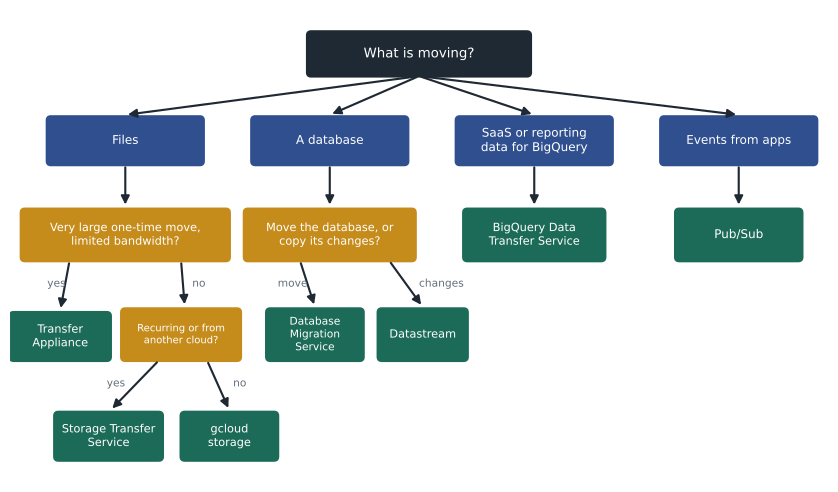
Google Cloud has several tools for moving data in, and the exam often describes a situation and asks which one fits. The table sorts them by what they move and from where.
| Tool | Moves | From | Typical use |
|---|---|---|---|
| gcloud storage (cp, rsync) | Files | A computer or server you control | Small or occasional uploads; scripts on a server |
| Storage Transfer Service | Files and objects | Other clouds (such as Amazon S3 and Azure Blob Storage), HTTP sources, other Cloud Storage buckets, and on-premises file systems through agents | Large or recurring transfers, scheduled, with retries and verification |
| Transfer Appliance | Files, offline | A data centre with too much data or too little bandwidth | Shipping a physical device for very large one-time moves |
| BigQuery Data Transfer Service | Data into BigQuery tables | Google SaaS (Google Ads, YouTube, Google Play, Search Ads 360), other clouds' storage, some data warehouses for migration, and scheduled queries | Recurring loads of reporting data straight into BigQuery |
| Database Migration Service | Whole databases | MySQL, PostgreSQL, SQL Server and Oracle sources | Migrating a database to Cloud SQL or AlloyDB |
| Datastream | Ongoing changes from databases (change data capture) | MySQL, PostgreSQL, Oracle and SQL Server | Replicating changes into BigQuery or Cloud Storage with low delay |
| Pub/Sub | Event messages | Applications and devices that publish events | Streaming ingestion (lesson 7) |
Several of these tools are easy to confuse. Storage Transfer Service moves files into Cloud Storage; BigQuery Data Transfer Service loads data into BigQuery tables, usually on a schedule, from sources it has connectors for. Database Migration Service moves a database to another database; Datastream copies changes from a database continuously, typically into BigQuery for analysis. Keeping those four apart answers a surprising number of exam questions.
Online or offline: the bandwidth question
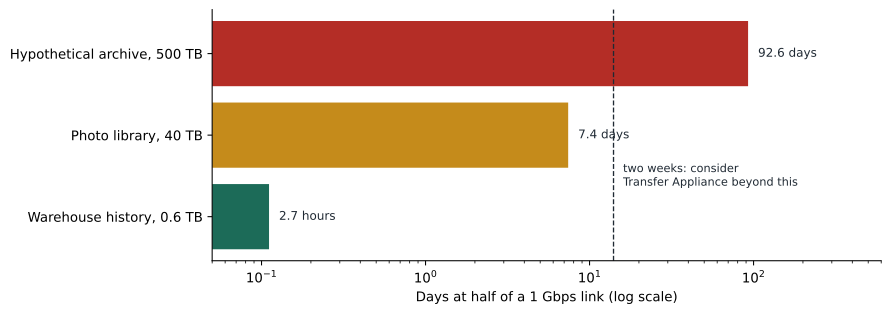
For the one-time move of the old warehouse's history and the 40 TB product photo library, the first question is whether to send the data over the network or ship it on a Transfer Appliance. The answer depends on the amount of data and the bandwidth that can be spared. Birchline's head office has a 1 gigabit per second internet connection, but the network team will allow only about half of it for transfers during business hours.
# How long would it take to send each dataset over the network?
def days_to_transfer(terabytes, link_gbps, usable_share):
    bits = terabytes * 1e12 * 8                 # 1 TB = 10**12 bytes
    seconds = bits / (link_gbps * 1e9 * usable_share)
    return seconds / 86_400

datasets = {"Warehouse history (Parquet)": 0.6, "Product photo library": 40}
for name, tb in datasets.items():
    day = days_to_transfer(tb, link_gbps=1, usable_share=0.5)
    night = days_to_transfer(tb, link_gbps=1, usable_share=0.9)
print(f"{name:28s} {tb:5.1f} TB about {day:5.1f} days at half the link, {night:5.1f} days at 90 in 100")Warehouse history (Parquet) 0.6 TB about 0.1 days at half the link, 0.1 days at 90 in 100 Product photo library 40.0 TB about 7.4 days at half the link, 4.1 days at 90 in 100
What this code does
It converts each dataset's size from terabytes to bits and divides by the part of the internet connection that can be used, giving the transfer time in seconds and then in days. It does this twice: once using half the connection, as allowed during business hours, and once using most of it, as might be possible overnight. The results show that the warehouse history moves in hours, while the photo library needs about a week at half the link.
The warehouse history, exported to compressed Parquet at about 0.6 TB, takes under three hours. The photo library takes a little over seven days at half the link, or about four days with most of the link overnight and at weekends. That is slow but manageable, so the team plans to use Storage Transfer Service with an on-premises agent, which can be limited to a set bandwidth and resumes automatically after interruptions. Transfer Appliance makes sense when an online transfer would take far longer, typically weeks or months, or when the network cannot be spared at all. Google's documentation suggests comparing the online transfer time with the time to order, fill and ship an appliance.
| Data | Size | Online time at half of 1 Gbps | Decision |
|---|---|---|---|
| Warehouse history (Parquet) | About 0.6 TB | About 2.7 hours | Upload with gcloud storage or Storage Transfer Service |
| Product photo library | About 40 TB | About 7.4 days | Storage Transfer Service with an on-premises agent, bandwidth-limited |
| A hypothetical 500 TB archive | 500 TB | About 93 days | Transfer Appliance |
Birchline's ingestion plan
By the end of the session, Mateo has a plan for each source. It is the first page of what will become the team's ingestion design document.
| Source | Approach | Tool | Landing place | Lesson |
|---|---|---|---|---|
| Store till files | Nightly batch | Stores upload to Cloud Storage; BigQuery load job (ELT) | gs://bl-data-landing/pos/ then raw.pos_sales | 6 |
| Online orders and product catalogue | Continuous changes | Datastream from MySQL | raw dataset in BigQuery | 6 |
| Web events | Streaming | Pub/Sub, then a BigQuery subscription or Dataflow | raw.web_events | 7 and 8 |
| Returns portal | Nightly batch with a light transform (ETLT) | Cloud Run job converts and masks; BigQuery load | raw.returns | 6 |
| Supplier price lists | Monthly batch from many formats | Cloud Data Fusion pipeline | staging.supplier_prices | 9 |
| Google Ads campaign data | Daily batch | BigQuery Data Transfer Service | raw.google_ads | 6 |
| Warehouse history | One-time bulk | Export to Parquet; upload; load | raw.history_sales | 6 |
| Product photo library | One-time bulk | Storage Transfer Service with an agent | gs://bl-product-photos/ | 11 |
Triggering a batch: schedules and arrival events
A batch load needs something to start it. The simplest trigger is a schedule: run the load at 03:00 every night, after the stores' 02:00 delivery deadline. Cloud Scheduler, BigQuery scheduled queries and the schedulers built into Storage Transfer Service and BigQuery Data Transfer Service all work this way. Schedules are easy to understand, but they assume the data has arrived. If store 019's file turns up at 03:20, a 03:00 load misses it until the next night.
The alternative is to trigger on arrival. Cloud Storage can announce each new object, and Eventarc can route that event to a Cloud Run service or a Cloud Run function that starts a load for just that file. Each store's sales then load minutes after they arrive, and a late file is simply loaded late. The price is more moving parts: one load per file instead of one per night, and a separate check that all 40 files eventually arrived. Birchline starts with a nightly schedule plus a missing-file check, and plans to revisit arrival triggers once the stores move to the new tills.
Whichever trigger is used, the job runs as a service account, not as a person. Ravi creates one service account for the nightly load with only the permissions it needs: read objects in the landing bucket, create load jobs and write to the raw dataset. GCP-222 returns to access control, but the habit starts here: no pipeline should depend on someone's personal account staying active.
Change data capture
The online shop's MySQL database deserves a closer look. Copying the whole orders table every fifteen minutes would mostly copy rows that have not changed, and would put load on the production database. Change data capture (CDC) instead reads the database's own change log, the binary log in MySQL, and sends only inserts, updates and deletes. Datastream does exactly this and can write the changes into BigQuery, where it keeps a table that mirrors the source. The delay is typically seconds to minutes, and the shop database barely notices.
CDC does need some preparation on the source. The database must keep its change log long enough for Datastream to read it, Datastream needs a user with the right permissions, and the network path between Datastream and the database must be set up, for example through private connectivity. The shop team schedules that work with Mateo for early November, and the first Datastream stream is planned for the week of November 16.
Thinking about reliability
Whatever the approach, an ingestion job fails sometimes: a store's upload is late, a network link drops, a source sends a malformed file. Good designs plan for it. Batch loads should be idempotent, so re-running a night does not double it, as lesson 4 explained. Transfers should verify what they copied, which Storage Transfer Service does by checking checksums. Streaming pipelines must expect duplicates and late events, which lessons 7 and 8 cover. And every feed needs a way to notice missing data, which is the subject of lesson 10.
Common mistakes
MistakeChoosing streaming because it sounds modern.
InsteadAsk how old the data can be when used; choose batch unless fresher data is worth the extra complexity.
MistakeUsing Storage Transfer Service to load data into BigQuery tables.
InsteadStorage Transfer Service moves files into Cloud Storage; BigQuery Data Transfer Service and load jobs fill tables.
MistakeUsing Database Migration Service to feed analytics from a live database.
InsteadUse Datastream for continuous change data capture into BigQuery; DMS is for migrating databases.
MistakeOrdering a Transfer Appliance for a few terabytes.
InsteadCalculate the online transfer time first; an appliance pays off only for very large moves or very limited bandwidth.
Worked problem
Picking tools for a new source
Birchline's marketing team wants the daily performance of its Google Ads campaigns in BigQuery, and the e-commerce team wants every change to the product catalogue in BigQuery within a few minutes. Which tool fits each?
Show solution
- Google Ads is a Google SaaS source with a connector in BigQuery Data Transfer Service, which can load campaign data into BigQuery tables on a daily schedule.
- The product catalogue lives in the shop's MySQL database and changes during the day.
- Copying the whole table repeatedly would be wasteful; change data capture sends only the changes.
- Datastream reads MySQL's change log and writes the changes into BigQuery within minutes.
Answer: BigQuery Data Transfer Service for Google Ads; Datastream for the product catalogue.
Summary and key terms
- Batch ingestion moves data in scheduled chunks, streaming moves each record within seconds, and micro-batch runs small batches every few minutes.
- Choose by asking how old data can be when it is used. gcloud storage suits small uploads; Storage Transfer Service moves files into Cloud Storage from other clouds, HTTP and on-premises agents; Transfer Appliance ships very large datasets offline.
- BigQuery Data Transfer Service loads SaaS and other sources into BigQuery tables on a schedule.
- Database Migration Service migrates databases; Datastream captures database changes continuously into BigQuery.
- Pub/Sub receives events.
- Compare online transfer time with appliance time for large moves, and design every feed to be re-runnable and checked.
- Batch ingestion
- Moving data in chunks on a schedule.
- Streaming ingestion
- Moving each record as it happens, typically within seconds.
- Micro-batch
- Small batches run every few minutes.
- Storage Transfer Service
- A managed service that copies files into Cloud Storage from other clouds, HTTP sources, buckets and on-premises systems.
- Transfer Appliance
- A physical device Google ships for very large offline data transfers.
- BigQuery Data Transfer Service
- A service that loads data from supported sources into BigQuery on a schedule.
- Change data capture
- Copying only the inserts, updates and deletes from a database's change log.
- Datastream
- Google Cloud's managed change data capture service.
Practice problems
Work each problem on paper first, then reveal the answer to check.
What is the first question when choosing between batch and streaming?
Show answer
How old the data can be when someone uses it, and what it costs if it is older.
Which tool copies ongoing changes from MySQL into BigQuery?
Show answer
Datastream.
Which tool loads Google Ads data into BigQuery on a schedule?
Show answer
BigQuery Data Transfer Service.
About how long does 40 TB take over half of a 1 Gbps link?
Show answer
About 7.4 days.
Lesson quiz · 5 questions
Score 60% or more to complete this lesson.
Create a free account to save your progress, take quizzes and earn a certificate.