
GCP-220 · Lesson 7 of 12 · 20 min
Pub/Sub for event data
▶ Video coming soon A video version of this lesson is on the way.
Birchline has never captured what shoppers do on its website. The shop logs orders, but not the searches that found nothing, the products viewed and abandoned, or the checkout pages where payments failed. Jules Baptiste, the e-commerce product manager, wants those events, and the operations team wants checkout failures within a minute. On Tuesday, October 27, Ravi introduces the service that will receive them: Pub/Sub.
What Pub/Sub is
Pub/Sub is Google Cloud's managed messaging service. Applications called publishers send messages to a topic. Other applications receive those messages through subscriptions attached to the topic. Publishers and subscribers never talk to each other directly, so the website does not need to know who uses its events, and new uses can be added later by adding subscriptions. Pub/Sub stores each message until every subscription has received and acknowledged it, which lets subscribers fall behind for a while, for example during a deployment, without losing data.
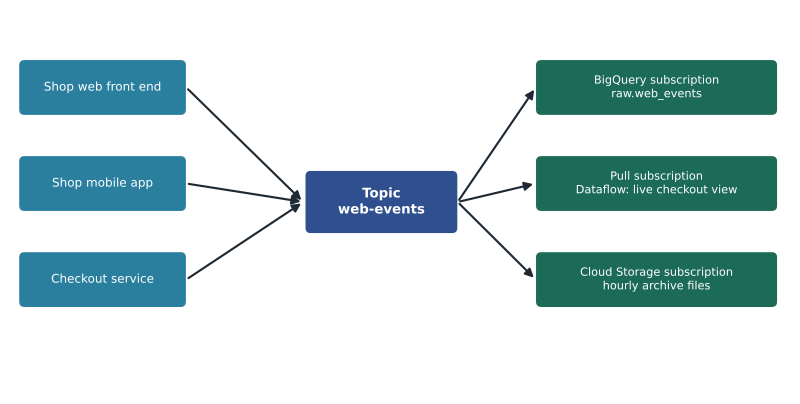
The decoupling is the main reason to use Pub/Sub for ingestion. Without it, the website would have to write directly into BigQuery, retry when BigQuery was briefly unavailable, and be changed whenever a new consumer appeared. With it, the website publishes and forgets, and each consumer reads at its own pace.
Messages, topics and subscriptions
A message has a data payload, which Pub/Sub treats as bytes and which Birchline encodes as JSON, plus optional attributes: short key-value pairs such as event_type=search or app=mobile that subscribers can filter on without opening the payload. Pub/Sub assigns each message a message ID and a publish time. Messages can be up to 10 MB, far more than a web event needs.
{"event_id": "e-6f1c2a90", "event_type": "add_to_cart", "event_time": "2026-10-27T15:04:11.482Z",
 "session_id": "s-91b07", "page": "/p/TNT-2P-GRN", "sku": "TNT-2P-GRN", "qty": 1, "app": "web"}
attributes: event_type=add_to_cart, app=web
Note that the event carries its own event_id and event_time, set by the website when the click happened. Pub/Sub's message ID and publish time describe when the message reached Pub/Sub, which can be later if the shopper's phone was offline for a moment. For analysis, the time that matters is the event time.
| Subscription type | How messages are delivered | Good for |
|---|---|---|
| Pull | The subscriber asks Pub/Sub for messages and acknowledges each after processing | Dataflow pipelines and services that control their own pace |
| Push | Pub/Sub sends each message to an HTTPS endpoint, such as a Cloud Run service | Event-driven services that react to each message |
| BigQuery subscription | Pub/Sub writes messages straight into a BigQuery table, using the Storage Write API | Landing events in BigQuery with no pipeline code |
| Cloud Storage subscription | Pub/Sub writes batches of messages as files in a bucket | Archiving raw events cheaply, in text or Avro files |
For Birchline, the BigQuery subscription is the obvious way to land events: it needs no code, it writes directly into raw.web_events, and it can either write the whole message into a column or map the JSON fields onto the table's columns when a topic schema is set. A Cloud Storage subscription keeps an hourly archive of raw events in a bucket, which is cheaper than BigQuery storage for data that will rarely be read again. The live checkout dashboard needs some processing first, such as counting failures per minute, so it reads from a pull subscription through Dataflow, which is the subject of lesson 8.
Delivery guarantees
Pub/Sub's default delivery is at least once: every message will be delivered, but occasionally one may be delivered more than once, for example when a subscriber fails to acknowledge in time and Pub/Sub sends it again. Subscribers must therefore tolerate duplicates. Pull subscriptions can turn on exactly-once delivery, which prevents redelivery of a message that was acknowledged successfully, within one region; it adds some latency and is not a substitute for handling duplicates that the publisher itself sends twice. The website may retry a publish after a network timeout, and that produces two messages with different message IDs but the same event_id.
The practical rule is to treat event_id as the key and remove duplicates downstream. In BigQuery staging, a QUALIFY with ROW_NUMBER partitioned by event_id, as in lesson 4, keeps one copy of each event.
# Removing duplicate events by event_id, keeping the earliest copy received.
received = [
    {"msg_id": "m1", "event_id": "e-01", "event_type": "view",        "publish_ms": 1000},
    {"msg_id": "m2", "event_id": "e-02", "event_type": "add_to_cart", "publish_ms": 1040},
    {"msg_id": "m3", "event_id": "e-02", "event_type": "add_to_cart", "publish_ms": 1310},  # publisher retry
    {"msg_id": "m2", "event_id": "e-02", "event_type": "add_to_cart", "publish_ms": 1040},  # redelivery
    {"msg_id": "m4", "event_id": "e-03", "event_type": "checkout_error", "publish_ms": 1400},
]
first_seen = {}
for m in sorted(received, key=lambda m: m["publish_ms"]):
    first_seen.setdefault(m["event_id"], m)

print("messages received:", len(received))
print("distinct message ids:", len({m["msg_id"] for m in received}))
print("distinct events:", len(first_seen))
for e in first_seen.values():
print(e["event_id"], e["event_type"], "from", e["msg_id"])messages received: 5 distinct message ids: 4 distinct events: 3 e-01 view from m1 e-02 add_to_cart from m2 e-03 checkout_error from m4
What this code does
It takes five messages as a subscriber might receive them and keeps only the first copy of each event, using the event identifier set by the website. One extra copy came from Pub/Sub delivering the same message twice and one from the website retrying its publish, which created a new message ID. Counting distinct message IDs would still leave one duplicate, while counting distinct event identifiers gives the true three events.
The output shows why Mateo deduplicates on event_id and not on the message ID: the publisher's retry created a genuinely new message with a new message ID, so only the event's own identifier reveals it as a copy.
Acknowledgement, retention and replay
When a subscriber receives a message, it has an acknowledgement deadline to process it and acknowledge it, 10 seconds by default and adjustable up to 10 minutes. If the deadline passes without an acknowledgement, Pub/Sub delivers the message again. Unacknowledged messages are kept for the subscription's retention period, 7 days by default and up to 31 days. A topic can also be configured to retain messages, which, together with the seek feature, lets a subscription replay messages from a past time, for example after a bug in a pipeline wrote bad results for an afternoon.
Messages that repeatedly fail, perhaps because they are malformed, can be sent to a dead-letter topic after a set number of delivery attempts. That keeps one bad message from being retried forever and blocking attention from the rest. Birchline sends failures to web-events-dead-letter, and a small alert tells Mateo when anything arrives there.
| Setting | Birchline choice | Why |
|---|---|---|
| Acknowledgement deadline | 60 seconds for the pull subscription | Dataflow handles extension automatically; 60 seconds gives room for slow moments |
| Subscription message retention | 7 days | Covers a long weekend outage with room to spare |
| Topic retention | 7 days | Allows replay into a new subscription or after a pipeline bug |
| Dead-letter topic | After 5 delivery attempts | Keeps malformed events from blocking the queue |
| Exactly-once delivery | On for the dashboard's pull subscription | Fewer duplicate counts on the live view; staging still deduplicates |
| Message ordering | Off | Analysis uses event_time, not arrival order; ordering adds cost and limits throughput |
Ordering and late data
Pub/Sub does not promise to deliver messages in the order they were published unless ordering keys are used, and then only for messages with the same key published in the same region. Ordering is useful when the sequence of messages matters to the subscriber, such as applying updates to the same record in order. For analytics, ordering usually matters less than it seems: the events carry their own event_time, and queries sort or group by that.
Late data is the other side of the same coin. A shopper on a train may generate events that reach Pub/Sub minutes after they happened. A dashboard that counts events by the minute they arrived will put them in the wrong minute; one that counts by event_time puts them in the right minute but must decide how long to wait for stragglers. Lesson 8 shows how Dataflow handles this with windows and watermarks.
Schemas and filters
A topic can have a schema, written in Avro or Protocol Buffers, and Pub/Sub then rejects messages that do not match it. That stops malformed events at the door instead of in a pipeline. Birchline adds an Avro schema for web events with the eight fields above, with sku and qty optional because most events are page views. Subscriptions can also have a filter on attributes, so a subscription that only cares about checkout errors can ask for event_type = "checkout_error" and never receive the millions of page views.
gcloud pubsub topics create web-events \
  --schema=web-event-v1 --message-encoding=json \
  --message-retention-duration=7d

gcloud pubsub subscriptions create web-events-to-bq \
  --topic=web-events \
  --bigquery-table=bl-data-prod:raw.web_events \
  --use-topic-schema \
  --dead-letter-topic=web-events-dead-letter --max-delivery-attempts=5

gcloud pubsub subscriptions create checkout-errors \
  --topic=web-events --message-filter='attributes.event_type = "checkout_error"' \
  --enable-exactly-once-delivery --ack-deadline=60
Watching the backlog
A subscription that falls behind is the most common Pub/Sub problem in practice, and Cloud Monitoring shows it with two metrics. The number of unacknowledged messages says how big the backlog is, and the age of the oldest unacknowledged message says how far behind the subscriber is. The age is usually the more useful alert: a backlog of 50,000 messages is fine if they are 20 seconds old, but a single message that is two hours old means something is stuck. Mateo sets an alert on the checkout-errors subscription when the oldest message is older than two minutes, because the dashboard is supposed to be live, and a looser alert of one hour on the BigQuery subscription. If the age keeps rising toward the 7-day retention limit, messages will start to expire, so the alert gives the team time to act long before anything is lost.
Sizing and cost
About 2 million events a day sounds large, but Pub/Sub is built for far more. At an average of 0.6 KB per event, 2 million events is about 1.2 GB a day, or about 36 GB a month for each subscription that reads them. Pub/Sub prices by the volume of data published and delivered, with a free allowance each month, so the main cost driver is how many subscriptions read the full stream. That is one more reason to use filters: the checkout-errors subscription reads only a tiny share of the volume. Storage for retained messages is billed too, so long topic retention is worth it only if replay is likely to be needed.
Keeping personal data in mind
Web events can easily carry personal information: an email address typed into a search box, a postal code, an account number in a URL. Under PIPEDA, Birchline must limit collection to what it needs for identified purposes. The shop developers agree to send session identifiers rather than customer identifiers, to strip query strings from page URLs, and to never put form contents in events. Teresa Okonjo's team reviews the event schema before it goes live, and any change to the schema goes through the same review.
Common mistakes
MistakeHaving the website write directly into BigQuery.
InsteadPublish to Pub/Sub and let subscriptions deliver to BigQuery and other consumers.
MistakeAssuming each message arrives exactly once.
InsteadExpect duplicates with at-least-once delivery and deduplicate on an event identifier.
MistakeDeduplicating on Pub/Sub's message ID.
InsteadUse the event's own ID; a publisher retry creates a new message ID for the same event.
MistakeCounting events by arrival time.
InsteadUse the event time recorded at the source, and handle late events.
MistakeLeaving one bad message to be retried forever.
InsteadSet a dead-letter topic and alert on anything that lands there.
Worked problem
Choosing subscriptions for a new use
Merchandising wants all search events, with their search terms, in BigQuery for weekly analysis. The fraud team wants every checkout_error event delivered to its own Cloud Run service within seconds. What should be added to the web-events topic?
Show solution
- Search events already land in raw.web_events through the BigQuery subscription, so merchandising can query them there; no new subscription is needed.
- For the fraud team, create a push subscription to the Cloud Run service's HTTPS endpoint.
- Add a filter on attributes.event_type = "checkout_error" so the service receives only those events.
- Give the push subscription a dead-letter topic, and make the service tolerate duplicates by checking event_id.
Answer: Reuse the BigQuery subscription for search analysis, and add a filtered push subscription with a dead-letter topic for the fraud service.
Summary and key terms
- Pub/Sub decouples publishers from subscribers: publishers send messages to a topic and each subscription delivers them to one consumer.
- Subscriptions can be pull, push, BigQuery (writing straight to a table) or Cloud Storage (writing files).
- Delivery is at least once by default, so subscribers must handle duplicates, ideally using an event ID set by the source; exactly-once delivery is available for pull subscriptions in one region.
- Unacknowledged messages are retained, 7 days by default, and topics can retain messages for replay with seek.
- Dead-letter topics catch messages that keep failing.
- Ordering keys order messages with the same key, but analytics should rely on event time.
- Topic schemas reject malformed messages, and filters reduce what each subscription receives.
- Topic
- A named channel that publishers send messages to.
- Subscription
- A named stream of a topic's messages delivered to one consumer.
- BigQuery subscription
- A subscription that writes messages directly into a BigQuery table.
- At-least-once delivery
- Every message is delivered, possibly more than once.
- Acknowledgement deadline
- The time a subscriber has to acknowledge a message before it is redelivered.
- Dead-letter topic
- A topic that receives messages that failed delivery a set number of times.
- Seek
- A Pub/Sub feature that replays retained messages from a chosen time or snapshot.
- Event time
- The time an event happened at its source, as opposed to when it was received.
Practice problems
Work each problem on paper first, then reveal the answer to check.
Why does a publisher retry create a duplicate that message IDs cannot detect?
Show answer
The retry is a new message with a new message ID but the same event.
Which subscription type writes straight into a BigQuery table?
Show answer
A BigQuery subscription.
How long are unacknowledged messages kept by default?
Show answer
7 days.
What stops malformed events at the topic?
Show answer
A topic schema.
Lesson quiz · 5 questions
Score 60% or more to complete this lesson.
Create a free account to save your progress, take quizzes and earn a certificate.