
GCP-220 · Lesson 8 of 12 · 20 min
Dataflow pipelines in practice
▶ Video coming soon A video version of this lesson is on the way.
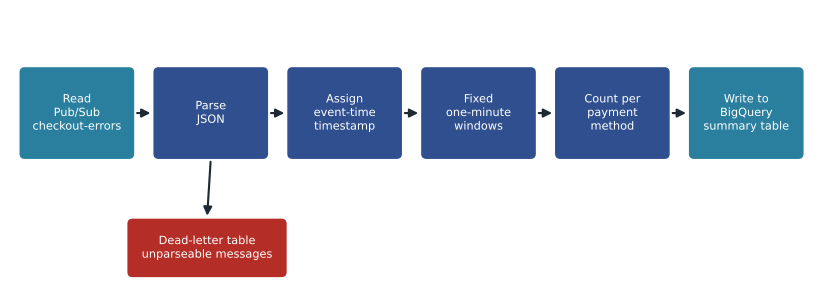
The BigQuery subscription from lesson 7 lands every web event in raw.web_events, but the operations team's request is different. They want a small table, refreshed every minute, that shows how many checkout errors each payment method produced in that minute, so they can call the payment provider the moment something breaks. That needs events grouped by time as they arrive, which is a job for a stream processor. On Thursday, October 29, Ravi introduces Dataflow.
What Dataflow is
Dataflow is Google Cloud's managed service for running data processing pipelines written with Apache Beam, an open-source programming model. Beam lets one pipeline describe a series of steps, such as read, parse, filter, group, aggregate and write, and the same code can process a fixed batch of files or an endless stream of messages. Dataflow runs the pipeline on workers it creates and removes automatically, balances the work among them, and retries failed pieces. You do not manage servers; you pay for the resources the job uses while it runs.
| Beam idea | Meaning | In Birchline's checkout pipeline |
|---|---|---|
| Pipeline | The whole graph of steps, from sources to sinks | From Pub/Sub to a BigQuery summary table |
| PCollection | A collection of elements flowing between steps; bounded for batch, unbounded for streams | The stream of checkout_error events |
| PTransform | A step that turns one PCollection into another | Parse JSON, keep checkout errors, count per payment method |
| Source and sink (I/O connectors) | Steps that read from or write to systems | Read from a Pub/Sub subscription; write to BigQuery |
| Runner | The engine that executes the pipeline | Dataflow (the same code could run locally for testing) |
Templates: Dataflow without writing code
Many ingestion jobs are so common that Google provides ready-made pipelines called templates. A template is launched with parameters, from the console, the gcloud CLI or an API call, and needs no Beam code at all. Google-provided templates cover moves such as Pub/Sub to BigQuery, text files in Cloud Storage to BigQuery, a JDBC database to BigQuery, Datastream output to BigQuery, and Pub/Sub to Cloud Storage. Teams can also package their own pipelines as Flex Templates, so that analysts can run them with different parameters without touching the code. The Dataflow console also offers a job builder for assembling simple pipelines visually, and Beam pipelines can be described in YAML for straightforward cases.
| Need | Option | Why |
|---|---|---|
| Land Pub/Sub messages in BigQuery with simple mapping | A BigQuery subscription (no Dataflow) or the Pub/Sub to BigQuery template | No code; the subscription is simplest if no transformation is needed |
| Load CSV files from Cloud Storage with a small transformation | The text files to BigQuery template with a user-defined function | A JavaScript or Python function can reshape each record |
| Group a stream by time and aggregate | A custom Beam pipeline, possibly packaged as a Flex Template | Windows and triggers need code |
| Very large batch transformation of files | A custom Beam pipeline, or SQL in BigQuery after loading | ELT in BigQuery is often simpler if the data can be loaded first |
Ravi's advice is to reach for the simplest tool that works. For landing web events, the BigQuery subscription already does the job, and adding Dataflow would only add cost. For the checkout summary, a custom pipeline is justified because it groups events into one-minute windows by event time, which neither a subscription nor a simple template does.
Windows, watermarks and late data
A stream never ends, so aggregations over it need boundaries. Windowing divides the stream into finite groups by event time. Beam offers three main kinds. Fixed windows are back-to-back intervals of the same length, such as each minute. Sliding windows overlap, such as a five-minute window starting every minute, which smooths a dashboard. Session windows group events from the same key that are close together and close when there is a gap, which suits shopper sessions.
| Window type | Shape | Birchline use |
|---|---|---|
| Fixed (tumbling) | Consecutive, non-overlapping intervals | Checkout errors per minute |
| Sliding (hopping) | Overlapping intervals of a set length, starting at a set period | Searches with no results over the last 15 minutes, updated every minute |
| Session | Activity for one key separated by gaps of inactivity | Shopper sessions ending after 30 minutes of inactivity |
| Global | One window for all time | Rarely used for streams without triggers |
Events arrive late, as lesson 7 explained, so the pipeline needs to know when a window can be considered complete. Dataflow tracks a watermark: its estimate of how far event time has progressed, meaning that events older than the watermark are not expected any more. When the watermark passes the end of a window, the window's result is emitted. Allowed lateness says how long after that the pipeline should still accept stragglers and update the result, and triggers decide when results are emitted, for example early speculative results every few seconds and a final one when the watermark passes.
# Counting checkout errors in one-minute event-time windows, with late events.
events = [  # (event_time_seconds, payment_method, arrival_time_seconds)
    (5, "CARD", 6), (20, "CARD", 21), (42, "PAYPAL", 43), (58, "CARD", 70),   # last one arrives late
    (61, "CARD", 62), (75, "CARD", 76), (119, "GIFT", 121), (30, "CARD", 140), # very late event
]
window = 60          # seconds
allowed_lateness = 30

counts, dropped = {}, []
for t, method, arrived in sorted(events, key=lambda e: e[2]):
    start = t - t % window
    window_end = start + window
    if arrived > window_end + allowed_lateness:
        dropped.append((t, method, arrived))
        continue
    key = (start, method)
    counts[key] = counts.get(key, 0) + 1

for (start, method), n in sorted(counts.items()):
    print(f"window {start:3d}-{start + window:3d}s  {method:6s} {n}")
print("dropped as too late:", dropped)window 0- 60s CARD 3 window 0- 60s PAYPAL 1 window 60-120s CARD 2 window 60-120s GIFT 1 dropped as too late: [(30, 'CARD', 140)]
What this code does
It places each checkout error into the one-minute window that matches when the error happened, not when it arrived, and counts errors per payment method in each window. An event that arrives after its window has closed is still counted if it is within the 30 seconds of allowed lateness, and is dropped if it is later than that. The output shows the counts per minute and the one event that came too late to be counted.
In the example, the card error that happened at 58 seconds but arrived at 70 still counts toward the first minute, because it is within the allowed lateness. The one that happened at 30 seconds but arrived at 140 is dropped from the live view. Mateo notes that nothing is lost overall: every event also lands in raw.web_events through the BigQuery subscription, so the daily reports, which run hours later, include it. The live view trades completeness for speed; the warehouse does not.
Writing the results
The pipeline writes each window's counts to curated.checkout_errors_by_minute in BigQuery using the Storage Write API. Each row carries the window start, the payment method, the count and the time it was written. When a late event updates a window, the pipeline writes a new row for that window with the updated count, so the dashboard query takes the latest row for each window. Rows the pipeline cannot parse go to a dead-letter table, raw.web_events_bad, so that a malformed message is visible rather than silently ignored.
Running and watching a job
A Dataflow job shows its pipeline as a graph in the console, with each step's throughput, the system latency (how long elements wait), the data freshness (how far the watermark lags behind real time) and the number of workers. Autoscaling adds workers when the backlog grows and removes them when it shrinks, within limits the team sets. For streaming jobs, Streaming Engine moves part of the work off the worker machines into Google's backend, which usually makes autoscaling smoother and workers smaller.
| Signal | What it means | Birchline alert |
|---|---|---|
| Data freshness | How far behind real time the watermark is | Alert if over 3 minutes for 5 minutes |
| System latency | How long elements wait to be processed | Watch; investigate if rising steadily |
| Backlog on the Pub/Sub subscription | Messages not yet read | Alert if the oldest message is over 2 minutes old |
| Errors and dead-letter rows | Elements that failed | Alert on any dead-letter row |
| Worker count | Current scale | Cap at 3 workers to bound cost |
Streaming jobs also need a plan for change. When the team changes the pipeline, for example to add a new payment method, Dataflow can update a running job in place, keeping its state and its position in the subscription, as long as the new pipeline is compatible. When a job must stop, draining it stops reading new messages but finishes the work already in progress, so no windows are left half counted; cancelling stops immediately and abandons in-progress work. Before any of that, Beam pipelines can be tested on a laptop with the local direct runner and a handful of sample messages, which is far cheaper than finding a mistake in production.
What Dataflow costs
Dataflow bills for the worker resources used while a job runs, mainly vCPU time and memory, plus data processed by Dataflow Shuffle for batch jobs or by Streaming Engine for streaming jobs. A streaming job runs all the time, so even a small one costs money every hour of every day. Mateo estimates the checkout pipeline using an illustrative rate, to show the effect of keeping it small.
# Rough monthly cost of a small always-on streaming job (illustrative rates, not a quote).
hours = 24 * 30
workers = 1
vcpus_per_worker = 2
memory_gb_per_worker = 4
rate_vcpu_hour = 0.069        # dollars, illustrative
rate_gb_hour = 0.0035         # dollars, illustrative

compute = hours * workers * (vcpus_per_worker * rate_vcpu_hour + memory_gb_per_worker * rate_gb_hour)
print(f"Worker cost per month: about {compute:,.0f} dollars")
print(f"With 3 workers at peak all month: about {compute * 3:,.0f} dollars")Worker cost per month: about 109 dollars With 3 workers at peak all month: about 328 dollars
What this code does
It multiplies the hours in a month by the number of workers and by each worker's processors and memory, using illustrative hourly rates, to estimate a month of worker cost. It then shows the cost if the job ran at its maximum of three workers all month. The numbers are rough, but they show that an always-on streaming job has a steady monthly cost, so keeping it small and capping its workers matters.
About 109 dollars a month for one small worker, before Streaming Engine and Pub/Sub charges, is a reasonable price for a live view the operations team says will save hours during a payment outage. The same reasoning explains why Ravi did not put the whole web-events stream through Dataflow: the BigQuery subscription does that part without an always-on job.
Dataflow, Dataproc or BigQuery?
| Situation | Best fit | Reason |
|---|---|---|
| Streaming aggregation with event-time windows | Dataflow | Beam handles windows, watermarks and late data |
| Large batch transformation of data already in BigQuery | BigQuery SQL | No cluster or pipeline to manage; ELT |
| Existing Spark or Hadoop jobs moving to the cloud | Dataproc (or Serverless for Apache Spark) | Runs existing code with few changes |
| Simple landing of messages or files | BigQuery subscription, load jobs or a template | Least code and lowest cost |
Common mistakes
MistakeUsing Dataflow to land Pub/Sub messages in BigQuery with no transformation.
InsteadUse a BigQuery subscription; add Dataflow only when processing is needed.
MistakeGrouping streaming events by arrival time.
InsteadAssign event-time timestamps and use windows based on them.
MistakeSetting no allowed lateness and wondering why counts are low.
InsteadChoose allowed lateness from how late events really arrive, and keep raw data for complete reports.
MistakeLetting a streaming job autoscale without limits.
InsteadSet a maximum number of workers and watch data freshness and cost.
Worked problem
Choosing windows for the search team
Merchandising wants a screen showing the top searches with no results over the last 15 minutes, refreshed every minute. Which window type and settings fit?
Show solution
- The view covers a period longer than its refresh interval, so the windows must overlap.
- Sliding windows of 15 minutes that start every minute give exactly that: each minute, a new 15-minute window closes.
- Use the event time of each search, not its arrival time.
- Choose a modest allowed lateness, such as one minute, because the screen is about trends rather than exact counts.
Answer: Sliding windows of 15 minutes every minute, on event time, with about a minute of allowed lateness.
Summary and key terms
- Dataflow runs Apache Beam pipelines as a managed service, for both batch and streaming, with automatic scaling.
- Beam pipelines are made of PCollections and PTransforms, with sources and sinks at the ends.
- Google-provided templates and Flex Templates run common pipelines with parameters and no code.
- Windows divide streams by event time into fixed, sliding or session groups; the watermark estimates when a window is complete, allowed lateness accepts stragglers, and triggers decide when results are emitted.
- Watch data freshness, latency, backlog and dead-letter rows, and cap workers.
- Streaming jobs cost money every hour, so use simpler options, such as BigQuery subscriptions, when no processing is needed.
- Dataflow
- Google Cloud's managed service for running Apache Beam pipelines.
- Apache Beam
- An open-source model for batch and streaming data pipelines.
- PCollection
- A collection of data elements flowing through a Beam pipeline.
- Template
- A packaged Dataflow pipeline that runs with parameters and no code changes.
- Window
- A boundary that groups stream elements by event time for aggregation.
- Watermark
- Dataflow's estimate of how far event time has progressed in a stream.
- Allowed lateness
- How long after a window closes late elements are still accepted.
- Streaming Engine
- A Dataflow feature that moves streaming state and shuffling off the workers.
Practice problems
Work each problem on paper first, then reveal the answer to check.
When is a BigQuery subscription better than a Dataflow pipeline?
Show answer
When messages only need to be landed in BigQuery without processing.
Which window type suits a 15-minute view refreshed every minute?
Show answer
Sliding windows.
What does the watermark represent?
Show answer
How far event time has progressed, so that older events are no longer expected.
Why does nothing get lost when the live view drops a very late event?
Show answer
Every event also lands in the raw table, which the daily reports use.
Lesson quiz · 5 questions
Score 60% or more to complete this lesson.
Create a free account to save your progress, take quizzes and earn a certificate.