
GCP-190 · Lesson 8 of 12 · 22 min
Commonly confused services and features
▶ Video coming soon A video version of this lesson is on the way.
After the four section reviews, Farah asks Owen and Jules to bring the mistakes logs they have kept since the first practice set. Laid side by side on the break room table, the two logs tell the same story. Very few mistakes come from not knowing a product exists. Most come from confusing it with a neighbour: Cloud SQL with Spanner, Looker with Data Studio (formerly Looker Studio), GKE with Cloud Run, sustained use discounts with committed use discounts. "The exam puts neighbours next to each other on purpose," Farah says. "If you can tell them apart in one sentence each, you will pick up most of the marks people lose." This lesson collects the pairs and groups that candidates confuse most often and gives you a one-line way to separate each.
The method is the same for every pair. Name what both members have in common, then name the one difference that decides between them in a scenario. Then attach a signpost phrase to each. Owen writes the pairs on index cards: the common ground on the front, the deciding difference and the signposts on the back. He reviews them in spare minutes, shuffling the deck each time so that he cannot rely on order.
Databases and storage
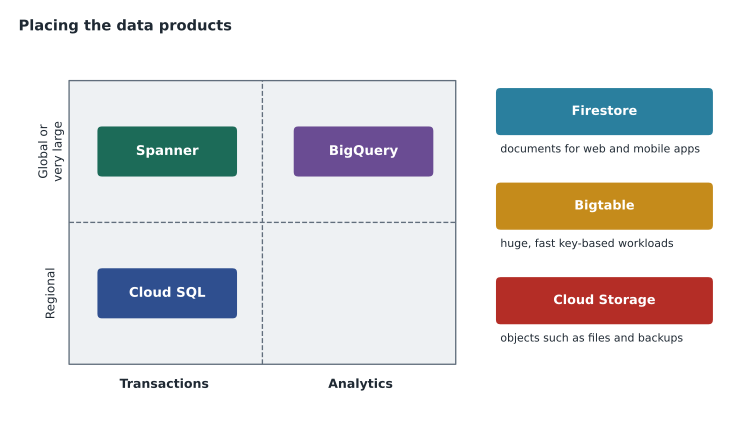
Cloud SQL and Spanner are both managed relational databases that support SQL and transactions. The difference is scale and reach. Cloud SQL suits traditional applications in a region, with familiar engines such as MySQL and PostgreSQL. Spanner scales horizontally and keeps strong consistency across regions, so it suits global applications with very high scale that still need transactions. Signposts: "existing MySQL app, regional" points to Cloud SQL; "global, consistent transactions at massive scale" points to Spanner. AlloyDB sits nearby as a PostgreSQL-compatible option for demanding workloads.
BigQuery and Cloud SQL are both queried with SQL, but they serve different purposes. Cloud SQL handles day-to-day transactions, such as taking orders. BigQuery handles analysis over very large data sets. If the question is about dashboards, trends and years of history, think BigQuery; if it is about an application reading and writing individual records, think Cloud SQL. Firestore and Bigtable are both NoSQL, but Firestore is a serverless document database for web and mobile apps, while Bigtable is a wide-column store for huge, fast workloads such as time-series data. Cloud Storage holds objects such as files and backups, not database records.
Cloud Storage classes are another frequent confusion. Standard storage suits data accessed often. Nearline, Coldline and Archive suit data accessed less and less often, with lower storage prices and higher costs and minimum durations for access. Signposts: "accessed about once a month" points to Nearline, "once a quarter" to Coldline, and "kept for years for compliance, rarely read" to Archive. Location choices, such as a single region, a dual-region or a multi-region, trade cost against availability and distance from users.
| Pair | Common ground | Deciding difference |
|---|---|---|
| Cloud SQL / Spanner | Managed relational databases | Regional and familiar versus global scale with strong consistency |
| Cloud SQL / BigQuery | Both use SQL | Transactions versus large-scale analytics |
| Firestore / Bigtable | Both NoSQL | App documents versus huge, fast key-based workloads |
| Nearline / Coldline / Archive | Lower-cost storage classes | Monthly, quarterly or yearly-or-less access |
| Pub/Sub / Dataflow | Both used in streaming | Pub/Sub moves messages; Dataflow processes data |
| Dataflow / Dataproc | Both process data | Managed pipelines versus managed Spark and Hadoop |
Analytics and business intelligence
Looker and Data Studio both produce dashboards and reports, which is why people mix them up. Looker is an enterprise business intelligence platform with a governed semantic layer: business metrics are defined once and used consistently everywhere, which suits organizations that need one trusted version of figures such as revenue. Data Studio is a simpler, self-service tool for building reports and dashboards quickly from many data sources. Signposts: "consistent, governed metrics across the company" points to Looker; "a quick dashboard for a team" points to Data Studio.
Pub/Sub and Dataflow are often used together, so it helps to be clear on their roles. Pub/Sub is messaging: it receives events from many senders and delivers them to subscribers. Dataflow is processing: it transforms, enriches and aggregates data in streams or batches. A typical streaming design uses Pub/Sub to collect clicks or sales events, Dataflow to process them, and BigQuery to store and analyse the results. Dataproc runs managed Spark and Hadoop, so it suits teams moving existing Spark jobs to the cloud.
Compute
Compute Engine, GKE, Cloud Run, Cloud Run functions and App Engine all run code, which makes them a classic exam group. The deciding questions are how much the team wants to manage and what form the code takes. Virtual machines and full control point to Compute Engine. Many containers that need orchestration, often with an existing Kubernetes skill set, point to GKE. Containers without cluster management, especially with variable traffic and a small team, point to Cloud Run. Small pieces of code triggered by events, such as a file arriving, point to Cloud Run functions. A web app where developers just deploy code points to App Engine or Cloud Run.
| Signpost | Usually points to |
|---|---|
| Legacy app, needs a specific operating system | Compute Engine |
| Hundreds of microservices, Kubernetes skills | GKE |
| Containers, small team, spiky traffic | Cloud Run |
| Run code when an event happens | Cloud Run functions |
| Move VMware workloads as they are | Google Cloud VMware Engine |
AI choices
The AI options are another group. Pre-trained APIs, such as Vision or Translation, solve common tasks with no training. BigQuery ML lets analysts build models with SQL on data in BigQuery. AutoML on Vertex AI trains custom models from your labelled data with little code. Custom training on Vertex AI gives data scientists full control. Gemini and other foundation models on Vertex AI provide generative AI. The deciding questions are how common the task is, where the data lives, and how much expertise the organization has. A useful one-liner: start with the simplest option that meets the need, and move up only when you need something more specific.
Security and identity
IAM and Cloud Identity are often confused. Cloud Identity manages who users are: accounts, groups, sign-in and multi-factor authentication. IAM manages what those identities can do on Google Cloud resources. A second pair is firewall rules and Cloud Armor. Firewall rules allow or deny network traffic to resources based on addresses, ports and protocols. Cloud Armor protects web applications behind a load balancer from attacks such as denial of service and common web exploits. A third is encryption by default and customer-managed keys: Google encrypts data at rest by default, and Cloud KMS lets organizations that need more control manage their own keys. Security Command Center is the place to see security findings across an organization.
Cost and operations
Sustained use discounts and committed use discounts both lower compute prices. Sustained use discounts apply automatically when some resources run for much of a month. Committed use discounts require you to commit to a level of use for one or three years in return for a larger discount. Spot VMs are much cheaper but can be stopped at short notice, so they suit interruptible work. Budgets and quotas also get mixed up: budgets send alerts when spending approaches a planned figure, while quotas cap how much of a resource can be used. Finally, Cloud Monitoring and Cloud Logging both belong to Google Cloud Observability: Monitoring tracks metrics and raises alerts, while Logging collects and searches log entries.
| Pair | Deciding difference |
|---|---|
| IAM / Cloud Identity | What identities may do versus who the identities are |
| Firewall rules / Cloud Armor | Network traffic rules versus web application protection |
| Default encryption / Cloud KMS | Automatic protection versus customer-controlled keys |
| Sustained use / committed use | Automatic for heavy monthly use versus a one- or three-year commitment |
| Budgets / quotas | Alerts on spending versus limits on use |
| Monitoring / Logging | Metrics and alerts versus log entries and search |
| SLO / SLA | Internal target versus contract with customers |
Concepts that sound alike
Some confusions are about concepts rather than products. Regions and zones are one pair: a region is a geographic area, such as a metropolitan area, and a zone is an isolated location within a region. Spreading across zones protects against the failure of one location; spreading across regions protects against larger outages and can bring services closer to users in different places. Scalability and elasticity are another pair, covered in lesson 4: scalability is the ability to grow, and elasticity is growing and shrinking automatically. High availability and disaster recovery are a third pair. High availability keeps a service running through common failures, usually without users noticing; disaster recovery restores a service after a major event, measured by recovery time and recovery point objectives.
Data residency and data sovereignty also sound alike. Residency is about where data is stored; sovereignty is about who controls access to it and which laws apply. A question about keeping records in a particular country is about residency, usually answered by choosing regions and restricting where resources can be created. A question about limiting the provider's own access, or about operating under a particular legal regime, is about sovereignty, and may point to controls such as Assured Workloads, customer-managed keys and access transparency. Finally, authentication and authorization: authentication proves who you are; authorization decides what you may do.
Building your own pairs
No list covers every confusion, because each person mixes up different things. The most useful list is your own, built from your mistakes log. Every time you choose a neighbour of the right answer, add the pair to your cards with its common ground and deciding difference. After a few practice sessions, look at which pairs keep returning. Those are the ones to rehearse daily in the final weeks. Owen's top three were Cloud SQL and Spanner, committed and sustained use discounts, and GKE and Cloud Run. Jules's were Firestore and Bigtable, Looker and Data Studio, and IAM and Cloud Identity. Both lists shrank steadily once they started rehearsing them.
A useful test of readiness for any pair is to explain it to someone else without notes, in one sentence, and then give one scenario where each member is the right answer. If you can do that quickly for every pair on your list, the neighbours will no longer be able to trick you on the exam.
Product names are another source of confusion, because Google renames and reorganizes products from time to time. Cloud Functions became Cloud Run functions, and several AI products have changed names as the generative AI offerings grew. The exam guide and the certification page use current names, so check them shortly before your exam. If an older study resource uses a different name, focus on what the product does; the purpose usually stays the same even when the name changes. Jules keeps a short list of old and new names at the bottom of the comparison table, so that an unfamiliar name in a practice question does not cause a moment of panic.
Worked problem
Separating neighbours in a scenario
A sports league wants a dashboard that every department trusts, with revenue defined the same way for finance, marketing and sales. A volunteer coach wants a quick chart of attendance from a spreadsheet. Which tool fits each?
Show solution
- Both want dashboards, so the common ground is business intelligence.
- The league's deciding need is governed, consistent metrics across departments, which points to Looker.
- The coach's need is a quick, self-service chart, which points to Data Studio.
Answer: Looker for the league; Data Studio for the coach.
By the end of the session, Owen's deck has thirty cards. Jules has a one-page table instead, because Jules likes to see the neighbours side by side. Both approaches work; what matters is that each pair can be separated in one sentence, without hesitation.
Common mistakes
MistakeChoosing Spanner whenever a question mentions a database.
InsteadSpanner is for global scale with strong consistency; Cloud SQL suits most regional apps.
MistakeUsing Cloud SQL for large-scale analytics.
InsteadUse BigQuery for analysis over very large data.
MistakeTreating Looker and Data Studio as the same product.
InsteadLooker governs metrics; Data Studio builds quick self-service reports.
MistakeSaying Cloud Identity grants access to resources.
InsteadCloud Identity manages identities; IAM grants access.
MistakeExpecting a budget to stop spending.
InsteadBudgets alert; quotas and other controls limit use.
Summary and key terms
- Most lost marks come from confusing neighbouring products, not from missing knowledge.
- For each pair, name the common ground and the one deciding difference.
- Cloud SQL is regional and familiar; Spanner is global and strongly consistent; BigQuery is for analytics.
- Pub/Sub moves messages; Dataflow processes them; Dataproc runs Spark and Hadoop.
- Cloud Run is serverless containers; GKE is managed Kubernetes; Compute Engine is virtual machines.
- IAM grants access; Cloud Identity manages identities. Budgets alert; quotas limit.
- Storage class
- A Cloud Storage option priced for how often data is accessed.
- Semantic layer
- A shared definition of business metrics used across reports, as in Looker.
- Messaging
- Moving events from senders to receivers, as Pub/Sub does.
- Orchestration
- Scheduling and managing many containers, as Kubernetes does.
- Quota
- A limit on how much of a resource can be used.
- Sustained use discount
- An automatic discount for some resources that run for much of a month.
Practice problems
Work each problem on paper first, then reveal the answer to check.
What separates Cloud SQL from Spanner?
Show answer
Spanner scales globally with strong consistency; Cloud SQL suits regional apps.
Which storage class suits data read about once a quarter?
Show answer
Coldline.
What does Pub/Sub do that Dataflow does not?
Show answer
It moves messages between senders and receivers.
Which tool gives governed, consistent metrics?
Show answer
Looker.
What protects a web app from denial-of-service attacks at the load balancer?
Show answer
Cloud Armor.
Which discount needs a one- or three-year commitment?
Show answer
Committed use discounts.
Do budgets cap spending?
Show answer
No; they send alerts. Quotas limit use.
Lesson quiz · 5 questions
Score 60% or more to complete this lesson.
Create a free account to save your progress, take quizzes and earn a certificate.