
GCP-190 · Lesson 11 of 12 · 22 min
The final week and exam day
▶ Video coming soon A video version of this lesson is on the way.
Owen's exam is booked for a Thursday afternoon in the second half of January 2027, and Jules's for the following Wednesday morning. A week before Owen's date, Farah sits down with both of them to plan the last seven days. "This week is not for learning new things," she says. "It is for keeping what you have, sleeping well and removing every small thing that could go wrong on the day." This lesson describes a final-week plan and what happens on exam day, at a testing centre and online. The dates are plans for January 2027, still ahead as this course is written, and the procedures are as Google's and Pearson's help pages described them when we checked in November 2026. Check your booking confirmation for the current details.
The shape of the final week
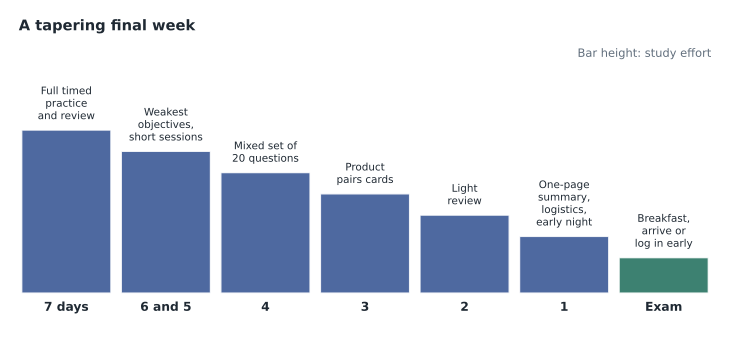
A good final week tapers. Early in the week, do one last full timed practice session, if you have not done one recently, and review it with your mistakes log. In the middle of the week, return to your weakest objectives and your cards of confusing neighbours, using short sessions of retrieval practice rather than long rereading. In the last two days, review lightly: skim your summaries, flip through your cards and stop. The night before, do nothing more than a short look at your one-page summary, then put it away. Cramming late the night before tends to cost more in sleep and calm than it gains in knowledge.
Write a one-page summary for the final days. It is not a set of notes to memorize; it is a reminder of the ideas you found hardest and the signposts that help you most. Owen's page has the AI ladder, the cost levers, the shared responsibility table and his rule about changing answers. Jules's page has the data product grid, the compute spectrum and the two-minute rule. Making the page is itself a useful review, because deciding what to leave out forces you to judge what matters.
Logistics checklist
Most exam-day problems are logistics. Three days before the exam, confirm the date, time and time zone in your booking, and check the identification you will bring against your registration name. Two days before, if you are testing online, run Pearson's system test again on the same computer, network and room, install any updates that are waiting, and plan how to keep others off the network and out of the room. If you are testing at a centre, check the address, the journey time at that time of day and the parking or transit options, and allow for weather. The day before, prepare your ID, your route or your room, and anything else the confirmation asks for.
| When | Testing centre | Online proctored |
|---|---|---|
| Three days before | Confirm time, centre and ID name match | Confirm time and time zone, ID name match |
| Two days before | Check route and travel time at that hour | Rerun system test; install pending updates |
| Day before | Prepare ID; plan to leave early | Clear the desk and room; arrange quiet |
| Exam day | Arrive early; follow centre rules for lockers | Restart computer; close other apps; launch on time |
At a testing centre
Plan to arrive early. Testing centres usually ask you to check in before your scheduled time, show your identification and agree to the rules. You will typically store your belongings, including your phone, watch and bag, in a locker, and you may be asked to turn out your pockets. The staff then take you to a workstation in a supervised room. Follow their instructions exactly, and ask before you do anything that is not clearly allowed. If something goes wrong with the computer during the exam, raise your hand and wait for staff rather than trying to fix it yourself. Owen visits his testing centre on a Saturday the week before so that the journey and the building are familiar on the day.
Online, from home
For an online exam, prepare the room as described in lesson 2: a private, quiet space with only your computer on a cleared desk, no extra monitors, no paper, no phone and no other people. Restart the computer an hour before, close every other application, and plug in rather than relying on a battery. Launch the session within the window shown in your booking; Google's help page described a window from 10 minutes before to 20 minutes after the start time, and warned that missing it means losing the fee. Check-in takes several minutes and includes photographing your ID and your workspace. The proctor may ask you to show the room with your webcam. Once the exam starts, stay in view, keep quiet and do not read questions aloud.
If your connection drops or the computer freezes, do not panic and do not open anything else. Pearson will try to reconnect you, and the proctor may contact you. Google's help page notes that if a session cannot be restarted after you have seen exam content, the attempt counts toward the retake limit, which is another reason to test your setup carefully and to keep others off your network. Jules asks the household to avoid streaming video and gaming on the morning of the exam and plugs the laptop directly into the router with a cable.
The first few minutes
Before the first question, you may see instructions and the exam terms, which you must accept. Take a breath and settle. When the questions start, glance at the question count and set your checkpoints from lesson 9 in your head: about a third of the questions by about 25 minutes and two thirds by about 50 minutes. Answer the first few questions steadily rather than quickly; early nerves pass after a few minutes, and a calm start sets the pace for the rest.
Managing nerves
Some nerves are normal and even helpful, because they keep you alert. Too much anxiety narrows attention and makes questions look harder than they are. Simple techniques help. Slow breathing, with a longer breath out than in, calms the body within a minute. If a question throws you, mark it, move on and come back later; the next question is often easier. Remember that the exam has a range of difficulty, that you do not need a perfect score, and that you can retake it after 14 days if things go badly. Owen reminds himself that he has answered hundreds of practice questions; Jules remembers that the exam is mostly about business judgement, which is Jules's strength.
# Turn an exam start time into checkpoint clock times (an example time)
import datetime
start = datetime.datetime(2027, 1, 21, 13, 0)   # a planned start, not a prediction
for minutes, label in ((25, "about one third done"), (50, "about two thirds done"), (75, "first pass done"), (90, "end")):
    t = start + datetime.timedelta(minutes=minutes)
print(f"{t.hour:02d}:{t.minute:02d}", "-", label)13:25 - about one third done 13:50 - about two thirds done 14:15 - first pass done 14:30 - end
What this code does
From a planned exam start time, the program adds minutes to give clock times for each checkpoint: one third done, two thirds done, first pass done and the end. Writing these down before the exam makes pacing easier to check during it. The example runs from 1:25 pm to 2:30 pm.
Finishing the exam
When you reach the end of your first pass, use your reserve time to review marked questions, rereading the ask and constraints before looking at your answer, and change an answer only with a named reason. Make sure every question has an answer. When you submit, you will usually see a provisional result on screen. Google's help page says that photographing your result on screen during an online exam is a violation, so do not do it. Official confirmation and the certificate follow later through your registration account and email; lesson 12 covers what happens next.
Looking after yourself
Sleep is the most underrated part of exam preparation. Memory consolidates during sleep, and tired people read less carefully, which matters on an exam built from scenarios. In the final week, keep regular hours and protect the last two nights in particular. Eat normally on the day, without trying anything new, and avoid large amounts of caffeine if it makes you jittery. If you are testing online, remember that food and drink are not allowed in the workspace and there are no breaks, so plan to eat and use the washroom before you launch the session. At a testing centre, ask about the centre's rules on breaks and water before you start rather than during the exam.
Movement helps too. A short walk before the exam reduces tension and improves alertness. Owen plans to walk the last part of the way to the testing centre; Jules plans a walk around the block before logging in. Both plan to switch their phones off, or leave them in another room, an hour before the exam, so that work messages cannot unsettle them at the last moment.
If something goes wrong on the day
Plan for the unlikely. If you are ill on the day, check the rescheduling rules in your account; a change more than 24 hours ahead avoids the late fee, and on the day itself you may lose the fee, which is still better than sitting an exam you cannot concentrate on. If you are running late for a testing centre, contact the centre according to your confirmation's instructions. If your online check-in fails, follow Pearson's instructions on screen and contact its support by chat or phone; do not start troubleshooting by installing new software in a panic. Keep your confirmation email and the support contact details easy to find, on paper if you are testing online, but away from the desk once the exam starts.
Jules writes a short card with three lines: the booking time and time zone, the Pearson support contact, and a reminder to breathe slowly if something goes wrong. The card stays in the kitchen, out of the workspace, during the exam. Owen does the same and puts his card in his coat pocket, which goes in the locker at the testing centre.
After the exam, whatever the result, take the rest of the day off from studying. Write down a few notes about how the day went, such as how the timing felt and which kinds of questions surprised you, without recording any questions. Those notes help whether you go on to another certification or need a retake. Then do something that has nothing to do with the cloud. Owen plans to meet friends for dinner; Jules plans to go skating at the outdoor rink near home. Farah has told both of them she does not want to hear about cloud products until the following Monday.
Worked problem
Recovering from a bad start
Ten minutes into the exam, a candidate has answered only four questions and feels panicked because three of them seemed hard. What should she do?
Show solution
- Recognize the feeling and take two slow breaths with longer breaths out.
- Check pace: four questions in ten minutes is behind, but early questions often feel slow and there is a reserve.
- Apply the two-minute cap strictly and mark any hard question for review.
- Expect to catch up on easier questions; check again at the 25-minute checkpoint.
Answer: Breathe, apply the time cap, mark hard questions and use the checkpoints to recover pace.
Common mistakes
MistakeCramming late the night before.
InsteadTaper the final week and protect your sleep.
MistakeRunning the online system test on the exam morning only.
InsteadRerun it two days before on the same setup.
MistakeLeaving extra items on the desk for an online exam.
InsteadClear everything except the computer.
MistakeTrying to fix a frozen testing centre computer yourself.
InsteadRaise your hand and wait for staff.
MistakePhotographing the provisional result in an online exam.
InsteadIt is a listed violation; wait for the official confirmation.
Summary and key terms
- Taper the final week: one full practice session, focused retrieval on weak spots, then light review.
- Write a one-page summary of your hardest ideas and signposts.
- Most exam-day problems are logistics: confirm time, ID, route or room and system test in advance.
- At a centre, arrive early, use the locker and ask staff for help; online, prepare the room and launch on time.
- Set checkpoints in the first minutes, manage nerves with slow breathing and keep moving.
- Use the reserve to review marked questions and answer every question.
- Taper
- Reducing study effort in the final days before an exam.
- One-page summary
- A short reminder of your hardest ideas and most useful signposts.
- Launch window
- The period around the start time in which an online exam must be started.
- Provisional result
- The result shown on screen at the end of the exam, before official confirmation.
- Workspace check
- The proctor's check of the room and desk before an online exam.
- Reserve time
- Time left after the first pass for reviewing marked questions.
Practice problems
Work each problem on paper first, then reveal the answer to check.
What should the night before the exam look like?
Show answer
A short look at the one-page summary, a logistics check and an early night.
When should you rerun the online system test?
Show answer
About two days before, on the same computer, network and room.
What should you do if a testing centre computer freezes?
Show answer
Raise your hand and wait for staff.
What is the online launch window described by Google's help page?
Show answer
From 10 minutes before to 20 minutes after the start time.
What helps calm nerves quickly?
Show answer
Slow breathing with longer breaths out.
Why should you not photograph the provisional result online?
Show answer
It is a listed violation that can invalidate the exam.
What goes on the one-page summary?
Show answer
The ideas you found hardest and the signposts that help most.
Lesson quiz · 5 questions
Score 60% or more to complete this lesson.
Create a free account to save your progress, take quizzes and earn a certificate.