
GCP-190 · Lesson 4 of 12 · 25 min
Review: Digital transformation with Google Cloud
▶ Video coming soon A video version of this lesson is on the way.
The first review session takes place in early December 2026 in Birchline's break room, with a box of samples from the new winter jacket line on the table. Farah has a simple format for every review lesson in this course. First, she and the candidates restate the objectives of one exam guide section in plain words. Second, they go through the key ideas the section expects, linking each one to something real at Birchline. Third, they work through original practice scenarios and explain why each wrong option is wrong. "If you can explain an idea using our own company," she says, "you understand it well enough for the exam." This lesson reviews section 1, digital transformation with Google Cloud, which GCP-102 covered in depth.
Section 1 has two objectives in the guide we read: explain why and how the cloud is changing businesses, and describe fundamental cloud concepts. The first is about motivation and value; the second is about the vocabulary that every later section depends on. Questions here are often short and conceptual, but they reward precise understanding, because the options tend to be close paraphrases of each other.
What digital transformation means
Digital transformation is the use of modern digital technology to change how an organization works and creates value, not just to do the same things on newer machines. A company that moves its servers to the cloud and changes nothing else has migrated, but it has not transformed. Transformation shows up in new ways of serving customers, faster decisions based on data, products that improve continuously, and teams that can experiment cheaply. For Birchline, the move to Google Cloud began because the data centre lease ends in late 2027, but the leadership team's real goals are a faster online shop, stock levels that are accurate across forty stores, and better forecasts for seasonal lines. Those goals are what make the project a transformation.
The exam often frames transformation as a response to pressure: customers expect fast digital service, competitors release features weekly, data is growing quickly, and old systems are expensive to maintain. The cloud helps because it changes the economics and speed of technology. Instead of buying hardware years in advance, an organization rents capacity when it needs it. Instead of waiting weeks for a server, a team can start one in minutes. Instead of building every capability from scratch, it can use managed services for databases, analytics and AI. Questions in this section ask you to recognize these benefits and to connect them to business outcomes.
Cloud economics: capital and operating expenditure
A core idea in this section is the shift from capital expenditure to operating expenditure. Capital expenditure, or capex, is money spent up front on assets such as servers and data centre equipment, which are then used for years. Operating expenditure, or opex, is ongoing spending on services as they are used. In the cloud, organizations mostly pay for what they use, so technology spending looks more like opex. This can improve cash flow and flexibility, because you do not buy capacity you might never use, but it also means costs can grow unexpectedly if usage is not managed. Dana Leclair, Birchline's chief financial officer, likes the flexibility and is nervous about surprises, which is why section 6 on cost control matters to her.
Another economic idea is total cost of ownership. Comparing a cloud bill with the price of a server is misleading, because owning infrastructure also costs power, cooling, space, hardware refreshes, maintenance contracts and staff time. A fair comparison counts all of these. Questions may ask which costs an organization stops paying when it moves to the cloud, or why a direct price comparison can be misleading.
# A simple, illustrative total cost comparison over three years (made-up numbers)
on_prem = {"hardware": 420000, "power and cooling": 95000, "space": 60000,
           "maintenance": 75000, "staff time": 180000}
cloud = {"compute and storage": 610000, "staff time": 90000}
print("On premises:", sum(on_prem.values()))
print("Cloud:", sum(cloud.values()))
print("Difference:", sum(on_prem.values()) - sum(cloud.values()))On premises: 830000 Cloud: 700000 Difference: 130000
What this code does
Made-up three-year costs for running systems in-house and in the cloud are listed and added up. The program prints both totals and the difference between them. In this example the cloud is 130,000 cheaper, the kind of simple comparison exam questions describe.
The figures above are invented for illustration, not a real quote. The point is the method: list every cost on both sides before comparing. In practice, the answer depends on how efficiently the cloud resources are used, which is why operations and cost control appear later in the exam guide.
Fundamental cloud concepts
The guide expects you to describe the main cloud models. Infrastructure as a service, or IaaS, gives you virtual machines, storage and networks; you manage the operating system and everything above it. Compute Engine is Google Cloud's IaaS compute service. Platform as a service, or PaaS, gives you a platform on which to run your code; the provider manages the servers and runtime. App Engine and Cloud Run are examples. Software as a service, or SaaS, gives you a complete application, such as Google Workspace; you simply use it. As you move from IaaS to SaaS, you manage less and the provider manages more, which trades control for convenience.
| Model | You manage | Provider manages | Example |
|---|---|---|---|
| On premises | Everything | Nothing | Birchline's current data centre |
| IaaS | Operating system, middleware, applications, data | Hardware, networking, virtualization | Compute Engine |
| PaaS | Applications and data | Hardware through runtime | App Engine, Cloud Run |
| SaaS | Your data and how you use the application | The whole application stack | Google Workspace |
Deployment models describe where the cloud runs. Public cloud is shared infrastructure run by a provider such as Google. Private cloud is cloud-style infrastructure dedicated to one organization, often in its own data centre. Hybrid cloud combines on-premises or private infrastructure with public cloud. Multicloud means using more than one public cloud provider. Many large organizations are hybrid or multicloud for a period, sometimes permanently, and Google Cloud offers tools to manage workloads across environments. Birchline will be hybrid during its migration, with stores still running local systems while the shop and data warehouse move first.
Other concepts appear often. Scalability is the ability to handle more work by adding resources. Elasticity is scaling up and down automatically as demand changes, which matters for Birchline's holiday rush. High availability means designing so that a service keeps running when parts fail, for example by spreading it across zones. Google Cloud's infrastructure is organized into regions, which are geographic areas, and zones, which are isolated locations within a region. You learned the details in GCP-101; for this section, know why regions and zones matter for availability, performance and data location.
Shared responsibility in transformation
Moving to the cloud changes who is responsible for what. The cloud provider is responsible for the security and operation of the underlying infrastructure; the customer is responsible for how they configure and use services, their data and their users' access. How much each side manages depends on the service model, as the table above shows. Google also describes a shared fate approach, in which it provides secure defaults, guidance and tools to help customers get their part right. Section 5 reviews this in detail; in section 1, you mainly need to understand that moving to the cloud does not hand all responsibility to the provider.
Practice scenarios
Leading a transformation
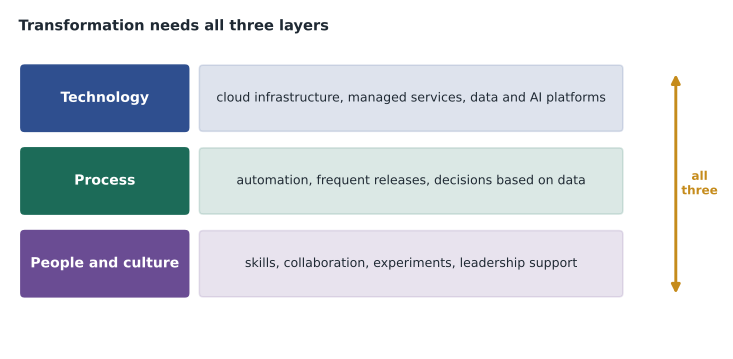
The guide's first objective is about why and how, and the how is mostly about people and process. Technology alone rarely transforms an organization. Leaders set the goals, fund the change and model new behaviour; teams learn new skills and new ways of working; processes are redesigned so that the new technology is actually used. Google and many other cloud providers recommend starting with clear business outcomes, building cloud skills across the organization, and creating a small group, often called a cloud centre of excellence, that sets standards, shares good practice and helps other teams adopt the cloud safely. Questions may ask what an organization should do first or what most often makes transformation fail. Lack of leadership support, unclear goals and missing skills are common answers; the choice of product is rarely the root cause.
Culture matters as much as structure. Organizations that transform successfully tend to encourage experimentation, accept small failures as learning, share information openly and measure results. A team that is punished for every failed experiment will stop experimenting, and the speed advantage of the cloud will be wasted. Birchline has started small: the online shop team runs one controlled experiment every two weeks, such as a new product page layout for a small share of visitors, and reviews the results openly whether the experiment worked or not.
More practice scenarios
Here are three more original scenarios with brief reasoning. First: a regional hospital wants to reduce the time doctors spend searching for patient information and is considering several technology projects. Which question should leadership answer first? The best answer is about the outcome, such as how much time doctors should save and how success will be measured, rather than which product to buy. Second: a manufacturer's finance team worries that moving to the cloud will make costs unpredictable. Which response best addresses the concern? An answer about budgets, alerts, labels and regular cost reviews addresses it directly; an answer claiming the cloud is always cheaper does not. Third: a retailer has moved its systems to the cloud but its teams still wait weeks for approvals to start new projects. What is limiting the benefit? The process and culture, not the technology.
In each case, the right answer connects technology to a business outcome or removes a barrier that technology alone cannot remove. When a section 1 question seems to have two good technical answers, look for the option that speaks to outcomes, people or process.
Sustainability is also part of the transformation story. Running workloads in large, efficient cloud data centres can reduce the energy used per unit of computing compared with many small on-premises server rooms, and Google publishes information about its carbon-free energy goals and provides a carbon footprint report for customers. For some organizations, a lower environmental impact is a stated goal of moving to the cloud, alongside cost and speed. Questions may list it as one of several benefits; recognize it as a genuine business driver, especially for companies that report on their emissions, but do not treat it as the only reason for a move. Birchline's annual report now includes a short section on its technology emissions, and Dana has asked for the carbon footprint data to be included in the monthly cost review.
Worked problem
Transformation or migration?
A furniture retailer moves its inventory system from its own servers onto Compute Engine virtual machines without changing the application. Six months later, it builds a new mobile ordering feature using managed services and uses its sales data to forecast demand. Which part of this is migration and which part is transformation?
Show solution
- Moving the unchanged inventory system to virtual machines is a migration, often called lift and shift. It may cut costs or remove hardware, but the business works the same way.
- Building new customer features quickly with managed services changes how the retailer serves customers.
- Using data to forecast demand changes how decisions are made.
- The later steps are transformation; the first step made them easier by moving the systems to the cloud.
Answer: The move to virtual machines is migration; the new features and data-driven forecasting are transformation.
Worked problem
Choosing a service model
A small accounting firm wants email, shared documents and video meetings for twenty staff, with no IT employee. Which service model fits best, and why?
Show solution
- The firm wants complete applications, not infrastructure or a development platform.
- It has no one to manage servers, operating systems or software updates.
- SaaS, such as Google Workspace, gives complete applications managed by the provider.
Answer: SaaS. The firm only manages its users and data, and the provider runs everything else.
Owen notices that most practice questions in this section are about why, not how. The best preparation is to be able to explain, in a sentence or two, what each concept means and what business benefit it brings. Jules finds this the easiest section, because it is closest to the conversations Jules already has with Birchline's leadership team.
Common mistakes
MistakeCalling any move to the cloud a transformation.
InsteadMigration moves systems; transformation changes how the business works and creates value.
MistakeComparing a cloud bill with the price of a server.
InsteadCompare total cost of ownership, including power, space, maintenance and staff time.
MistakeThinking the provider is responsible for everything in the cloud.
InsteadResponsibility is shared, and the customer always controls data and access.
MistakeMixing up scalability and elasticity.
InsteadScalability is the ability to grow; elasticity is growing and shrinking automatically with demand.
MistakeTreating PaaS and SaaS as the same.
InsteadPaaS runs your code; SaaS is a complete application you use.
Summary and key terms
- Digital transformation changes how an organization works and creates value; migration alone does not.
- The cloud shifts spending from capital to operating expenditure and changes the speed of technology.
- Compare total cost of ownership, not just prices.
- IaaS, PaaS and SaaS trade control for convenience; deployment models are public, private, hybrid and multicloud.
- Scalability, elasticity and high availability are key cloud benefits, supported by regions and zones.
- Responsibility is shared between provider and customer.
- Digital transformation
- Using modern digital technology to change how an organization works and creates value.
- Capex
- Capital expenditure: up-front spending on long-lived assets.
- Opex
- Operating expenditure: ongoing spending on services as they are used.
- Total cost of ownership
- The full cost of running a system, including indirect costs.
- Elasticity
- Automatically scaling resources up and down with demand.
- Hybrid cloud
- A combination of on-premises or private infrastructure with public cloud.
Practice problems
Work each problem on paper first, then reveal the answer to check.
What is the difference between migration and transformation?
Show answer
Migration moves systems; transformation changes how the business works.
Which model is Compute Engine?
Show answer
IaaS.
What does opex mean?
Show answer
Ongoing operating expenditure, paid as services are used.
Why is a server's price a poor comparison with a cloud bill?
Show answer
It leaves out power, space, maintenance, refresh and staff costs.
What is multicloud?
Show answer
Using more than one public cloud provider.
Which benefit helps Birchline with the holiday rush?
Show answer
Elasticity.
Who controls access to data in the cloud?
Show answer
The customer.
Lesson quiz · 5 questions
Score 60% or more to complete this lesson.
Create a free account to save your progress, take quizzes and earn a certificate.