
FILM-101 · Lesson 6 of 12 · 29 min
Editing I: continuity editing
A film is usually made of hundreds or thousands of shots. Editing is the craft of selecting shots and joining them, deciding what follows what, for how long, and with what kind of transition. It is sometimes called the invisible art, because the most widespread editing system is designed so that viewers do not notice it at all. This lesson explains that system, continuity editing, which developed in American cinema in the 1910s and became the international default for narrative film. Lesson 7 looks at alternatives: montage, rhythm, jump cuts and the long take.
What editing controls
Editing controls four kinds of relationship between shots, a framework widely used in film studies.
- Graphic relations: how the shapes, colours, movements and compositions of two shots relate. A graphic match links shots through similar shapes or movement.
- Rhythmic relations: how long each shot lasts and the pattern of durations, which create pace.
- Spatial relations: how editing constructs a sense of space, connecting places that may be filmed miles or months apart.
- Temporal relations: how editing orders events and compresses or expands time.
Every cut involves all four, even if the editor's main concern is one. In continuity editing, the dominant goal is clarity of space and time so that the story flows smoothly.
Transitions
Most shots are joined by a straight cut, an instantaneous change from one shot to the next. Other transitions carry conventional meanings.
| Transition | Description | Common use |
|---|---|---|
| Cut | Instant change from one shot to the next | The standard join; almost all transitions |
| Fade-out and fade-in | Image gradually darkens to black, or emerges from black | End or start of a major section; passage of time |
| Dissolve | One shot gradually fades out as the next fades in, briefly overlapping | Passage of time, change of place, connection between ideas |
| Wipe | A line or shape moves across the frame, replacing one shot with another | Older adventure serials; playful or retro effect |
| Iris | A circular mask closes on or opens from part of the frame | Silent era; nostalgic or comic effect |
| Match cut | A cut linking two shots through similar shapes, movement or sound | Emphasizes connections across time or space |
The 180-degree rule
The foundation of continuity editing is the 180-degree system. Imagine a line, called the axis of action, running through the main characters or the direction of movement in a scene. The camera stays on one side of that line, within a half-circle of 180 degrees. As long as it does, characters keep consistent screen directions: the person on the left stays on the left and looks right, the person on the right looks left, and movement continues in the same direction from shot to shot.
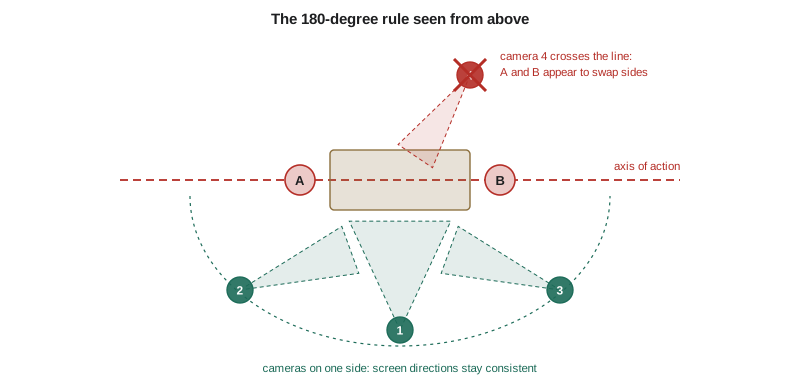
If the camera crosses the line, the characters appear to swap sides and look in the same direction, which can confuse viewers about where people are. Filmmakers who want to cross the line usually do so with a shot that moves across it on screen, a shot directly along the axis, or a cutaway that resets our orientation.
Worked problem
Diagnosing a 180-degree problem
In a described dialogue scene, Shot 1 shows Lena on the left of the frame looking right at Omar. Shot 2 shows Omar on the right looking left at Lena. Shot 3 shows Lena again, but now on the right side of the frame looking left. What has happened, and how could it be fixed?
Show solution
- Establish the axis: the line runs between Lena and Omar, with the camera originally on one side.
- In Shots 1 and 2 the eyelines face each other, so the camera is on one side of the line.
- In Shot 3 Lena looks left, the same direction Omar looked, which means the camera has crossed to the other side of the axis.
- Fixes: reshoot Shot 3 from the original side; use a shot that moves across the line on camera; insert a neutral shot along the axis or a cutaway before the new side.
Answer: Shot 3 crosses the axis of action, so Lena and Omar now both look left and seem to face the same way; the editor can replace Shot 3 with a take from the original side or bridge the change with a visible camera move or a neutral shot.
Establishing and analytical editing
A classical continuity scene often follows a pattern.
- An establishing shot, usually a long shot, shows the space and the characters' positions.
- The scene is then broken down into closer shots, called analytical editing: medium shots, over-the-shoulder shots, close-ups.
- A re-establishing shot may return to a wider view when characters move or new ones enter.
This pattern gives viewers a mental map of the space so that closer shots never confuse them.
Shot/reverse-shot and eyeline match
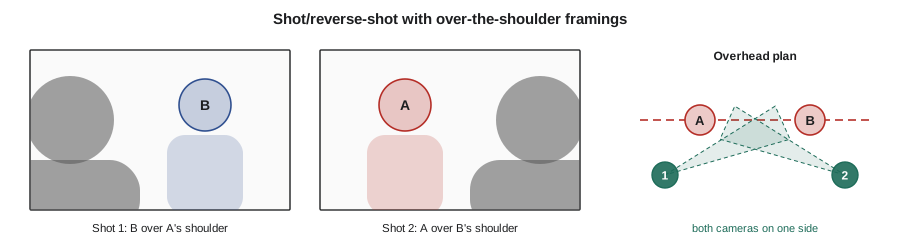
Conversations in continuity style are usually edited as shot/reverse-shot: a shot of one character, then a shot of the other from the opposite angle on the same side of the axis, alternating. Over-the-shoulder framings include part of the listener in the foreground, which reinforces the spatial relation.
An eyeline match cuts from a character looking at something offscreen to a shot of what they are looking at. The viewer infers that the second shot shows what the character sees, even if the two shots were filmed separately. Eyeline matches are the basis of point-of-view editing, described in Lesson 2.
Match on action
A match on action cuts from one shot to another in the middle of a movement, so that the movement appears to continue across the cut. A character reaches for a door handle in a long shot; the next shot is a close-up of the hand turning the handle. The motion carries the eye across the cut and hides it. Editors often cut on movement for exactly this reason.
Other continuity devices include matching props, costumes and lighting between shots (the job of the script supervisor during shooting) and keeping directions of entrances and exits consistent: a character who exits frame right should usually enter the next shot from frame left if they are moving in the same direction.
Cutaways, inserts and crosscutting
- A cutaway shows something outside the main action, such as a clock or a bystander, often to cover a jump in time or a continuity problem.
- An insert is a close shot of a detail within the scene, such as a letter or a phone screen, that gives important information.
- Crosscutting (parallel editing) alternates between two or more lines of action happening in different places, usually at the same time. Early American filmmaker D. W. Griffith made crosscutting famous for last-minute rescues; it remains standard in thrillers and action films to build suspense.
Worked problem
Building suspense with crosscutting
A described sequence alternates between a ferry approaching a dock and a child wandering toward the edge of the pier. The shots of each line shorten as the sequence continues: 8 seconds, 6, 4, 3, 2, 1. What does this pattern achieve?
Show solution
- Identify the device: two lines of action in different places at the same time, alternating, which is crosscutting.
- Identify the rhythm: shot durations shrink, so cuts come faster.
- Link to effect: faster alternation increases tension and implies the lines are converging toward a shared moment.
Answer: The crosscutting creates suspense by implying that the ferry and the child will meet, and the shrinking shot lengths accelerate the rhythm so tension builds toward a climax.
Why continuity editing feels invisible
Continuity editing works because it exploits how viewers perceive and infer. We assume that shots joined together are connected in space and time unless told otherwise. Cuts timed to movement, eyelines and dialogue pass almost unnoticed. Cognitive film researchers have found that viewers often fail to notice cuts that follow continuity principles, while they readily notice jarring ones. This invisibility is a style, not a neutral recording of reality, and it has costs and benefits. It makes stories easy to follow, but it can also hide how much the film constructs what we see.
Continuity on set and in post
Continuity is maintained during shooting and built in editing.
In Canada, picture editors on many productions are represented by the Directors Guild of Canada, which includes picture and sound editors in several regions, and the Canadian Cinema Editors organization promotes the craft. Script supervisors keep continuity notes on set so that editors can match action, props and eyelines later.
Coverage and the editor's choices
On most narrative productions, each scene is filmed several times from different set-ups, a practice called coverage. A typical dialogue scene might be covered with a wide master shot of the whole action, medium shots of each character, over-the-shoulder shots and close-ups, plus inserts of important objects. The editor then chooses which shot to use for each moment, which take of each shot, and exactly where to cut. These choices shape performance and emphasis. An editor can hold on a listener's reaction rather than the speaker, cut away just before a line lands, or let a pause run long to build tension.
Because the same footage can be cut in many ways, editing is sometimes described as the final rewrite of a film. Editors often say they cut for emotion first, story second and rhythm third, and only then worry about perfect continuity. When analyzing a scene, ask not only how the shots are joined but why the editor might have chosen this shot at this moment. Whose reaction are we shown? What are we prevented from seeing? How long does the editor make us wait?
Worked problem
Reading an editor's emphasis
In a described breakup scene, the man delivers a long speech, but most of the shots show the woman listening in close-up, with only brief shots of him. What does this editing choice suggest?
Show solution
- Identify the pattern: the editor favours the listener's reaction over the speaker.
- Consider the effect: we experience the speech through her response rather than his words.
- Link to sympathy: the scene aligns us with the woman, making her the emotional centre.
Answer: By holding on the woman's reactions, the editing makes her the emotional centre of the scene, so the audience experiences the breakup from her side.
Common mistakes
MistakeThinking the 180-degree rule can never be broken
InsteadThe rule can be broken deliberately, but crossing the line without a bridge usually confuses viewers
MistakeConfusing crosscutting with flashbacks
InsteadCrosscutting alternates between simultaneous actions in different places; a flashback moves back in time
MistakeTreating continuity editing as natural or neutral
InsteadRecognize it as a historically developed style that constructs space and time
MistakeIgnoring eyelines when judging spatial clarity
InsteadCheck that characters' looks match across shots so viewers can map who is looking at whom
MistakeNoticing only the cut and not the four relations
InsteadConsider graphic, rhythmic, spatial and temporal relations at every cut
Summary and key terms
- Editing controls graphic, rhythmic, spatial and temporal relations between shots.
- Cuts dominate, while fades, dissolves, wipes and irises carry conventional meanings.
- The 180-degree rule keeps screen direction consistent by keeping the camera on one side of the axis of action.
- Classical scenes move from establishing shots to analytical editing and back.
- Shot/reverse-shot, eyeline matches and matches on action make cuts feel seamless.
- Cutaways, inserts and crosscutting manage information and build suspense.
- Continuity editing seems invisible because it fits how viewers infer space and time.
- Continuity editing
- A system of editing designed to keep space, time and action clear and smooth
- Axis of action
- An imaginary line through the main action that the camera stays on one side of
- 180-degree rule
- The guideline that the camera stays on one side of the axis of action to keep screen directions consistent
- Shot/reverse-shot
- Alternating shots of two characters from opposite angles on the same side of the axis
- Eyeline match
- A cut from a character looking offscreen to what they are looking at
- Match on action
- A cut made during a movement so that it seems to continue across the cut
- Dissolve
- A transition in which one shot fades out while the next fades in, briefly overlapping
- Crosscutting
- Alternating between lines of action in different places, usually at the same time
- Cutaway
- A shot of something outside the main action, often used to bridge time or cover a problem
- Insert
- A close shot of a detail within a scene that gives information
Practice problems
Work each problem on paper first, then reveal the answer to check.
Name the four relations editing controls.
Show answer
Graphic, rhythmic, spatial and temporal.
What does a dissolve often suggest?
Show answer
A passage of time or a change of place.
What happens if the camera crosses the axis of action?
Show answer
Characters appear to swap sides and screen directions reverse, confusing the viewer.
Name two ways to cross the line without confusion.
Show answer
Move the camera across the line on screen, or use a shot along the axis or a cutaway.
What is an eyeline match?
Show answer
A cut from a character looking offscreen to what they see.
Why do editors cut on movement?
Show answer
Motion carries the eye across the cut and helps hide it.
What is crosscutting?
Show answer
Alternating between simultaneous lines of action in different places.
Who keeps continuity notes on set?
Show answer
The script supervisor.
What is the usual order of shots in a classical continuity scene?
Show answer
Establishing shot, analytical closer shots, and re-establishing shots when needed.
If a character exits frame right while walking, where should they usually enter the next shot?
Show answer
From frame left, to keep consistent direction.
Lesson quiz · 5 questions
Score 60% or more to complete this lesson.
Create a free account to save your progress, take quizzes and earn a certificate.