
CYB-101 · Lesson 5 of 12 · 24 min
Cryptography basics
▶ Video coming soon A video version of this lesson is on the way.
Cryptography is the mathematics of keeping information secret and proving it has not been changed. It is everywhere in Ridgeline's day: the padlock in the browser when Theo updates the online shop, the card reader talking to the payment provider, BitLocker protecting the drive in OFFICE-01, the cloud backup copy, the authenticator app on Rosa's phone. Nobody at Ridgeline needs to design cryptography, and nobody should try. But anyone working in IT needs to understand what the main tools do, what they cannot do, and how to choose and use them correctly, because most cryptographic failures come from misuse rather than broken mathematics.
This lesson covers the building blocks: encryption with one key and with two, hashing, salting and password storage, and why homemade schemes fail. Lesson 6 builds on it with certificates and the chain of trust.
Some vocabulary
Plaintext is readable data. Encryption transforms plaintext into ciphertext, which looks like random noise, using an algorithm (the cipher) and a key. Decryption turns ciphertext back into plaintext with the right key. The security of a modern system rests on the key, not on keeping the algorithm secret: the algorithms used everywhere, such as AES, are public and have been studied by experts for decades. This principle, that a system should stay secure even if everything except the key is public, is known as Kerckhoffs's principle, and it is the main reason not to trust any product that claims its own secret algorithm.
Key length matters because the simplest attack on any cipher is to try every possible key. Each extra bit doubles the number of possible keys. A 128-bit key has about 340 trillion trillion trillion possibilities, far beyond what any computer can search. That is why modern ciphers use keys of 128 or 256 bits, and why weak keys, such as a password typed directly in as a key, undermine strong algorithms.
for bits in (8, 40, 56, 128, 256):
    keys = 2 ** bits
    print(f"{bits:>3}-bit key: {keys:.3e} possible keys")
per_second = 10 ** 12          # a trillion guesses a second
years = 2 ** 128 / per_second / (60 * 60 * 24 * 365)
print(f"Trying every 128-bit key at a trillion a second: about {years:.1e} years")8-bit key: 2.560e+02 possible keys 40-bit key: 1.100e+12 possible keys 56-bit key: 7.206e+16 possible keys 128-bit key: 3.403e+38 possible keys 256-bit key: 1.158e+77 possible keys Trying every 128-bit key at a trillion a second: about 1.1e+19 years
Why homemade cryptography fails
The oldest known ciphers simply shifted each letter along the alphabet. Julius Caesar is said to have used a shift of three, so A became D and B became E. The Caesar cipher illustrates the two classic weaknesses of homemade schemes. First, the key space is tiny: there are only 25 useful shifts, so anyone can try them all in seconds. Second, the pattern of the language survives encryption: the most common letter in English text is E, so the most common letter in the ciphertext is probably E shifted. Jordan once suggested scrambling the supplier price list with a simple letter substitution before emailing it; this exercise shows why Sam said no.
Try it yourself
Why a shift cipher is not security
Complete shift(text, n), which shifts each capital letter A to Z forward by n places, wrapping from Z back to A, and leaves every other character unchanged. Then all_shifts(text) returns the 26 possible results (shift 0 to 25), which shows how quickly anyone can try every key.
def shift(text, n):
    out = []
    for ch in text:
        if "A" <= ch <= "Z":
            out.append(ch)  # replace with the shifted letter
        else:
            out.append(ch)
    return "".join(out)

def all_shifts(text):
    return [shift(text, n) for n in range(26)]

secret = shift("PRICE LIST", 3)
print(secret)
print([s for s in all_shifts(secret) if "PRICE" in s])
Symmetric encryption
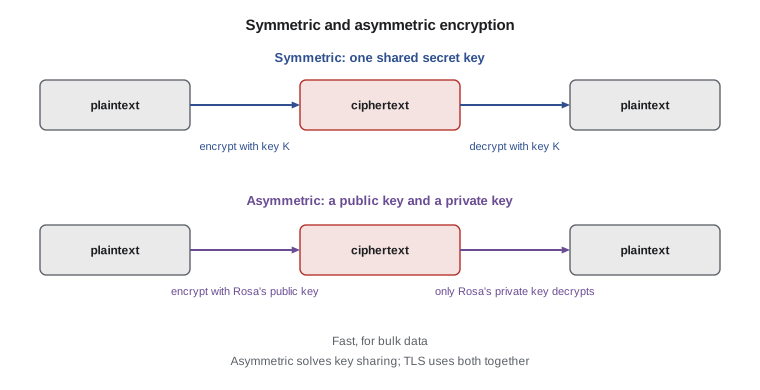
Symmetric encryption uses the same secret key to encrypt and decrypt. It is fast, which makes it suitable for large amounts of data: whole drives, backup files, and the bulk of every secure network connection. The Advanced Encryption Standard (AES), with 128-bit or 256-bit keys, is the standard choice. BitLocker uses AES to encrypt OFFICE-01's drive, the NAS can encrypt its backup copies with AES before sending them to the cloud, and HTTPS connections use AES or a similar modern cipher called ChaCha20 once the connection is set up.
The difficulty with symmetric encryption is key distribution. Both sides need the same key, and that key must be shared without anyone else learning it. If Rosa wants to send an encrypted file to Ridgeline's accountant, how does she get the key to the accountant safely? Emailing it alongside the file defeats the purpose. For a single file, sharing a strong passphrase by phone works. For millions of web connections between strangers, it does not, and that problem is what asymmetric encryption solves.
Asymmetric encryption
Asymmetric encryption, also called public-key cryptography, uses a pair of mathematically linked keys. The public key can be shared with anyone; the private key is kept secret by its owner. Data encrypted with the public key can only be decrypted with the matching private key. So anyone can send Rosa a secret message using her public key, but only Rosa can read it. Common asymmetric algorithms are RSA and elliptic-curve cryptography (ECC), which achieves similar strength with much shorter keys.
The pair also works in reverse for digital signatures. If Rosa creates a signature using her private key, anyone with her public key can check that the signature is genuine and that the signed data has not changed since. Signatures provide integrity, authentication and non-repudiation, which lesson 1 introduced. Software updates are signed by their makers so that a computer can refuse an update that has been tampered with, and certificates, covered in lesson 6, are built from signatures.
Asymmetric operations are much slower than symmetric ones, so real systems combine the two. When Theo's browser connects to the shop's admin page, the two sides use asymmetric cryptography to authenticate the server and agree on a fresh symmetric session key, then switch to fast symmetric encryption for the rest of the session. This combination is called hybrid encryption, and it underpins TLS, the protocol behind HTTPS, as well as VPNs and secure email.
Hashing
A hash function takes any input, from a single word to a large file, and produces a short, fixed-length output called a hash or digest. Good cryptographic hash functions, such as SHA-256, have three key properties. The same input always produces the same hash. A tiny change to the input produces a completely different hash. And it is practically impossible to work backwards from a hash to the input, or to find two different inputs with the same hash. Hashing is not encryption: there is no key and no way to decrypt.
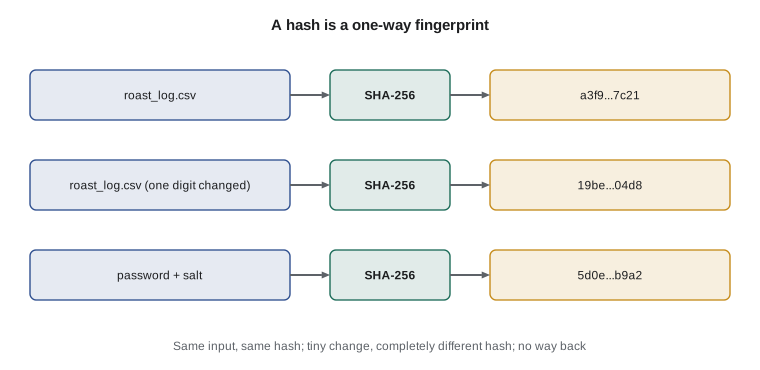
Hashes are used to check integrity. Software download pages publish the hash of each file so that you can confirm your copy has not been corrupted or altered. Backup tools hash files to detect changes. Kai's roast logs could be hashed at the end of each day and the hashes kept separately, so that any later edit would be obvious. Older hash functions such as MD5 and SHA-1 are now broken for security purposes, because researchers can create different inputs with the same hash; they should not be used for anything that matters.
import hashlib
log = "2026-10-14,B-0412,RC-103,12.0,10.2,13.5,224\n"
edited = log.replace("224", "234")
print("original:", hashlib.sha256(log.encode()).hexdigest())
print("edited: ", hashlib.sha256(edited.encode()).hexdigest())original: 85616bb9fcea7f7ad8eefe9f0878059e055d06fd7c5bea44d76c9845aa161004 edited: 288cebdb6129ee71c9d822f649276da3d41b3f8d826f84668fc7a5cda9030c8c
Try it yourself
Check a file has not changed
Kai saves the SHA-256 hash of each day's roast log. Complete fingerprint(text), which returns the SHA-256 hex digest of the text encoded as UTF-8, and unchanged(text, saved_hash), which returns True only if the text still matches the saved hash.
import hashlib

def fingerprint(text):
    return ""

def unchanged(text, saved_hash):
    return True

log = "2026-10-14,B-0412,RC-103,12.0,10.2,13.5,224\n"
saved = fingerprint(log)
print(unchanged(log, saved), unchanged(log.replace("224", "234"), saved))
Storing passwords: salting and slow hashing
Systems should never store passwords as plain text, and they should not encrypt them either, because anyone who obtains the key could decrypt them all. Instead they store a hash. When you sign in, the system hashes what you typed and compares it with the stored hash. But a plain fast hash is not enough. Attackers who steal a database of hashes can hash billions of common passwords per second and look for matches, and identical passwords produce identical hashes, revealing which users share a password.
Two techniques fix this. A salt is a random value, different for every user, that is combined with the password before hashing and stored alongside the hash. Salting means identical passwords produce different hashes and makes precomputed tables of hashes useless. Key stretching uses a deliberately slow algorithm designed for passwords, such as PBKDF2, bcrypt, scrypt or Argon2, which repeats the work many thousands of times. A fraction of a second per sign-in is unnoticeable to a user but multiplies an attacker's work enormously. Jordan's Python tools never store passwords at all; they rely on the sign-in systems of the shop and Microsoft accounts, which is the best approach of all.
Try it yourself
Salted password hashes
Complete hash_password(password, salt) using hashlib.pbkdf2_hmac with SHA-256 and 1,000 iterations (real systems use far more; this keeps the exercise quick), returning the hex string of the result. Then complete verify(password, salt, stored) so it returns True only when the password produces the stored hash.
import hashlib

def hash_password(password, salt):
    # use hashlib.pbkdf2_hmac('sha256', password bytes, salt bytes, 1000)
    return password

def verify(password, salt, stored):
    return False

salt = bytes.fromhex("a1b2c3d4e5f60718")
stored = hash_password("long coffee sentence", salt)
print(verify("long coffee sentence", salt, stored), verify("guess", salt, stored))
Using cryptography well
A few practical rules cover most of what an IT generalist needs. Use well-known, current algorithms and the libraries and features built into operating systems and platforms, rather than writing your own. Prefer AES or ChaCha20 for symmetric encryption, SHA-256 or better for hashing, and Argon2, bcrypt, scrypt or PBKDF2 for passwords. Protect keys as carefully as the data they protect: a BitLocker recovery key printed and taped to the computer it protects is no protection at all. Ridgeline stores its recovery keys in its Microsoft business account and in a sealed envelope in the safe.
Remember that encryption protects data in specific states. Data at rest, such as files on a drive, is protected by drive or file encryption. Data in transit, crossing a network, is protected by TLS or a VPN. Data in use, being processed in memory, is the hardest to protect and is usually handled by limiting who can run code on the system at all. Finally, plan for change. Algorithms weaken over time; researchers are already preparing post-quantum algorithms designed to resist future quantum computers, and standards bodies have begun publishing them. Choosing products that keep their cryptography up to date matters more than any single algorithm choice.
Worked problem
Choosing the right tool
For each need, choose symmetric encryption, asymmetric encryption, hashing or a slow salted password hash: (a) protecting the backup file before upload, (b) proving a software update came from its maker, (c) storing sign-in passwords for a staff portal, (d) detecting changes to roast logs.
Show solution
- (a) Bulk data with a key Ridgeline controls: symmetric encryption such as AES.
- (b) Proof of origin and integrity: a digital signature, which uses asymmetric cryptography.
- (c) Passwords must never be recoverable: a slow, salted password hash such as Argon2 or PBKDF2.
- (d) Integrity without secrecy: a SHA-256 hash of each log, stored separately.
Answer: (a) symmetric, (b) asymmetric signatures, (c) salted slow hashing, (d) hashing.
Common mistakes
MistakeInventing a private scrambling scheme because nobody knows how it works.
InsteadUse public, well-studied algorithms; security should rest on the key alone.
MistakeCalling hashing a form of encryption.
InsteadHashing has no key and cannot be reversed; encryption is designed to be decrypted with the right key.
MistakeStoring passwords encrypted or with a fast plain hash.
InsteadUse a slow, salted password hash such as Argon2, bcrypt, scrypt or PBKDF2.
MistakeKeeping the encryption key next to the encrypted data.
InsteadStore keys separately and securely, such as in an account vault and a safe.
MistakeStill using MD5 or SHA-1 for integrity checks that matter.
InsteadUse SHA-256 or newer.
MistakeEmailing a password for an encrypted file in the same message as the file.
InsteadShare the key or passphrase through a different channel, such as a phone call.
Summary and key terms
- Encryption turns plaintext into ciphertext with an algorithm and a key; security rests on the key.
- Homemade schemes fail because of tiny key spaces and surviving patterns.
- Symmetric encryption, such as AES, is fast but needs a shared secret key.
- Asymmetric encryption uses a public and private key pair and enables digital signatures.
- Real systems such as TLS combine asymmetric key agreement with symmetric bulk encryption.
- Hashes such as SHA-256 are one-way fingerprints used to check integrity.
- Passwords are stored as slow, salted hashes, never in plain text or encrypted.
- plaintext
- Readable data before encryption.
- ciphertext
- Encrypted data that is unreadable without the key.
- symmetric encryption
- Encryption that uses one shared secret key.
- AES
- The Advanced Encryption Standard, the most widely used symmetric cipher.
- asymmetric encryption
- Encryption that uses a public key and a matching private key.
- digital signature
- A value made with a private key that proves origin and integrity.
- hash
- A fixed-length, one-way fingerprint of data.
- salt
- A random value combined with a password before hashing.
- key stretching
- Making password hashing deliberately slow to resist guessing.
- Kerckhoffs's principle
- A system should stay secure even if everything except the key is public.
Practice problems
Work each problem on paper first, then reveal the answer to check.
Why does a 129-bit key have twice as many possible values as a 128-bit key?
Show answer
Each extra bit doubles the number of possible keys.
Rosa wants to send an encrypted spreadsheet to the accountant. How should she share the passphrase?
Show answer
By a different channel, such as a phone call, not in the same email as the file.
Which key does someone use to send Rosa a message only she can read?
Show answer
Rosa's public key; only her private key can decrypt it.
Why is MD5 unsuitable for checking software downloads today?
Show answer
It is broken: attackers can create different files with the same MD5 hash.
Two staff choose the same password. With salting, are their stored hashes the same?
Show answer
No; each has a different random salt, so the hashes differ.
Name the three states of data and one protection for each of the first two.
Show answer
At rest (drive encryption such as BitLocker), in transit (TLS or a VPN) and in use.
Lesson quiz · 5 questions
Score 60% or more to complete this lesson.
Create a free account to save your progress, take quizzes and earn a certificate.