
CYB-101 · Lesson 3 of 12 · 24 min
Common attacks and how they are stopped
▶ Video coming soon A video version of this lesson is on the way.
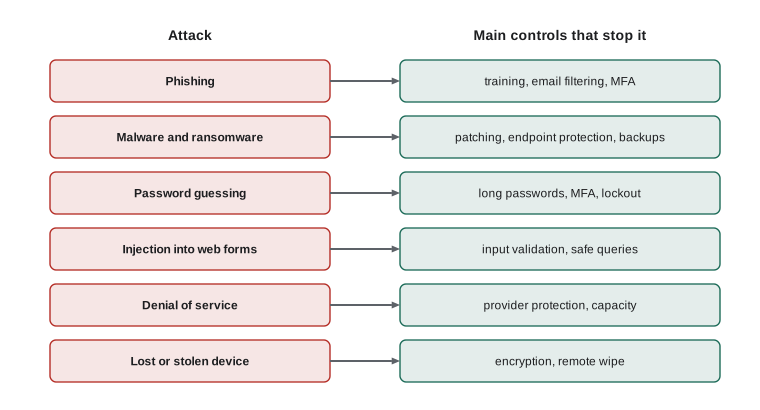
Lesson 2 asked who attacks and why. This lesson looks at how: the handful of attack techniques behind most real incidents, how to recognize each one, and, most importantly, which controls stop it. A defender does not need to know how to build an attack, any more than a firefighter needs to know how to start a fire. What a defender needs is to recognize the signs early and to know which protections make each attack fail.
The attacks are grouped into social engineering, malware, password and account attacks, attacks on applications, attacks on availability and attacks on networks and devices. For each group you will see what it looks like at Ridgeline and the controls Sam added to the review.
Social engineering
Social engineering means manipulating people into doing something that helps an attacker: revealing a password, opening an attachment, changing bank details or letting someone into the building. It works because it exploits normal, helpful human behaviour, and it is involved in a large share of successful breaches. Social engineers rely on a few dependable levers: authority (the message appears to come from the boss, the bank or the government), urgency (act within two hours or lose access), fear (your account has been hacked), curiosity (see the attached photos), helpfulness (I am new and locked out, could you reset my password?) and familiarity (the sender seems to be a supplier you deal with every week).
Phishing is social engineering by email. Mass phishing sends the same lure to thousands of people; spear phishing targets a particular person with details that make it convincing, such as Anita's name and the name of Ridgeline's payroll provider. Whaling targets senior people such as Rosa. Smishing uses text messages and vishing uses voice calls. Business email compromise is a particularly costly form: the attacker takes over or imitates a real email account, then sends a perfectly ordinary-looking request to pay an invoice to a new account. Because there is often no malicious link or attachment at all, filters struggle to catch it.
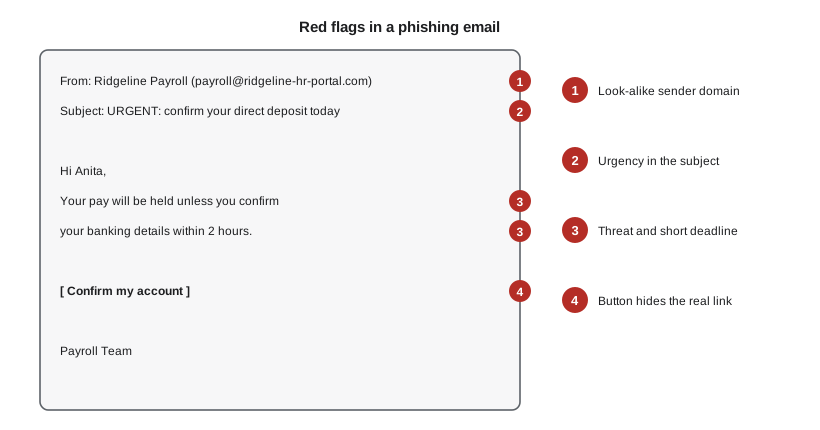
The red flags in the payroll email are typical. The sender's domain looks related but is not one Ridgeline uses. The subject creates urgency. The message threatens a loss and sets a short deadline. And the button hides where it really leads; hovering over it, or pressing and holding on a phone, shows the actual address. Other common signs include unexpected attachments, requests to bypass normal procedures, generic greetings, slight misspellings of familiar names, and any request for a password, a code or a payment change.
Controls against social engineering work in layers. Email filtering removes most known phishing before it arrives. Training helps staff recognize what slips through, and a simple reporting route, such as forwarding to Jordan, turns every employee into a sensor. Multi-factor authentication means a stolen password alone is not enough (lesson 7). Process controls stop the most expensive attacks: Ridgeline now confirms any change to supplier or employee bank details by phoning a number already on file, never one given in the message. Physical controls, such as a locked back-office door and a rule that visitors are accompanied, address in-person tricks such as tailgating, where someone follows a staff member through a door.
Try it yourself
Score a suspicious email
Jordan is writing a simple helper that counts red flags in an email so staff can see why a message is suspicious. Each email is a dictionary. Complete red_flags(email) so that it returns a list of the flags found, in this order:
"unknown domain" if the sender's domain (the part after @) is not in TRUSTED; "urgent" if the subject contains the word URGENT in any letter case; "asks for password" if the body mentions password in any letter case; "link mismatch" if the link text and the real link address differ.
TRUSTED = {"ridgelinecoffee.example", "payrollco.example"}

def red_flags(email):
    flags = []
    domain = email["sender"].split("@")[-1]
    # add each flag in the order given
    return flags

msg = {"sender": "payroll@ridgeline-hr-portal.example", "subject": "URGENT: confirm your deposit",
       "body": "Enter your password to keep your pay", "link_text": "payrollco.example",
       "link_url": "http://ridgeline-hr-portal.example/login"}
print(red_flags(msg))
Malware
Malware is any software designed to cause harm. The main kinds differ in how they spread and what they do. A virus attaches itself to files or programs and spreads when they are run or shared. A worm spreads on its own across networks by exploiting vulnerabilities, without anyone opening anything. A trojan pretends to be something useful, such as a free invoice template or a cracked copy of paid software, and carries a harmful payload. Spyware and keyloggers secretly record activity and keystrokes. A remote access trojan gives an attacker control of the computer. A rootkit hides deep in the operating system to avoid detection. A botnet is a network of infected devices controlled together, often used to send spam or flood websites.
Ransomware deserves special attention because it is the most damaging attack most small businesses face. Modern ransomware groups usually steal data first and then encrypt it, so the victim faces two threats: losing access to their files and having confidential data published. The usual ways in are phishing, stolen passwords for remote access, and unpatched internet-facing systems. The defences are the same ones that appear throughout this course: patching, multi-factor authentication, endpoint protection, limited administrator rights, network segmentation, and above all backups that ransomware cannot reach, such as Ridgeline's cloud backup copy with thirty days of versions that cannot be altered or deleted.
Fileless malware runs in memory using tools already built into the operating system, such as scripting tools, which makes it harder for traditional antivirus to spot. That is one reason modern endpoint protection watches behaviour, such as a word processor suddenly launching a script that contacts an unknown server, rather than relying only on recognizing known malicious files.
Password and account attacks
Attackers want accounts, because a valid login lets them in through the front door. Brute-force attacks try many passwords against one account. Password spraying tries a few very common passwords, such as Summer2026!, against many accounts, staying under lockout limits. Credential stuffing takes usernames and passwords stolen from one website and tries them on others, succeeding wherever people reuse passwords. Offline cracking happens when attackers steal a database of password hashes and test billions of guesses per second on their own hardware (lesson 5 explains why salted, slow hashes resist this).
Controls include long, unique passwords stored in a password manager, multi-factor authentication, lockout or throttling after repeated failures, checking new passwords against lists of known compromised passwords, monitoring for unusual sign-ins, and alerts when an account signs in from a new country. Lesson 7 covers these in detail. Detecting a brute-force attempt is a straightforward logging task, as the next listing shows.
failed = [
    ("09:01", "anita"), ("09:02", "theo"), ("09:15", "admin"), ("09:15", "admin"),
    ("09:16", "admin"), ("09:16", "admin"), ("09:16", "admin"), ("09:17", "admin"),
]
counts = {}
for time, user in failed:
    counts[user] = counts.get(user, 0) + 1
for user, n in sorted(counts.items(), key=lambda kv: -kv[1]):
    flag = "  <-- possible brute-force attempt" if n >= 5 else ""
print(f"{user:<6} {n} failed sign-ins{flag}")admin 6 failed sign-ins <-- possible brute-force attempt anita 1 failed sign-ins theo 1 failed sign-ins
Try it yourself
Find accounts under attack
Complete suspicious(failed, limit) so that it returns a sorted list of usernames that have at least limit failed sign-ins in the log. Each log entry is a tuple of (time, username).
failed = [("09:01", "anita"), ("09:15", "admin"), ("09:15", "admin"), ("09:16", "admin"),
          ("09:20", "theo"), ("09:21", "theo"), ("09:22", "theo"), ("09:16", "admin")]

def suspicious(failed, limit):
    counts = {}
    # count failures per user, then keep those at or above the limit
    return []

print(suspicious(failed, 3))
Attacks on applications
Web applications, such as an online shop, accept input from anyone on the internet. Injection attacks exploit applications that mix that untrusted input into commands without checking it. In SQL injection, an attacker types database instructions into a search box or login form; if the application pastes that text directly into a database query, the database may obey it, revealing or altering data. Cross-site scripting works similarly in the browser: the attacker plants script in a page, such as a product review, and other visitors' browsers run it. Other application weaknesses include broken access control (changing an order number in the address bar shows someone else's order) and security misconfiguration (an admin page left reachable with a default password).
The defences are well established. Validate input against what is expected, preferably with an allow-list of acceptable values or patterns. Never build database queries by joining strings; use parameterized queries, which send the data separately from the instruction so that the database always treats it as data. Encode output so that user-supplied text is displayed as text, not run as script. Keep platforms and plugins patched, and check access on the server for every request. Ridgeline's shop runs on a hosted platform that handles most of this, but Jordan's own Python tools must follow the same rules.
import sqlite3
db = sqlite3.connect(":memory:")
db.execute("CREATE TABLE coffee (sku TEXT, name TEXT, stock INTEGER)")
db.executemany("INSERT INTO coffee VALUES (?, ?, ?)",
               [("RC-101", "Sunrise Blend", 42), ("RC-102", "Ethiopia Guji", 15)])

def find(sku):
    # The ? placeholder sends sku as data, never as part of the SQL instruction.
    return db.execute("SELECT name, stock FROM coffee WHERE sku = ?", (sku,)).fetchall()

print(find("RC-101"))
print(find("RC-101' OR '1'='1")) # hostile input is just an odd SKU: no match[('Sunrise Blend', 42)]
[]Try it yourself
Validate a SKU with an allow-list
Ridgeline's product codes always look like RC- followed by exactly three digits. Complete valid_sku(text) so that it returns True only for codes in that exact format, such as RC-104, and False for anything else, including codes with extra characters.
import re

def valid_sku(text):
    # match the whole string: RC- then exactly three digits
    return True

for s in ["RC-104", "RC-1040", "rc-104", "RC-104; DROP", ""]:
    print(repr(s), valid_sku(s))
Attacks on availability, networks and devices
A denial-of-service attack tries to make a service unavailable, usually by flooding it with traffic or requests. When the traffic comes from thousands of compromised devices at once it is a distributed denial-of-service (DDoS) attack. A small business cannot absorb a large DDoS on its own internet connection, which is one reason to host the online shop with a provider that includes DDoS protection, and to have a plan for taking card payments if the internet connection fails.
On networks, an on-path attacker (sometimes called a man-in-the-middle) places themselves between two parties to read or alter traffic, for example on an open public Wi-Fi network or through a rogue access point named to look like the cafe's network. Encryption in transit, such as HTTPS and VPNs, defeats eavesdropping, and secure Wi-Fi configuration reduces the opportunity (lesson 8). Devices face physical threats too: theft, card skimmers attached to payment terminals, and malicious USB devices. Encryption, inspection routines and a rule never to plug in unknown devices address these.
Worked problem
Tracing an invoice fraud attempt
An email from Ridgeline's regular packaging supplier says their bank has changed and asks Theo to pay this month's invoice to a new account. The email address is correct. What kind of attack might this be, and what should Theo do?
Show solution
- Because the address is genuine, the supplier's email account may have been taken over: a business email compromise.
- The request changes payment details and arrives by email, exactly the pattern Ridgeline's process control targets.
- Theo does not reply to the email or use any phone number in it. He calls the supplier using the number in Ridgeline's records.
- If the supplier did not send it, Theo warns them that their account is compromised and reports the attempt to Jordan.
Answer: Treat it as possible business email compromise: verify by phone using a known number before changing any payment details.
Common mistakes
MistakeTrusting an email because the sender address looks right.
InsteadAddresses can be spoofed or accounts taken over; verify payment or password requests through a separate, known channel.
MistakeBelieving antivirus alone stops ransomware.
InsteadCombine patching, MFA, limited admin rights, segmentation, endpoint protection and backups the attacker cannot reach.
MistakeReusing a password on several sites.
InsteadUse a unique password for every account, stored in a password manager, so one breach does not unlock the others.
MistakeBuilding database queries by joining strings with user input.
InsteadUse parameterized queries and validate input against an allow-list.
MistakePunishing staff who click on phishing links.
InsteadEncourage quick reporting; a prompt report limits damage, while fear makes people hide mistakes.
MistakePlugging in a USB stick found in the car park to see whose it is.
InsteadNever connect unknown devices; hand them to IT.
Summary and key terms
- Social engineering exploits authority, urgency, fear, curiosity, helpfulness and familiarity.
- Phishing, spear phishing, smishing, vishing and business email compromise are common forms.
- Malware includes viruses, worms, trojans, spyware, remote access trojans, rootkits and ransomware.
- Ransomware usually steals data and then encrypts it; backups that attackers cannot reach are essential.
- Password attacks include brute force, spraying, credential stuffing and offline cracking.
- Injection attacks are stopped by input validation, parameterized queries and output encoding.
- Denial-of-service, on-path and physical attacks are handled with provider protection, encryption and good habits.
- social engineering
- Manipulating people into helping an attacker.
- phishing
- Fraudulent messages designed to steal information or install malware.
- business email compromise
- Fraud using a taken-over or imitated email account, usually to redirect payments.
- malware
- Software designed to cause harm.
- ransomware
- Malware that encrypts data, and often steals it, to extort payment.
- credential stuffing
- Trying usernames and passwords stolen from one site on other sites.
- password spraying
- Trying a few common passwords against many accounts.
- SQL injection
- An attack that inserts database instructions into unvalidated input.
- parameterized query
- A database query that sends user data separately from the instruction.
- denial of service
- An attack that makes a service unavailable, often by flooding it.
Practice problems
Work each problem on paper first, then reveal the answer to check.
Name three social engineering levers used in Ridgeline's payroll phishing email.
Show answer
Authority (payroll), urgency (today), and fear (pay will be held).
How does credential stuffing differ from brute force?
Show answer
Brute force guesses many passwords for one account; credential stuffing reuses real username and password pairs stolen elsewhere.
Why is business email compromise hard for filters to catch?
Show answer
The message often comes from a genuine account and contains no malicious link or attachment, just a plausible request.
What is the single most important control for recovering from ransomware?
Show answer
Recent, tested backups that the attacker cannot reach, alter or delete.
Why do parameterized queries prevent SQL injection?
Show answer
The user input is sent as data, separately from the SQL instruction, so it can never change what the query does.
A rogue Wi-Fi network called Ridgeline-Free appears near the cafe. What attack might it enable, and what protects users?
Show answer
An on-path attack; encryption such as HTTPS and VPNs, and telling customers the real network name.
Lesson quiz · 5 questions
Score 60% or more to complete this lesson.
Create a free account to save your progress, take quizzes and earn a certificate.